User Attributes
Configure how attributes map from directory providers to Directory Users.
WorkOS can automatically find and normalize most common attributes from directory providers into the Directory User object, which represents an enterprise user. More unique cases can be mapped by your customers admins.
Here is an example Directory User. The data stored varies per directory provider and may include attributes such as photo URLs, pay groups, supervisors, etc.
In this guide, we’ll explain how to map data from directory providers to the Directory Users.
- Standard attributes
- The most common user information, normalized across providers.
- Predefined attributes
- Detailed user attributes for specific use cases, normalized across providers. You can opt-in to each attribute you’d like auto-mapped.
- Custom attributes
- For unique cases, you can create custom attributes your customers can map when setting up a directory.
Every Directory User comes with the following standard attributes. These are the core set of attributes that are common across all identity providers. These are structured fields with a guaranteed schema in the top-level Directory User payload.
emails, job_title, and username were previously considered standard attributes, but have been deprecated in favor of equivalent auto-mapped custom attributes.
For more detailed user information, you can opt-in to additional predefined attributes and define your own custom attributes. These attributes will appear in the custom attributes field on Directory User objects and can be configured in the WorkOS Dashboard.
custom_attributes field. See JWT Templates for how to include these in your access tokens.
When enabled, the values will be mapped without additional setup. Not every directory provider has data for every field, so they are always optional if enabled. These fields are named and schematized by WorkOS – they cannot be renamed.
Enable or disable a predefined attribute
Predefined attributes can be enabled or disabled in the WorkOS Dashboard on the Identity Provider Attributes page.
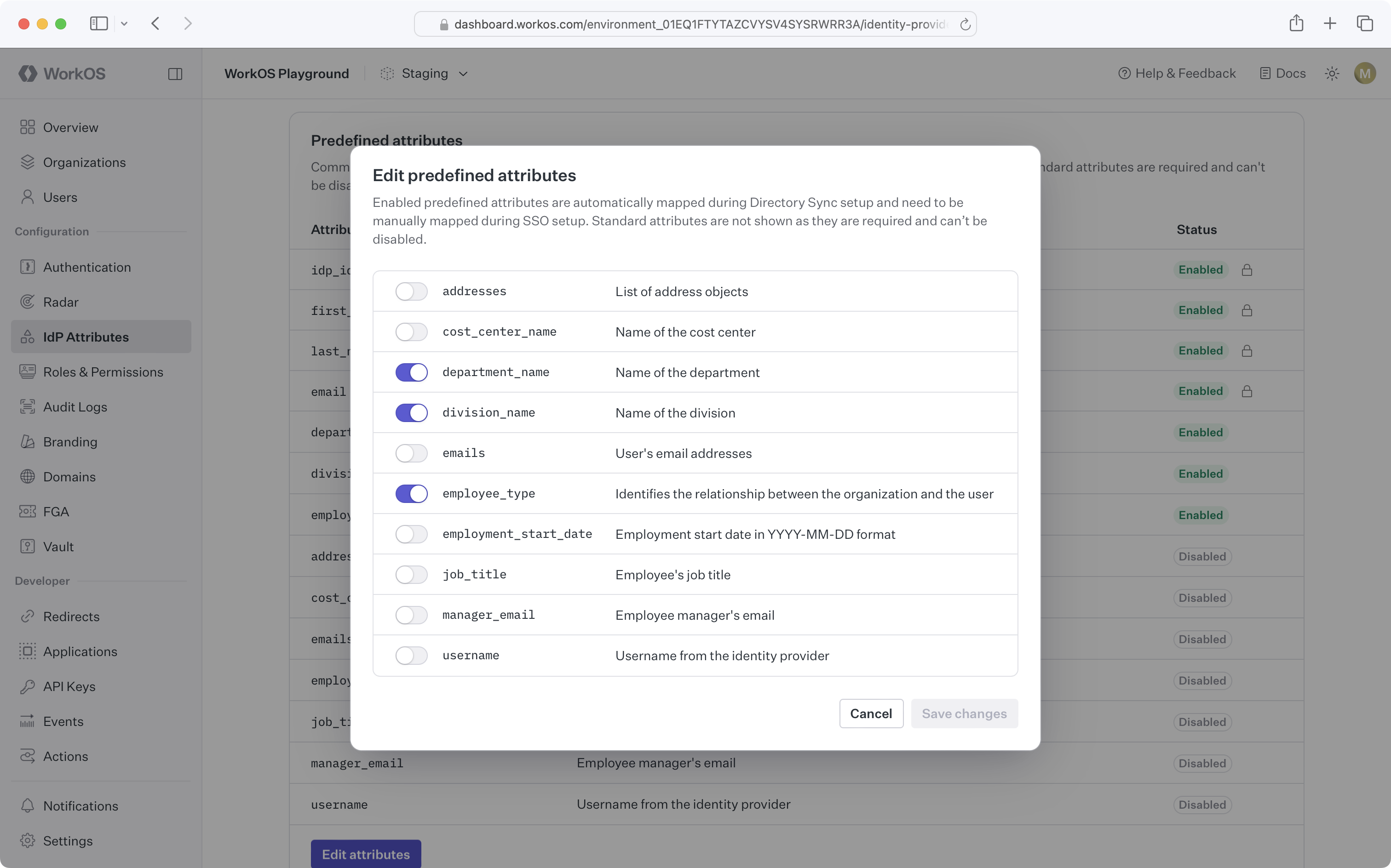
The following support table outlines the attribute availability across directory providers.
Custom attributes can be utilized to enrich Directory User objects with additional data from the identity provider. You can create attributes that appear as fields in the Admin Portal. Your customers can map these fields to the correct values in their system when setting up Directory Sync with their identity provider.
Create a custom attribute
Custom attributes can be created in the WorkOS Dashboard on the Identity Provider Attributes page.

Delete a custom attribute
When a custom attribute is deleted, the attribute will be deleted from all Directory User objects.
Nested attributes
Custom attributes support nested attribute mapping. Different directory providers structure their data differently, and nested attribute support allows you or your customer to map values regardless of where they appear in the directory structure.
Nested attributes from the directory can be mapped to custom attributes using the WorkOS Dashboard or Admin Portal by selecting attributes from an interactive schema viewer. The schema viewer displays the structure of user data from their directory, allowing them to browse and select any nested field. This ensures accurate mapping without manual configuration.
Example: Different structures across providers
The same logical attribute (like “license”) may appear at different nesting levels depending on the provider:
With nested attribute support, you can create a single custom attribute called license_tier, and IT admins can map it to the correct location in their specific directory provider’s structure using the schema viewer.
The raw_attributes field on Directory User objects is deprecated and will stop returning data on April 15, 2026.
Custom attributes and nested attribute mapping are the recommended replacements. These features provide a consistent, structured API while giving IT admins the flexibility to map any field from their directory provider.
Contact support via email or Slack if you need help with the migration. We also have tooling to automate the WorkOS-side configuration on your behalf.
For a full migration walkthrough covering Directory Sync, SSO, and AuthKit, see the migration guide.
Are existing directories required to update the attribute mapping when new required custom attributes are added?
No, when you add a new required custom attribute to your settings, this won’t be retroactively required for directories that have already been set up and configured. However, in the WorkOS dashboard, you will be able to navigate directly to the existing directory and fill in details for those attributes manually.
Can our customers add their own custom attributes outside of what is defined in the WorkOS dashboard?
We do not currently support this functionality, as you have to define any custom attributes in the dashboard first. Please reach out to support if you have a specific use case that you would like to discuss.
What happens if an attribute cannot be mapped from the IdP?
Attributes that cannot be mapped for a particular Directory User will result in a null value for the attribute. dsync.user.updated events are not emitted when an attribute changes from null to undefined or vice versa.
How do IT admins map nested attributes?
IT admins can map nested attributes using the schema viewer in the WorkOS Admin Portal when configuring their directory. The schema viewer displays the actual structure of user data from their directory provider, showing how attributes are organized.
To map a nested attribute:
- IT admins navigate to the attribute mapping step during directory configuration
- They view a visual representation of their directory’s user data structure
- They select any field, regardless of nesting level, from the schema viewer
- The mapping is automatically configured for that nested attribute
This approach works consistently across all directory providers, even though each provider may structure their data differently. The schema viewer adapts to show the specific structure of the IT admin’s directory provider, ensuring accurate mapping without requiring technical knowledge of the underlying data format.