Your access token is a snapshot, not a live query
How long a revoked role keeps working, why an empty permissions claim is ambiguous, and what to re-check after an organization switch.

Reading claims off a verified access token is the easy part. claims.permissions is a string array, and checking whether it contains invoices:delete is one line of code.
What is harder, and what nothing really documents, is knowing what those claims mean and when they stop being true. A permission in a token is not an answer to "may this caller do this right now." It is a record of what was true when the token was minted, for the organization that was selected at the time, about the caller in general rather than about the record in front of you. Every one of those qualifications is a place where authorization goes wrong in a way that testing does not catch.
This is about the qualifications. It assumes you already verify the token, which is a separate job.
How long a role or permission change takes to reach the token
An admin removes a permission from a role. When does the user stop being able to do the thing?
Not immediately. The WorkOS FGA integration docs put it plainly: API checks reflect changes immediately, while JWT permissions require a session refresh since the token was issued at sign-in. The claims in an already-issued token describe the world as it was at the moment it was minted, and no dashboard change reaches back into it.
A token is a snapshot, not a live query. That is not a flaw to engineer around, it is the trade you accepted in exchange for authorizing without a network call, and it is why the same docs keep resource-level assignments out of the token entirely, on the grounds that resource assignments change frequently and stale tokens would cause mismatches.
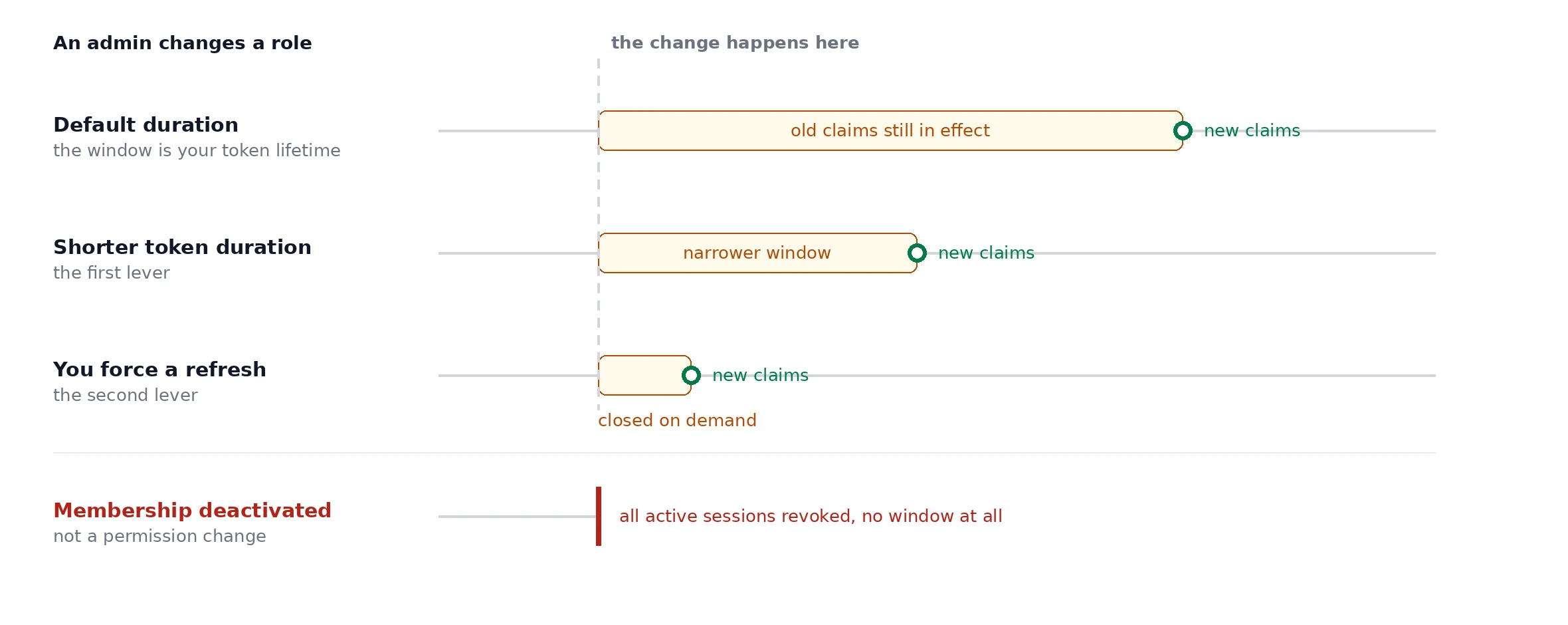
What matters is that you know the size of the window and have decided it is acceptable. Two things control it.
- Access token duration, configured per application in the dashboard under Sessions. The docs recommend keeping it short precisely so that changes in the session are quickly reflected in your app. Pick a number deliberately rather than inheriting one, and know what yours is, because it is also the answer to "how long could a revoked permission keep working."
- An on demand refresh, which is the lever people forget. You do not have to wait for expiry. If your app knows something changed, for example because an admin just edited a role in a widget you embedded, refresh the session and the next token carries the new claims. The docs recommend exactly this for entitlements and feature flags after a dashboard change.
One important carve out. This reasoning applies to a revoked permission or a changed role. It does not apply to revoked access. Deactivating an organization membership sets its status to inactive and revokes all active sessions, so a user removed from an organization is out immediately rather than at the end of their token's life. Do not tell a security reviewer that all permission changes wait for expiry, because membership removal does not, and that is usually the case they are asking about.
An empty permissions array is not a missing organization
Here is a distinction that almost every implementation gets wrong on the first pass, because both cases look like "this user has no permissions."
permissions: [] means the caller has a role, and that role grants nothing. This is a real state. Every environment is seeded with a default member role that is automatically assigned to every organization member, and nothing obliges that role to carry permissions.
No org_id at all means something different: no organization was selected for this session. The docs are explicit that role and permissions only apply when an organization is selected. So an organization-less session is not a caller with no permissions, it is a caller for whom the question does not yet apply.
Conflate the two and you get one of two bugs. Treat a missing org_id as an empty permission set and a user mid-onboarding gets a 403 they cannot resolve, which looks like your app is broken. Treat an empty permissions array as "claims not loaded yet" and fall back to something permissive, and you have handed access to a member whose role grants nothing.
Handle them separately and early:
A 409 with a distinguishable body lets the client send the user to an organization picker. A 403 tells them to ask their admin. Those are different conversations, and collapsing them into one status code moves the confusion to your support queue.
An organization switch is a new token and a new decision
A user who belongs to several organizations has one sub and a different org_id per session. Switching between them is not a mutation. You pass organization_id to the refresh token endpoint and get back a new access token whose org_id, role, and permissions match the membership in that organization.
Two consequences that are easy to miss.
The switch is not always quiet. If the session is not authorized for the target organization you get an authentication error and the user has to authenticate again. And if the target organization requires SSO or MFA, the user is redirected to reauthorize rather than silently handed a new token. A switcher that assumes success will break on exactly the enterprise customers you most want to keep.
The backend has to re-decide. The common bug is a UI that switches organizations while the server keeps authorizing against claims from the old token, usually because the new token was stored but a cached decision was not invalidated. Permissions do not carry across organizations. The same user can be an admin in one and a read-only member in another, so every authorization decision has to come from the token that arrived with the request rather than from anything you computed earlier in the session.
A permission check is not an ownership check
invoices:delete says the caller may delete invoices. It says nothing about whether they may delete this invoice.
This is the mistake that produces cross-tenant data access, and it survives code review because the permission check is right there and looks like authorization. The WorkOS FGA docs frame it as two layers: check the token directly for organization-wide concerns like navigation and settings, and call the authorization API for access to a specific resource.
Even if you are not using FGA, keep the shape. A permission check at the edge answers whether to route the request at all. An ownership check at the data layer answers whether this row belongs to this caller's organization, and that check should be a predicate in the query rather than a comparison after the fetch:
And take the tenant from the token, never from the request. An organization_id in a path parameter, a query string, or a JSON body is a value the caller chose. claims.org_id is a value WorkOS signed. Those are not interchangeable, and the difference between them is the entire attack.
Why permissions, entitlements, and feature flags are not interchangeable
A decoded token can carry permissions, entitlements, and feature_flags, all of them string arrays of slugs, all of them looking like a list of things the caller may do. They answer different questions, and the most reliable way to keep them apart is by where each one comes from rather than by what it means.
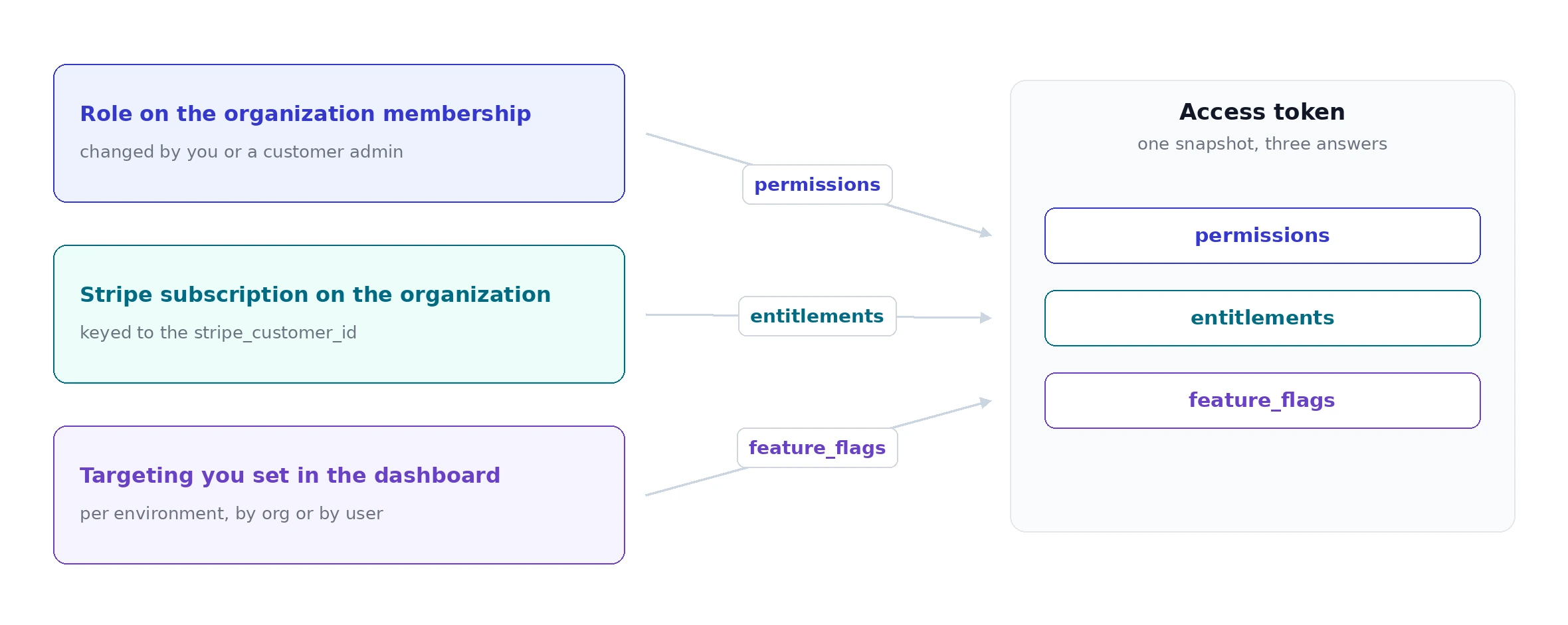
permissionsis role derived. It comes from the role on the caller's organization membership, and it changes when you or a customer admin changes that role.entitlementsis billing derived. WorkOS sources these from Stripe, keyed on thestripe_customer_idset on the organization, so the claim reflects the plan someone is paying for. Entitlements added mid cycle appear in the next billing cycle or when a new subscription is created, and then only reach the token on the next sign in or refresh.feature_flagsis targeted by you. You create flags in the dashboard per environment and target them at organizations or individual users, which makes this the rollout claim rather than the authorization claim or the billing claim.
Worth being honest about an overlap here rather than pretending the split is clean. Plan tier gating can plausibly be done with either entitlements or feature flags, and the docs list restricting advanced functionality to higher tier plans as a use case for flags while also describing it as the purpose of entitlements. The two do not disagree so much as both apply. Pick one per decision, write down which, and be consistent, because the failure mode of mixing them is billing logic living inside a permission check where nobody expects to find it.
One smaller note on roles. Both role and roles are present in the token, and roles is an array even when the multiple roles setting is off, so reading roles is the forward compatible choice. The multiple roles launch post says the singular role claim will eventually be deprecated, though the docs do not currently say so.
Why not to put everything in the token
Every claim you add to a token is an authorization decision you have chosen to cache, with the staleness that implies. There is also a hard limit.
The RBAC configuration docs ask you to keep permission slugs concise because those slugs end up in the session JWT, which is limited to roughly 4KB in many modern browsers. Permissions, roles, entitlements, and feature flags all draw on that same budget, and JWT templates add to it as well, with the rendered template capped at 3072 bytes.
This has a design consequence beyond the size. If your permission set is large enough that you are worried about the limit, the token is probably the wrong place for the decision, and an API check at request time is the right one. For large flag sets specifically, the WorkOS docs suggest the runtime client rather than the claim, which is the same instinct applied to flags.
Why you authorize on permissions and not role slugs
This part is established, and I am not going to re-argue it. Authorize on permissions, not on the role. Several WorkOS posts make the case, including the Node RBAC walkthrough and the Python API guide.
What is worth correcting is the reason usually given for it, including in some of our own writing. The argument is normally that roles get renamed, and that is not quite right: the token carries the role slug, and slugs are immutable and cannot be changed after creation. A display name change never reaches your code.
The real reasons are better ones.
The slug is stable but its meaning is not. A customer admin with the right widget permission can replace a role's entire permission set while the slug stays exactly the same. Code that trusts admin to imply a capability is trusting a label whose contents someone else controls.
There is no single slug to branch on. Custom roles are scoped to one organization, and their slugs are either prefixed with org- or auto generated with a six character suffix, so the same conceptual role looks like billing-admin-a1b2c3 in one tenant and something else in the next. A comparison against a role slug cannot be written once and hold across customers.
Deleting a role is quiet. When a role is deleted in single role mode, affected memberships are reassigned to the default role, and the change propagates asynchronously. Nobody gets an error. A user simply has different authority than they did, under a different slug, and only a permission check notices.
Permissions avoid all three, because a permission slug means the same thing in every organization in your environment and is the thing your code actually cares about.
The short version
- Know your access token duration, because it is also the length of your staleness window. Force a refresh when you know something changed.
- Membership deactivation revokes sessions immediately. Role and permission edits do not.
- Handle a missing
org_iddifferently from an emptypermissionsarray. They are different states with different fixes. - Re-decide on every request from the token that arrived. Organization switches do not carry permissions across.
- Check the permission at the edge and the ownership at the data layer, and take the tenant from
claims.org_idrather than from anything the caller sent. - Keep
permissions,entitlements, andfeature_flagsdoing separate jobs, and write down which one owns plan gating.