How to add WorkOS AuthKit to a Ruby on Rails app
The CLI gets you signed in. This is the session layer underneath it: what the sealed cookie holds, how to refresh it inside a before_action, and the three dashboard settings that break logout in production.

If you are still deciding between the Rails 8 generator, Devise, Rodauth and a managed provider, that comparison lives in the complete guide to building authentication in Rails. This post assumes you have made that call and picked AuthKit, and goes one level down into the part a quickstart skips: the session layer.
Specifically, what the sealed cookie actually holds, how refresh behaves inside a Rails filter, and the handful of dashboard settings that work fine locally and then break the first time someone signs out in production.
Start with the CLI
There is no reason to hand-write the first version. The WorkOS CLI detects Rails, installs the gem, writes the callback route, sets the redirect URI in your dashboard and runs your build to confirm it compiles:
Ruby and Rails are both on its supported list, and it composes with existing middleware rather than replacing it. Run git diff afterwards and you will see everything below, written into your tree.
The rest of this post is what it produced, translated into idiomatic Rails and extended where the generated code stops.
Three dashboard settings, and what each one breaks
Before any code, there are three values to set under your application's Redirects tab. Each one fails in a different way if you skip it.
- Redirect URI is where WorkOS sends the user after they authenticate.
http://localhost:3000/callbackis the usual default. Wildcards are supported, but not for the default redirect URI. - Initiate login URL is the one people skip. AuthKit detects when a sign-in request did not start at your app, which happens when someone bookmarks the hosted page or follows a password reset or invitation link from an email, and sends them here. Password reset and invitation details survive that redirect only if this URL starts an AuthKit sign-in rather than rendering your own page.
- Sign-out URI is where users land after logging out. If you have not configured one, users see an error when they log out. That is the setting that works in development, because you never test logout properly in development, and then greets a real user on day one.
Then two secrets:
The redirect flow
Configure a client once. In Rails, an initializer is the natural home:
Sending a user to sign in means generating an authorization URL server side and redirecting to it. Note allow_other_host, which Rails requires for any redirect off your own domain and which is easy to forget until the redirect silently fails:
The user authenticates on the WorkOS-hosted page and comes back to your callback with a code in the query string. That code is valid for ten minutes. Exchange it, and ask for a sealed session in the same call:
Two things worth noticing. Sealing is a parameter on the exchange, not a separate step, so there is no intermediate moment where you are holding raw tokens and deciding what to do with them. And the cookie value is already encrypted, so write it with cookies, not cookies.encrypted. Wrapping a sealed value in Rails' own encryption works, but it buys nothing and makes the failure modes harder to read.
What is in the sealed session, and why the password matters
A sealed session is the access token, the refresh token and the user, encrypted into one opaque string that lives in a cookie. Your server decrypts it on each request. The refresh token is the reason for the encryption: it can be exchanged for new credentials, so it should never sit in a cookie in a readable form.
The key to that encryption is WORKOS_COOKIE_PASSWORD, and the SDK requires it to be at least 32 characters. Generate one and store it as an environment variable:
Do not pick something memorable. The entire confidentiality of the session rests on this value being unguessable, and unlike an API key you cannot rotate it without invalidating every live session at once.
The access token inside the seal is a normal JWT signed by WorkOS. You do not have to verify it yourself, because authenticate does that for you. If you also run a separate Rails API tier that receives that token directly and needs to verify it, handling JWTs in Ruby covers JWKS fetching, RS256 pinning and key rotation properly, and there is no reason to reinvent it here.
Reading the session on every request
Load the seal, authenticate, and you have a result you can pattern match. The SDK returns a hash, so destructure it rather than reaching for methods:
authenticate gives you authenticated, a reason when it fails, and the user when it succeeds. The user is a hash, so it is user[:email] and user[:first_name], not method calls.
NO_SESSION_COOKIE_PROVIDED is worth special-casing because it means there is nothing to refresh. Any other failure is worth trying to recover from, which is the next part.
Refresh, inside a Rails filter
This is the part the quickstart shows in Sinatra and that does not translate line for line, because Rails filters and Rails cookie writes behave differently.
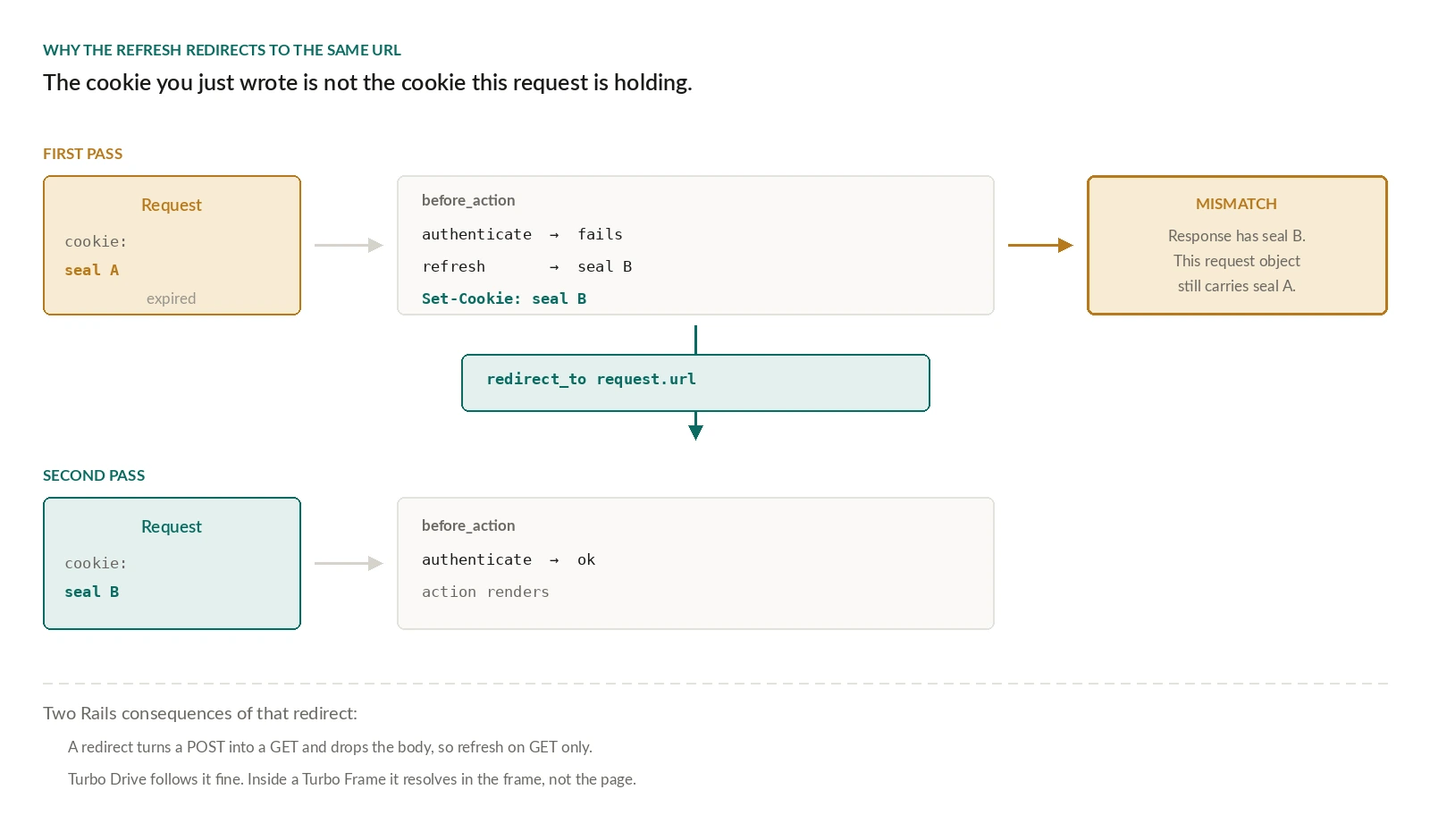
The redirect back to request.url is the part that looks wrong and is not. refresh returns a new sealed_session, and you have just written it to the response. The request currently in flight is still holding the old cookie in memory, so continuing to render it would use stale credentials for the rest of the action. Redirecting to the same URL makes the browser come back with the cookie you just set.
Two Rails-specific consequences.
- Only refresh on GET. A redirect turns a POST into a GET and drops the body, so a refresh that fires mid-form-submission loses the submission. Scope the filter, or check
request.get?before redirecting and return a 401 otherwise so your frontend can retry. - Turbo will follow the redirect. If your app uses Turbo Drive, the redirect to
request.urlis handled as a normal visit and works. A Turbo Frame request is a different matter, because the redirect resolves inside the frame rather than at the page level. If you have frames on authenticated pages, test a refresh landing inside one.
Wire the filter up where you want it:
Logout is a POST, and that is deliberate
Build the logout URL from a live session, because it needs the session ID in order to revoke it server side:
Use delete or post, never get. A GET logout can be triggered by a browser prefetching a link, which signs people out of your app while they are reading a page. Rails gives you CSRF protection on non-GET requests by default through protect_from_forgery, so a form-based logout is covered without extra work. If you are on Sinatra rather than Rails, the quickstart shows the equivalent using rack_csrf.
get_logout_url takes no arguments. Where the user lands afterwards is the Sign-out URI from the dashboard, which is why that setting is on the list at the top.
One edge case worth handling: if the cookie is already missing or the seal will not load, this action raises before it can build a URL. Rescue it, clear the cookie anyway and send the user to your signed-out page. Someone clicking sign out twice should not see a 500.
Mirroring users into your own database
AuthKit gives you a user on every authenticated request, so you may not need a local users row at all. You will want one as soon as anything in your schema needs a foreign key to a person.
The pattern to avoid is a find_or_create_by in current_user, because that writes to the database on every authenticated request forever in order to handle a row that already exists. Create the local record once, in the callback, keyed on the WorkOS user ID:
Key on the WorkOS ID, not the email address. People change email addresses, and keying on a mutable value means you eventually create a second row for the same human.
A note on what comes after
The reason to put a hosted flow in front of your Rails app is rarely the login form. It is that enterprise SSO arrives later as a dashboard setting rather than a dependency you add to your Gemfile, which matters more than it sounds like it should: the SAML gems most Rails teams reach for carried a complete authentication bypass for a decade before anyone noticed.
The session layer above is the whole loop. Redirect out, exchange the code, seal the result, read it on each request, refresh when it expires and revoke on logout. The gem carries the cryptography and the token rotation. Your app keeps a thin, readable concern that knows who the user is.