Every integration catalog is also a list of what you don't support
The path for adding a provider yourself, whether it speaks OAuth, odd OAuth, or only API keys.

A prospect asks whether you connect to the tool their team actually runs on. Someone checks the docs, and the honest answer is a link to a page that doesn't have it on it.
WorkOS Pipes ships more than 300 pre-configured providers, and that catalog will never be finished. Somebody's team runs a regional accounting system nobody outside its country has heard of, or a note-taking tool that hands out one API key per user and calls it a day. The real question is what it takes to add a provider yourself, and how much of your integration code has to change when you do. In Pipes, it's a form in the dashboard or a single API call, and the code that consumes the connection doesn't change at all: a custom provider appears in the Pipes widget, your users connect their accounts, and you fetch credentials from your backend exactly as you do for a catalog provider.
Three different versions of "not supported"
"Not in the catalog" usually turns out to be one of three problems, and only one of them requires you to know anything about the provider's OAuth implementation.
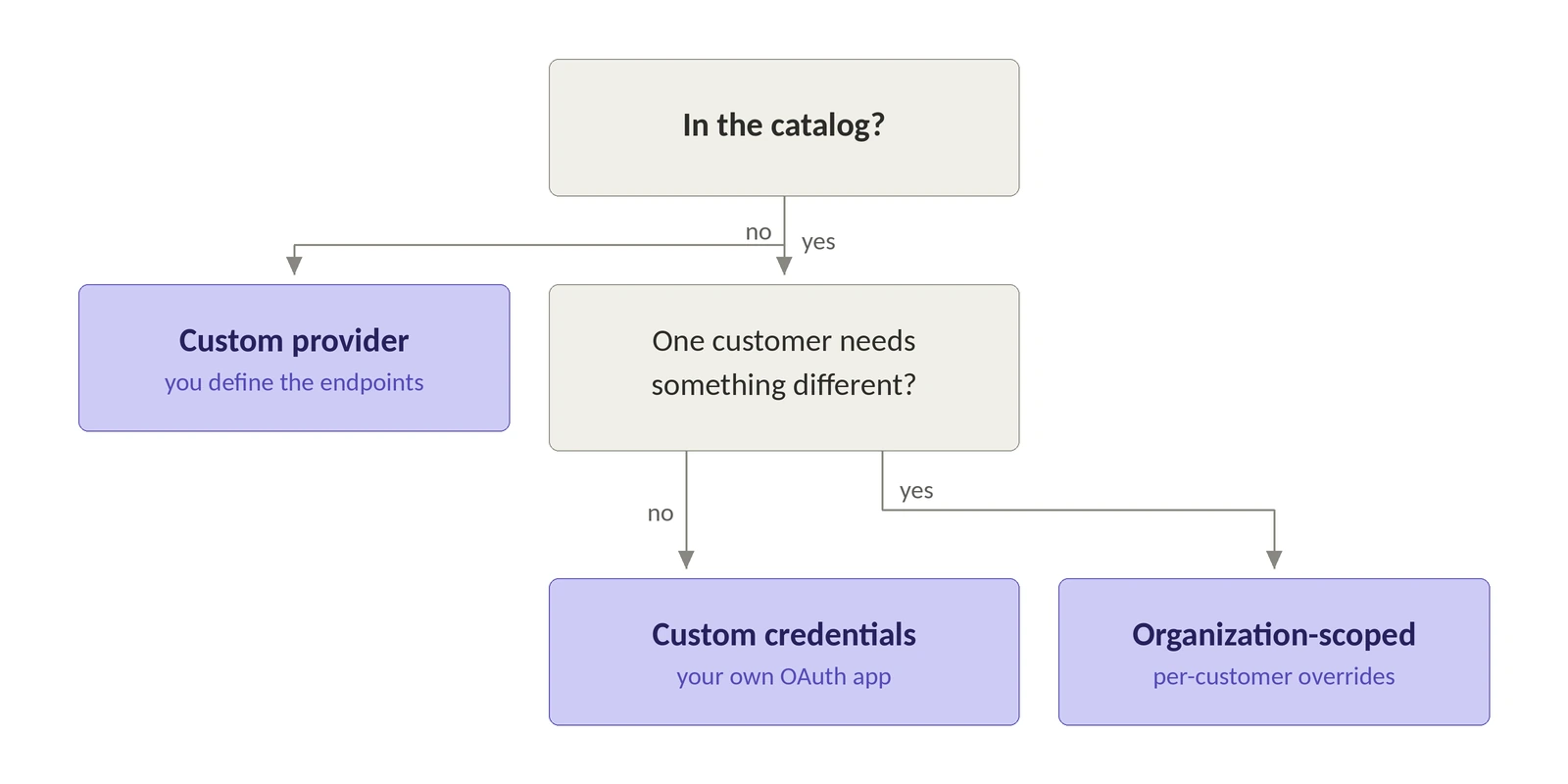
- The provider is in the catalog, but you want the connection to run through your own OAuth application. That's custom credentials: the provider is one WorkOS already supports, and the OAuth application on the other end is yours.
- The provider is in the catalog, but one customer has its own requirements: a narrower set of scopes, its own OAuth application, or the provider switched off entirely. That's an organization-scoped provider, which lets a single organization override whether the provider is enabled, the scopes it requests, and the credentials it uses. Some providers require this. Each organization supplies its own client ID and secret so the customer authenticates against its own account, and until an organization does, its users can't connect at all.
- The provider isn't in the catalog at all. That's a custom provider: you supply the provider's configuration yourself instead of picking a pre-built one. Pipes shipped this in June 2026, and the point of it is that any compatible data source can be connected to your application. The docs offer one other path for a provider you don't see in the list, which is to ask the WorkOS team about it.
Defining an OAuth provider yourself
Open the Pipes section of the WorkOS Dashboard, click Connect provider, choose Add a custom provider, and pick the authentication method the provider uses. The form follows from that choice.
The OAuth form asks for four things:
- Provider details. A name, a slug that identifies it inside your environment, and an optional description shown to users in the widget.
- OAuth endpoints. The authorization URL and token URL, plus a refresh token URL if the provider issues refresh tokens from a different endpoint.
- Credentials. Create an OAuth application in the provider's dashboard, register the redirect URI the form shows you, then enter the client ID and, if the provider requires one, the client secret.
- Scopes. The scopes your application needs, which users grant when they authorize the connection.
The resulting data integration carries the callback URL WorkOS generated for it and a state of valid, invalid, or requested, so you can check where a new provider stands before a user tries to connect through it.
The fields that exist because OAuth implementations disagree
Those four steps cover a well-behaved provider. The long tail is where OAuth 2.0 gets interpreted creatively, so the custom provider configuration exposes the parts most integration layers hard-code:
That table is the list of things you would otherwise discover one 400 at a time. Send space-separated scopes to a provider that expects commas and nothing in the response tells you the separator was the problem; you get a rejected authorization request and an afternoon with a proxy.
When the provider has no OAuth at all
A large part of the long tail never implements OAuth. The user generates a key in the provider's settings, pastes it somewhere, and that's the entire authorization model. Pipes treats that as a first-class authentication method: the user provides their key, WorkOS stores it securely, and you retrieve it from your backend through the same flow you already use for OAuth access tokens. The July 2026 changelog entry that shipped this names Granola, Orb, and Plain as the kind of tools it covers; all three now sit in the catalog under the slugs granola, orb, and plain.
An API key custom provider is the easiest thing in Pipes to configure, because there's almost nothing to configure: it takes the provider details and nothing else. For an API key provider from the catalog, the only field you can set is an optional description shown to users in the widget.
Your users then supply their own keys. The widget renders a key entry form, stores the credential when they submit it, and shows the last four characters so they can confirm which key is connected and rotate it later. The connected account reports auth_method as api_key and an api_key_last_4 instead of scopes and client credentials.
You can also set or rotate a key from your backend. One endpoint handles the initial install and every rotation after it: a new secret replaces the stored one. PUT /data-integrations/{slug}/api-key takes a user_id, an optional organization_id, and the secret, which in the Node SDK is one call.
Declaring the provider from your backend
Custom providers aren't a dashboard-only feature. POST /data-integrations takes a built-in provider's slug as provider, or a new slug plus a custom_provider definition for one that doesn't exist yet. The definition accepts most of what the dashboard form does, with the slug and description sitting at the top level of the request rather than inside it: name, authorization_url, token_url, refresh_token_url, pkce_enabled, request_scope_separator, scopes_required, client_secret_required, additional_authorization_parameters, token_body_content_type, and authenticate_via.
For an API key provider the same call gets much shorter: set auth_methods to ["api_key"] alongside a custom_provider block.
There's a third value for auth_methods worth knowing about, client_credentials, for providers that authenticate the application rather than a user. It has its own install endpoint at PUT /data-integrations/{slug}/client-credentials and its own auth_method value on the connected account. The rest of this article is about the two user-facing methods, but "which authentication method does it use" has three answers, not two.
The API refuses to be clever about mixed configuration. An API key custom provider has no OAuth application behind it, so credentials is null on the integration and name is the only field the provider definition accepts. Sending OAuth configuration anyway fails the request rather than being silently dropped, so a misconfigured provider surfaces immediately instead of failing later when a user tries to connect. The rejected set is every OAuth-shaped field: the endpoints, the flow settings, and credentials. scopes are the one exception: accepted, then cleared, because an API key carries whatever access it was issued with and there's nothing to request at authorization time.
A custom provider also declares exactly one authentication method; a list containing both api_key and oauth is rejected. And sending custom_provider, description, or scopes alongside an api_key block is rejected, because the definition and the stored key are written by different paths and accepting both would leave one of them stale. Get the slug wrong with no definition attached and you get a 404. Get the credentials configuration wrong, client ID and secret missing for the custom type, or supplied for the organization type, and you get a 422.
The call site doesn't change
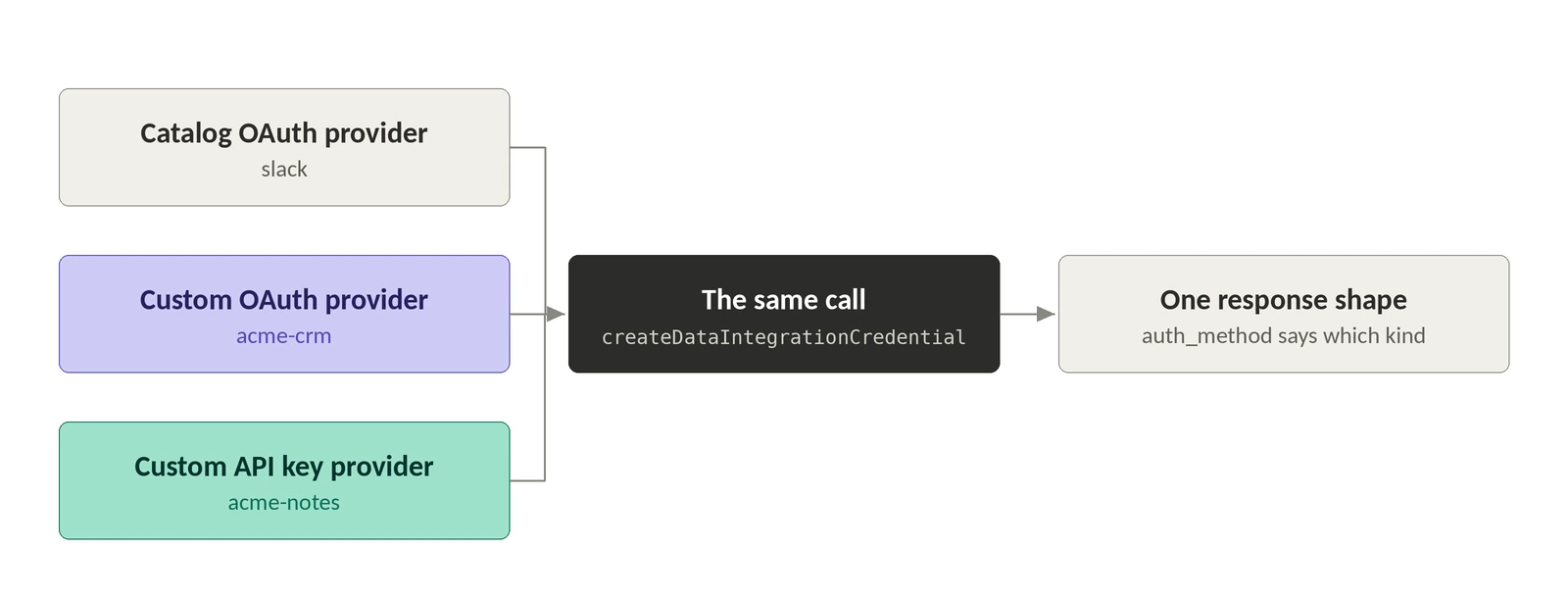
This is the part that decides whether the long tail is actually cheap. Once a user has connected, you fetch their credential from your backend with the vend credentials endpoint, POST /data-integrations/{slug}/credentials, passing a user_id, which is createDataIntegrationCredential in the Node SDK.
That response shape holds whether the provider is a catalog OAuth integration or a custom API key one you declared this morning: the credentials API vends whichever credential type the provider uses, and rotating a key is a single idempotent call. For OAuth providers, Pipes refreshes the token when needed, and when it can't, the response carries active: false and an error of either not_installed or needs_reauthorization so you can route the user back into the widget. Handle unknown values gracefully there, because the docs say more may be added. A user who never connected comes back the same way: a 200 with {"active": false}.
If the code making provider calls shouldn't hold a live credential, an agent sandbox or a customer-controlled runtime, Relay inverts it: WorkOS calls the provider and returns its response, so the token never enters your environment. Through Relay a missing connection comes back as a 402. For OAuth providers that carries an authorization_url you can hand to the user; for API key providers it's null, since there's no authorization screen to send anyone to, so fall back to the widget. Relay is in early access and enabled per environment.
The decisions you can't take back
Three things to get right the first time.
- A provider's authentication method is fixed at creation. OAuth or API key or client credentials, one of them, and that choice can't be changed afterward. Switching means removing the provider and adding it again with the method you want. There's no in-place switch, which makes that one radio button the setup choice worth slowing down for.
- Deleting a custom provider takes its connected accounts with it. Existing access tokens stop working and the provider disappears from the widget for everyone who had connected it. Removing a single connected account is narrower but has its own sharp edge: it deletes the stored access and refresh tokens on the WorkOS side without revoking access at the provider, so a thorough user may still need to disconnect your application in the provider's own settings.
- And if you already have connections to migrate, your users don't have to reauthorize. The create connected account endpoint imports a connection by supplying the OAuth tokens you already hold, which makes moving a homegrown integration onto Pipes a data migration rather than a re-onboarding campaign. It validates the combination you send: an access token with an expiry but no refresh token is a 422, as is an expiry on its own, and a duplicate account for the same user and integration is a 409. Send no tokens at all and the account is created in
needs_reauthorization, which is a reasonable way to stage a migration you intend to finish later.
Stop shipping the catalog as the answer
The catalog gets you the common cases quickly. What a buyer is really asking when they ask whether you support their provider is whether adding it is a roadmap conversation or an afternoon. With a custom provider it's the afternoon: a definition, one call, and the credential fetch you already wrote.
So the next time the question comes up in a deal, skip the list. Ask which authentication method the provider uses, because that's the only thing you still need to find out.
The full setup is documented in custom providers and API key providers. If you're still deciding how to model both credential types in your own schema, API keys vs. OAuth covers that side of it.