Agent Registration with Auth.md
Introducing auth.md — an open protocol that lets agents register for your service.


An agent hits your API. It gets a 401. What does it do next?
If you sat down today to make that scenario work end-to-end, your options aren't great. The agent can give up. It can ask the user to stop what they're doing, open a browser, create an account, generate an API key, and paste it back to the agent. You can ship a bespoke agent-registration endpoint for your service, but it will be unique to your service and unknown to agents.
Sign-up forms were built for humans clicking on screens. Even OAuth flows assume a human in the loop, not an agent. Neither was designed for a process whose first step is “the agent initiates a connection to my service.”
Today we're releasing auth.md — an open protocol that tells agents how to register for your service via a Markdown file published on your domain.
What is auth.md?
Auth.md is two things:
A document — plain Markdown, hosted at https://yourservice.com/auth.md. Agents parse it like llms.txt or agents.md: headings to navigate, fenced code blocks to extract request shapes, prose to disambiguate.
A protocol — a small set of HTTP endpoints (/agent-auth, /agent-auth/claim, /agent-auth/claim/complete) that agents use to register for services on behalf of users. Once registered agents use standard credentials to access the service. The protocol extends the structured Protected Resource Metadata (RFC 9728) at /.well-known/oauth-protected-resource. This provides a source of truth that agents can probe.
auth.md serves as a guide for agents in how to interface with your service even if they aren't trained on the protocol. They discover it through documentation, an SDK, or a search result.
An auth.md file contains the following pieces of content:
You can see an example auth.md file here.
Why we built auth.md
Developers are building apps from scratch with agents or extending their apps with new functionality starting with the agent. After developing a solid plan the agent needs to act, but if that requires integrating a new service it immediately becomes a dependency the human has to resolve.
The agent ecosystem doesn't have a primitive for “register on behalf of a user.” OAuth assumes a browser-based consent dance. A few companies have experimented with endpoints but they are flimsy and don't standardize well.
auth.md is the discovery layer that ties existing standards together and fills in the parts that were missing — most notably, an ability for an agent to attest to a user's identity. To smooth the adoption curve, there is an OTP-driven claim flow for agents whose provider can't attest the user's identity.
The scope is deliberately targeted. There is no new crypto, no new key distribution, no new user model. It extends existing standards and uses existing auth technology to solve a novel problem.
Two flows, your choice which to support
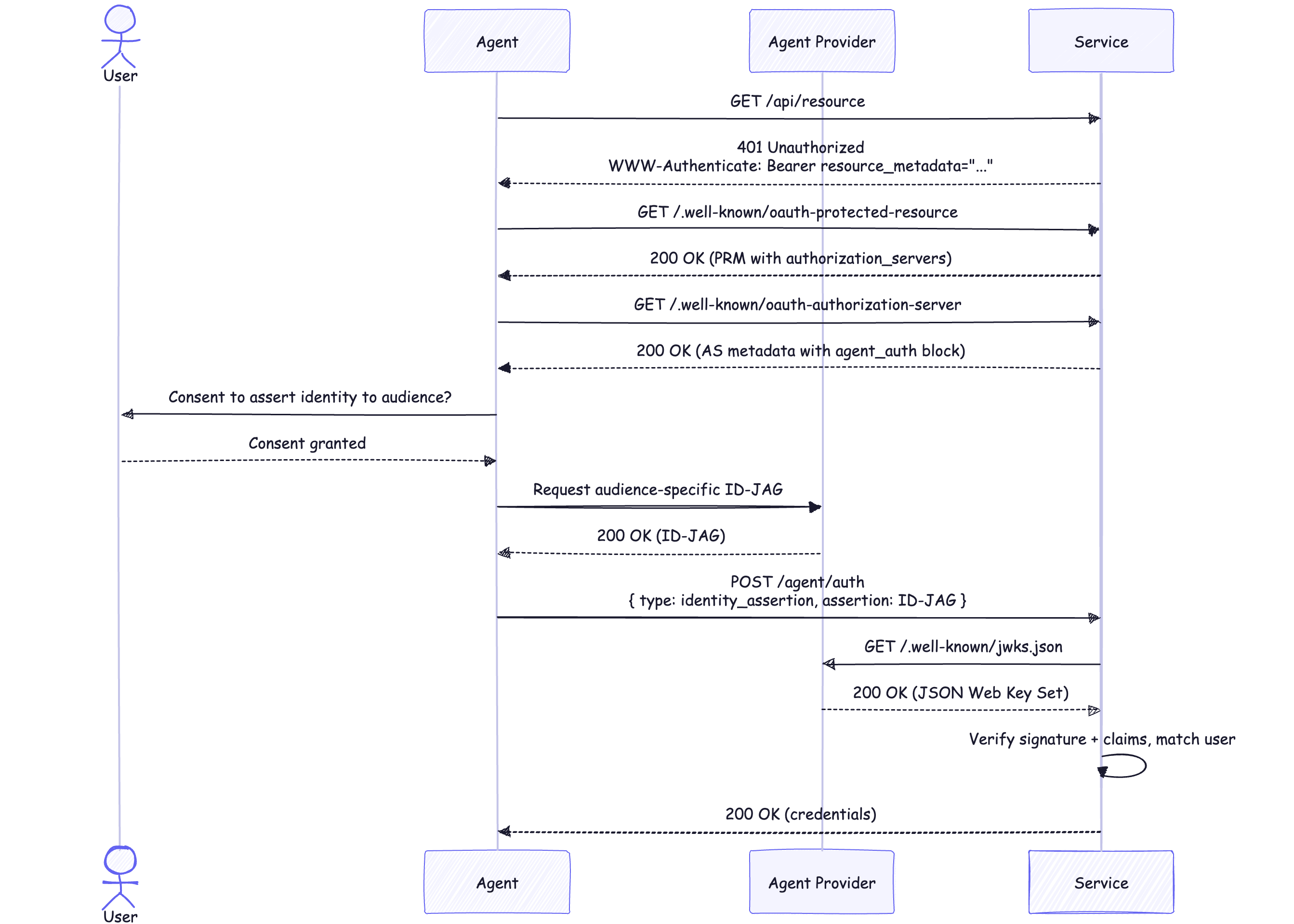
Agent Verified. A trusted agent provider — a platform whose agents act on behalf of identifiable users — signs an ID-JAG asserting “this agent is acting for this user.” The agent POSTs the ID-JAG to your /agent-auth endpoint. You verify the signature against the provider's JWKS, match the assertion to a user, and return credentials synchronously. The verification path is OIDC token verification with a different content type — if your service already JIT-provisions users from an identity provider, this is a small change.
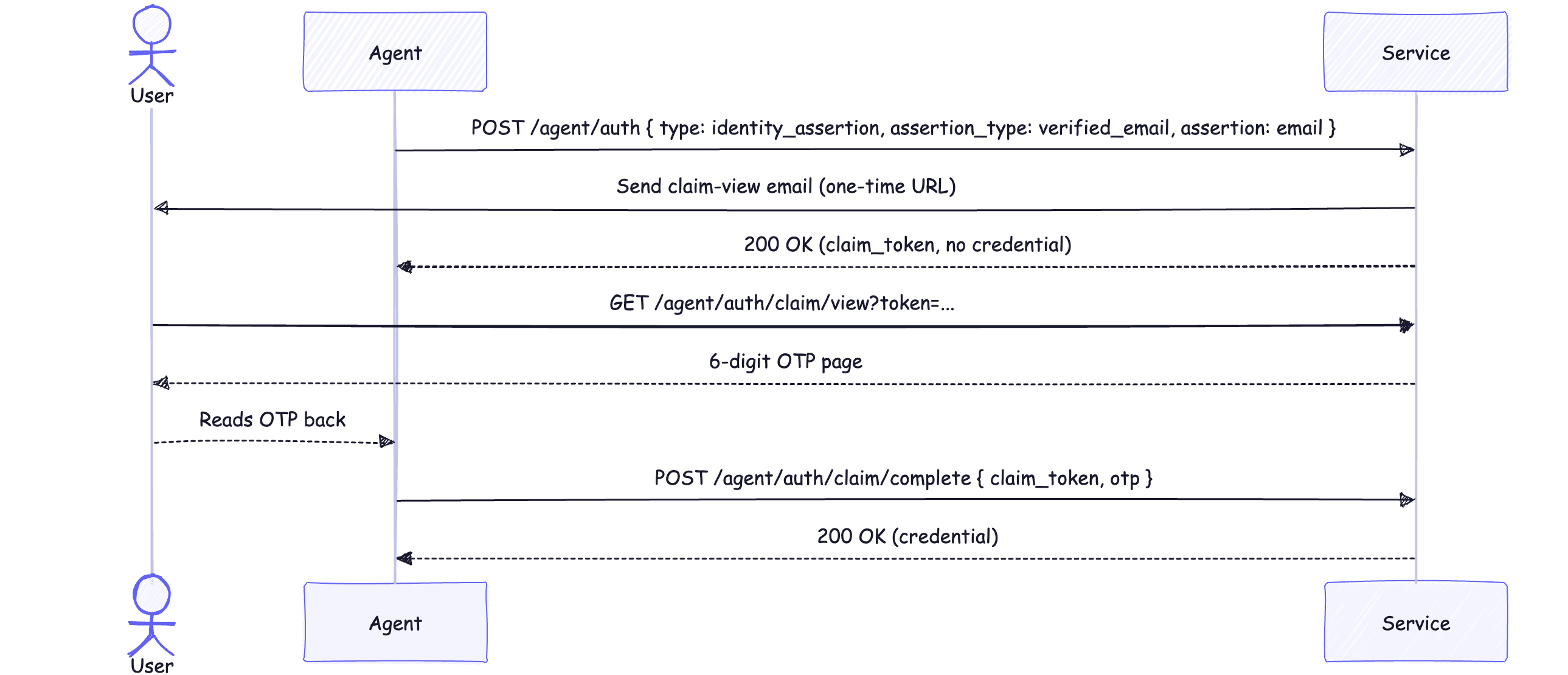
User Claimed. For when there isn't a provider identity or you can't trust it. The user provides a six-digit OTP from your service back to the agent. Two ways to allow this flow to be initiated:
- Email required — your service holds the credential until the OTP is verified. No pre-claim usage.
- Anonymous start — your service issues a credential immediately, scoped to whatever pre-claim permissions you choose. The agent (or the user) can run the OTP claim later, before the registration expires, to bind the credential to a real user and upgrade its scopes.
Here is the email-required entry point, end to end:
You decide which flows you accept. Agents discover that choice through your auth.md and the protected resource metadata endpoint.
Integrating auth.md into your app
Integration requires five steps:
- Write your
auth.md. Start from the template, fill in service name, scopes, supported flows. Delete the sections for the flows you don't support. - Publish protected resource metadata at
/.well-known/oauth-protected-resourcewith anagent_authblock. Roughly twenty lines of JSON. - Return
WWW-Authenticate: Bearer resource_metadata=“…”on 401 responses, so agents that bump into your API can discover the rest. - Implement
POST /agent-auth. Dispatch ontype. The verified handler is JWKS-backed JWT verification plus the user matching you already do. The claimed handlers are a small OTP state machine. - Issue credentials — either short-lived access tokens or API keys, your call. The shape is the same as anything else you issue today.
The verified handler is the simplest. In Node, with jose:
That's the load-bearing path. Everything else — the trust list, the replay cache, the revocation handler — is plumbing around it. Accept phone_number_verified the same way if your user model supports it.
The user claimed flow is more state. You generate a claim_token at registration, hash it before storing, email a one-time view URL, render an OTP page, accept the OTP back, and either upgrade scopes in place (anonymous start) or issue a fresh credential (email required). All of that is documented step-by-step in the integration guide for apps.
Integrating as an agent provider
If you operate an agent platform whose agents act on behalf of authenticated users then implementing is three steps:
- Mint audience-specific ID-JAGs on user consent.
- Publish a JWKS at
/.well-known/jwks.json. - Honor revocation calls from your user-facing control plane by POSTing a logout token to the service's
revocation_uri.
Doing this makes you the identity broker for every service a user's agent touches — you keep the consent prompt, the delegation list, and the revoke UX inside your product. Full walkthrough is in the agent providers guide.
The shape we chose, and why
There are three design decisions worth discussing.
Standards over reinvention. RFC 9728 for discovery, the IETF ID-JAG draft for delegation, OIDC backchannel logout for revocation. You don't need to verify a new kind of token or trust a new kind of key. If you have an existing OAuth verification path, this slots into it.
Compatibility with how services already onboard users. JIT provisioning is the path. We're just changing what triggers it. If your sign-up form creates a user from a verified email today from services like Google, your /agent-auth handler creates a user from a verified email plus a delegation record. The user model doesn't change.
Discoverable by default — no coordination required. A service that supports auth.md is immediately reachable by any agent. No partner integrations, no per-vendor onboarding, no “preferred agent provider” lock-in on either side. The user claimed flow is open to any agent that can read your auth.md. As agents adopt the agent verified flow, they can seamlessly transition to that without additional effort on your part.
Get started with auth.md
Agents are already trying to access your service. Now you can give them a way in.
- Read the spec on GitHub — full integration guide, flow walkthroughs, error tables.
- Copy the example auth.md file, update for your service, and publish it at your domain.
- Implement
/agent-auth. The apps guide has everything you need to integrate. - Tell us about your experience. Email
authmd@workos.com. We want to hear from you about your experience.
Agents need primitives that scale. auth.md is one of them — the lowest layer of trust between an autonomous actor and a service that doesn't know it. We're shipping this to unblock services who are looking for adoption from agents. We want feedback from the community so we can iterate and improve quickly to arrive at what supports applications' needs.
If building primitives like this is the work you want to be doing, we're hiring across identity, infra, and agent auth.