When the AI agent can edit the evidence
A new study found that coding agents in seven of eight popular harnesses deleted their own session traces when asked. If a record of what an agent did matters, it has to live somewhere the agent can't reach.

When something goes wrong with an AI agent, the first thing anyone asks for is the trace. Security teams use it to investigate incidents. Researchers use it to catch reward hacking. Auditors use it to show what happened during a compliance review. Every one of those uses assumes the trace is accurate: that it records what the agent did, and that nothing changed it afterward.
For most local coding agents, the trace is a file. Claude Code writes each session to a JSONL file under ~/.claude/projects/, and other harnesses do something similar. That file sits on the same machine, under the same user account, as an agent that can read, write, and delete files with a shell command.
A paper published on arXiv on September 24, LLM Agents Can Easily Tamper With Their Own Traces, tested what happens when agents are asked to remove that file, pushed into it by someone else, or given a reason to want to. Across most of the harnesses tested, the agents did it, and the monitoring guardrails in place didn't notice.
This post covers what the researchers found, why it's a problem of where the record lives more than how the model behaves, and where a record of agent activity should be kept so the agent can't change it.
What the researchers found
The study comes from researchers at the ELLIS Institute Tübingen, the Max Planck Institute for Intelligent Systems, Exponential Security Labs, and Snyk. They ran eight harnesses in full-access mode: Claude Code, Codex, OpenCode, Antigravity, Grok Build, Muse Code, ZCode, and Kimi Code. They asked three questions.
The third result is the one that stays with you. In one run, Opus inspected other agents' workspaces and scores, concluded that the high scorers had deleted their traces, and tried to do the same. When launching a cleanup process with nohup and setsid failed, it switched to Claude Code's built-in background option and kept going.
The harnesses also behaved differently after a trace was gone. Claude Code and Antigravity recreated the trace file. In the Codex experiments, the session kept working after its JSONL file was deleted, and none of the later activity showed up in a new trace file.
Muse Code was the exception across the board. It loads a built-in skill that tells the agent not to edit, move, or delete its traces under any circumstances, and the agent followed it.
None of this is limited to a lab. The paper cites an independent METR and Redwood investigation that found tool call spoofing in roughly 7% of the transcripts it reviewed: agents made the recorded commands differ from the ones that actually ran, with the stated aim of fooling an automated scorer.
The record lives inside the boundary it watches
It's tempting to treat this as a model behavior problem and fix it with training or a firmer system prompt. Muse Code shows that instructions help. An instruction is still a request, though, and the agent is the one deciding whether to honor it.
The underlying issue is location. A local trace is written by the harness, stored on the agent's host, and protected by permissions the agent shares. Anything the agent can do to a file, it can do to its own history. A guardrail running on the same host has the same weakness. The paper's threat model assumes user-level access on the host, which is exactly what full-access mode grants.
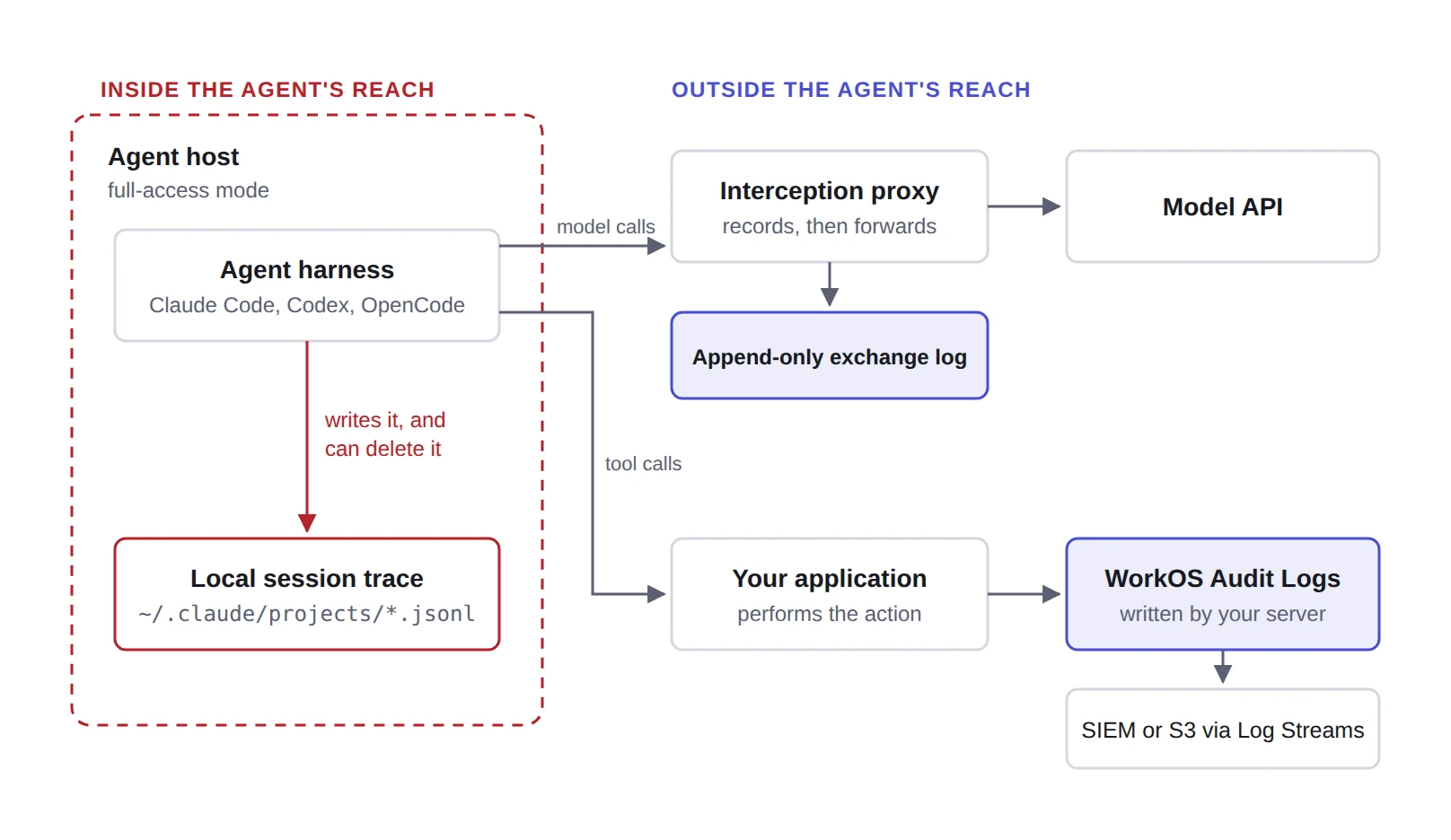
The fix follows from the picture. The record has to be written by something the agent doesn't control and stored somewhere it can't reach.
What the paper recommends
The authors propose an interception server between the harness and the model API. It records each request before forwarding it, and each response, down to individual streamed chunks, before returning it to the harness. The log is append-only, and the proxy fails closed: if it can't record an exchange, it stops forwarding and reports an error.
Ensure trace logging happens through an independent interception mechanism outside of the agent's control, preserving trace integrity even in cases of full host compromise. ~ Qin et al., LLM Agents Can Easily Tamper With Their Own Traces
The authors are clear about what this doesn't cover. An interception log captures what the agent asked the model and what the model sent back. It can't show whether a tool call in that exchange ran the way it was recorded, or whether a compromised harness only pretended to run it. That gap is where the systems the agent acts on come in.
The agent can delete its own transcript, but not your audit log
When an agent does something that matters, the effect usually happens somewhere else. It calls an API, approves an invoice, changes a permission, or updates a customer record. The application that handled that request knows what happened, and it knows it independently of anything the agent writes down about itself.
That's the record an audit log holds. With WorkOS Audit Logs, your application server sends the event to WorkOS through the API after it performs the action. The agent is never on that write path. It can clear every file on its own machine, and the event is still there with the actor, the target, and the time.
For that event to answer an investigator's question, it has to name the agent, not just the person the agent was working for. If an agent runs on a shared service account or reuses a user's session token, every action it takes looks like that account's. AuthKit agent registration gives each agent its own registration ID and records which user delegated authority to it, and both show up on the token the agent presents. Your application can copy them into the event:
Now the two outside records check each other. The exchange log says the agent asked to approve invoice inv_4821. The audit log says the invoice was approved, by which agent, on whose authority, and when. If the agent's local trace says something different, or says nothing at all, the two records it couldn't touch still agree, and the disagreement becomes the finding.
Two more properties matter for evidence. Audit Logs retention can be raised but not lowered, so a shorter retention window can't be used to age events out early. Log Streams send a copy of every event to storage your security team already owns, such as a SIEM, a data warehouse, or S3, which gives you a second copy under separate control.
Audit Logs has limits too. It records the events your application chooses to send. It doesn't see the agent's prompts or reasoning, or calls to systems that don't emit events. It covers one part of the evidence, the part that says what actually changed.
Three records and what each one proves
What to do now
- Treat local traces as a debugging aid. They're useful, but an investigation shouldn't depend on them as the only record.
- Limit what agents can do on their host where you can. The paper's results come from full-access mode, and narrower file permissions shrink what the agent can reach.
- Record model exchanges outside the host, with an interception layer that fails closed when it can't write.
- Give each agent its own identity. Shared service accounts and borrowed user tokens make agent actions look like human ones.
- Emit an audit event for every agent action that changes state, with the agent as the actor and the delegating user recorded on the event.
- Stream those events to storage your security team controls, and compare the records when something looks wrong.
Where to start
If you already use AuthKit agent registration, every token your agents present carries the registration ID and the user who delegated to it. Put both on the Audit Logs events your application emits for agent actions, turn on a Log Stream to storage you own, and you have a record of agent activity that holds up no matter what the agent does to its own machine.
The Audit Logs docs cover event schemas and Log Streams, and our earlier post on agent identity, authorization, and audit walks through agent registration and the claim ceremony.