5 Atlas agents essential to how we operate at WorkOS
Meet the agents our teams rely on day to day: what each one does, what it's connected to, and where it knows to stop.

Meet the agents that help our teams stay on track day to day at WorkOS. They have full context of what we're doing and know when to take action and when to defer to a human.
Inside WorkOS, every team has built their own agents, each with a name, a job, the right connections, and a place to work.
A few started as ideas from Claude Day, our monthly company-wide hackathon; others grew from little experiments into production workflows. In each case, someone spotted a job worth handing off and spun up a new agent to do it.
Creating an agent is as simple as sending Atlas a message in Slack. You describe the job in plain language and Atlas creates a new agent with the right prompt, tools, and connections, ready to get to work.
Of the many Atlas bots the team has poofed into existence, here are five that make us more efficient and, seemingly, a few IQ points smarter.
@wallaby provides GTM intelligence in one place
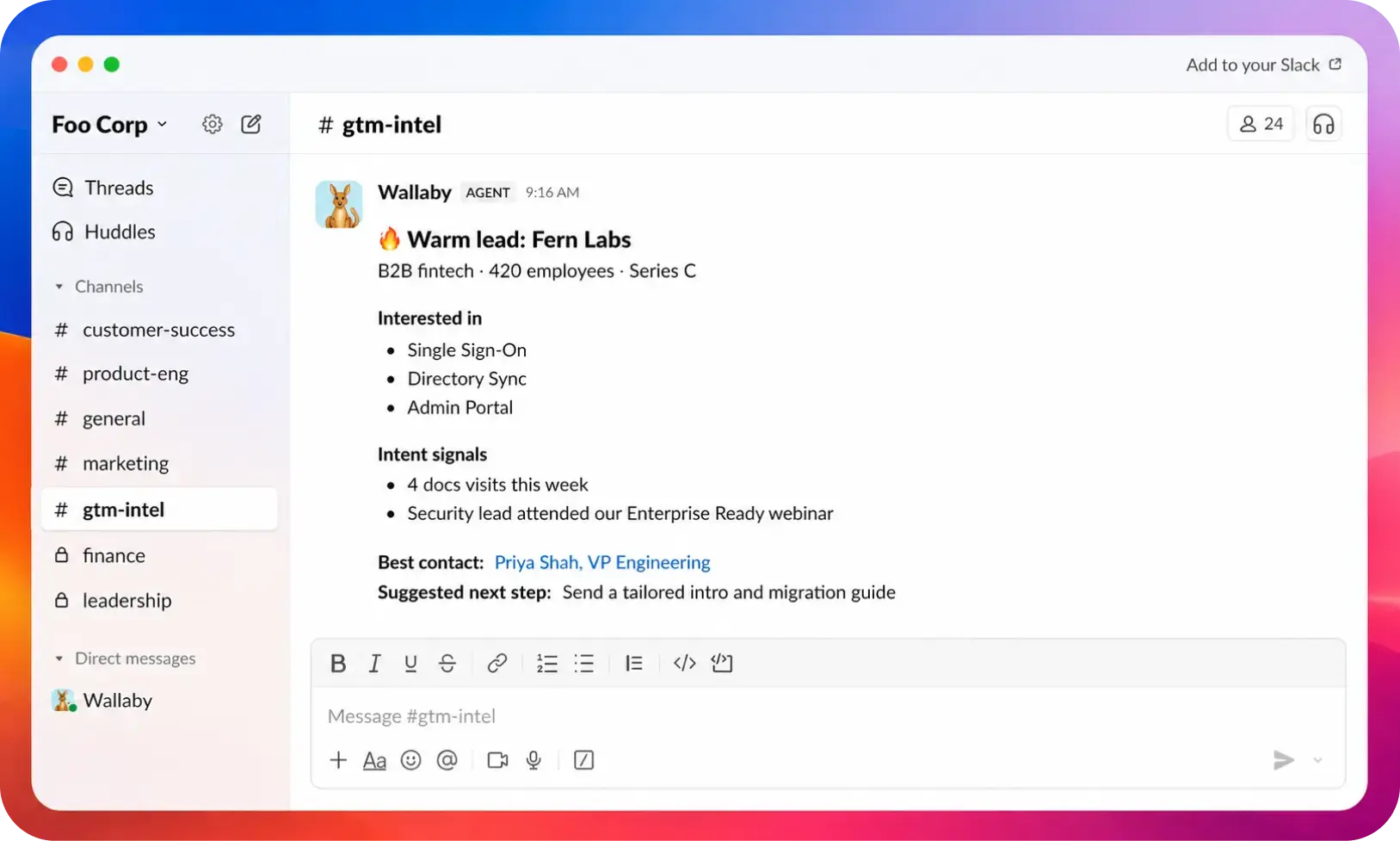
Customer and account context at WorkOS used to be scattered across Snowflake, Salesforce, Close, Gong, Slack, Luma, spreadsheets, internal tools, and a handful of ad hoc bots. Even a basic account question could require warehouse queries, CRM records, call notes, Slack threads, enrichment runs, and a working knowledge of our ownership rules.
Now you just ask @wallaby. AEs, CSMs, SEs, leaders, and engineers call it into a thread to find an account owner, check whether a company is a customer, understand product usage, catch up on a conversation, or build a prospecting list. Through the internal Wallaby API, it can also run enrichment, create lists and campaigns, and support event workflows.
Its behavior comes from instructions and memory; its reach comes from a carefully scoped set of integrations and custom connectors:
- Snowflake for warehouse questions
- WorkOS data guides for governed business definitions before querying
- Salesforce and Close for CRM context
- Google Drive and Google Sheets for contracts and list intake
- Slack for tribal knowledge and customer-channel history
- Linear and Notion for internal work and documentation
- Luma for event workflows
- A custom Wallaby connector for GTM actions
The instructions matter as much as the tool list. @wallaby follows a simple rule: "evidence or silence." If it cannot verify a customer status, pricing fact, or ownership answer, it says so. It checks our governed data guides before querying Snowflake. Enrichment runs and CRM syncs require an explicit request, and the underlying actions use safeguards such as idempotency keys. When a job runs asynchronously, @wallaby returns the run ID and offers to check it later instead of pretending it will follow up on its own.
@wallaby is cautious by design, and that restraint is a big reason people trust it. It knows where to look, what it is allowed to do, and when it needs to come back with "not found."
@kipp brings the Data team's definitions into Slack
Writing SQL is rarely the hardest part of analytics. The harder part is knowing which dataset to trust, which business definition applies, and how the underlying data has been transformed. That context is what makes an answer reliable, regardless of where the question is asked.
Our Data team has invested in three layers:
- Canonical datasets in Snowflake, so people and agents work from the same source of truth
- Data guides, business rules, and routing docs that explain how to interpret and use those datasets
- Tools for exploring and sharing data across the surfaces where people and agents work, including Flashboards, MCP servers, and Atlas agents
@kipp is the Data team's data engineering companion in Slack, built around our data architecture and best practices. It knows the WorkOS fiscal calendar and our default analytical lenses. It can navigate Snowflake from curated tables down to raw data and diagnose observability warnings. Just as importantly, it knows when to stop and tag the Data team instead of filling a gap with a confident guess.
That makes @kipp useful for more than writing queries. It carries the Data team's definitions and working habits into the conversation while leaving judgment calls with the people who own them.
@icon-drift-bot keeps an eye on the design system
Our design-system work started with a very human ritual: recurring office hours where designers and engineers discuss component behavior, naming, accessibility, migration plans, and UI details. Those conversations create shared judgment, but they also create follow-up work — recaps to write, action items to close, documentation to update, icon drift between Figma and code to reconcile, and design guidance that coding agents miss unless someone points them to it.
We kept the office hours and built a small crew around the maintenance work.
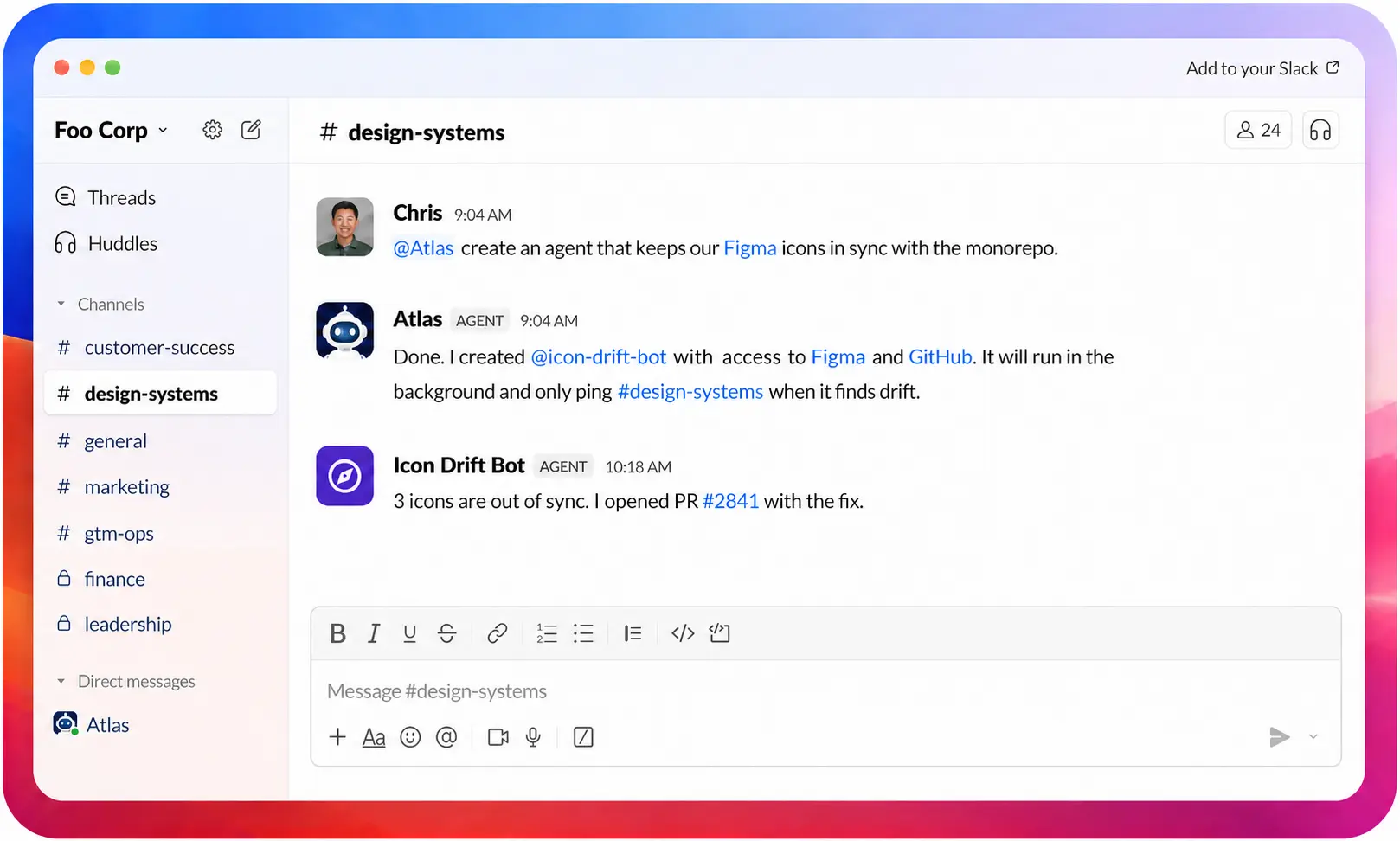
@icon-drift-bot has a very clear beat: it watches the Figma icon list, compares it with the SVGs in the monorepo, and lets the design channel know when the two have wandered apart. It distinguishes icons added in Figma from ones removed there, and it can trigger a CI workflow that regenerates the files and opens a PR for review.
Atlas workflows let agents like this run quietly in the background without waiting for someone to prompt them. @icon-drift-bot keeps watch on its own and only pings the team when it finds drift that needs attention.
@vendor-checklist keeps vendor reviews moving
Vendor procurement and security reviews involve a lot of steps and handoffs. @vendor-checklist shepherds each review from start to finish, keeping the work moving without relying on someone to remember every follow-up.
Its narrow job makes it easy to know when to call it in and what it should own.
Honorable mentions
Those are the five we rely on most, but they are not the only bots working around WorkOS.
- @concierge builds and publishes customer onboarding guides.
- @office-ops keeps track of the weekly office list.
- @nagbot reminds owners to update the All-Hands document.
- @fup turns a call transcript into a Gmail draft.
- @billy handles read-only billing lookups across Orb and Stripe.
- @qbr-generator builds account-meeting decks.
Giving each workflow a name makes it easier to request, improve, and share with the rest of the company. Day to day, that matters more than a generic AI demo.
What we learned
Atlas caught on quickly because a new agent can be useful almost immediately. Agents have access to tools by default, so they can look up context and take action instead of stopping at an answer. Describing a job in Slack is a low enough bar that people can try an idea without turning it into an engineering project.
Slack is also where people learn what these agents can do. They work in public channels, so anyone can watch someone call @wallaby into a thread, see how they phrase the request, and learn from the result. One useful interaction often gives someone else an idea for an agent of their own.
The ones that stick are simple and memorable. They have a clear job, a name people remember, and an obvious moment when you would tag them in. Everyone knows what @wallaby is for, what @kipp is good at, and how to put them to work.
Tell us what you think
Atlas has become part of how work gets done at WorkOS. Agents help our team move faster, taking recurring work off people's plates and making room for new workflows we would not have built otherwise.
Now we are excited to see what your teams create. Tell us which jobs you give your agents, what they do surprisingly well, where they get confused, and which connections you wish they had.
Visit workos.com/atlas to get started, and follow us on 𝕏 for more updates.