WorkOS Atlas: A secure home for the internal apps your team builds with AI
Build internal apps with your coding agent and share them with coworkers, without handing out API keys or rebuilding access controls for every app.







Your coworkers are already building software. The ops lead who asked a coding agent for a renewals tracker, the marketer with a campaign dashboard, the engineer whose weekend tool now sits in half the company's bookmarks. WorkOS Atlas gives those apps a shared, secure home: company sign-in, connections to your data, and centrally managed access, there from the first deploy.
We first showed WorkOS Atlas at init(). This week we're opening early access, and we want to show what it looks like when a whole company starts building.
Watch Ryan walk through Atlas, from building an app in Claude Code to the controls admins get over who can use it.
Building got easy but everything after it did not
Coding agents changed who gets to build. Anyone who knows a workflow well can now describe the tool they wish they had, and get working code back.
The hard part starts after that. Where does the app run? Who can sign in? How does it reach Snowflake, GitHub, or Stripe without someone pasting an API key into it? Every new app means handing out credentials, guessing at permissions, and rebuilding access controls from scratch.
That work lands on one person: usually a hands-on engineering leader who, at most startups, is also the de facto IT admin. They want to say yes to more builders. They're also accountable when an internal tool leaks data. Without a common foundation, the options are to say no, or to say yes and hope.
From a prompt to something your coworkers can use
WorkOS Atlas works with the coding agent your team already uses, like Claude Code, Cursor, or Codex. Connect it to Atlas once, describe what you want, and your agent builds the app and deploys it.
Try something like: “Build a weekly status board for the exec team. Pull project progress from Linear, each team’s Friday update from Slack and the numbers from Snowflake. Group it by department and flag anything at risk. Deploy it to Atlas.”
What comes back is a real app at its own address. Your agent uses the connections your admin already set up, so nobody pastes an API key into a prompt. Coworkers open it and sign in with their company account, and a scheduled job refreshes it every Friday. Nobody had to set up hosting or wire up authentication.
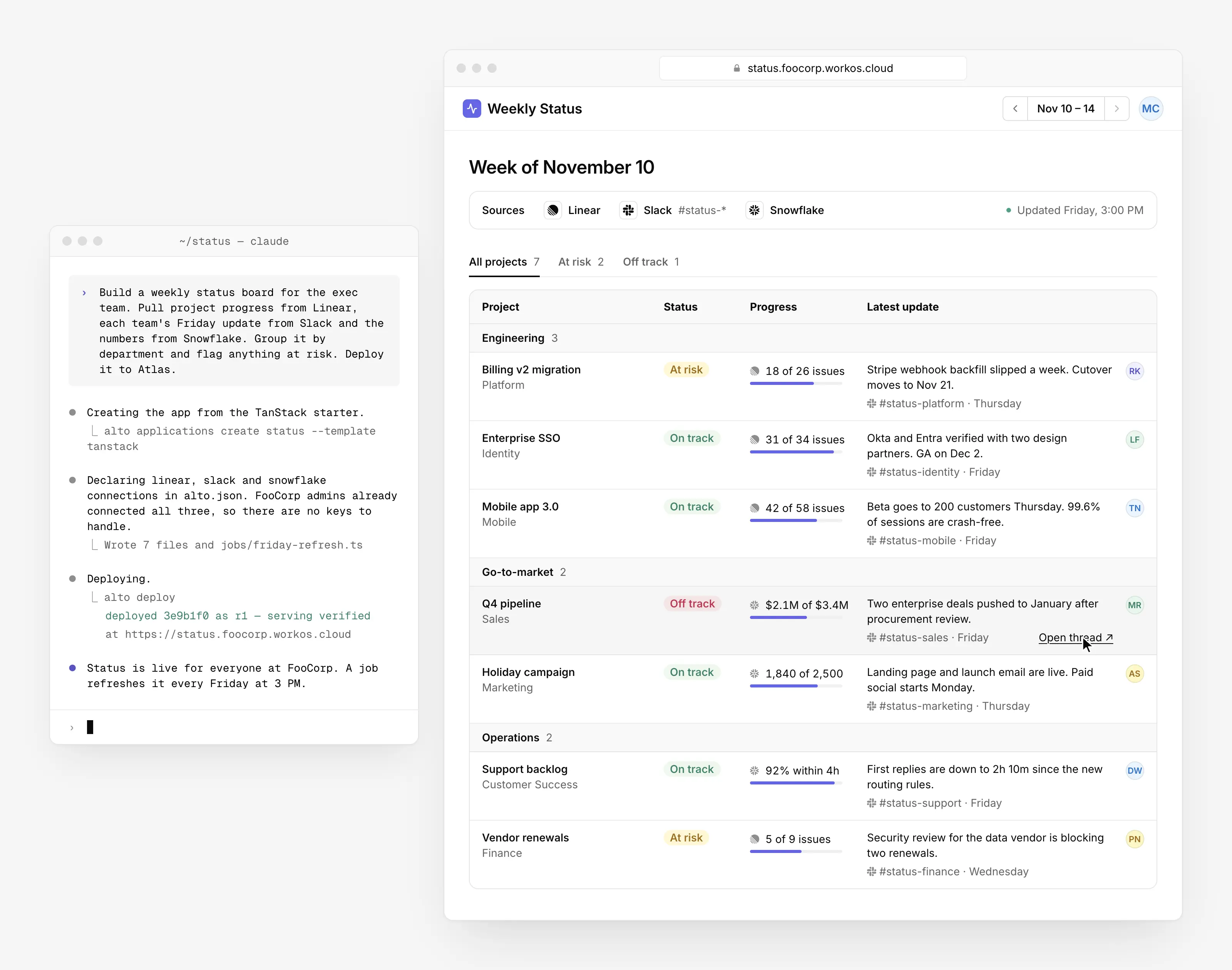
Connect your company's data without passing API keys around
An internal app is only as useful as the data it can reach. That's also where it gets risky.
With Atlas, an admin turns on the tools your company uses once (GitHub, Google Workspace, Slack, Snowflake, and more). Builders declare which ones their app needs. Atlas makes the request on the app's behalf, so connection credentials stay out of app code. No keys in a repo, no secrets pasted into a chat with an agent.
When an app acts as a person, say to read their pull requests or calendar, that person connects their own account and approves that specific app. When a builder needs a tool that isn't turned on yet, they ask, and an admin approves it.
Secure by default means builders inherit the protections instead of rebuilding them for every app:
- New apps require company sign-in, with your existing SSO and MFA.
- Connection credentials stay out of app code.
- Access to data connections is managed centrally, not app by app.
Not another to-do app: What we build on Atlas
Internal tools used to come from engineering, because only engineers could deploy an app, connect it to company data, and keep it secure. Atlas takes those barriers away. Some of our most-used and most powerful internal apps were built outside engineering, by the people who knew the workflow best and no longer had to wait for someone else to build it.
What they build surprised us too: it's not just internal CRUD apps. It falls into roughly three groups.
Small, delightful things. One of our engineers, Colin Barber, built a live world map that lights up every time someone signs in with WorkOS, anywhere in the world. It's simple, and it's exactly the kind of thing you'd put on the TV in the lobby. Not every app needs to be a structured SaaS product.
Everyday tools everyone uses. Some of our busiest apps solve problems every company has. Our org chart app gets steady traffic from across the company. Blurple Pages answers "who owns this?" with the right team, Slack channel, and on-call rotation. Time Off Hub pulls everyone's PTO from Rippling into one team calendar. And a shared skills dashboard lets people publish the agent skills they've written and download each other's.
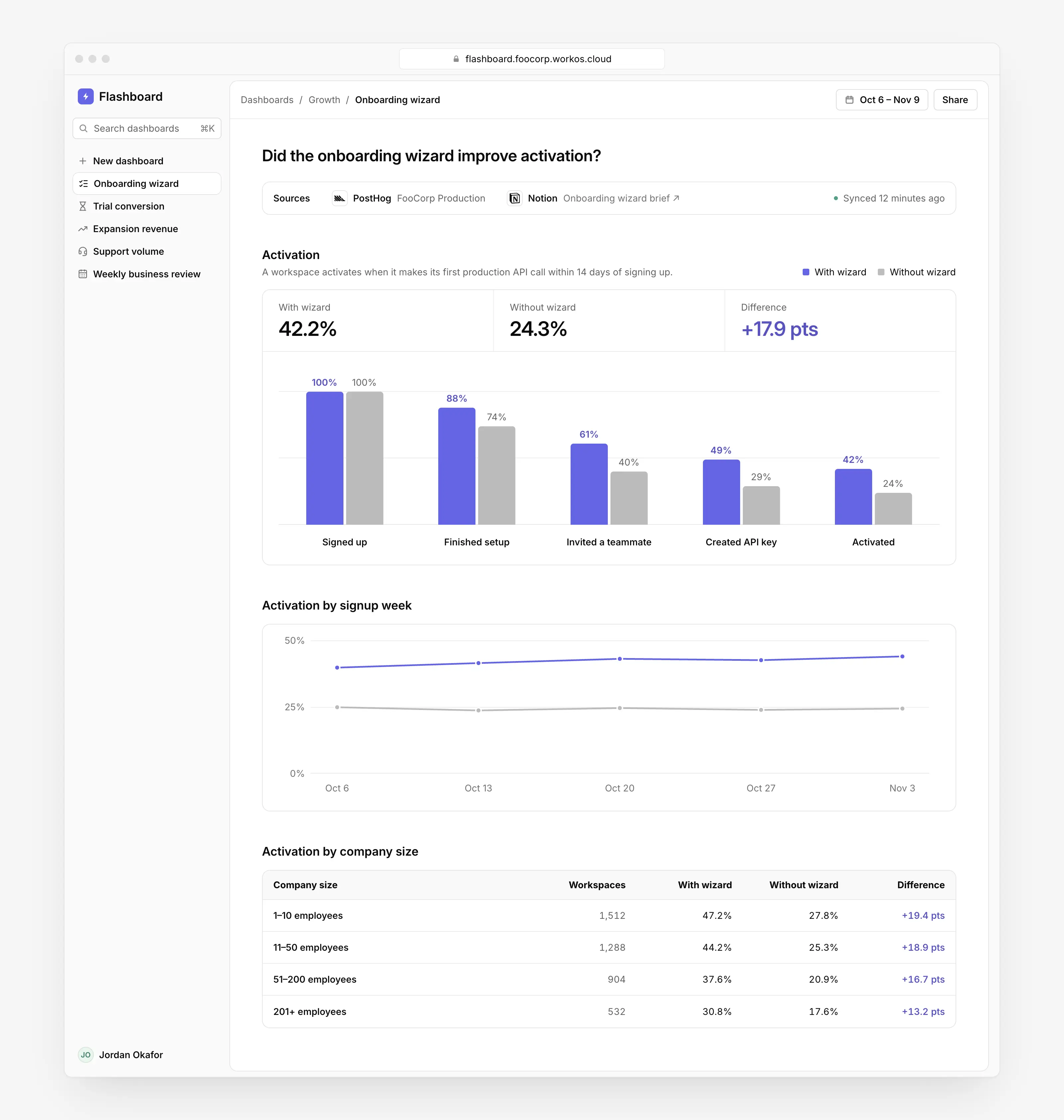
Real internal products. Flashboards is our flagship example. Product teams use it to track onboarding funnels, activation, growth, and adoption. One team used it to compare onboarding outcomes for users who were shown a new onboarding wizard. Ten years ago, a tool like this could have been a startup of its own.
Tools for your agents. Apps on Atlas can also expose tools over MCP. That means you can build an app whose main user is an agent: something that knows your codebase and your feature set, and that you reach from the chat you already use.
Control without the busywork
Atlas is built for the person who has to say yes: the engineering leader who wants more people building, and doesn't want to become a full-time IT department to make it happen.
You don't lose sight of anything by letting go. Admins can see every app that's running and who owns it. They decide which tools are connected, approve new connection requests, and restrict sensitive apps to specific people, groups, or roles from your identity provider. An activity log records who changed what.
For builders, it means not waiting in line for engineering. For the person accountable for security, it means one place to manage access instead of dozens of improvised setups.
Bring Atlas to your team
WorkOS Atlas is in early access. Tell us about your team and what you want to build. We're onboarding teams one by one and setting up Atlas alongside each of them.
We're shaping what comes next with these early teams, so tell us what you'd need to bring Atlas to your company, too.