Auth0 Enterprise Connect in beta vs. WorkOS for enterprise SSO and SCIM
Auth0's beta keeps the authorization server you already run and adds the enterprise surface around it. The differences from WorkOS show up in SCIM direction, plan tier, and which pricing table you are actually reading.

Your app already has auth. It works, the login page looks the way you want it, and user records live in your own database. Then an enterprise prospect sends a security questionnaire asking about SAML, SCIM provisioning, and who administers the connection. Rewriting authentication for one deal is not on the table.
Both WorkOS and Auth0's new Enterprise Connect beta aim at exactly that spot: keep the authorization server you already run, and add the enterprise-facing surface around it. Auth0 published Enterprise Connect as a beta on July 30, 2026. Read the announcement closely, because the two products split the problem differently, and the split lands on whoever ends up owning the SCIM integration.
What Enterprise Connect does
Auth0's changelog entry is short and specific:
"Enterprise Connect is now in Beta. It lets you use Auth0 as a modular B2B identity layer. You can federate your existing SAML or OIDC capable authorization server to Auth0 and layer on enterprise SSO, user provisioning, and self-service onboarding / setup capabilities for B2B use cases."
The mechanics, quoting the same entry: a guided setup walks through "federating over OIDC or SAML, including Okta as a connection strategy, configuring the integration, self-service onboarding, adding user profile claims into ID tokens using Actions code, and wiring up outbound SCIM user provisioning." Connection lifecycle events (connection.created, connection.updated, connection.deleted) keep your local domain map in sync as customers onboard.
Two practical notes before you plan a roadmap around it. Access is gated behind a conversation: "Please contact the Sales team if you would like to evaluate Enterprise Connect Beta." And if you go searching for docs, you will also turn up a June 2019 Auth0 post announcing OIDC support as a beta Enterprise Connection for customers with a Developer Pro or Enterprise license. That is an older, separate release with an overlapping name. Check the date on whatever page you land on.
WorkOS starts from the same premise
WorkOS has run this model as its main product line for years. SSO covers SAML and OpenID Connect through a single API across 20+ supported identity providers, and the design is explicitly bring your own database, UX, and UI: you keep your user records, WorkOS handles the federation. Directory Sync covers 12+ directory services with real-time webhook events. Both are generally available and priced publicly per connection. The 99.99% uptime SLA applies to enterprise customers, and on the pricing page it sits with the annual credits plan rather than pay as you go, so confirm which one your contract is.
The bolt-on story is literal here. Alongside the named providers, the integration docs cover generic SAML, generic SCIM, generic OpenID Connect, and SFTP connections, including a guide for federating an existing Auth0 tenant into WorkOS over SAML and a separate full migration guide off Auth0. The generic path has a cost: named integrations ship with provider-specific setup documentation, while a generic SCIM or SAML connection is where you and your customer's IT admin work out the attribute mapping between you.
Inbound and outbound SCIM are different jobs
Direction matters more than the protocol name. The job your enterprise customers are asking for is inbound: their IdP or HR system pushes users and groups into your app, and you create, deactivate, and re-map roles off that feed. What Enterprise Connect's guided setup wires up is outbound SCIM user provisioning, identity data flowing out of Auth0 into another system.
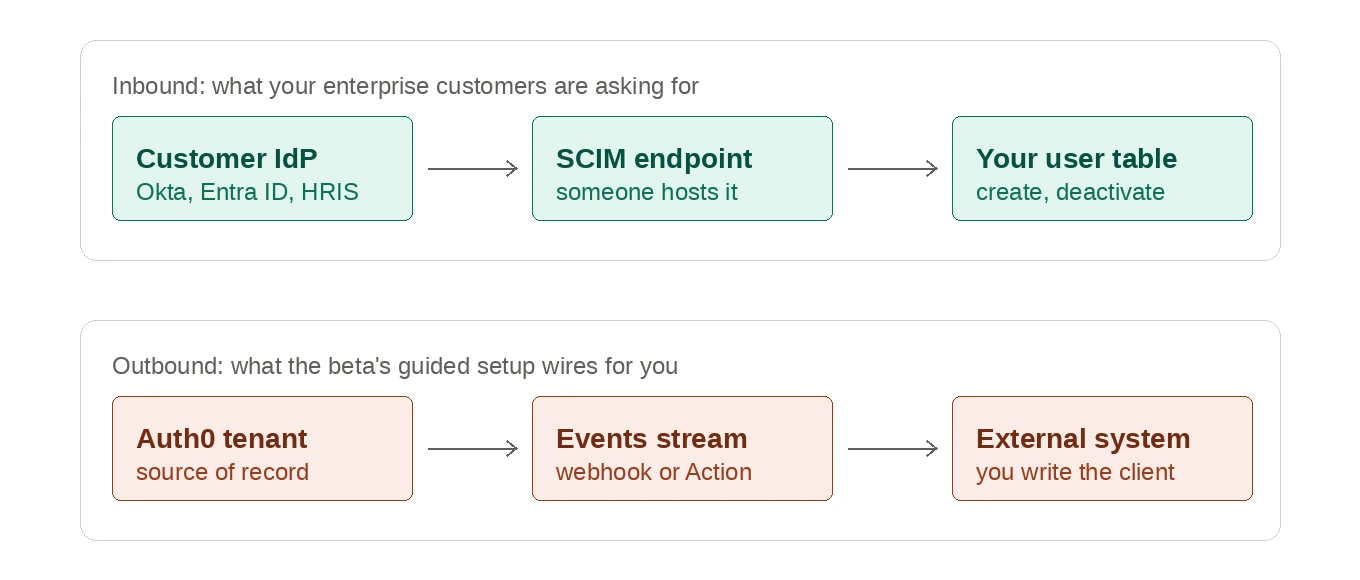
Auth0 does support inbound SCIM, as a separate feature on SAML, OpenID Connect, Okta Workforce Identity, and Microsoft Azure AD / Entra ID connections. Outbound sync of users, groups, and memberships to external systems runs through the Events feature, targeting a custom webhook endpoint, AWS EventBridge, or an Auth0 Action. Worth knowing what that means in practice: "outbound SCIM" is the changelog's phrasing for an event stream you subscribe to, not a SCIM client that speaks to a downstream system for you. Both directions exist; the question for a beta evaluation is which one the guided path configures end to end, and how much of the other one you assemble yourself.
Other constraints worth checking in a trial:
- Group provisioning uses the SCIM 2.0 core schema, but only
usermember types are supported, and groupdisplayNamevalues must be unique per connection, which Auth0 attributes to Entra ID compatibility. - Google Workspace user provisioning runs through Auth0's Directory Sync feature rather than inbound SCIM. Note that this is Google Workspace specific, not a general directory sync product. Group and group membership support there reached general availability on August 6, 2026, after two earlier early access stages.
On the WorkOS side, the inbound integrations are enumerated per provider: Okta SCIM, Entra ID SCIM, OneLogin SCIM, JumpCloud SCIM, PingFederate SCIM, CyberArk SCIM, SailPoint SCIM, Rippling SCIM, HRIS sources like BambooHR, HiBob, and Workday, and Google Directory Sync, with a generic SCIM connection for anything not on the list. Changes arrive as webhook events your app subscribes to: dsync.user.created, dsync.user.updated, dsync.user.deleted, dsync.group.created, dsync.group.updated, dsync.group.deleted, dsync.group.user_added, dsync.group.user_removed, dsync.activated, and dsync.deleted for the directory itself.
One thing to build for on either platform: most providers soft delete. A user removed upstream usually arrives as an update with an inactive state, not a delete. If your deprovisioning logic only listens for delete events, it will pass a demo and fail a customer.
Which plan you are on decides what you get
Auth0's pricing and plan comparison pages carry a use case toggle between B2C and B2B, and they default to B2C. That default is the single most common way to misread what Auth0 offers here, because the enterprise features in question move between tracks.
On the B2C comparison table, inbound SCIM shows as included on Free, not included on Essentials, not included on Professional, and included on Enterprise. Self-service SSO shows as "Select Enterprise Plans." The footnote on both mid-tier plans explains why: "Upgrade to B2B to continue using EC, Self-Service SSO, and SCIM." On the B2B track, per Auth0's own February 2026 plan announcement, the Free plan includes SCIM, self-service SSO, and one enterprise connection, and paid B2B tiers carry enterprise connections as an add-on.
The mid-tier column carries a footnote that is the whole story: "Upgrade to B2B to continue using EC, Self-Service SSO, and SCIM." Read against auth0.com/pricing in August 2026, with the use case toggle set to B2C, which is where the page opens.
So the accurate version of the constraint is not "Auth0 strips SCIM from paid plans." It is: inbound SCIM and self-service SSO require that your plan or custom agreement include enterprise connections, and on the B2C track the paid mid-tiers do not. Get the requirement in writing for the specific plan you are being quoted, on the specific track.
Who clicks through the IdP setup
Neither vendor expects your support team to walk a customer's IT admin through Okta by hand, and both ship a delegated flow.
Auth0's is Self-Service Enterprise Configuration. You define up to 20 self-service profiles per tenant, choosing which strategies customer admins may use from okta, waad for Entra ID, google-apps, keycloak-samlp, adfs, pingfederate, generic oidc, and generic samlp. Provisioning support is narrower than SSO support: Okta, Entra ID, generic OIDC, and generic SAML. Each customer admin gets an access ticket valid five days from generation, with five hours to finish once opened, and a maximum of ten accesses before you issue a new one. The five day window is configurable up to that maximum; the five hour one is not. Provisioning is a toggle on the ticket, labeled "Sync Users and Groups through Provisioning" when creating a new connection and worded slightly differently for an existing one, with configurable SCIM bearer token expiration and scopes. Bearer tokens do not expire by default, and if a connection is created without all user provisioning scopes, SCIM does not turn on.
WorkOS's is the Admin Portal, included in every account and fully functional without customization; custom branding is extra and a custom domain runs $99 a month. The same API interface generates both SSO and Directory Sync links, along with audit logs, log streams, domain verification, and certificate renewal, via an intent parameter. API generated Portal Links expire five minutes after creation and cannot be revoked. Links shared from the dashboard behave differently: they last 30 days, can be revoked, and revoke themselves once setup completes. The portal carries current setup documentation, with screenshots, for every supported identity and directory provider, and IT admins configure and map their own custom attributes from their directory providers inside it.
What each model bills you for
Auth0 prices by monthly active users. The Free plan runs to 25,000 MAU with one enterprise connection. Past that you pick a paid plan and a MAU tier, which run from 1,000 up to 100,000 or more.
Two things to hold onto when you read the published numbers. The monthly prices shown next to Essentials and Professional are anchored to wherever the MAU slider sits, and it starts at 500. They are a starting price, not a plan ceiling. And they are B2C track prices. The B2B track, which is the one that carries enterprise connections and inbound SCIM on paid plans, is priced separately and higher. If you are evaluating Enterprise Connect, the B2C figure on the page is not your number. Ask for the B2B quote.
WorkOS prices SSO and Directory Sync per enterprise connection: $125 each for 1 to 15 connections, $100 for 16 to 30, $80 for 31 to 50, $65 for 51 to 100. Per the pricing FAQ:
"No, each connection at WorkOS is billed the same, regardless of the identity provider (IdP), directory service used, or the total number of end users."
Read the connection definition carefully, because it is per product. Each enterprise customer you support with SSO counts as one connection, and each customer you support with Directory Sync counts as one. A customer on both is two connections, which at the first tier is $250 a month, not $125. Since the whole point of this comparison is provisioning, assume most of your enterprise accounts land on both lines. AuthKit user management is free to 1 million monthly active users, then $2,500 a month per additional million. Published connection tiers stop at 100; past that the page points you at sales, which is the same conversation as Auth0's custom enterprise tiers.
The axis matters more than the rate. Per connection billing scales with the number of enterprise accounts you have closed, the same number your sales team reports, doubled if they take both products. Per MAU billing scales with seat expansion inside those accounts, which is usually good news for revenue and arrives as a cost you did not forecast. Model both structures against your next four enterprise deals before you commit to either.
How to evaluate a beta
Enterprise Connect is in beta, and access runs through sales. Nothing wrong with that. It does put the burden of proof on your evaluation. Seven questions, and what the answers tell you:
Test the answers, do not just collect them. Run your two ugliest customer directories rather than the demo Okta tenant, deprovision a real user upstream and watch what arrives, and time the IT admin path yourself, including the case where an admin stalls on domain verification and comes back after the five hour assistant window has closed. Then price your next four enterprise deals both ways, counting SSO and Directory Sync separately on the WorkOS side and asking for B2B pricing on the Auth0 side.
If you need this shipped rather than evaluated, the generally available version of the same motion is WorkOS SSO plus Directory Sync sitting behind the login you already have, with a documented SAML path for federating an existing Auth0 tenant in. Start with the directory feed. A dsync.user.deleted event that never reaches your app is what a customer's security team escalates; a login page redesign is not.