Give a scheduled agent access to a user's Google, Slack, and Jira with no signed-in session
A runnable tutorial for pulling per-connection third-party credentials from WorkOS Pipes with nobody logged in, plus relay, rotation, revocation, and audit logging.

Most third-party integration code assumes a browser. The user clicks connect, OAuth redirects, your handler stashes a token on the session, and everything downstream reads it from there. Then someone asks for a nightly digest that reads the user's Google Drive, files Jira tickets, and posts to Slack at 6am, and the assumption falls apart. At 6am there is no session, no browser, and nobody to consent to anything.
On July 30, Auth0 announced Token Vault Privileged Worker in Early Access, which lets autonomous agents pull a user's third-party tokens from Token Vault with no user session required. Their changelog is blunt about the gap it closes: Token Vault assumes a human is actively logged in to hand over their token, and an agent that runs on a schedule, in CI, or wakes up at 2am may not have one. Turning it on means contacting Auth0.
WorkOS Pipes does the same job today, and the credential pull is one authenticated POST with your API key and a user ID. No account team in the loop. Relay, the variant that keeps the token out of your process entirely, is the one piece still in early access.
This post is the tutorial: a scheduled worker that pulls scoped, per-connection credentials for Google, Slack, and Jira with nobody signed in, then relays calls without ever holding a token, rotates what needs rotating, revokes cleanly, and writes an audit log entry for every pull.
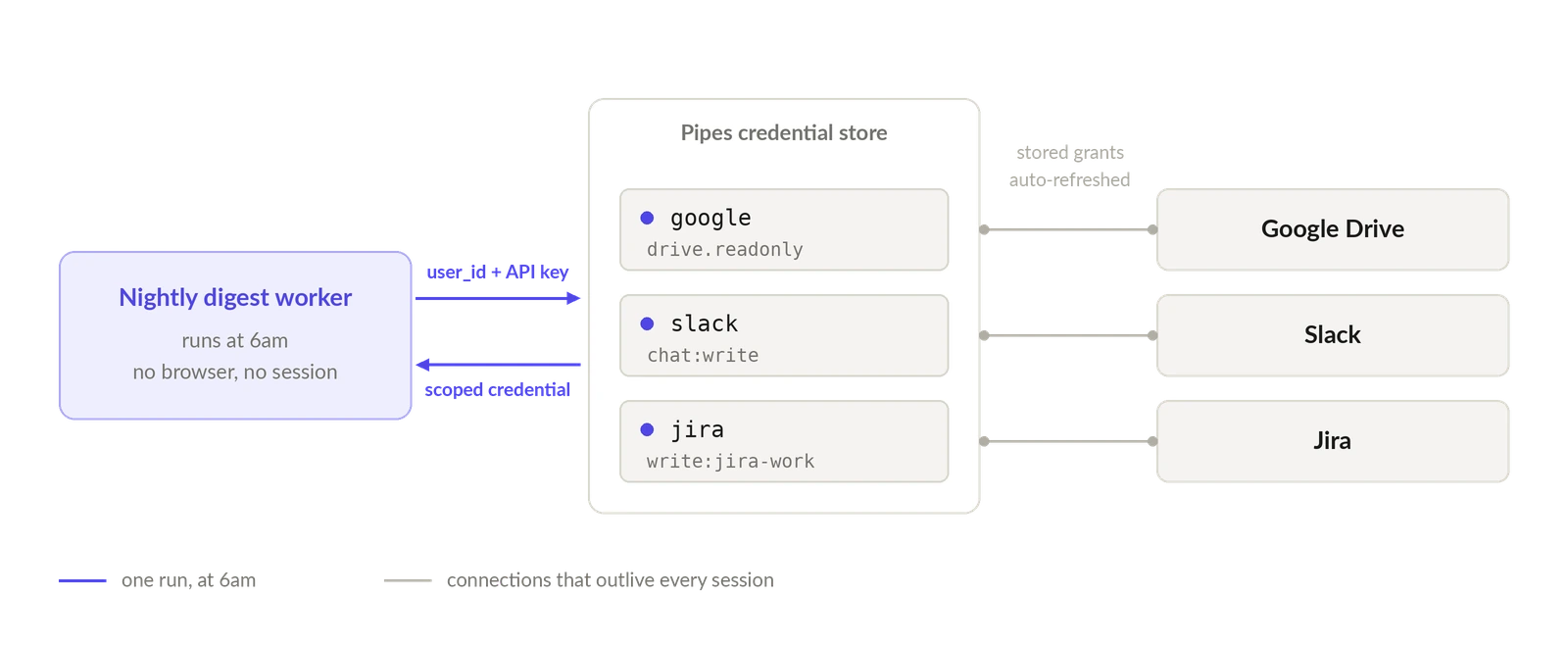
A connected account is not a session
This works without a session because Pipes stores the user's authorization as a connected account, a durable object that outlives any login. Fetch one and you get back its full state:
The user's OAuth grant lives there, not in your session store, and state is either connected or needs_reauthorization. Pipes handles the OAuth dance, credential storage, and token refresh on top of it.
So the credential pull needs two things your worker already has: your WorkOS API key, and the ID of the user you are acting for. There is no session token in that request, because the request is not about a session.
Connect each provider once
Provider setup happens in the Pipes section of the WorkOS Dashboard. Click Connect provider, choose the provider, and set the OAuth scopes you need. Do this once for google, slack, and jira. Scopes are configured here rather than per request, which makes this the place where you decide how far your nightly worker can reach.
You can also do it over the API, which is the better path if you manage environments as code:
Four configuration details are worth getting right before you ship.
-
enableddefaults tofalse. Create a data integration over the API without setting it and users cannot connect. The returned object also carries astateofvalid,invalid, orrequested, whereinvalidmeans the integration is unconfigured or errored. Check it after creation rather than assuming a 200 means working. - WorkOS-managed shared credentials are for sandbox environments only. Production needs your own OAuth app, configured with
credentials.type: "custom", or"organization"if each customer organization supplies its own. Passingclient_idandclient_secretwith theorganizationtype is a 422, as is omitting them withcustom. - Register the redirect URI. The created integration returns a
redirect_uriof the formhttps://api.workos.com/data-integrations/{slug}/{id}/callback. That is the value to register in the provider's own OAuth app. - Decide the connection's scope now. Pipes connections are either organization-scoped or user-only, and lookups require an exact match. A mismatch in either direction is indistinguishable from a user who never connected, which is a miserable thing to debug at 6am.
Users connect their own accounts through the Pipes widget, a pre-built UI that lists available providers, lets users connect and manage them, and tells the user when reauthorization is needed. If you would rather drive the flow yourself:
If you are migrating from an existing integration, you do not have to make every user reconnect. The create connected account endpoint imports OAuth tokens directly, and derives state from what you supply. Token combinations are validated: an access_token with expires_at but no refresh_token is rejected with a 422, as is expires_at on its own, and supplying no tokens at all lands the account in needs_reauthorization.
Two endpoints, one decision
Pipes exposes two credential endpoints and it is worth knowing which you are using, because the SDK method names and the response shapes differ.
Note the parameter name changes between them: provider on one, slug on the other. Use getAccessToken if every provider you touch is OAuth. Use the credentials endpoint if any provider is installed with an API key, since it branches on the installation's auth_method and returns the stored secret for API-key installations. The rest of this tutorial uses the credentials endpoint, because a real worker eventually meets a provider that only does keys.
Pull the credentials with nobody signed in
Here is the core of the worker. It walks the three providers for one user and collects whatever is usable, treating a missing connection as data rather than an exception.
Two things about that snippet are easy to get wrong.
The REST response is snake_case and the Node SDK is camelCase. The raw payload has missing_scopes; the SDK gives you missingScopes. Reading the snake_case name off an SDK object yields undefined, which passes every check you write against it.
missing_scopes is a run-planning signal, not an error. If your provider configuration gained a scope the user has not granted yet, that is a reauthorization prompt for tomorrow's login, not a failed job tonight. The whole point of checking it up front is that you find out before you have half-written a Jira ticket.
Here is what the endpoint returns, using the docs' GitHub example. The shape is identical whichever provider you name:
From there the provider call is ordinary. Listing the user's Drive files is the same request you would write with any OAuth token:
Do something deliberate with blocked. A digest covering two providers out of three beats no digest at all, so send what you have, record the misses, and queue a reconnect prompt for the user's next login instead of failing the run because Jira went stale overnight.
Or keep the token out of the worker entirely
Vending a credential means the token lands in your worker's memory, which is fine on trusted infrastructure and a real problem inside an agent runtime that reads untrusted text. Pipes offers a second path over the same connections and refresh machinery: relay, where WorkOS calls the provider for you and streams the response back, so the token never enters your environment.
The docs draw the line plainly. Access tokens are for trusted infrastructure and long-running syncs. Relay is for agents, sandboxes, and untrusted runtimes.
Relay is in early access. Contact WorkOS support by email or Slack to enable it for your environment.
Making a relayed request
The base URL is https://api.workos.com/relay and any HTTP method is accepted. Converting a direct provider call is four edits: keep the method, body, and content headers as they are; send it to the relay base URL with the original URL in X-Relay-URL; put your WorkOS API key in Authorization instead of the provider token; and name the user in X-Relay-User, adding X-Relay-Organization for organization-scoped connections.
There is no provider header. The provider is resolved from the host in X-Relay-URL, so your code keeps working with the provider's real URLs.
There is also path routing, where you prefix the provider's path with the base URL and the provider slug, so /relay/github/user proxies to https://api.github.com/user. It is more compact, but it can only reach the provider's default host. URL routing is the better default because it reaches any of a provider's allowed hosts and keeps real URLs in your code and logs.
Behind that request, WorkOS verifies the key and resolves the environment, resolves the user from X-Relay-User, looks up the connected account, fetches the credential and refreshes it if expired, strips the relay control headers and cookies and forwarding metadata, injects the provider credential into Authorization, and streams the provider's status, headers, and body back verbatim. Your API key is never forwarded upstream.
The 402 branch is the one that matters
A user who never connected, whose grant was revoked, or whose token can no longer be refreshed gets 402 Payment Required:
It is 402 rather than 401 or 403 specifically so you cannot confuse it with a WorkOS authentication failure, which is a 401, or a provider's own 401 or 403 passed through from upstream. Treat authorization_url as optional, because it is null when WorkOS cannot build one, which usually means the provider's Pipes configuration is incomplete. Fall back to the widget rather than assuming the field is present.
An organization scope mismatch returns this same 402. If a user you know is connected keeps getting one, check the X-Relay-Organization header against their connected account before asking them to reauthorize.
Errors worth handling explicitly
Relay errors are JSON with code and message. Provider errors pass through unchanged, so the presence of X-Relay-Upstream-Status is how you tell the two apart: it means the request reached the provider, which distinguishes an upstream 404 from a relay 404.
Splitting relay_credential_error from relay_authorization_required matters. One of them means ask the human, the other means do not bother the human.
Limits before you route a sync through it
Bodies are forwarded byte-for-byte up to 5 MB, and GET and HEAD send none. Upstream timeout is 30 seconds. X-Relay-URL must be HTTPS, because credentials are never injected into a plaintext request. Requests can only target a supported provider's allowed hosts. Redirects are returned rather than followed.
On the way out, relay strips hop-by-hop headers, Cookie, forwarding metadata such as X-Forwarded-*, Via, and X-Real-IP, your Authorization header, and anything prefixed X-Relay- or X-WorkOS-. On the way back it strips hop-by-hop headers and Set-Cookie, and because compressed bodies are decoded in transit, Content-Encoding and Content-Length may be removed.
For this tutorial's three providers, the allowed hosts are www.googleapis.com for Google, slack.com and api.slack.com for Slack, and api.atlassian.com for Jira. The list is part of each provider's WorkOS configuration, so it grows as providers are added without any change on your side.
Rotation you don't write
For OAuth connections, rotation is already handled. Pipes refreshes the token when needed, on both the vend and relay paths, so you always receive a valid, non-expired credential. Your worker's job is to read expires_at for observability, not to schedule refreshes.
Three rotations do stay yours.
Your OAuth app's client secret. Passing credentials to the data integration update endpoint rotates the stored client secret to the new value. Everything you omit from that request is left unchanged, so you can rotate the secret without touching scopes.
API-key providers. The upsert endpoint creates an API-key installation, or rotates the stored key when one already exists:
Your WorkOS API key. Relay removes provider tokens from the calling environment, not this key. It authenticates every WorkOS API call for the environment, so treat it as a secret even in a sandbox: inject it at request time rather than baking it into agent-visible code or prompts, and rotate it from the dashboard's API Keys section if a runtime is compromised.
Revocation, and what it actually revokes
Cutting one user's connection is one call:
Or in the SDK, which is what your admin tooling should call:
That disconnects the account, removes the stored access and refresh tokens, and returns 204 No Content. The next credential pull comes back active: false, and the next relayed call comes back 402. Pass organization_id if the connection is organization-scoped, or you will be deleting a connection that does not exist.
For incident response you want the bigger hammer too. Deleting the data integration itself removes every associated connected account across the environment, and it is idempotent, so deleting one that is already gone still succeeds:
One caveat belongs in your runbook. Deleting the connected account does not revoke access on the provider side, and the user may need to disconnect your app from the provider's own settings. If a provider token has already leaked out of your systems, deleting the Pipes connection stops your workers, not the leak. A leaked provider token remains a bearer credential for someone else's API, valid until it expires or the user revokes the grant at the provider, and it works from anywhere.
To keep your own state in sync ahead of the failure rather than after it, poll or subscribe on connection state. getUserConnectedAccount returns the state field directly:
An audit entry for every credential pull
WorkOS Audit Logs record what action was taken, who performed it, what resources were affected, and when and where it happened. For agent credential pulls you emit those events yourself, which is more work than a claim appearing automatically in a token response, but it buys you exactly the actor and target shape you want: the agent as actor, the connected account as target, the run as metadata.
Configure the schema first. You must register the allowed event schemas in the dashboard before emitting anything, giving each action its targets, and every event is scoped to an organization, so you need an Organization ID.
An event carries an action, an optional version, occurredAt, an actor, a list of targets, a context with a location and optional user agent, and arbitrary metadata. createEvent(organizationId, event, options) posts to /audit_logs/events.
Pass your own idempotency key. When you omit one, WorkOS generates a key from the event content, which gives you basic duplicate protection but keys the deduplication to the payload rather than to the attempt. Keying on run and provider means a retried job does not double-log a pull it already recorded, and two legitimate pulls in the same run for different providers still both land.
Then wire it into the loop at the point where the credential comes back usable, so the trail records pulls that actually happened rather than pulls you meant to make:
Relayed calls are worth logging too, and they are cheaper to log honestly, because you are recording an action taken rather than a secret handed over.
Where the two designs differ
Both products solve the same problem, a background worker holding its own strong credential and asking for a specific user's third-party token, and they make different tradeoffs getting there.
Auth0 puts more of the enforcement in the platform. Both ip_allowlist and grants must be populated or every request is rejected, and asking for a narrower scope than what was granted returns a downscoped token where the identity provider supports it, or fails rather than silently returning the full grant. That is genuine per-request control, and it costs you asymmetric worker credentials and a maintained IP allowlist to get.
Pipes asks for less setup and offers something the token-exchange model structurally cannot: returning the provider's response instead of the provider's token. It leaves the audit event and the reason-for-access string to your code.
One more thing Auth0's docs get right that is worth copying regardless of platform: do not put PII in the reason-for-access string. It lands in logs that administrators and log streaming destinations can read.
What none of this fixes
Relay changes where a credential lives, not what an agent can be talked into doing with it. Your WorkOS API key still sits in the runtime and authenticates every call for that environment, which is why the docs are insistent about injecting it at request time.
Scopes are still whatever the provider offers, granted at connect time rather than per task. If your Drive scope is broad enough to read everything, an agent that gets confused reads everything. Narrow the integration's scopes rather than relying on the worker to behave.
And provider-side access outlives your delete call.
Unattended code also needs the boring parts: retries and backoff for when the credential call itself errors or gets throttled, a distinction between the errors that need a human and the ones that do not, and an alert path for a 6am run that came back with nothing usable. Treat Pipes as a dependency with a failure mode, the same way you treat your database.
What you get is a background agent whose access is enumerable, revocable in one request, and logged per pull, with no signed-in human required. Start with the Pipes docs, and read missing_scopes before your next 6am run.