How to add human approval to async AI agent actions
A developer's guide to Client-Initiated Backchannel Authentication (CIBA) for agentic systems.

AI agents are increasingly trusted to take real actions: sending emails, processing refunds, modifying infrastructure, canceling subscriptions. Most security guides say the same thing about operations like these: "require human confirmation before irreversible actions." Almost none of them explain how.
Hard-blocking the agent until a human clicks something in the same browser session works for simple chatbots. It breaks immediately for autonomous agents that run in the background, trigger on schedules, or operate inside multi-step pipelines where no user is waiting at a keyboard. The agent needs to pause, reach the right person, get a yes or no, and continue. That is not a UX problem. It is an authentication problem, and there is a protocol designed to solve it.
This guide explains Client-Initiated Backchannel Authentication (CIBA, RFC 9126), what it is, how it works, and how to implement it so your agents can request human approval mid-task without killing the workflow.
The problem: Agents need decisions humans did not pre-authorize
When a user starts a session with an agent, they typically authorize it to do a class of things: "help me manage my calendar," "handle support tickets," "monitor our infrastructure." That consent is coarse. It does not mean the user has pre-approved every specific action the agent might take inside that class.
An agent that can "manage your calendar" probably should not be able to delete every event from the past year without asking. An agent that can "handle support tickets" probably should not be able to issue a $10,000 refund autonomously. An agent that can "monitor infrastructure" probably should not be able to terminate production instances on its own judgment.
The actions that matter most are exactly the ones where you want a human in the loop. The problem is that the human is not there.
Traditional OAuth consent happens at session start, in a browser, with the user watching. By the time an autonomous agent decides it needs to do something sensitive, the user may be asleep, on a different device, or three steps removed from the original request. You cannot redirect them to a consent screen. There is no browser session to redirect.
This is the gap CIBA fills.
What CIBA is
CIBA is an OAuth 2.0 extension (RFC 9126) that decouples the entity requesting a service from the entity doing the authenticating. In standard OAuth, those two are the same person sitting at the same browser. CIBA removes that assumption.
The authorization server can notify the user through any out-of-band channel (push notification, SMS, a separate app, Slack, email) and wait for them to respond there. The client (your agent) does not need to redirect anything. It makes a backchannel request, waits for the user to respond on their own device, and receives a token when they do.
For AI agents, the flow looks like this:
- The agent decides it needs to take a sensitive action it was not pre-authorized for.
- The agent sends a backchannel authentication request to the authorization server, describing what it wants to do and who should approve it.
- The authorization server sends the user a notification: "Your agent is requesting permission to [action]. Approve or deny."
- The user responds on their device, without being redirected anywhere.
- The agent either polls for the result or receives a webhook callback.
- If approved, the agent receives a scoped token and proceeds. If denied, it stops and logs the outcome.
.webp)
The agent and the user were never in the same session. The approval is still bound to a specific action, a specific time window, and a specific user identity. Nothing is pre-authorized in bulk.
The three CIBA response modes
The authorization server can notify the agent of the user's decision in three ways. Which one you use depends on your architecture:
- Poll mode is the simplest. The agent sends the initial request and gets back an
auth_req_id. It then polls the token endpoint at a defined interval until it gets a token, a denial, or a timeout. No webhook infrastructure required, but the agent is blocked waiting. - Ping mode is a middle ground. The authorization server sends a notification to a callback URL you register when the user responds. The agent then makes one token request and gets the result. This requires a reachable callback endpoint but is more efficient than polling.
- Push mode delivers the token directly to the callback URL when the user approves, without a second request from the agent. Lowest latency, most infrastructure to maintain.
For most agentic use cases, ping mode is the right default: it requires a callback URL but is significantly more efficient than polling for long-running tasks.
What the agent sends
The backchannel authentication request goes to the authorization server's /bc-authorize endpoint. It includes:
- A login hint to identify the user whose approval is needed (usually their email or a
subclaim from a previous token). - A
scopedescribing what the agent wants to do. - A human-readable
binding_messagethat will be shown to the user on their device, so they understand what they are approving. - A
requested_expirydefining how long the authorization server should wait for the user to respond.
The binding_message is not optional in practice. It is the only thing standing between the user and a vague "an app wants permission" notification. It should state exactly what the agent is about to do, in plain language.
Polling for the result
In poll mode, the agent loops against the token endpoint until the user responds:
A few things worth noting here. The slow_down error is the authorization server telling your agent to back off. Respect it and increase your polling interval. The authorization_pending error is normal: it just means the user has not responded yet. The access_denied error means the user said no. Treat that as a final state and do not retry.
Using the token
When the user approves, the token endpoint returns a standard access token scoped to what was requested. Use it exactly as you would any other OAuth token, and treat it as single-use for the action it was issued for:
The token is scoped to payments:write and bound to a specific authorization request. If your agent tries to use it for a different operation, the resource server should reject it.
What the user sees
The user experience on the approval side is entirely up to how your authorization server delivers the notification. The minimum viable version is an email with an approve/deny link. The better version is a push notification that opens a purpose-built approval UI: the action being requested, the agent requesting it, the binding message, and two buttons.
The binding message is what appears in that notification. Write it like a transaction confirmation, not a permission scope.
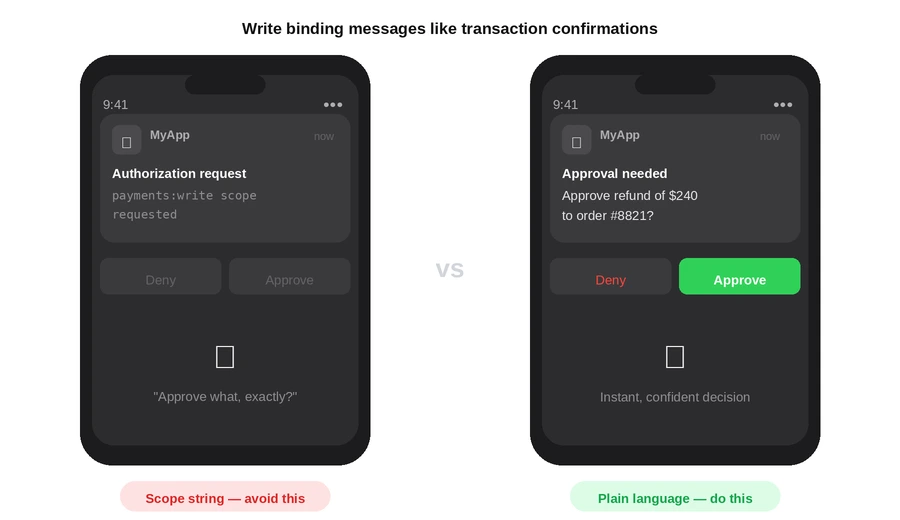
The user should be able to read the notification without any context and immediately know whether to approve.
Timeout and fallback handling
Requests expire. You set requested_expiry in the initial request, but users ignore notifications. Design for this explicitly:
- When you receive
expired_tokenfrom the polling loop, log the expiry with the original request context (agent ID, action, timestamp, user). - Do not auto-retry a CIBA request. If the authorization expired, the original task context may have changed. Surface the expiry to whatever system initiated the agent task and let it decide whether to restart.
- For time-sensitive tasks, set a short
requested_expiry(60 to 120 seconds) and make that explicit in the binding message: "Approve within 2 minutes or the action will be cancelled."
Where CIBA fits in your agent's authorization model
CIBA is not a replacement for the authorization checks that happen at every tool call. It sits above them, for the subset of actions that are both within the agent's permission scope and sensitive enough to warrant explicit human sign-off.
A useful mental model: think of it as a two-gate system.
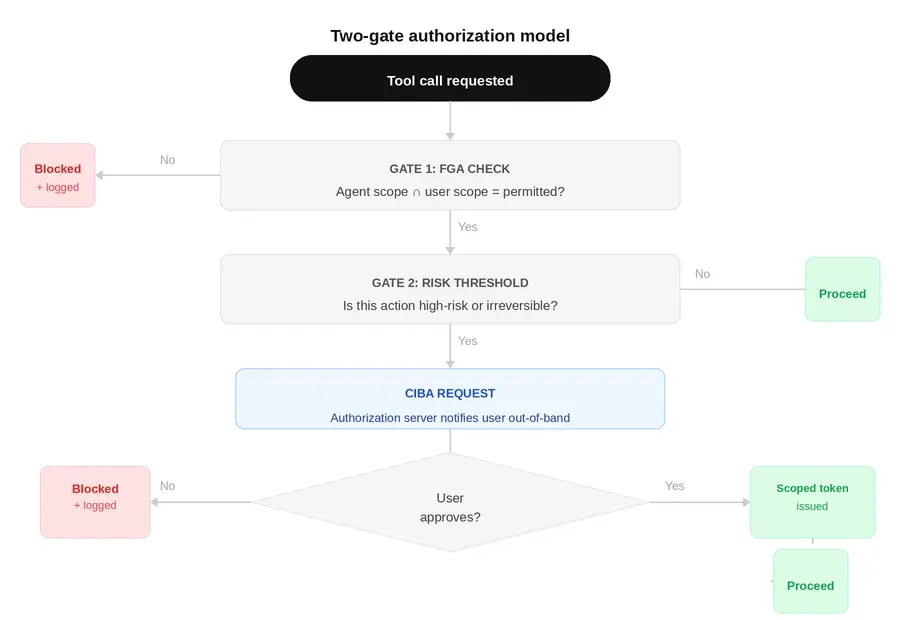
The first gate is the agent's own permission boundary. The FGA check, the scope validation, the intersection of agent and user permissions. If the action fails here, CIBA never runs. The agent does not have permission regardless of what any human says.
The second gate is CIBA. Actions that pass the first gate but exceed a risk threshold (irreversible, high-value, unusual for this agent's normal pattern) go to CIBA. The human approves or denies. If approved, the scoped token unlocks the action and creates a clear audit record of who authorized what.
This means your CIBA integration needs a risk evaluation layer that decides which tool calls need human approval. That logic belongs in your agent's tool-dispatch layer, before the tool is called:
The evaluateRisk function is yours to define. Start simple: a static list of tool names that always require approval (payment writes, destructive operations, external sends), plus a threshold on parameter values (dollar amounts above X, resource counts above Y).
Implementation checklist
- Authorization server supports RFC 9126 (CIBA). Verify before building.
- Each agent has its own client ID registered with the authorization server.
- Binding messages are human-readable and action-specific, not scope strings.
- Polling loop handles
authorization_pending,slow_down,access_denied, andexpired_tokenas distinct cases. - Expired requests are logged with full context and surfaced to the orchestrating system.
- Tokens returned via CIBA are treated as single-use for the specific action approved.
- Risk evaluation layer is in place to determine which tool calls trigger CIBA.
- Audit log captures: agent ID, user ID, action requested, binding message, approval or denial, timestamp, and resulting token (or lack of one).
- Denial is a final state: no auto-retry without user-initiated restart.
Summary
CIBA solves the hardest problem in human-in-the-loop agent design: how to get a human to approve a specific action when they are not in the same session as the agent. The protocol is mature (RFC 9126), the flow is straightforward, and the implementation complexity is mostly in the notification delivery and the risk evaluation logic, not in the OAuth mechanics themselves.
If your agents take any action that you would not want them to take without asking first, CIBA is how you build that ask into the protocol layer rather than the UI layer. That distinction matters at scale. A UI prompt can be bypassed by a sufficiently autonomous agent. A CIBA request cannot proceed without a token, and no token issues without a real human response on a real device.