Common CORS errors and how to fix them
A practical guide for developers working with cross-origin requests. Every frustrating console message, and the headers that fix them.

If you've built anything that talks to an API from a browser, you've almost certainly hit a CORS error. The red text in the console is cryptic, the request works fine from Postman or curl, and the instinct is to slap a wildcard header on the server and move on. But CORS exists for a good reason, and understanding the handful of errors it produces will save you hours of guesswork, and keep your application secure in the process.
This guide covers the seven CORS errors you're most likely to encounter, explains the mechanism behind each one, and gives you concrete, copy-paste fixes. Whether you're wiring up a new frontend to a REST API, debugging a failing preflight, or trying to figure out why your cookies aren't being sent, start here.
What is CORS and why does it exist?
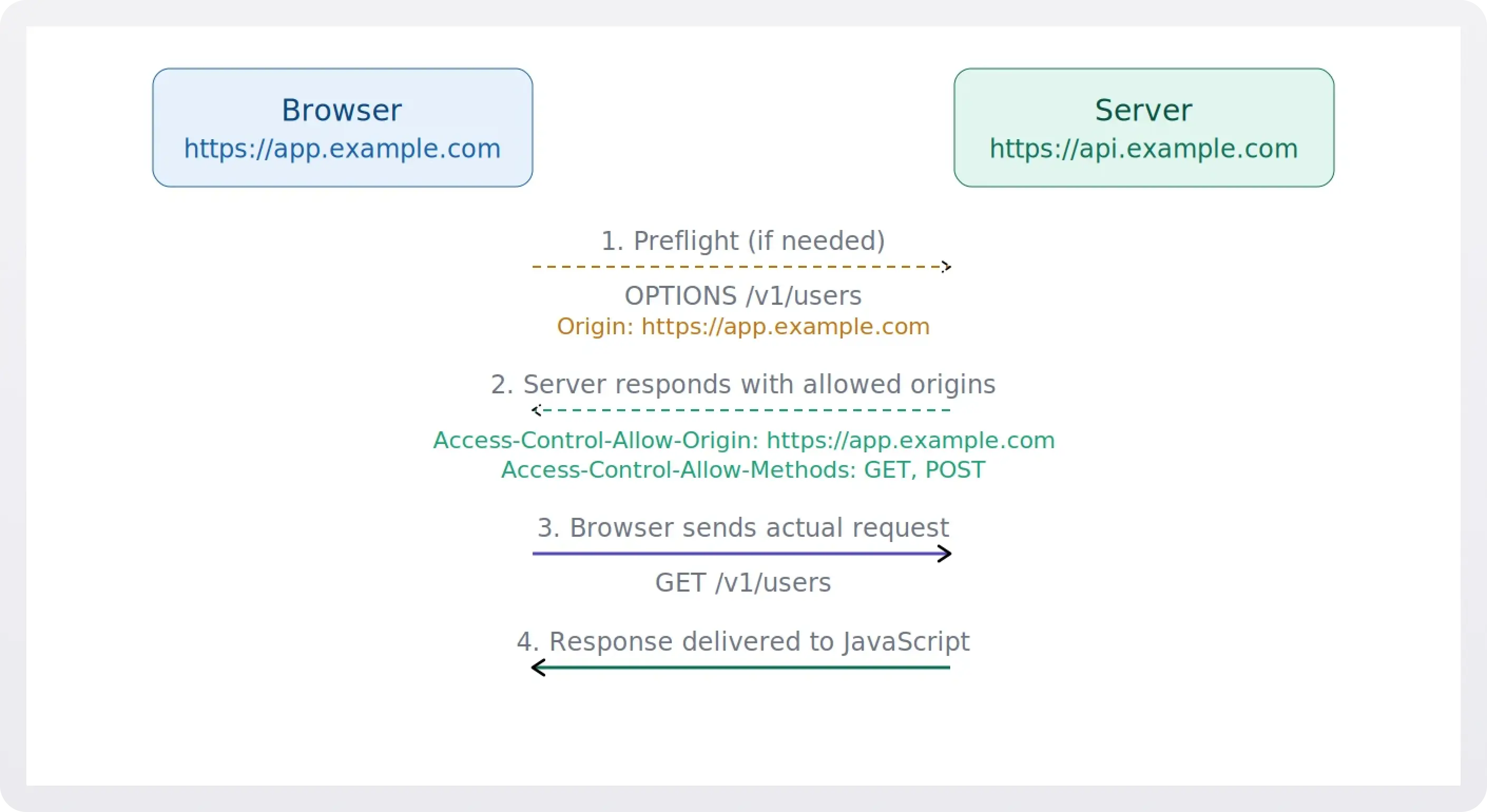
Cross-Origin Resource Sharing (CORS) is a browser security mechanism that controls how web pages on one origin can request resources from a different origin. An origin is defined by the combination of scheme, host, and port, so https://app.example.com and https://api.example.com are considered different origins, even though they share the same root domain.
.webp)
Without CORS, the browser's same-origin policy would block all cross-origin HTTP requests initiated from scripts. CORS loosens that policy in a controlled way: the server tells the browser which origins, methods, and headers are allowed. When the server's response headers don't match what the browser expects, you get a CORS error.
1. "No 'Access-Control-Allow-Origin' header is present"
This is the single most common CORS error, and it's the simplest to understand.
You'll see this in your console:
The server's response didn't include an Access-Control-Allow-Origin header, so the browser has no way to know whether your origin is allowed to read the response. It defaults to blocking it.
The fix is to add the header to your server's response. For a specific origin:
Or, if the resource is truly public and doesn't use credentials:
Important: the wildcard * cannot be used alongside Access-Control-Allow-Credentials: true. If you need cookies or auth headers, you must echo back the specific requesting origin.
2. Preflight request fails (OPTIONS not handled)
This one looks like this in the console:
Before sending certain requests (those using methods other than GET, HEAD, or POST, or those with custom headers) the browser sends a preflight OPTIONS request to check whether the server will accept the real request. If your server doesn't respond to OPTIONS with the correct CORS headers (or returns a non-2xx status code), the actual request never gets sent.
To fix this, make sure your server handles OPTIONS requests on every endpoint that receives cross-origin traffic. The response should include:
The Access-Control-Max-Age header tells the browser to cache the preflight result, so it won't re-send the OPTIONS request on every call.
3. "Method not allowed by Access-Control-Allow-Methods"
The console message here is fairly direct:
The preflight response lists which HTTP methods the server accepts for cross-origin requests, and the method your code is trying to use isn't on that list. This typically happens when your API supports PUT or DELETE but the CORS configuration only declares GET and POST.
Add the missing method to the Access-Control-Allow-Methods header in your preflight response:
Only expose the methods your API actually supports, don't blindly allow everything.
4. "Request header not allowed by Access-Control-Allow-Headers"
You'll recognize this one by the specific header name in the error:
Your client-side code is sending a custom header (like X-Custom-Token or Authorization), and the server's preflight response doesn't whitelist it. The browser won't send the actual request until the server explicitly says that header is okay.
List every custom request header your client sends in the Access-Control-Allow-Headers preflight response:
Note that certain headers like Accept, Content-Language, and Content-Type (with simple values) are safelisted by the browser and don't need to be declared. But most custom or auth-related headers do.
5. Credentials not supported with wildcard origin
This error tends to surface right after you add authentication:
You're sending cookies or an Authorization header with the request (via credentials: 'include' in fetch, or withCredentials: true in XMLHttpRequest), but the server responds with Access-Control-Allow-Origin: *. The browser rejects this combination for security reasons: a wildcard origin with credentials would let any site make authenticated requests to your API.
Replace the wildcard with the explicit requesting origin. A common pattern is to read the Origin request header and echo it back after validating it against an allowlist:
Never blindly echo back any origin. Always validate it against a strict allowlist to avoid exposing credentialed endpoints to arbitrary sites.
6. Response headers not exposed to client
This one is sneaky because there's no error in the console. Everything looks fine (your request succeeds, you get the response body) but when you try to read a response header like X-Request-Id or a custom pagination header, it comes back as null.
By default, browsers only expose a small set of "CORS-safelisted" response headers to JavaScript: Cache-Control, Content-Language, Content-Type, Expires, Last-Modified, and Pragma. Any header outside that list is hidden from your code unless the server explicitly opts in.
The fix is to add an Access-Control-Expose-Headers header listing the headers your client needs:
7. Mixed content: HTTP resource from HTTPS page
This one gets misdiagnosed as a CORS problem all the time. Your request is blocked before CORS even comes into play, and the console shows a mixed content warning instead.
What's happening is straightforward: a page served over HTTPS is trying to fetch a resource over plain HTTP. Modern browsers block this outright because it undermines the security of the encrypted connection. The error message is different from a CORS error, but if you're not reading carefully, it's easy to conflate the two.
Ensure all your API endpoints use HTTPS. If you're working locally, use a local proxy or configure your development server to serve over HTTPS. In production, there is no reason to serve APIs over plain HTTP.
8. CORS request not HTTP (the file:// scheme problem)
If you're opening an HTML file directly from your filesystem (double-clicking it or using a file:/// URL), any fetch or XMLHttpRequest to a remote API will fail with a CORS error, even if the server's CORS configuration is perfectly fine.
This happens because CORS only works over the http:// or https:// schemes. When the browser loads a page from file://, it assigns it an opaque origin that can't match any Access-Control-Allow-Origin value. The server never even gets a chance to allow it.
The fix is to stop opening files directly and serve them through a local development server instead. Most frameworks include one out of the box, and for quick static file serving, something like npx serve or Python's python -m http.server will do. Once the page is served over http://localhost, the origin is well-formed and CORS works as expected.
9. Multiple Access-Control-Allow-Origin headers in the response
This one is tricky because you might have the correct origin in the header, and it still fails. The console will tell you:
The browser expects exactly one Access-Control-Allow-Origin header per response. If it finds two (or more), it rejects the response outright, even if both values are identical. This usually happens when multiple layers of your stack each add the header independently. For example, your application code sets it, and then Nginx or a CDN adds it again on the way out.
To fix it, trace where the header is being set. Check your application middleware, your reverse proxy config, and any CDN or API gateway sitting in front of your server. Make sure only one layer is responsible for adding CORS headers. If your reverse proxy is already handling it, remove the header from your application code (or vice versa). You can verify by inspecting the raw response headers in the Network tab. If you see the header listed twice, that's your problem.
Quick reference: CORS headers
Debugging tips
1. Check the Network tab, not just the Console. The browser's Console shows the CORS error message, but the Network tab shows you the actual response headers (or lack thereof). Look at the preflight OPTIONS response first.
2. Use curl to test outside the browser. CORS is enforced by browsers, not by servers. If a curl request succeeds but your browser request fails, the problem is almost certainly a missing or incorrect CORS header.
3. Watch out for redirects. If your server redirects the preflight OPTIONS request (for example, from HTTP to HTTPS, or from a path without a trailing slash), the browser will fail the CORS check. Preflight requests do not follow redirects.
4. Don't rely on browser extensions. Extensions that "disable CORS" work by stripping security headers locally. They mask the problem during development and guarantee you'll hit it again in production.
5. Double-check your proxy setup. CDNs and reverse proxies (like Nginx or Cloudflare) can strip or override headers. If you've set CORS headers in your application code but they're not reaching the client, check your infrastructure layer.
Frequently asked questions
Is CORS a frontend or backend issue?
CORS is enforced by the browser, but the fix is always on the server. The browser reads the response headers to decide whether your JavaScript is allowed to see the data — so the server needs to send the right headers. No amount of frontend code can override a missing Access-Control-Allow-Origin.
Why does my request work in Postman but fail in the browser?
Postman doesn't enforce the same-origin policy. It sends the request directly to the server and shows you whatever comes back. Browsers add an extra layer of security by checking CORS headers before exposing the response to your JavaScript. If the headers are missing or wrong, the browser blocks it — even though the server responded successfully.
Can I just set Access-Control-Allow-Origin: * and be done with it?
For truly public, unauthenticated endpoints, yes. But the wildcard doesn't work with credentialed requests (cookies, Authorization headers). If your API requires authentication, you need to respond with the specific requesting origin instead — and validate it against an allowlist.
What triggers a preflight request?
The browser sends an OPTIONS preflight whenever the request uses a method other than GET, HEAD, or POST, includes custom headers (like Authorization or X-Custom-Token), or sets Content-Type to something other than application/x-www-form-urlencoded, multipart/form-data, or text/plain. Simple GET requests with no custom headers skip the preflight entirely.
Do I need to handle CORS for same-origin requests?
No. CORS only applies when the scheme, host, or port differ between the page and the resource it's requesting. If your frontend and API are served from the same origin, CORS headers aren't needed.
Does CORS protect my API from abuse?
Not really. CORS is a browser-side mechanism. It prevents other websites from reading your API responses via JavaScript running in a user's browser. It doesn't stop server-to-server requests, curl, or any client that ignores CORS. For API security, you still need proper authentication, rate limiting, and input validation.
Why do I get a CORS error when opening an HTML file directly?
When you open a file using a file:// URL, the browser assigns it an opaque origin that can't participate in CORS. The fix is to serve your files through a local development server (even a simple one like npx serve or python -m http.server) so the page has a proper http:// or https:// origin.
I'm getting duplicate Access-Control-Allow-Origin headers. What's going on?
This usually means more than one layer in your stack is adding the header. For example, both your application code and your reverse proxy. The browser requires exactly one instance of the header per response, so even two identical values will cause a failure. Audit your middleware, proxy config, and any CDN rules to make sure only one layer is responsible for CORS headers.
Wrapping up
CORS errors are frustrating, but they're almost always straightforward once you understand the underlying mechanism. The browser is asking the server a question ("Are you okay with this request from this origin?") and the server's headers are the answer. When the answer is missing or wrong, you get an error.
In every case, the fix lives on the server. Set the right headers, handle preflight OPTIONS requests, and be deliberate about which origins, methods, and headers you allow. Your future self (and your team) will thank you.