Using Cursor Bugbot to autoreview and fix Claude Code PRs
Different AI models catch different mistakes. Here's why I run Cursor Bugbot on every Claude Code PR.

You should have different AI models review each other's code. Not the same model that wrote it.
This sounds obvious once you hear it, but most developers haven't internalized it yet. If you're using Claude Code to ship PRs, and you're reviewing them yourself, you're leaving easy wins on the table. I've been running Cursor's Bugbot as an automatic reviewer on every Claude Code PR I open, and it's become one of my favorite parts of my workflow.
Here's why, and how to set it up.
The case for cross-model review
When you write code yourself and then review it yourself, you miss things. You're too close to it. You have the same blindspots on review that you had when you wrote it. This is why code review exists in the first place — fresh eyes catch what familiar eyes skip.
The same principle applies to AI-generated code. If Claude writes a PR and Claude reviews that PR, you're getting the same model's blindspots twice. Claude has particular patterns it defaults to, particular ways it structures code, particular phrases it reaches for in comments and documentation. A second pass from the same model is unlikely to flag those patterns because the model considers them correct.
A different model, trained differently, with different defaults and different preferences, will catch things Claude doesn't. Not because it's smarter. Because it's different.
Yes, Claude did ship its own Auto Reviews product, and it's solid. But I specifically like having a separate model with separate training and separate biases looking at the same code. The diversity is the point.
What Bugbot does now
Bugbot exited beta in July 2025 and has matured significantly since. During beta alone it reviewed over 1 million PRs and identified 1.5 million issues, with a 50%+ resolution rate. Today those numbers are better: the resolution rate is up to 76%, and the average number of issues caught per run has nearly doubled.
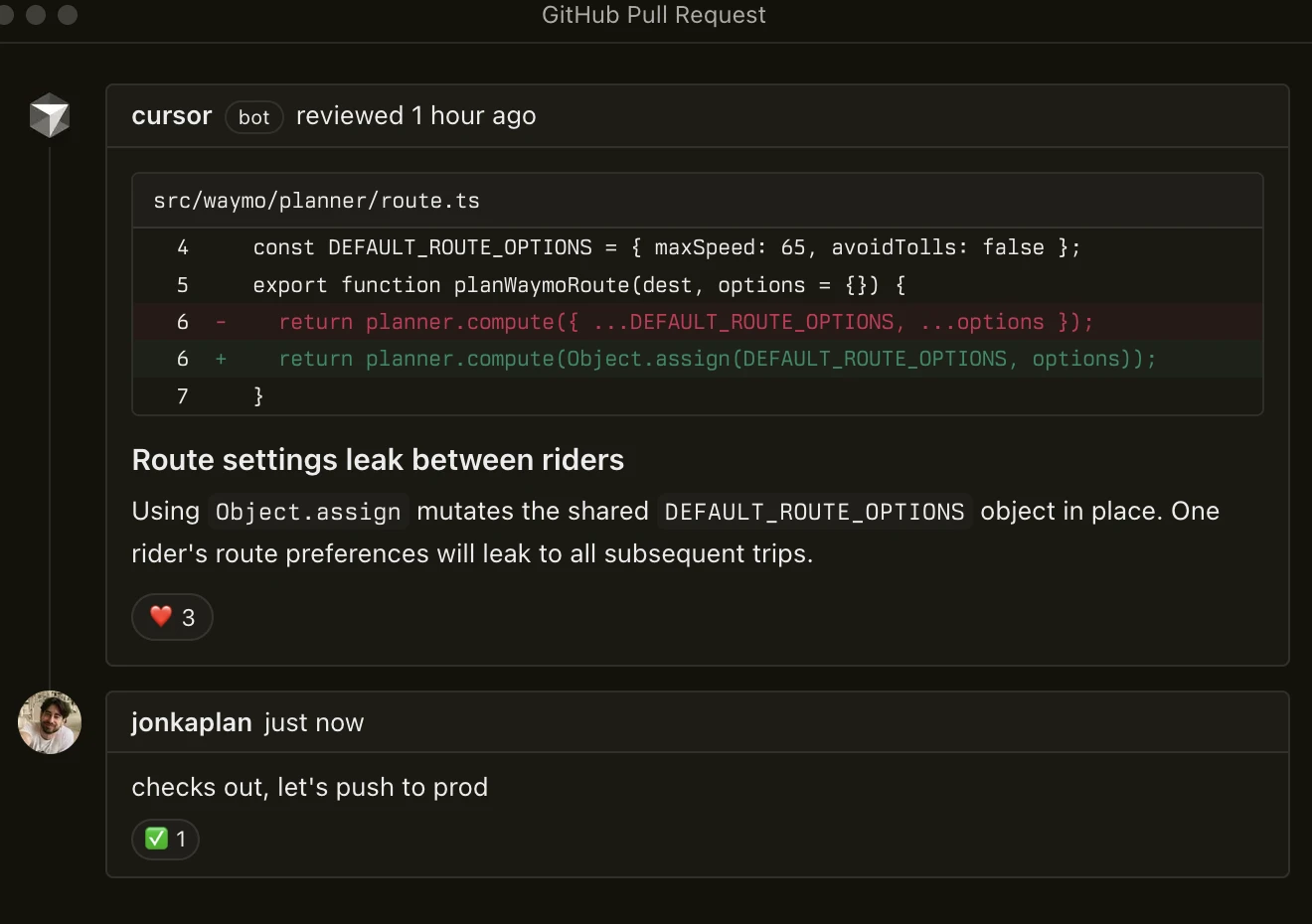
When you open a PR, Bugbot reviews it automatically — analyzing the diff, gathering context about intent, and leaving inline comments at the exact location of each issue. It catches logic bugs, edge cases, security issues, and code quality problems.
But the magic is Autofix: Bugbot spins up isolated cloud agents in their own VMs that can actually fix the issues it finds, then pushes those fixes as commits to your PR branch. Over 35% of autofix changes get merged by developers. That's not a tool doing real work on your PRs before you even look at them.
The engineering leadership testimonials tell the story. Sentry's David Cramer: "The hit rate from Bugbot is insane. Catching bugs early saves huge downstream cost." Discord's Kodie Goodwin: "Bugbot finds real bugs after human approval. Avoiding one sev pays for itself."
Rippling reports it gives back 40% of time spent on code reviews. And Sierra specifically called it out as "incredibly strong at reviewing AI-generated code" — which is exactly the use case I'm describing here.
What Bugbot catches that Claude misses
The most interesting thing Bugbot catches is Claude's writing ticks. If you've reviewed enough Claude-generated code, you know Claude has telltale patterns — verbal fingerprints — that mark code as AI-generated. The unnecessary "Note:" prefix on comments. The "This ensures that..." construction in docstrings. The overly thorough error messages that read like a helpful assistant rather than a terse developer. Phrasings that no human developer would naturally reach for.
These aren't bugs. The code works. But they're giveaways, and in a professional codebase they stand out. Bugbot flags these and often rewrites them to sound more natural. It's a different model with a different voice, so what reads as perfectly normal to Claude reads as slightly off to Bugbot — and Bugbot fixes it.
Beyond the stylistic stuff, Bugbot catches the obvious things that Claude should have caught itself but didn't. Broken builds. Missing imports. Test files that reference functions with the wrong signature. The kinds of issues where, when you see them, you think "come on, Claude, you should have gotten this right the first time." Bugbot finds them, fixes them, and pushes the fix before you even open the PR to review it.
That last part is the key quality-of-life improvement. By the time you sit down to review your own PR, the low-hanging fruit is already handled. You get to focus on the things that actually need a human — architecture decisions, business logic correctness, whether this is even the right approach. The mechanical stuff is already cleaned up.
The workflow in practice
My day-to-day is simple: I describe what I want to Claude Code, it builds the PR and opens it on GitHub. Within minutes, Bugbot picks it up, reviews it, and its autofix agents spin up to fix what they can — pushing commits directly to the branch. By the time I open the PR, Bugbot's already left its comments and pushed its fixes. I do my review on top of that cleaner baseline.
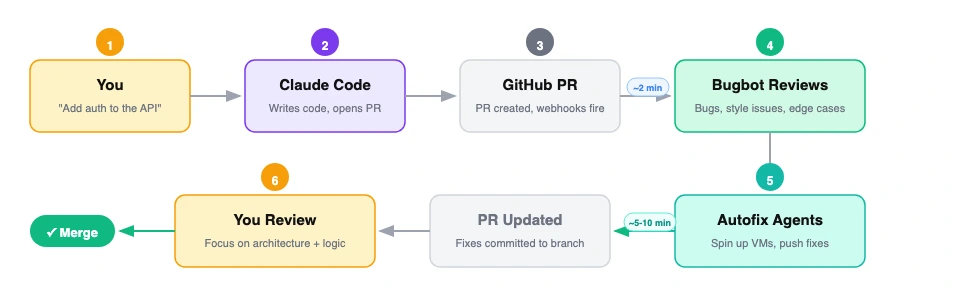
There's no extra configuration per-PR. Bugbot runs on every PR in the repo once you've enabled it. The whole thing is fire-and-forget. I don't think about Bugbot until I open the PR and see that it's already been tidied up.
Sometimes Bugbot's fixes are trivial — a comment reworded, an unused import removed. Sometimes they're meaningful — a broken test fixed, an edge case handled. Either way, my review starts from a better baseline than if I were looking at raw Claude output.
The key thing I want to emphasize: I'm not checking Bugbot's work against Claude's work and mediating between two AIs. Bugbot's changes are almost always clear improvements. I scan them, confirm they make sense, and move on. The 35% merge rate across all Bugbot users tracks with my experience — most of what it suggests is worth keeping.
How to set it up
Getting Bugbot running takes about five minutes.
1. Enable Bugbot on your repos. Head to your Cursor dashboard and open the Bugbot tab. Connect your GitHub org (you'll need org admin access) or GitLab instance (requires a paid Premium/Ultimate plan). Select which repositories to enable. Bugbot supports GitHub.com, GitLab.com, GitHub Enterprise Server (v3.8+), and self-hosted GitLab.
2. Configure review triggers. You can set Bugbot to run automatically on every PR update, or only when someone comments cursor review or bugbot run on a PR. For the cross-model review workflow, automatic is what you want — set it and forget it.
3. Enable Autofix. In the dashboard, turn on Autofix and choose your mode: "Create New Branch" (recommended — keeps fixes separate for easy review) or "Commit to Existing Branch" (max 3 attempts per PR to prevent loops). Autofix consumes Cloud Agent credits at your plan rate.
4. Set up Bugbot Rules. This is optional but powerful. Create a .cursor/BUGBOT.md file in your repo root with project-specific review guidance. Rules are hierarchical — you can nest them in subdirectories for more targeted enforcement:
project/
  .cursor/BUGBOT.md          # Project-wide rules
  backend/
    .cursor/BUGBOT.md        # Backend-specific rules
  frontend/
    .cursor/BUGBOT.md        # Frontend-specific rules
Rules can enforce things like: flag eval() or exec() usage as blocking bugs, require tests for any backend changes, catch deprecated React lifecycle methods, or run license scans when dependency files change. Team admins can also set org-wide rules from the dashboard that apply across all repos.
The rule hierarchy applies in order: Team Rules → project BUGBOT.md files → User Rules. Team members can override settings for their own PRs.
5. Network configuration. If you're behind a firewall, whitelist these IPs for Bugbot's inbound access: 184.73.225.134, 3.209.66.12, 52.44.113.131. Enterprise setups can use PrivateLink or a reverse proxy instead.
Pricing
Bugbot Pro runs $40/user/month ($32/user/month on annual billing). Each user gets 200 PR reviews per month, pooled across your team. There's a free tier with limited monthly reviews if you want to try it first.
One thing to know: Bugbot charges per user who authors PRs that Bugbot reviews in a given billing month. That includes external contributors — so if you have open-source repos with outside PRs, factor that in. For a team shipping Claude Code PRs internally, the math is straightforward and the ROI is obvious the first time it catches a bug that would have hit production.
There's also an admin API if you need to manage repos and user access programmatically (/bugbot/repo/update, /bugbot/repos, /bugbot/user/update — rate limited at 60 requests/minute per team).
Why this matters
We're heading toward a world where most code is AI-generated and the developer's primary job is review, direction, and judgment. In that world, your review pipeline matters a lot. Having a single model generate and review is like having a single developer write and review their own code — it works, but you're leaving value on the table.
Cross-model review is a simple pattern that meaningfully improves code quality. You don't need to build anything custom. You don't need to prompt-engineer a review chain. You enable Bugbot on your repo, drop a BUGBOT.md with your team's standards, and let it run on every PR. The models check each other's work automatically.
The best part is this will only get better. As models improve, the reviewers get better at catching issues and the generators get better at writing code. But the fundamental insight stays the same: diversity of perspective catches bugs that uniformity misses. That's true for human teams, and it turns out it's true for AI teams too.
If you're shipping code with Claude Code and you haven't set up automated cross-model review, go enable Bugbot and try it for a week. You'll feel the difference the first time you open a PR and the obvious stuff is already handled.