SCIM: Let your customers debug your integrations
When the person who can fix an integration can't see it, every failure becomes a support ticket. Why integration logs belong in front of the customer, and what we learned building them for SCIM.

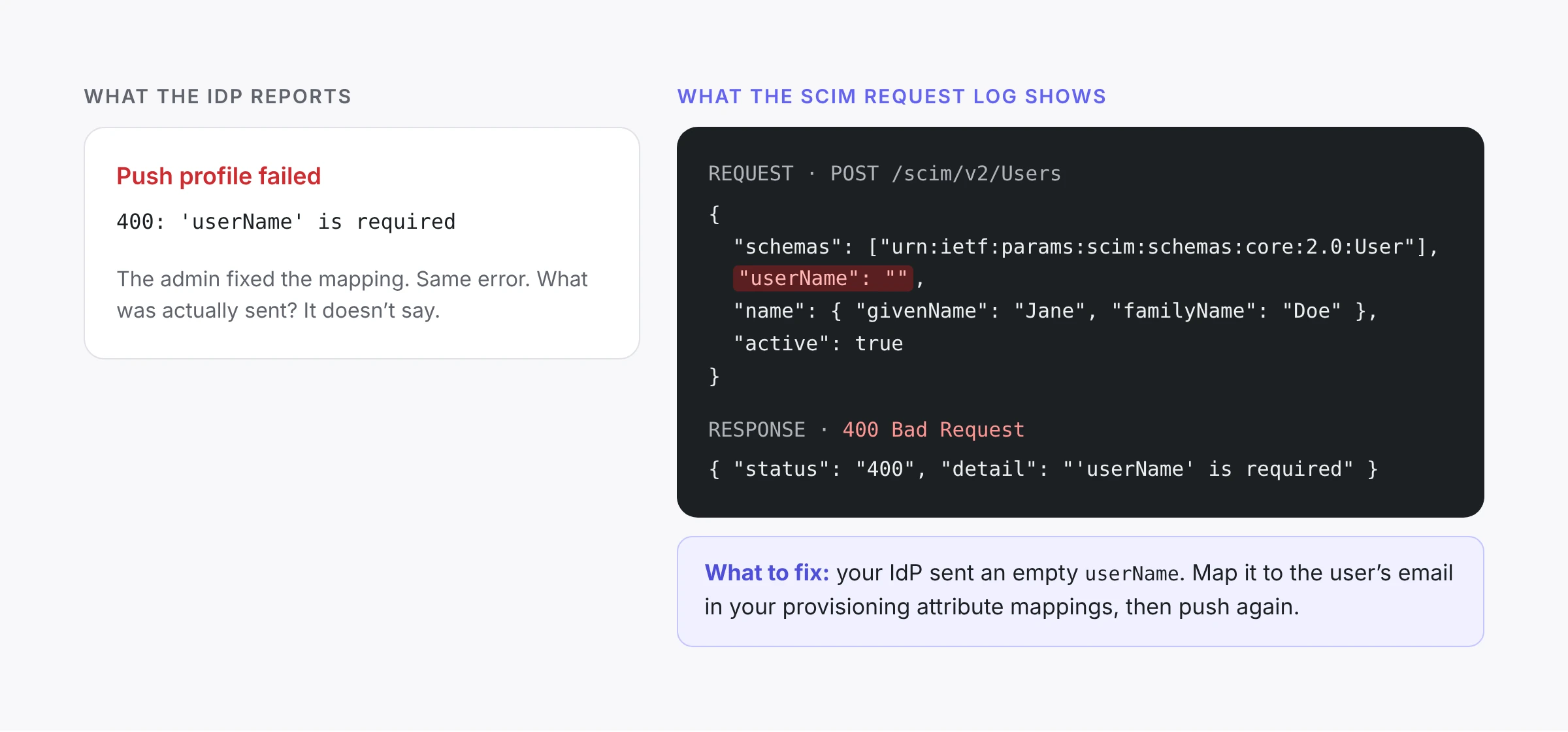
Here's a support thread we see in some form every month. A company buys a B2B SaaS product and connects its Okta tenant to provision 200 employees. Nothing arrives. The customer's IT admin opens Okta's system log and finds a 400: 'userName' is required. They fix the attribute mapping in Okta and push again. Same error.
Three weeks later, the thread has passed through three companies: the customer's IT team, the SaaS vendor's support team, and the vendor's identity provider. Everyone is competent and everyone is trying. But each of them can see only one slice of the problem. The IT admin can see what Okta thinks it sent. The vendor's support engineer can see that the directory never activated. The full request, with the empty field and the response that rejected it, sits in a server log that only the infrastructure provider can read.
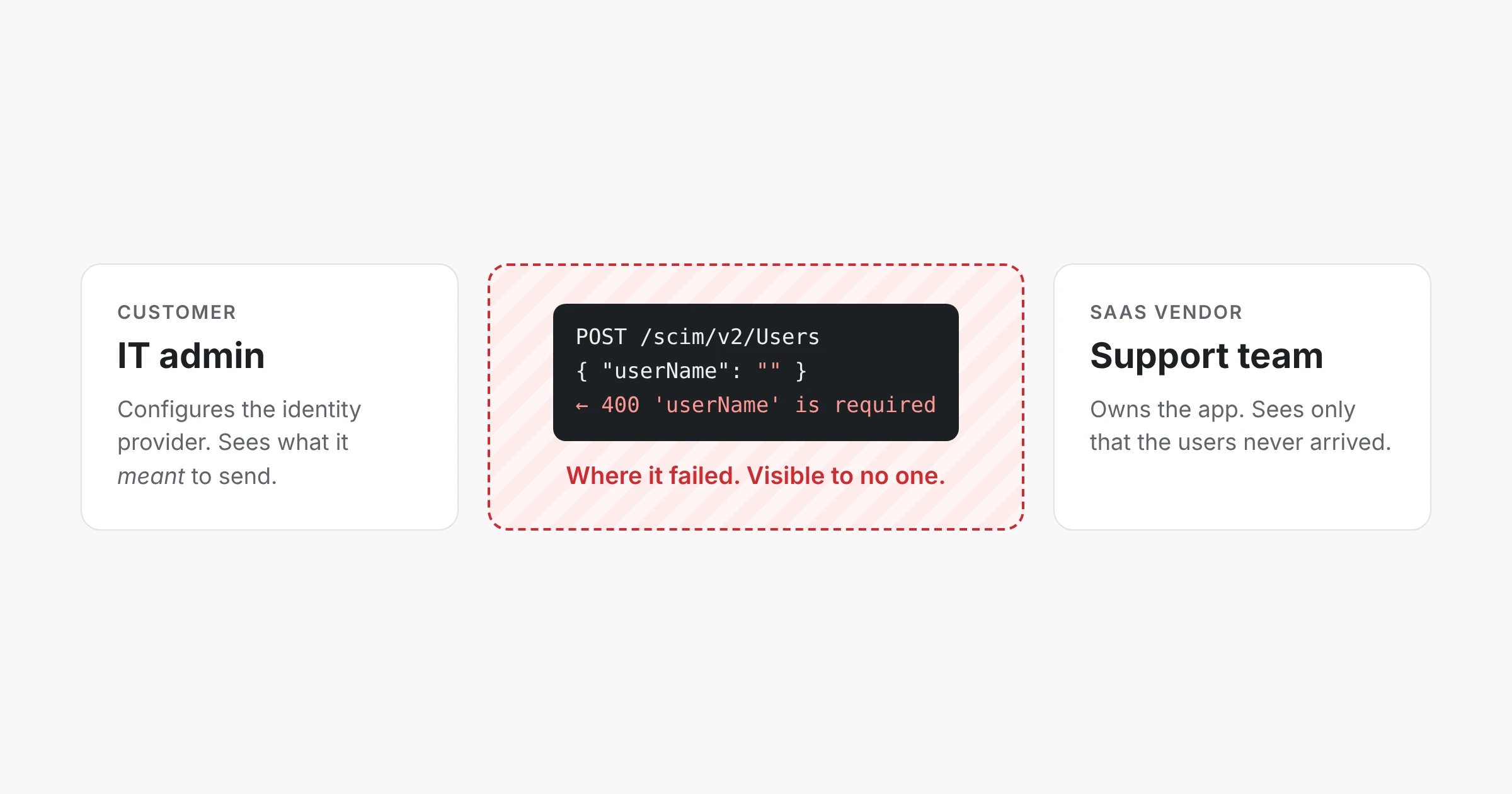
That's the pattern this post is about. When the person who can fix an integration can't see it, every failure becomes a ticket. Our argument: if you sell to enterprises, the logs for customer-configured integrations should be in front of the customer, not just your engineers.
Integrations fail at a boundary nobody owns
Most bugs live inside a system somebody controls. Customer-configured integrations are different: the failure lives between systems, in traffic that one party sends and another party receives. SCIM is the clearest case. The customer owns the identity provider, the vendor owns the endpoint, and the person debugging controls neither end.
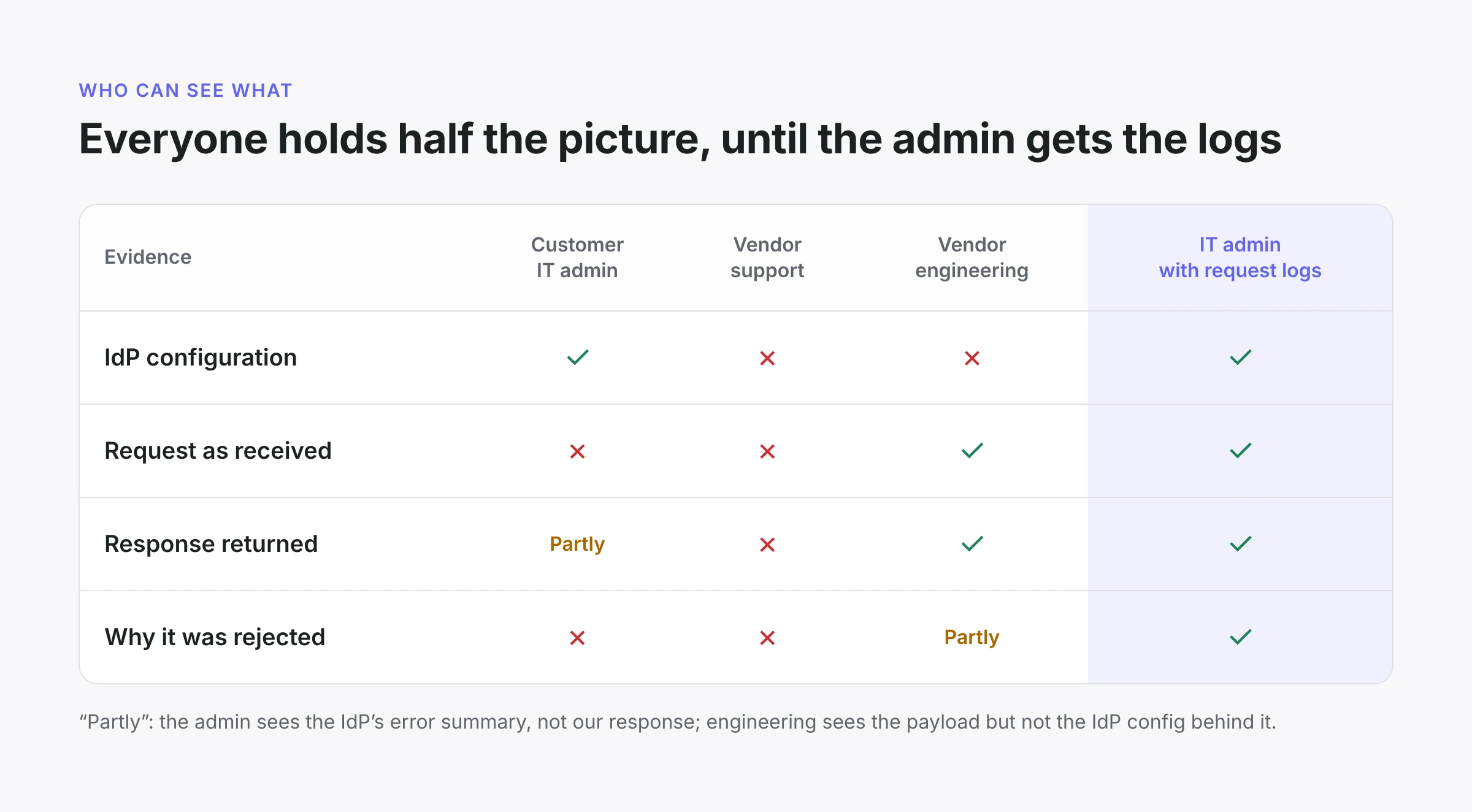
Every row is missing half the picture. So the debugging loop becomes a relay. The admin describes symptoms, the vendor pulls logs, the vendor guesses at a mapping change, the admin tries it, and everyone waits. Each hop adds a day. And the person who can apply the fix, the IT admin, is the one furthest from the evidence.
This isn't a SCIM quirk. It applies to anything your product receives on the customer's behalf from a system the customer configures: SAML assertions, inbound webhooks, email forwarding, data connectors.
The fix is visibility, not better error messages
The instinct is to improve what the customer already gets: clearer error strings, a status badge, a "sync failed" email. Those help at the margins. They don't close the loop, because a summary is still the vendor's interpretation. When the interpretation is wrong or incomplete, the admin is back to filing a ticket.
What closes the loop is the exchange itself: what arrived, what you sent back, and one sentence on what to change. An IT admin who sees "userName": "" in the request body doesn't need a support engineer to explain it. They know their mapping is broken, and they can fix it in the next five minutes.
We heard this directly from customers before we built it. An identity engineer at one of our larger customers told us their support team often lacked access to our dashboard, so engineers ended up doing first-line debugging. Their ask was specific: put the provisioning history in the customer-facing view, so their own customers could see why an event was received but not provisioned.
There's also a business case. Every provisioning ticket costs your support team time. It also costs you something harder to measure: an enterprise buyer's first experience of your product is a failed rollout and a three-week email thread.
What customer-facing logs need to get right
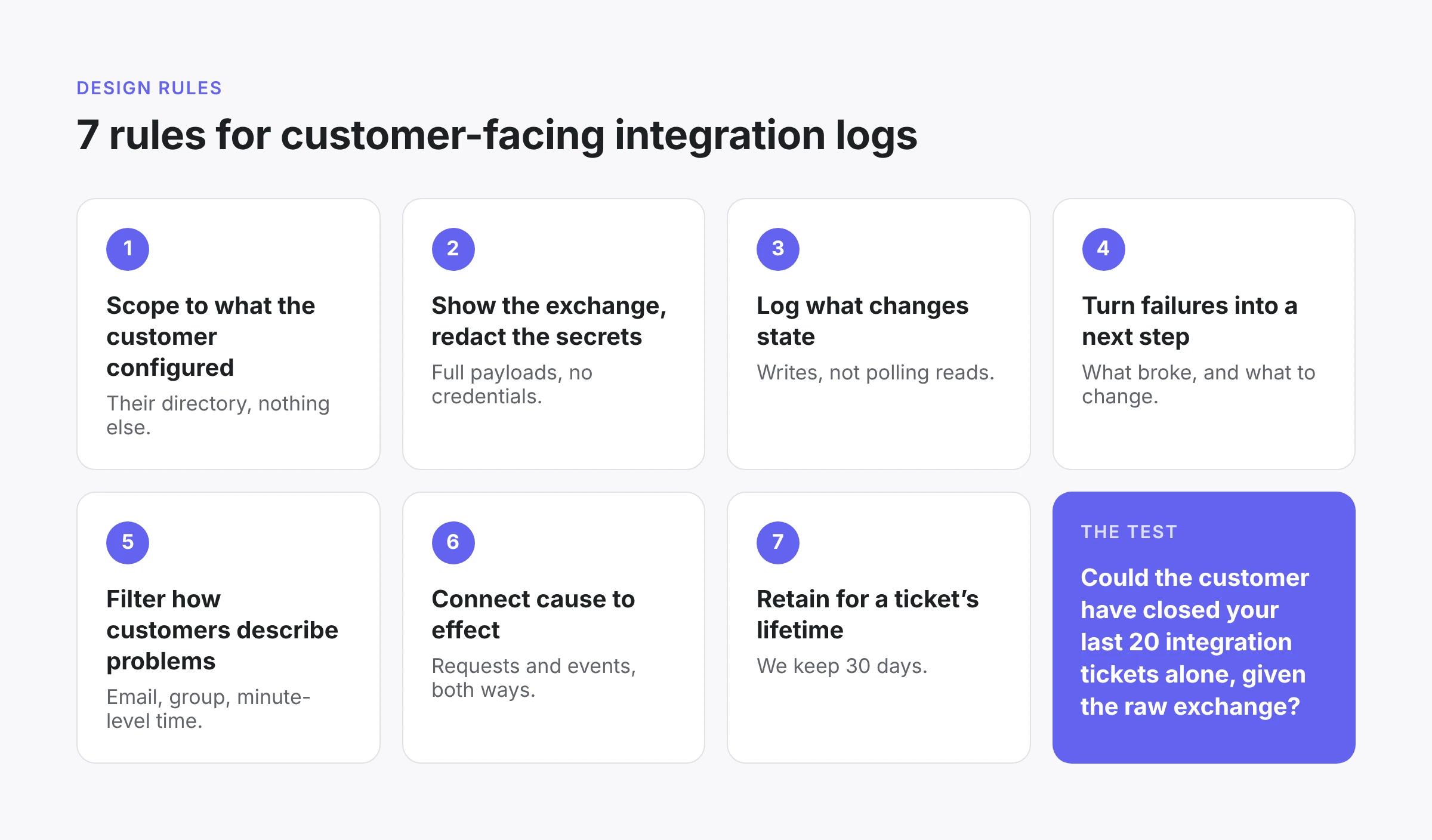
Exposing raw logs to a customer is not the same as exposing them to your engineers. The audience is different, and so are the risks. These are the design rules we landed on.
- Scope to what the customer configured. An admin sees requests for their own directory and nothing else. Tenant isolation isn't a feature here; it's what makes the feature possible.
- Show the exchange, redact the secrets. Full request and response bodies, with sensitive values redacted. The payload is the evidence, so don't summarize it away. But a log viewer must not become a way to read credentials.
- Log what changes state. We record write requests (creates, updates, deactivations) and skip reads. That keeps the log about things that can go wrong, not polling noise.
- Translate failures into a next step. A 409 or a 400 means little to most IT admins. Each failure gets a plain-language message: what went wrong and what to change in the IdP.
- Filter the way customers describe problems. Nobody files a ticket saying "request 7f3a failed." They say "Jane didn't get access Tuesday afternoon." So filters cover email, external ID, group, action, status and a time range down to the minute.
- Connect cause to effect. Link each request to the events it produced, and each event back to its request. Failed or no-op requests produce no events, and that absence is often the answer.
- Retain long enough for a ticket's lifetime. We keep 30 days. Customers have told us some escalations outlast that, so this is a tradeoff, not a solved problem.
How we did it: SCIM logs, one step closer each time
We shipped SCIM request logs three times, each time moving the evidence one step closer to the person who can act on it.
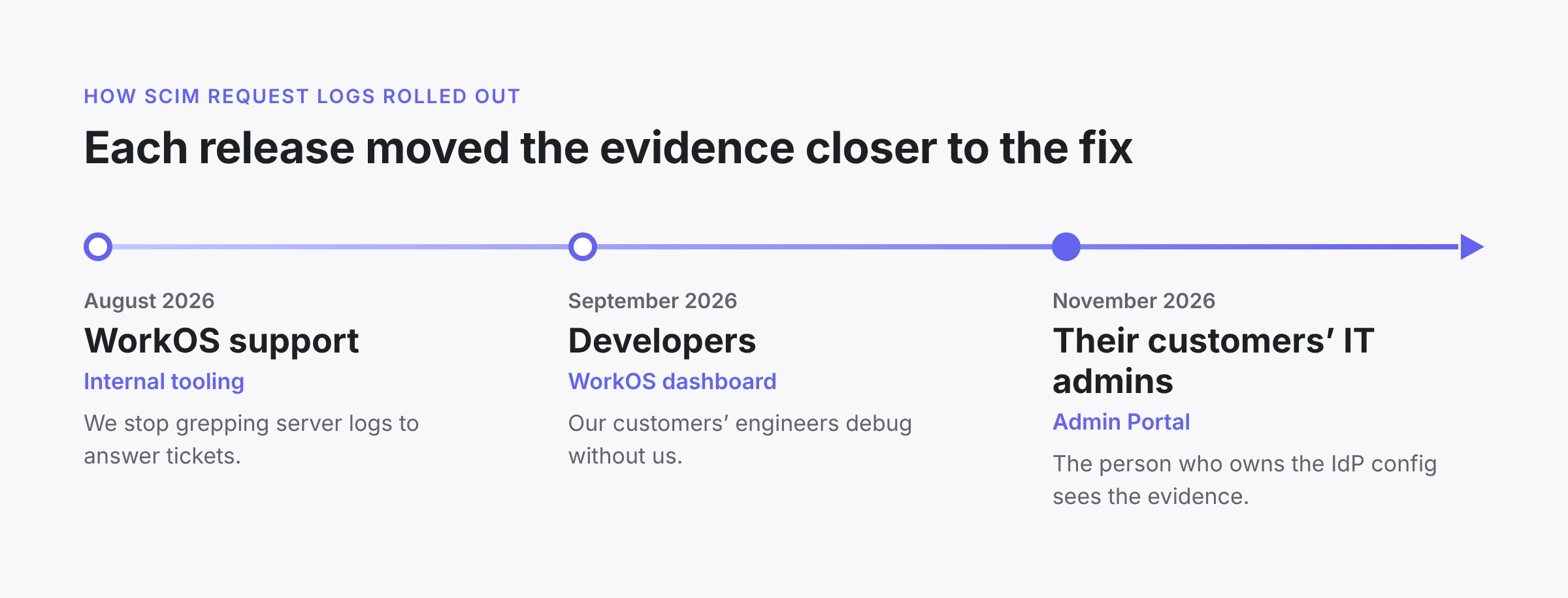
The third step is the one that matters most, and the one most products skip. In the Admin Portal, an IT admin opens their active directory and selects View logs on the SCIM Request Logs card. They get the same exchange-level view our engineers use, scoped to their directory, with secrets redacted.
Go back to the thread from the opening. With the Admin Portal logs, the admin filters to the last hour of failed requests. They open one and see the payload Okta actually sent, with userName empty, next to the 400 we returned and a note to map userName to the user's email. If the mapping looks right in Okta but the request still arrives empty, the log has just proved the problem sits in the IdP app's locked profile. That's a question for Okta, not for the vendor. Either way, the relay is over.
Where else this applies
If your product receives traffic that a customer's system sends on their behalf, you have the same boundary problem. Here's where to look in your own product:
- SSO. The SAML assertion or OIDC token your app rejected, with which claim was missing or which signature check failed.
- Inbound webhooks and integrations. The payloads a customer's system pushed to you, and the response you returned.
- Outbound webhooks. Delivery attempts, response codes and retries, so the customer can tell whether you never sent or their endpoint never accepted.
- Data connectors and imports. Which rows were rejected and why, not just a failed count.
A quick test: look at your last 20 integration tickets. For each one, ask whether the customer could have closed it alone if they'd seen the raw exchange. If most could, you have a visibility problem, not a support staffing problem.
Closing
Enterprise readiness is usually framed as a feature checklist: SSO, SCIM, audit logs. The checklist gets you through security review. What decides whether a rollout goes well is what happens when an integration breaks, and whether the customer can see why.
The IT admins configuring your product are capable people. Give them the evidence, and most of these tickets never get filed.
If you use WorkOS Directory Sync, SCIM request logs are live now in the dashboard and the Admin Portal.