Why your Electron deep link works on macOS but not on Windows
macOS hands a custom-scheme URL to the running app. Windows and Linux start a second copy with the URL in its arguments. Here is the main-process code for both.

Your sign-in callback works on your Mac and does nothing on Windows because the two operating systems deliver a custom-scheme URL like workos-auth://callback in completely different ways. macOS hands it to the running app as an open-url event. Windows and Linux launch a second copy of your executable with the URL in its command-line arguments, and unless your first instance holds the single-instance lock, nobody ever forwards it.
Desktop sign-in needs a custom scheme because a native app has no http:// address of its own to receive the redirect. The examples below use @workos/authkit-electron, which wires all three platforms for you, but the behavior underneath is plain Electron, and all of it lives in the main process.
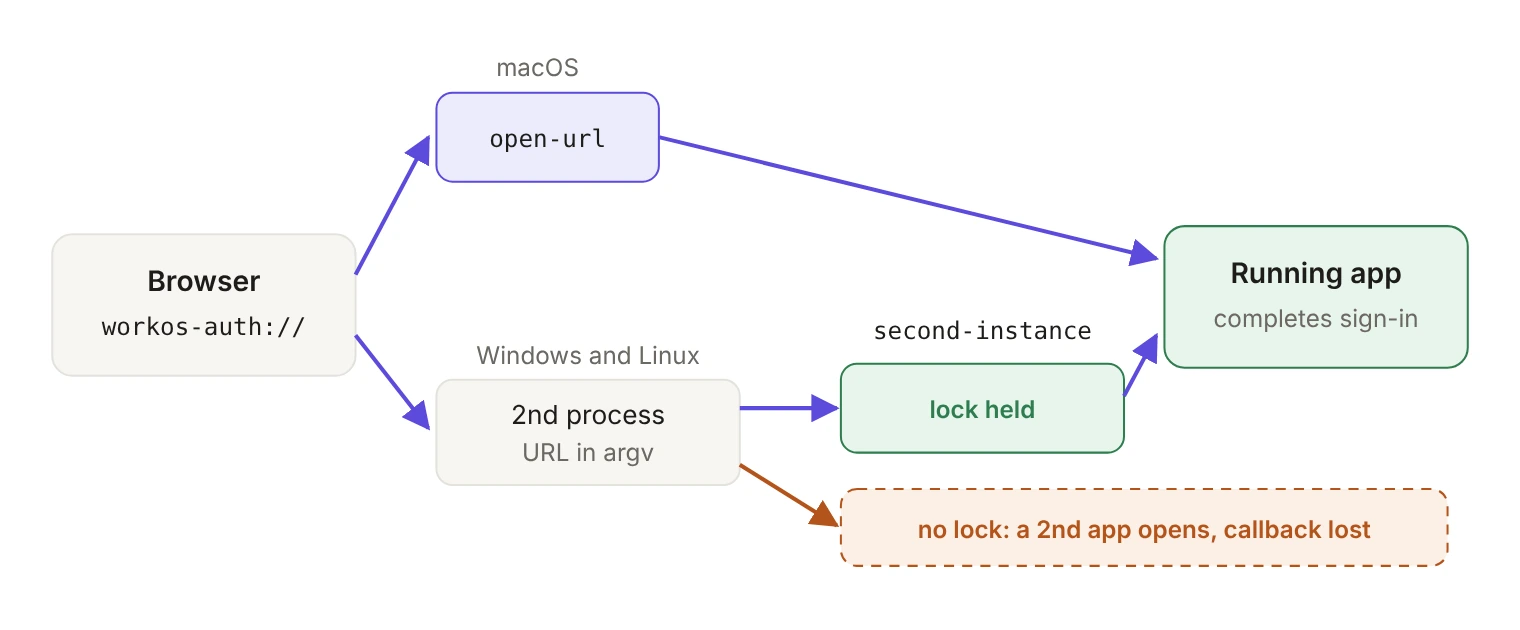
How does each OS deliver a custom-scheme link?
macOS. The running app receives the URL through open-url, a macOS-only event. The scheme also has to be declared in the app's Info.plist under CFBundleURLTypes, which your packager writes for you (more on that below).
Windows and Linux. No open-url fires. The OS starts a new process with the URL in its arguments, and Electron forwards that process's command line to the first instance as a second-instance event. Electron's tutorial pulls the URL off the end of the array:
Treat "last element" as a convention, not a guarantee. Electron's own second-instance docs warn that the order of argv might change and extra arguments might be appended, and Chromium adds switches of its own. Find the argument that starts with your scheme instead, which is what the AuthKit SDK does:
Cold start versus already running. If the app is already open on Windows or Linux, the second process forwards its arguments and exits, and second-instance fires in the first one. If the app is closed, there's no first instance: the process that starts is the one with the URL, sitting in its own process.argv. The SDK checks that once, when registerProtocol() runs.
macOS is different at cold start. There the launch URL also arrives as open-url, and Electron's docs warn that a listener registered late in startup can miss a URL that launches the app. The SDK attaches its listeners when registerProtocol() runs inside app.whenReady(), so design for the normal sign-in path: the user starts sign-in from the running app, and the callback comes back to that same running app. If someone quits the app halfway through sign-in, have them start again.
One development caveat that costs people an afternoon: on macOS and Linux, deep links only work when the app is packaged, not when you launch it from the command line in development. The symptom is silence. The browser does its part, and your app never hears about it.
Why does the Windows path need a single-instance lock?
Because without the lock there's no first instance to deliver to. app.requestSingleInstanceLock() returns true in the primary instance and false in any later one, which should quit immediately after its arguments have been sent to the instance holding the lock. That forwarding is what makes second-instance fire. Skip the lock, and the second process boots a second copy of your app with a second window, while the sign-in waiting in the first process never completes.
The AuthKit Electron SDK leaves this call to you, and its README says why:
"Early" means at the top of your main entry file, above anything that creates a window. If you want the window focused when a link arrives, pass onSecondInstance in the SDK's options; it runs when a second instance forwards a deep link on Windows or Linux.
Call the lock on every platform rather than branching on process.platform. macOS enforces a single instance itself when a user opens the app from Finder, but starting it from the command line bypasses that.
Where does registerProtocol() have to run?
Inside app.whenReady(), before you create the first window. It registers the app as the OS handler for the redirect URI's scheme and wires the macOS and Windows/Linux listeners. You never name the scheme twice: the SDK derives it from the redirectUri you pass to createAuthKit(), which has to be a custom scheme such as workos-auth://callback. Put together, a main process for deep links looks like this:
The package requires Node 22.11 or newer (its @workos-inc/node peer needs it too) and ships ES modules only, with no CommonJS build. It lists Electron 30 or newer as a peer, but Electron bundles its own Node, and the first release on Node 22 is Electron 35, so target 35 or newer.
Underneath, registration is app.setAsDefaultProtocolClient(). Development is where its details matter: when you run through the default Electron executable (electron .), the registration has to include the path to your app's entry script so a protocol launch loads your app rather than a bare Electron. The SDK does this for you when it detects a development launch; packaged apps launch their own executable and need no extra arguments. On macOS, you can only register schemes that are already in the app's Info.plist, which can't be changed at runtime.
What does the default sign-in flow do?
It sends the user to their real browser. The ceremony option defaults to { mode: 'system-browser' }, which opens the default OS browser and returns to your app through the custom-scheme deep link. Every platform difference in this post sits on that return path, which is why a desktop sign-in flow runs into all of them on day one.
Prepare your support team for one expected prompt: on return, the OS shows a dialog along the lines of "your-domain wants to open YourApp." That's the browser handing the callback back to your app, and users can check "Always open" to skip it next time.
What changes when you package the app?
registerProtocol() registers the scheme at runtime, which covers the running app. A packaged build also needs the scheme declared in your build config, so the OS knows about it before your app has ever run and can cold-launch it from a link. With electron-builder, one block does it:
electron-builder writes that scheme into the macOS Info.plist, and on Linux it adds x-scheme-handler/workos-auth to the MimeType line of the generated .desktop file. Windows has no build-time entry here: the registration comes from registerProtocol() the first time the installed app runs. That means a callback link can't launch a Windows install that has never been opened, which is rarely a problem for sign-in, since the user starts it from the app.
If a deep link never comes back to a packaged app, this block is the first thing to check. Build a Linux artifact and read the generated .desktop file once to confirm the MimeType entry is there.
What else is different on Linux?
Storage. The SDK persists the session with Electron's safeStorage, backed by the OS keyring. When safeStorage is unavailable, which on Linux usually means no keyring is running, the SDK refuses to persist and throws EncryptionUnavailableError rather than writing secrets in plaintext.
In practice this looks like a deep-link bug rather than a storage bug, because by the time it throws, the callback has arrived and sign-in looked fine. The fix is to install or start a keyring such as libsecret or gnome-keyring. There's a development-only escape hatch, createDefaultStorage({ allowPlaintext: true }), which stores session data unencrypted and should never ship in a distributed build.
What does each platform need from you?
A deep link that works on your Mac has told you two things: macOS found a handler, and your app happened to be running. It hasn't told you whether the lock is in place, whether the scheme survived packaging, or whether the Linux machine has a keyring. Build all three artifacts, sign in from a browser on each, and on Windows and Linux test once with the app fully closed. There's no clean way to script an OS-level deep-link click in CI, so budget for that manual pass on every release.
For the rest of the AuthKit wiring, see Add authentication to your Electron app in three calls.