Use Excalidraw Skills so your agents can describe themselves
With the Excalidraw skill , agents can draw anything — including their own architecture. Here's why that's worth doing...

There's a specific moment when working with AI tools where something shifts from "useful" to "wait, what just happened."
For me, that moment came when I asked Claude Code to explain how my TheraBody TheraCube Recover works, and it drew me a full physics diagram -- electrons, heat flow, Peltier effect and all -- then popped it open in my browser.
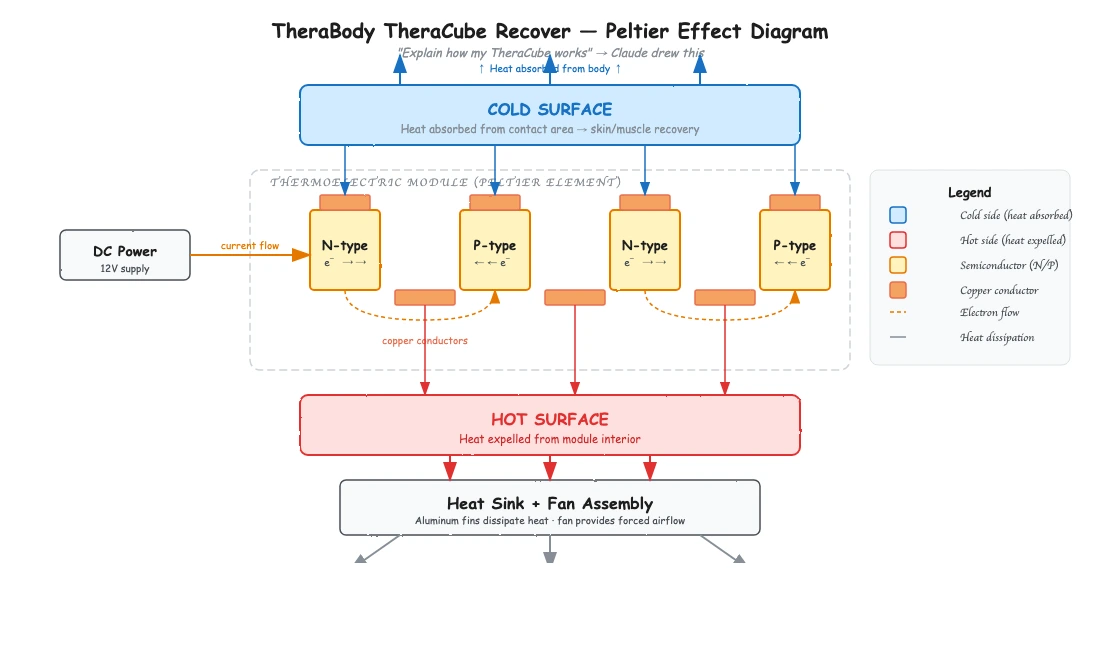
That alone was cool. But the real insight came later, when I realized the same capability could let my agentic systems draw themselves.
The Excalidraw Skill
There's a growing ecosystem of Excalidraw skills for Claude Code that you can drop into your .claude/skills/ directory. For those unfamiliar, Excalidraw is an open-source virtual whiteboard tool that produces clean, hand-drawn-style diagrams.
These skills let Claude generate .excalidraw files programmatically -- meaning it can compose boxes, arrows, labels, and connectors into structured diagrams, then render them for you.
Claude can reason about what it needs to draw, lay out the spatial relationships, and produce something genuinely legible. It handles architecture diagrams, flowcharts, system maps, data models -- anything you'd normally sketch on a whiteboard when explaining a system to a colleague.
The key thing to understand is that this is a skill, not just a prompt trick. With the right skill installed, the output is structured and consistent rather than best-effort ASCII art. The skill handles Excalidraw's JSON format, ensures clean arrows, proper label binding, and semantic color-coding.
The TheraCube Moment
I have a TheraBody TheraCube -- it's a recovery device with a surface that can get hot or cold on demand. I knew it used thermoelectric cooling, but I wanted to actually understand the physics.
So I asked Claude to explain how it works. Instead of giving me a wall of text about the Peltier effect, it drew a full diagram: the semiconductor junctions, the direction of electron flow, how heat gets absorbed on one side and dissipated on the other, the role of the heat sink and fan assembly. Everything was labeled and spatially organized so that the relationships between components were immediately clear.
It opened right in my browser. I could zoom in, pan around, and actually see the system rather than trying to mentally reconstruct it from paragraphs of description.
That was the moment I thought: if Claude can do this for a physical device it's never seen, what happens when I point it at a system it already knows intimately -- like itself?
The Real Insight: Agents Describing Themselves
I've been working with OpenClaw, an open-source autonomous AI agent that runs on dedicated hardware. OpenClaw connects to messaging apps, runs commands, manages files, browses the web, handles email -- it's a Swiss Army knife of agentic capabilities, and it's model-agnostic so you can swap in whatever LLM you want.
The problem with systems like this is that they get complex fast. You add a new connector, wire up a new skill, change a routing behavior, and suddenly it's hard to keep track of what the system actually looks like at any given moment. Documentation goes stale the second you write it.
You can ask the agent to describe itself. Ask it to show you all of its skills, its connectors, its message routing, its tool integrations. It already knows what it has access to, so it can generate a real-time architectural snapshot of itself as a diagram.
The result is a visual system map. When I asked OpenClaw to draw itself, what came back was a central "Gateway" node with spokes radiating out to each integration — Discord, email, file system, web browser — each with labeled arrows showing the protocol and data direction.
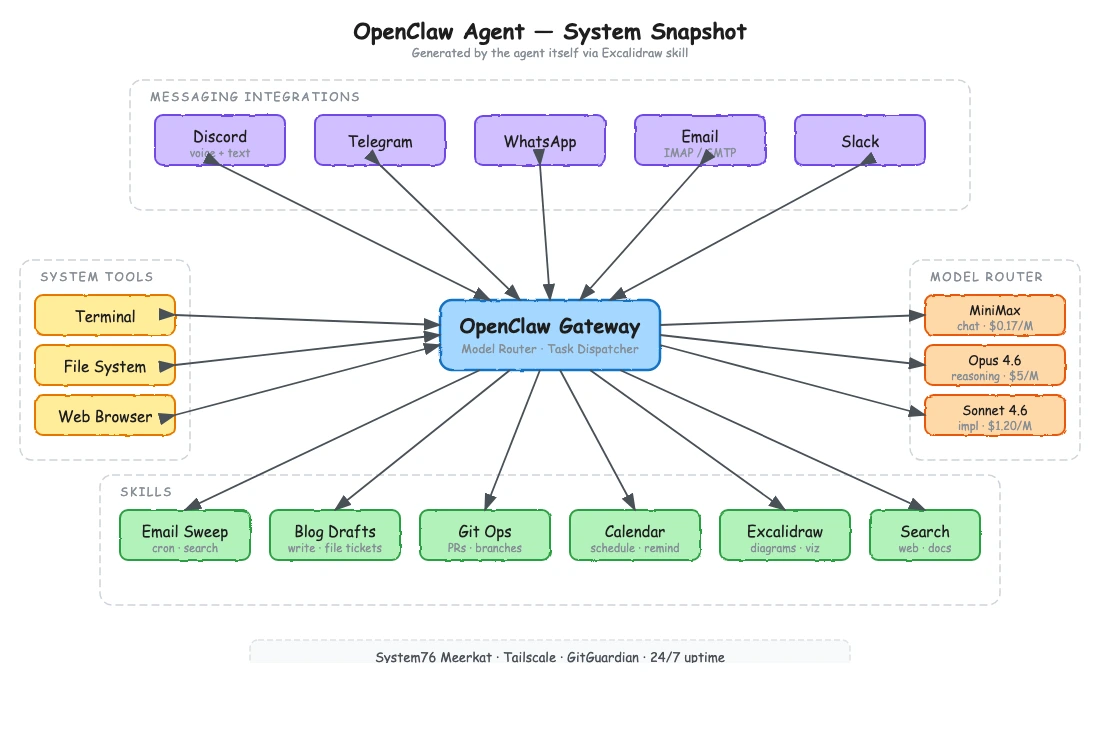
Skills were grouped in a cluster below, with dependency lines showing which skills called which tools. The whole thing looked like something a solutions architect would draw on a whiteboard, except it was generated on demand and reflected the actual current state of the system.
How Visual System Snapshots Help
If you're running a single agent with a handful of tools, you probably don't need this. You can hold the whole thing in your head.
But the moment you're working with more complex setups -- agents with dozens of skills, multiple communication channels, external API integrations, file system access, database connections -- the cognitive overhead grows. And it compounds when you're collaborating with others who need to understand the system too.
Visual snapshots solve several problems at once:
Onboarding
Instead of walking someone through a README that may or may not be current, you ask the agent to draw itself. They get an accurate picture of the system in seconds.
Debugging
When something goes wrong, being able to see the full topology of an agent's connections helps you reason about where the failure might be. "Show me everything you're connected to right now" is a powerful debugging prompt.
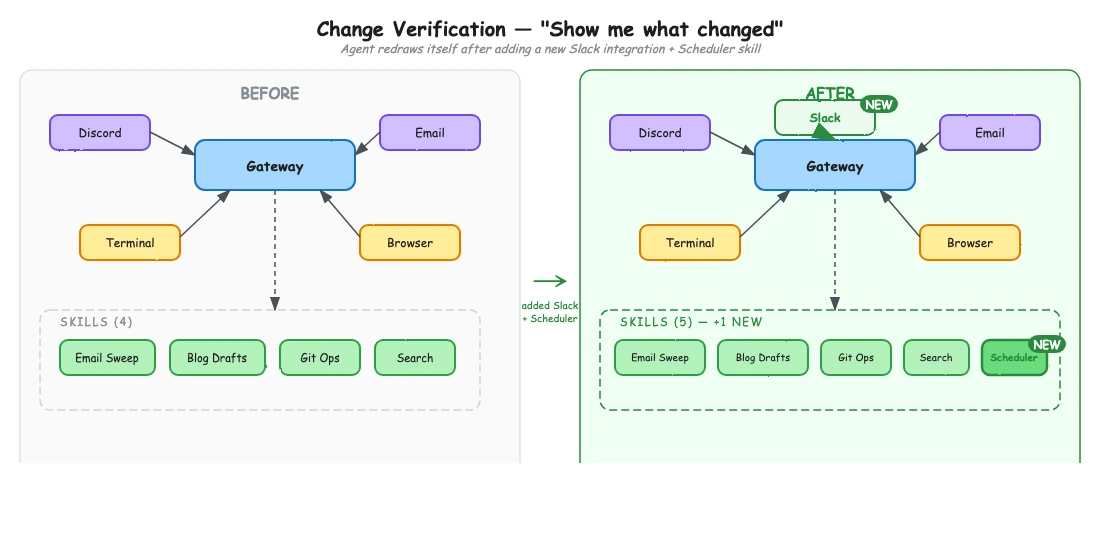
Change verification
After you modify an agent's configuration -- adding a new skill, changing a connector, updating permissions -- you can ask it to redraw itself and visually confirm that the change took effect.
Architecture reviews
If you're evaluating whether an agent setup is getting too complex or has redundant capabilities, a visual map makes that immediately obvious in a way that code or config files don't.
Getting Started
Setting this up takes about two minutes. Clone or download an Excalidraw skill and drop it into your project's .claude/skills/ directory. There are also MCP server implementations if you prefer that route, and versions that render to a live Excalidraw canvas in real time.
Once installed, just ask Claude to draw something: "Draw a diagram of your current skills and capabilities" or "Show me how this system is connected." It generates the file and pops it open in your browser. Export to PNG or SVG if you need a static version, or share the .excalidraw file directly.
For agentic systems like OpenClaw, same idea. The agent already knows its own configuration, skills, and connections — the Excalidraw skill just gives it a way to show you what it knows instead of telling you.
The Bigger Picture
We're at an interesting inflection point with agentic systems. They're getting complex enough that traditional documentation and configuration management approaches are starting to strain. At the same time, the agents themselves are becoming capable enough to help us understand them -- if we give them the right tools to express what they know.
The Excalidraw skill is one of those tools. It turns your agent's self-knowledge into something you can see, share, and reason about. And in my experience, the moment you can see a complex system is the moment you start actually understanding it.