Google OAuth's strict redirect URI matching: A guide for multi-tenant apps
Google enforces exact-match redirect URIs with no wildcards and no exceptions. Here's how to handle that cleanly when every customer has their own domain.

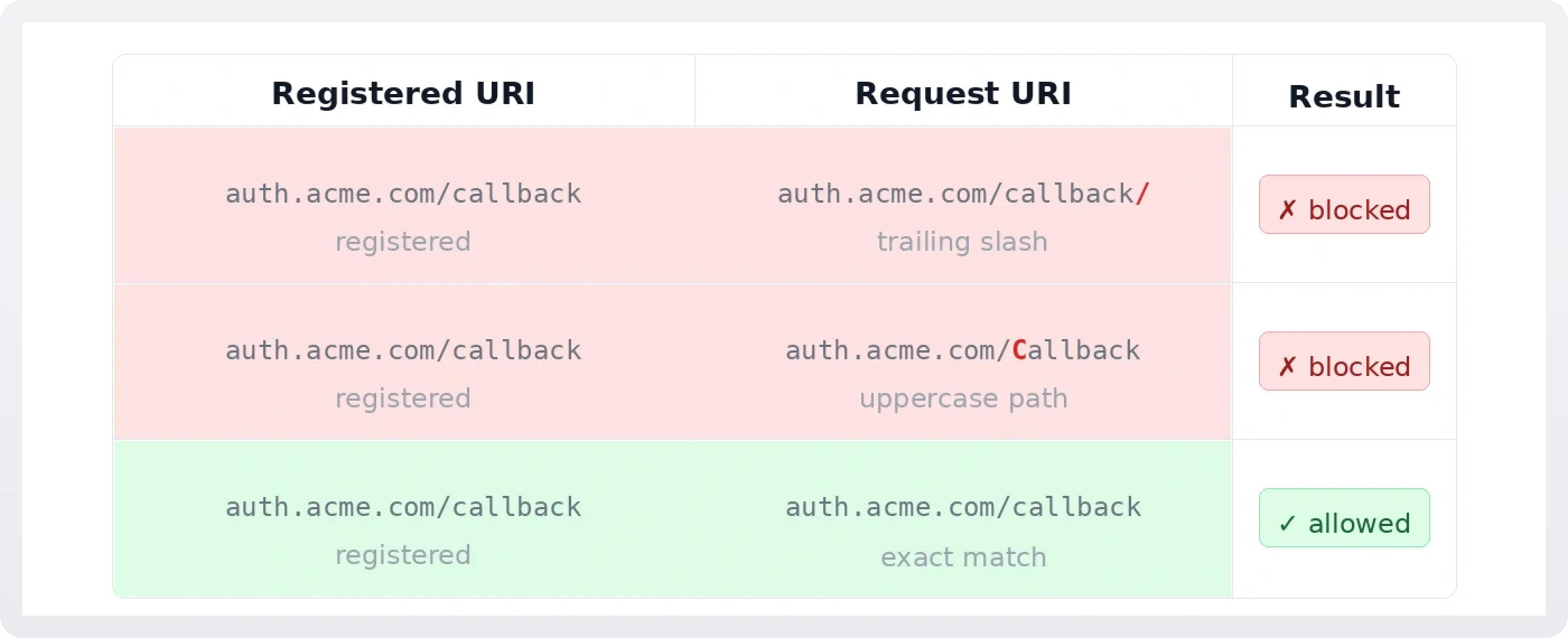
When you register an OAuth app with Google, you provide a list of allowed redirect URIs. After a user authenticates, Google checks whether the URI in the authorization request exactly matches one on that list. Not a prefix match. Not a wildcard. The scheme, host, port, and path all have to be identical, character for character.
For a single-tenant app pointing at https://app.example.com/auth/callback, this is fine. You register one URI, you're done.
For a multi-tenant B2B SaaS app where each customer brings their own domain, this becomes a real operational problem. If Acme Corp wants their login flow to redirect to https://auth.acme.com/callback, you need that exact string pre-registered in the Google Cloud Console before the first user ever clicks "Sign in with Google." And if Acme later migrates to https://sso.acme.com/callback, you need to register the new URI, keep the old one around during the transition, and coordinate the switch without locking anyone out mid-session.
Multiply that by dozens or hundreds of customers, and the operational surface gets large quickly.
Why Google is strict where others are flexible
It helps to understand this constraint in context, because Google is genuinely more restrictive than other major OAuth providers.
Microsoft Entra ID allows wildcard redirect URIs for single-page apps, letting you register https://*.example.com/callback to cover subdomains. It also supports per-tenant application registrations through its multi-tenant app model, so you can issue a separate client ID per customer rather than managing one global list of URIs.
Okta takes a different approach again. Its API-first design lets you create and update OAuth app configurations programmatically, which means you can automate the registration of new redirect URIs as part of your customer onboarding workflow rather than doing it manually.
Google does none of these. The Google Cloud Console requires explicit registration of every URI, and there is no official API for programmatically managing OAuth client configurations the way Okta exposes. This means that for Google-backed OAuth flows, the URI management problem is fundamentally more manual, and the risk of misconfiguration is higher.
The specific failure modes to know about
The registration lag problem
When a customer sets up a custom domain or migrates to a new one, there is a window between when they configure their DNS and when you have updated the Google Cloud Console registration. Any login attempt during that window fails with a redirect_uri_mismatch error, which to the end user looks like a broken product.
This is especially painful during migrations because you often cannot predict exactly when DNS will propagate or when the customer will test their first login.
The path sensitivity trap
Google's matching is case-sensitive and path-sensitive. https://auth.acme.com/callback and https://auth.acme.com/Callback are different URIs. So are https://auth.acme.com/callback and https://auth.acme.com/callback/. If your application generates redirect URIs dynamically (or if your hosting layer normalizes trailing slashes differently across environments), you will hit this.
The fix is to canonicalize your redirect URI construction so that what you send in the authorization request is always exactly what is registered. Treat the URI as a string constant, not something you build at runtime.
The migration blindspot
When a customer moves from one domain to another, you need both URIs registered simultaneously during the cutover window. The old one needs to stay registered until you're confident no sessions are still in flight. This sounds obvious but is easy to get wrong when you're managing registrations manually across many customers, especially if there is no audit trail of when each URI was added.
A related risk: if your Google Cloud Console access is shared across a team, someone may clean up "old" URIs that are still needed.
The quota ceiling
Google limits the number of redirect URIs you can register per OAuth client. The current limit is 100. For most apps this is not a problem, but if you are operating at scale with custom domains per customer, you can hit it. At that point your options are to split across multiple OAuth clients (and manage which client ID each customer uses) or to use a proxy layer that normalizes redirect URIs before they reach Google.
Patterns for handling this at scale
The central proxy pattern
Rather than registering a URI per customer, you register one URI that you control: https://auth.yourapp.com/callback. Your backend receives the callback, reads a state parameter that encodes the customer's tenant, and then redirects internally to the customer-specific destination.
This collapses your Google Cloud Console registration to a single URI that never changes, regardless of how many customers you have or how often they migrate. The tradeoff is that you take on responsibility for the intermediate redirect and need to ensure the state parameter handling is secure against open-redirect attacks.
The per-customer client ID pattern
Instead of one OAuth app for all customers, you provision a separate Google Cloud project or OAuth client per customer. Each client has its own redirect URI list, so migrations only affect the one customer, not your global registration.
This approach scales well operationally but creates onboarding overhead. Automating the provisioning of Google Cloud projects via Terraform or the Resource Manager API helps, but there is no way to automate the OAuth consent screen configuration through the API, so some manual steps remain.
The migration wizard pattern
The hardest version of this problem is not onboarding new customers with custom domains but migrating existing ones. At WorkOS, this came up directly when building a self-service migration wizard for customers moving between hosting configurations. The redirect URI had to change, and the migration had to happen without breaking active sessions or requiring customers to coordinate a maintenance window.
The solution involved registering the new URI before the DNS cutover, running both URIs simultaneously during the migration window, and only deregistering the old URI after confirming all sessions had rotated. The self-service flow guided customers through each step and validated DNS propagation before marking the migration complete, so the system would not advance until Google's matching would actually succeed.
.webp)
The broader lesson is that redirect URI migrations deserve the same care as database migrations: plan for rollback, keep old and new running simultaneously, and only cut over when you have verified the new path works end to end.
Practical checklist
Before you go live with a custom redirect URI for any customer, confirm the following:
- The URI is registered in the Google Cloud Console exactly as it will appear in authorization requests, including scheme, port (if non-standard), and path.
- Your application constructs the redirect URI as a constant, not from user input or dynamic string building.
- You have a process for registering new URIs before DNS is cut over, not after.
- You have a process for retiring old URIs with a documented delay after migration completes.
- You are monitoring
redirect_uri_mismatcherrors in your OAuth flow logs, so registration gaps surface as alerts rather than customer support tickets. - If you are approaching the 100-URI limit, you have a plan for splitting clients or moving to a proxy pattern.
The underlying tension
Google's strict matching exists for good reasons. Wildcard redirects are a real attack surface, and exact matching is the simplest way to prevent an attacker from registering a subdomain and intercepting auth codes. The constraint is not arbitrary.
But for multi-tenant apps, the operational cost of that strictness is real. The gap between "Google's security model" and "what your app needs to do for customers" is where most of the complexity lives, and it is complexity that falls entirely on you to manage.
The teams that handle this well treat redirect URI registration as a first-class infrastructure concern, not an afterthought. They automate what they can, build guardrails around the manual steps that remain, and design migration flows that keep both the old and new URIs valid until they are certain the transition is complete.