How Product Design is Evolving with AI
Designers shape the system, not just the screens. AI lets us go deeper into the medium — prototyping in production, exploring parametric tools, and designing for a new kind of user: agents.
WorkOS designers use AI to prototype in production, explore wider solution spaces, and design for agents. Here's how our craft is changing.

At WorkOS, we build the identity and access layer for the fastest-growing startups and AI companies. Our product engineering culture defines how we build software, and design operates the same way.
AI allows us to be better at every part of the project lifecycle: digging into customer feedback and synthesizing it better, exploring a wider set of solutions, and working directly in production.
By designing directly in the codebase, we can understand the medium that we ship to better, explore more of the constraints we’re designing for, and feel the impact of our decisions earlier in the process.
This post is about what it's like to design across a platform like ours, how the scope of our craft has grown with AI, and the work ahead.
Parametric exploration
In February we shipped Fine-Grained Authorization. The core unit of FGA is a relationship — a user has a role on a resource, a resource belongs to a folder, a folder inherits from another folder. The product is the shape of those relationships and how they resolve into a permission decision.
The most important part of FGA is the graph: the directionality, the inheritance, the way a single edge changes the answer to a permission question. Early explorations defaulted to tables, but tables flatten relationships into rows — and rows don't represent the underlying product decisions.
To better convey those relationships, we prototyped a working WYSIWYG editor that let the team manipulate the model directly and watch how permissions resolved in real time. Once we could feel the model, the right design was obvious. The conversation stopped being "what should this screen look like?" and became "what does the graph need to do?" Instead of iterating through a handful of mocks, we built parametric tools that let us adjust variables like inheritance depth, role assignment, and edge weight to refine the details that made the product feel right.
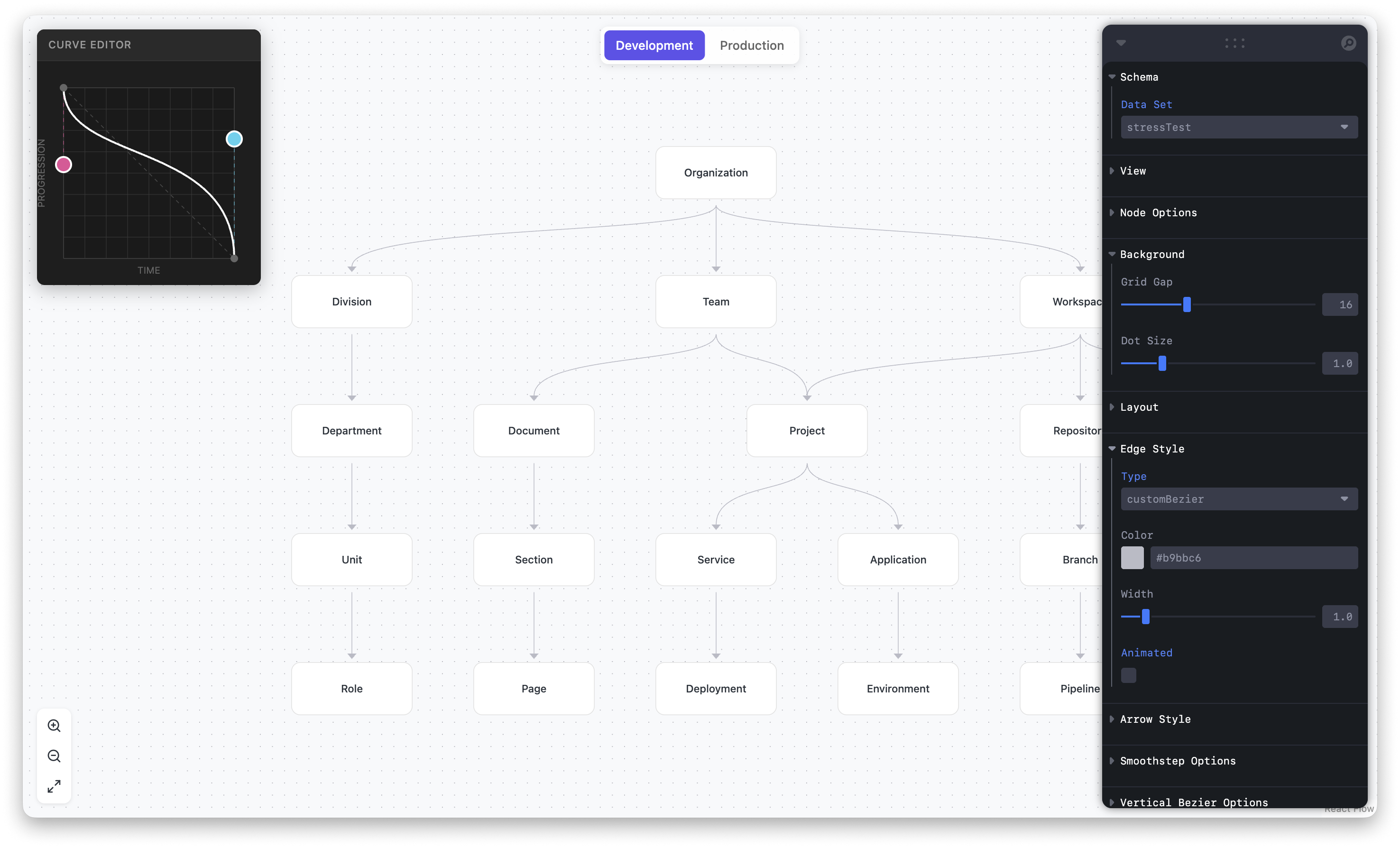
With AI, our baseline is more often than not a working prototype rather than a static mock. We still return to a canvas tool to fine-tune an idea and iron out final details, but it’s no longer the only place we begin.
Designing in production
As we’re designing, we use different artifacts with a range of fidelity to move quickly — sketches, wireframes, visual mocks, prototypes. Each one serves a different purpose at a different stage, with the same goal: get the right feedback at the right moment.
Traditionally, the further up the fidelity spectrum you went, the more time it took. The path from sketch to wireframe to mock to prototype was linear, and the prototypes were often fake, or made to feel like a version of the product people would actually use.
With AI, our team now prototypes and ships directly in production, allowing us to get better feedback earlier in the process. It's opened up a deeper layer of thinking we didn't have before, where we can validate decisions against real data and real states inside the actual product.
What we explore in production doesn’t have to ship to customers, and that’s important. What matters is that working in production forces us to consider the medium itself: edge cases, loading and performance decisions, permission models, and different API responses.
Designing in production means designing for what the product actually does, not what a mock can pretend to do. Being able to ship to production means we can be true stewards of craft too – a third of the 500+ UI Nits we've closed as a team were closed by designers.
The work ahead: agents
WorkOS isn't a single product, it's a platform. When we design something new, we think across numerous surfaces — the dashboard for our customers, an Admin Portal that lets IT admins self-serve, AuthKit for end users, and everything in between.
Increasingly that scope has expanded to surfaces that don't look like traditional UI: APIs, CLIs, and agentic experiences. The personas we design for keep changing too: we started with developers, then added IT admins, and now agents.
Agents are a new kind of user: one that can authenticate, read data, take actions, and make decisions on behalf of whoever's prompting it. That might be an engineer, but could also be a designer building a side project, a PM exploring an idea, or a founder who's implementing auth for the first time.
To allow agents to do the technical translation in the middle, our job is to give them everything they need to do that well: clear primitives, predictable shapes, and sufficient context to make the correct decisions. Who your agents are and what they're allowed to do are as much of a design question as they are a security one.
Come design with us
The work at WorkOS isn't just deciding what each screen should look like, it's deciding what the system needs to do. AI enables the design team to go deeper and work across a wider surface area, making sure we apply the same level of craft to our APIs and CLIs, for agents and users alike.
As the landscape evolves, it's important that we don't prescribe a single way to work — we trust each designer to match the tool to the moment, and encourage building new tools to better support our work.
If you're interested in working this way, we have plenty of opportunities to do so and would love to hear from you.