The WorkOS access model: Who gets into your organization, and how
Domain verification, organization policies, SSO, directory sync, JIT provisioning, and invitations, and how they fit together.

WorkOS has several mechanisms that all touch the same underlying question: who gets into an organization, and how. Domain verification, organization (domain) policies, SSO connections, directory sync, JIT provisioning, and invitations each handle a specific part of that question, and they're built to work together as layers rather than as a single gate.
This post walks through each mechanism on its own, shows how they combine, and then works through a few common real-world scenarios and how to implement each one in WorkOS.
The two questions every mechanism answers
Every one of these features is really answering one (or both) of two questions:
- Who is allowed to authenticate, and how? (password, SSO, passwordless, etc.)
- Who becomes a member of the organization, and how did that happen?
Keeping those two questions separate is the single most useful mental model here. Every mechanism below maps to one or both of them, some answer both at once, others only answer one.
The building blocks
Domain verification
Domain verification is the foundation everything else sits on. It proves that whoever configured an organization actually controls the domain they claim (typically via a DNS TXT record). Without it, anyone could claim initech.com for their organization and start pulling in real Initech employees through JIT or a domain policy. Only one organization can hold a given verified domain per environment, which is what prevents that collision.
Domain verification by itself does not grant access to anything. It's a prerequisite for the features below, not a gate on its own.
Organization authentication policies (domain policies)
Once a domain is verified, an organization can attach a domain policy to it. This is the piece that controls authentication method and automatic membership for anyone whose email matches that verified domain, regardless of whether they already have an account or which organization they picked at sign-in.
Two things fall out of a domain policy:
- It can require a specific authentication method (most commonly, SSO) for anyone on that domain.
- It works hand in hand with directory sync and JIT: users provisioned through a directory, or signing in for the first time with a matching domain, can be added as members automatically because the policy already vouches for them.
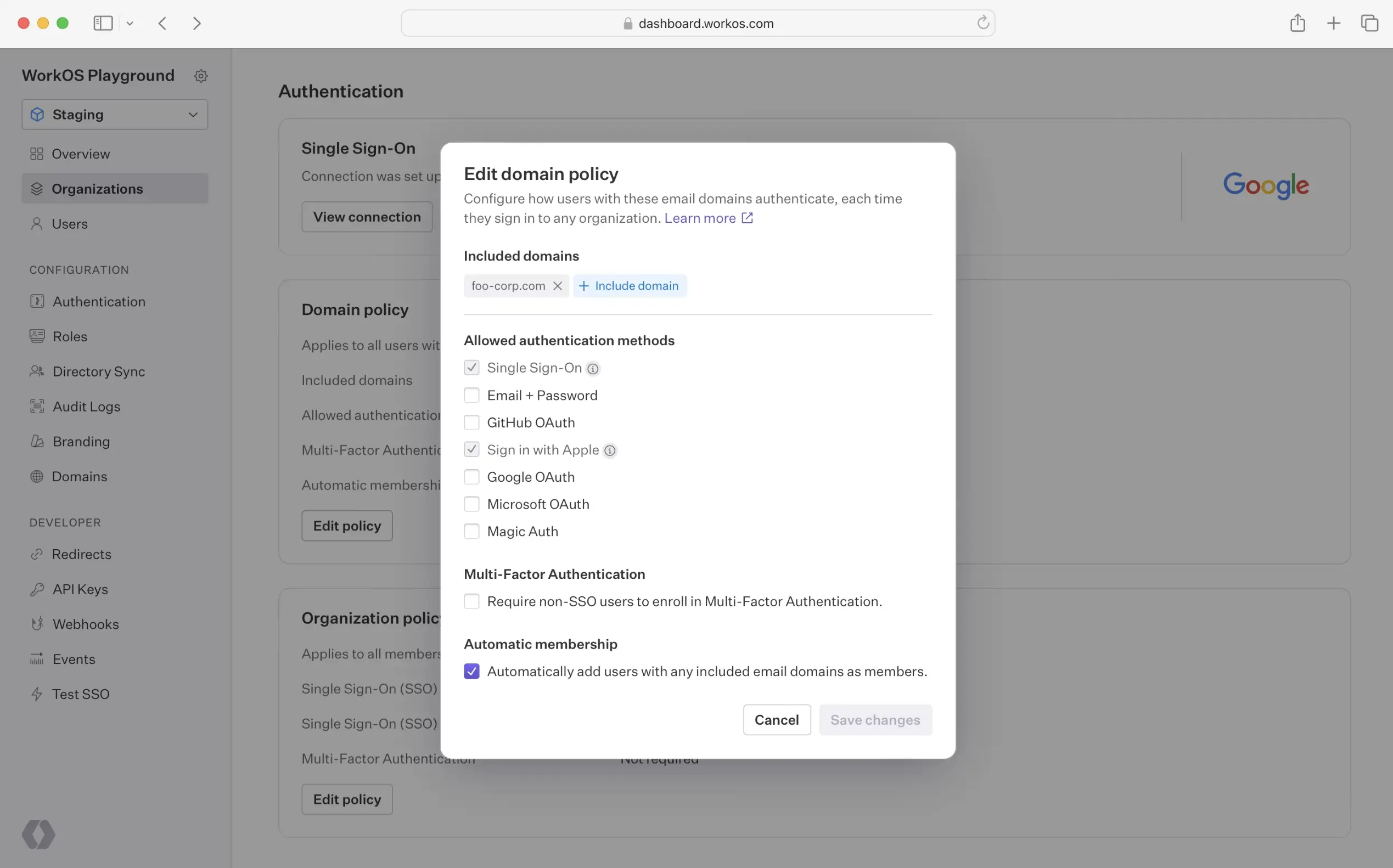
Domain policies are enforced for anyone with that domain in their email, not just people who are already members. That's what makes them powerful, but it also means they're not designed to work as a membership allowlist for one-off cases.
SSO connections
An SSO connection is the actual IdP integration (SAML or OIDC) for an organization. It answers "how does this person prove who they are," not "should this person have access." Note that once an SSO connection is configured for an organization, other authentication methods for that organization are typically disabled by default. The assumption is that the IT admin setting up SSO wants it to be the only way in.
Directory sync (SCIM)
Directory sync mirrors an organization's IdP directory: users and groups get created, updated, and removed in step with the source of truth. Directory sync determines membership for people the directory knows about.
Here's where it connects back to domain policy: a user provisioned through a directory whose email domain is included in the organization's domain policy is added as an active member automatically, no invitation required. A user provisioned through the same directory whose email domain is not in the domain policy is still created, but with a pending membership, and receives an invitation email to complete the join. Directory sync doesn't bypass domain policy, it defers to it.
JIT (just-in-time) provisioning
JIT provisioning creates a user and an organization membership automatically the first time someone signs in, without requiring a directory sync connection or a manual invite. It's built on top of domain policy: when someone's email domain matches an organization's verified domain, they're prompted to authenticate through that organization's IdP, and on success, a user and membership are created (or an existing user is added to the organization).
JIT is deliberately narrower for guests. If someone's email domain hasn't been verified for the organization, for example a contractor using their own personal domain, JIT won't silently add them. They have to be invited first, and only after that can they authenticate through the org's IdP. This is intentional: it stops someone from getting into an organization's IdP-gated resources just by showing up with an unrecognized email.
Both automatic membership by domain and SSO JIT are on by default, and both can be turned off per organization if an IT admin wants to control membership entirely through invitations instead.
Invitations
An invitation works on a different axis from the rest. Where domain policy, directory sync, and JIT all key off a verified domain, an invitation is a direct, explicit grant: someone with access to the organization decides a specific email address should join, regardless of what domain it's on.
This is why invitations supersede domain policy rather than being governed by it. Domain policies aren't an allowlist that invitations have to check against, they're a separate system for automatic membership and authentication. An invitation is a deliberate override: "I know this person isn't on our verified domain, but I want them in anyway."
A couple of details matter here:
- If the invited address is on a corporate domain, anyone else on that same domain can accept using their own address from that domain, not just the exact address invited.
- If the invited address is a consumer domain (Gmail, Yahoo, and similar), acceptance requires the exact email address the invitation was sent to.
How the mechanisms combine
Put together, the mechanisms form a layered system rather than a single gate. Domain verification, domain policy, SSO, JIT, and directory sync all build on top of each other into one automated path. Invitations sit outside that stack entirely, as a separate, deliberate path to the same outcome.

The table below breaks the same idea down mechanism by mechanism:
The practical way to think about it: domain policy, directory sync, and JIT all reason from "is this domain verified for this org," while invitations reason from "did someone with access decide to add this person." The domain-based systems don't constrain the invitation-based system, because they're built to solve different problems: one automates access for a known population, the other grants access to a specific individual on purpose.
Common scenarios and how to implement them
Employees should sign in through the company IdP and land in the org automatically
A customer wants every employee with a company email to authenticate through their corporate IdP, and to be added to the organization without any manual step.
To implement this:
- Verify the customer's domain.
- Create an SSO connection for the organization with their IdP.
- Set the organization's domain policy to require SSO for that domain.
- Enable JIT provisioning so a user and membership are created automatically the first time each employee signs in.
Membership and roles should stay in sync with the company directory
A customer's IT team wants memberships, and role assignments, to update automatically as people join, change teams, or leave, without manual intervention on either side.
To implement this:
- Verify the domain and configure the domain policy as above.
- Set up directory sync (SCIM) with their IdP.
- Map IdP groups to roles in your application.
- Users synced from the directory whose email matches the domain policy get active memberships automatically; when someone is removed from the directory, their membership is updated to reflect that.
Bringing in a single external contractor or partner
An organization wants to give one external person, for example an agency contact or contractor, access without changing anything about domain-wide policy.
To implement this:
- Send that person a direct invitation to the organization.
- If the organization also wants that guest to authenticate through their IdP, keep in mind the guest needs to accept the invitation first; only after that can SSO/JIT apply to them.
Making sure invitations can't add people outside approved domains
An organization wants a guarantee that no one can become a member unless their email is on a domain the organization has approved, including through invitations.
To implement this:
- Add a domain-validation check in your own invitation-sending flow: compare the invitee's email domain against the organization's verified/approved domains before calling the Invitations API.
- If you'd rather not build and maintain that check, ask your WorkOS contact about an organization-level setting that restricts invitations to an organization's own domains.
One company, multiple domains (mergers, subsidiaries, regional entities)
A single organization needs several verified domains, all governed by the same rules.
To implement this:
- Verify each domain individually.
- Add all of the verified domains to the same organization's domain policy.
- SSO requirements, JIT, and directory sync then apply uniformly across every domain included in that policy.
A simple way to reason about any specific case
To work out why a particular user has the access they do, it helps to ask, in order:
- Was this person invited directly? If yes, that explains the membership on its own, independent of domain policy.
- Is their email domain verified and included in the organization's domain policy? If yes, JIT or directory sync can add them automatically.
- Is their email domain not verified for this organization? Then the only way in is an explicit invitation, they won't be picked up by JIT or get an active membership through directory sync.

Access granted through an invitation to someone outside the organization's verified domains will always trace back to step 1, since none of the domain-based protections are designed to apply to invitations.
Built for flexibility and control
What makes this model work is that it doesn't force every organization into the same shape.
- A fast-moving startup customer can rely entirely on invitations and never touch domain verification.
- A large enterprise can lock everything down to SSO-only, JIT-provisioned access tied to a verified domain, with directory sync keeping membership and roles current automatically as their headcount changes.
- Most customers land somewhere in between, using domain policy and JIT for their main workforce while still inviting the occasional contractor or partner on a different domain.
Because domain-based automation and invitation-based grants are separate systems rather than one rigid pipeline, each organization can combine them to match how it actually operates, without WorkOS having to guess at a one-size-fits-all rule for who belongs where.
Ready to put this into practice? Sign up for WorkOS and start configuring domain verification, SSO, and JIT for your first organization in minutes.