Impersonation when your session is a bearer token
Why the cookie swap every framework recommends does not transfer, what each SDK actually hands you, and why the exit path is safer here than it was.

Search for how to implement user impersonation and you will find the same answer once per framework generation. Rails has Pretender. Django has django-hijack. Laravel has laravel-impersonate. Symfony ships _switch_user. Every one of them does the same thing underneath: swap the session cookie for one belonging to the target user, stamp a marker somewhere so you can swap back, done.
Then you try it in a single page app or a mobile app, and none of it applies. There is no session cookie to swap. The advice runs out exactly where your architecture starts.
You can watch this happen in public. The NextAuth discussion asking for impersonation has been open for five years. A Stack Overflow question about impersonation in a Rails API with a React front end waited four and a half years for its only answer, which opens by disclaiming itself. Laravel has a second impersonation package that exists solely because the first one does not support token based authentication. The question keeps getting asked because the cookie generation's answer does not carry over, and nobody has written the replacement.
Here is the replacement, for AuthKit specifically.
The good news is that the signal is already in the token
The reason the cookie recipe feels load bearing is that in a cookie world, the session is the cookie. Swapping it is how you change who you are, and the marker you stamp alongside it is the only record that a swap happened.
In a token world both of those jobs are already done for you, because the impersonation information travels inside the credential rather than beside it.
When a session is created through impersonation, the authenticate response carries an impersonator object with the WorkOS Dashboard user's email and the reason they typed before starting. The access token itself carries an act claim, and act.sub holds the same email. Every request your client makes already carries that claim, because it carries the token.
That is the whole difference. You are not maintaining a side channel that says "this is really an admin." The credential says so, it is signed, and your API can verify it without being told anything extra.
One dashboard setting stands between you and a rejected redirect
Before any of that works, there is a configuration step that is easy to miss and produces a baffling error when you do.
The impersonation flow starts in the WorkOS Dashboard and redirects a browser into your app. An SDK that validates PKCE or OAuth state will reject that redirect, because from its point of view a response arrived for a request it never made. There is no code verifier, no state to compare against.
The fix is to configure your application's Initiate login URI under Applications, then your application, then Redirects. Point it at your sign-in route, not your callback route. The impersonation redirect then lands on sign-in first, your SDK initializes PKCE and state the way it would for any other login, and only then does the flow continue to your callback with an authorization code for the impersonated user.
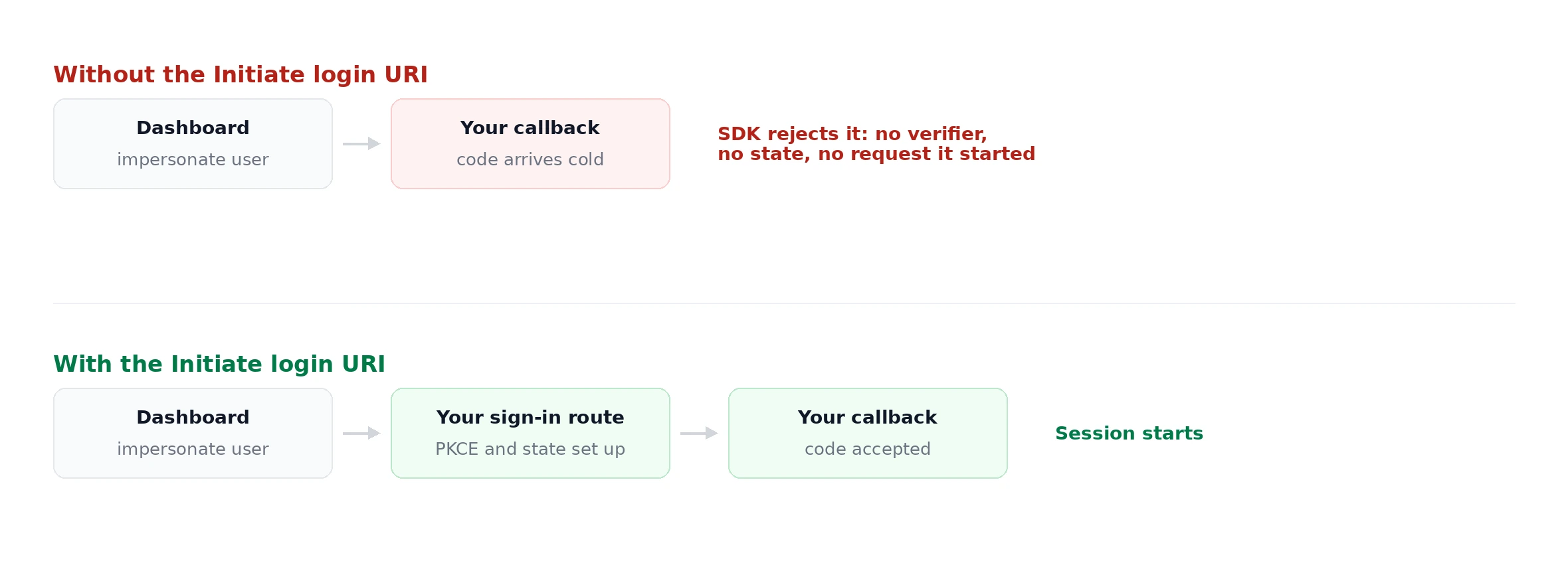
Get this wrong and impersonation redirects straight to the default callback, which any PKCE-validating SDK will refuse. The symptom looks like a broken SDK rather than a missing setting, which is why it is worth knowing before you debug it.
What your SDK actually gives you
This is where the SDKs differ more than you would expect, and where most of the time gets lost.
authkit-react does the work for you. The impersonator is part of the auth state:
impersonator is { email: string, reason: string | null } or null. It is populated on the initial code exchange and again on every token refresh, so the banner survives a refresh rather than flickering out mid-session.
authkit-js carries the data but does not keep it. This is the trap. The impersonator is present on the authentication response and on the refresh response, but the client stores only the user, access token, and authentication method. There is no getImpersonator(), and getUser() will not tell you. If you read it from the response and then throw the response away, the information is gone until the next refresh.
So capture it yourself, in either callback:
Handle both. The redirect callback fires once when the impersonation session starts, and the refresh callback fires for the rest of the session's life. Wire only the first and your banner disappears at the first refresh, which is the worst possible failure because the session is still impersonated.
There is a second signal if you prefer it: the authentication method on that same response can be Impersonation.
On mobile, the PKCE exchange returns it too. The Android and iOS SDKs both include impersonator on AuthenticateResponse, and it is reachable from the public client path that carries no API key at all:
AuthenticateResponseImpersonator has email: String and reason: String?. No secret is involved anywhere in that flow, which is the clearest demonstration that impersonation state reaches a genuinely public client.
Reading the claim on the client is not authorization
Both authkit-js and authkit-react export getClaims, and you may reach for it to read act directly. Two things to know.
It decodes without verifying. That is fine for deciding whether to draw a banner, and it is not a basis for any decision that matters. Anything security relevant happens on your API, against a token verified with the JWKS for your client.
And act is not in the exported payload type, so TypeScript will not find it unless you say so:
Note that act.sub is an email address, while the top level sub in the same token is a user ID like user_01HBEQ.... Two claims named sub, two different kinds of value. Do not write code that treats them interchangeably.
On the API side, nothing extra is needed. You already verify the token on every request. The act claim arrives with it, so the impersonator identity is available to your authorization and audit code for free:
That last field is what belongs in your audit trail. Attributing the action to the user alone loses the fact that an admin did it. Attributing it to the admin alone breaks the flows you were impersonating in order to reproduce.
The exit path is where cookie implementations get CVEs
Here is the part that is genuinely better in a token world, and nobody has said so.
In the cookie model, "stop impersonating" means restoring the admin's previous session, which means the app has to remember who the admin was. Implementations store that breadcrumb client side, and then trust it on the way back. That has gone wrong twice in public in the same way.
The devise_masquerade gem put the impersonator's user ID in the session cookie without the password salt that Devise normally requires, so an attacker could write any user ID into a decrypted cookie and have "back" return them as that user. CVSS 8.1. Five years later a WordPress plugin shipped the same bug class, treating a client controlled cookie as authoritative identity on its return path. The pattern is consistent: the dangerous direction is not going in, it is coming back.
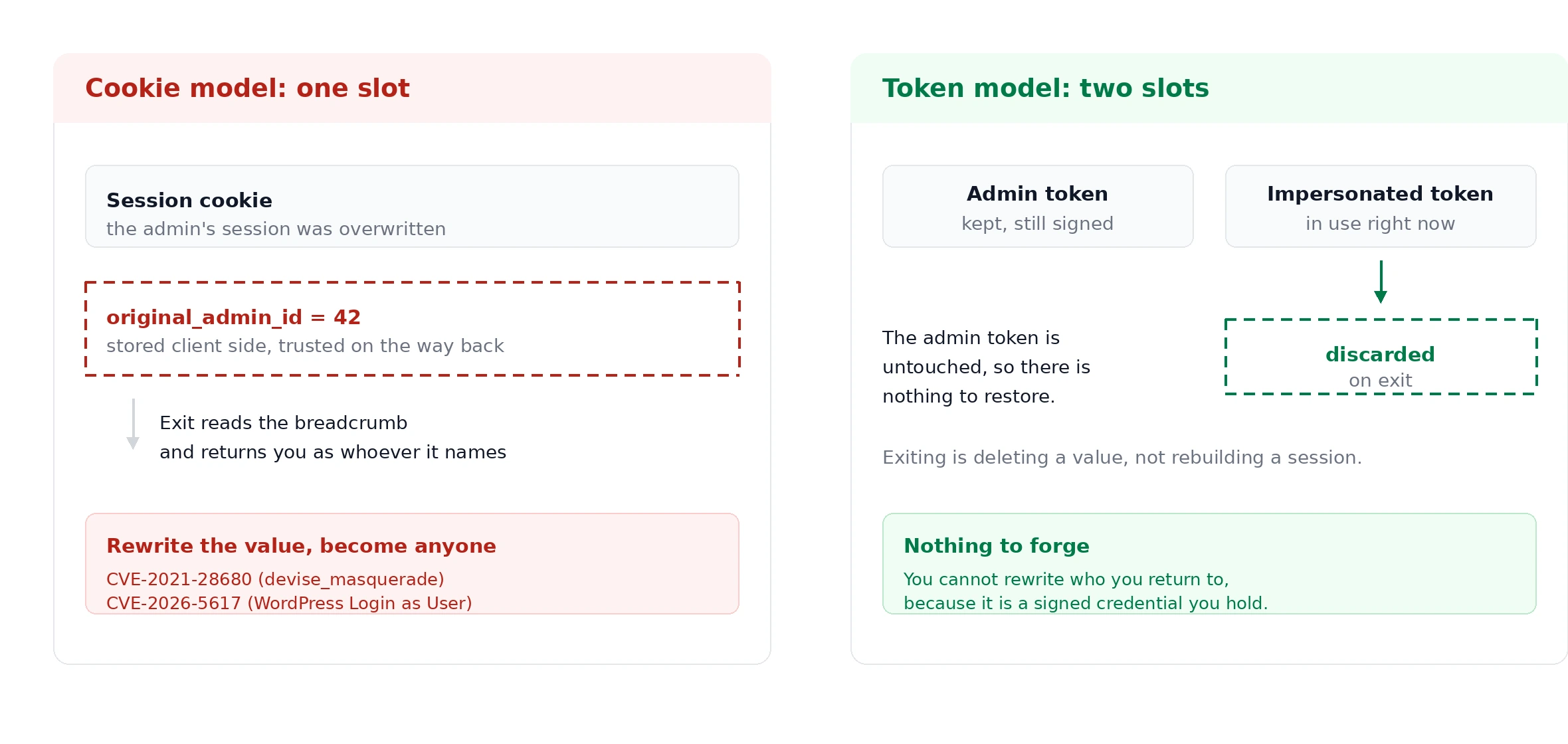
Bearer tokens sidestep this, provided you do one thing: never overwrite the admin's own token with the impersonated one.
Exiting is discarding a token. There is nothing to restore and nothing to trust, because the admin's own token was never destroyed and is self authenticating in a way a stored user ID is not. The forgery that broke both of those implementations has no equivalent here: you cannot rewrite who you return to, because who you return to is a signed credential you already hold.
This also gives you something the cookie model makes awkward. Since the two tokens are separate values rather than one slot, an admin can be impersonating in one tab and be themselves in another. Pigment's engineering team built exactly this deliberately, storing both identities so the admin's own session is never clobbered. With tokens you get it close to free.
Ending the session on purpose
Impersonation sessions expire on their own after 60 minutes, which handles the Friday afternoon session that is still open on Monday. Before that, there are two different mechanisms and they are not interchangeable.
The logout URL ends the session at WorkOS via a browser redirect. This is what the <Impersonation /> component's stop button actually does, despite looking like a purely client side control: it resolves the session ID, clears local state, and redirects to the logout endpoint. Use this when the impersonating admin is the one stopping.
The revoke session API is server to server. It takes a sessionId, which you get from the sid claim, and it kills a session the caller is not holding. Use it when someone else needs to end a session, for example a security console cutting off an impersonation in progress.
The catch for anyone building a SPA or a mobile app: revoke requires a secret key. Your client cannot call it, and should not be able to. If you want "end this impersonation session" as a feature, it is an endpoint on your own backend that takes a session ID and calls WorkOS with the key your server holds. Plan for that rather than discovering it when the call returns a 401.
The short version
- Configure the Initiate login URI to your sign-in route, or a PKCE SDK will reject the impersonation redirect.
authkit-reactgives youimpersonatorfromuseAuth().authkit-jsgives it to you once, inonRedirectCallbackandonRefresh, and then forgets it. Capture both.- On mobile,
AuthenticateResponse.impersonatorcomes back from the public client PKCE exchange with no secret involved. getClaimsdoes not verify and does not typeact. Banners only.- Keep the admin's token and the impersonated token in separate slots. Exiting is discarding one, which is why the bug class that produced two CVEs does not arise here.
- Sessions expire after 60 minutes. The logout URL ends one from the browser, the revoke API ends one from your server, and only the second needs a secret key.