What invalid_grant actually means, provider by provider
One string, five spec conditions, and a different meaning at every provider. Here is what Google, Microsoft, Salesforce, Xero, QuickBooks, and Slack each mean by it.

A token refresh just failed and your logs contain this:
That is a 400 from the token endpoint, and it is the least informative error in OAuth 2.0. RFC 6749 defines invalid_grant as an authorization grant or refresh token that "is invalid, expired, revoked, does not match the redirection URI used in the authorization request, or was issued to another client". Five conditions, one string, and the first of them is a catch-all that swallows the other four. Two are your bug, two are the user's account changing underneath you, and the catch-all is where every provider files everything else, including a wrong system clock.
The fix depends entirely on which one you hit, and the only thing that tells you is the provider-specific text sitting next to it.
The spec made one string do five jobs
error_description is optional in the spec, human-readable text to help the client developer understand what happened. That is where every provider puts the answer, and it is also the field every provider tells you not to depend on. Microsoft is blunt about it: error_description is "A specific error message that can help a developer identify the root cause of an authentication error. Never use this field to react to an error in your code". It also warns that its error codes are subject to change at any time, and that apps taking a dependency on the text or the numbers "will be broken over time."
So the machine-readable field tells you nothing you can act on, and the human-readable field that does is the one you are told not to branch on. In practice you branch on it anyway, defensively, with a fallback to full re-authorization. Here is what each provider is actually telling you.
Google revokes for seven different reasons
Google enumerates why a refresh token stops working: the user revoked your app's access, the token hasn't been used for six months, the user changed their password and the token carries Gmail scopes, the account exceeded its maximum number of live refresh tokens, granted time-based access expired, an admin set one of your requested services to Restricted, or, for Google Cloud Platform APIs, the session length set by the admin was exceeded. The Restricted case surfaces as admin_policy_enforced rather than invalid_grant, which is one of the few times Google hands you a directly routable code. The session-length case is the one that shows up wearing invalid_grant, and it gets its own section below.
Two of these bite hardest during development. If your Google Cloud project's consent screen is set to an external user type with publishing status "Testing," refresh tokens expire after 7 days unless the only scopes you requested are a subset of name, email address, and user profile. Any test account you don't re-authorize inside those 7 days loses its refresh token silently, and nothing in the error text says "your app is in Testing." It's the same expiry that quietly breaks Calendar and Gmail integrations built in testing mode.
The other is the token cap. Google allows 100 refresh tokens per Google Account per OAuth 2.0 client ID, and when you hit the ceiling, creating a new one invalidates the oldest without warning. Service accounts are exempt. If your reconnect flow mints a fresh grant every time a user clicks "Connect," you are the one revoking your own tokens. There is also a larger, undocumented limit across all clients, which is why Google suggests keeping a single account authorized to 15 or 20 clients at most, a number a developer's test account blows through quickly.
Then there is the session policy. When a Google Cloud session control policy expires, calls fail with error type invalid_grant, and the error_subtype field is what distinguishes a revoked token from a policy expiry, for example "error_subtype": "invalid_rapt". Those session durations run from 1 hour to 24 hours, and the correct response is to restart the auth session. Treat every invalid_grant as "the user disconnected us" and you will send an admin-governed enterprise user a reconnect email every hour.
When Google means your server clock is wrong
Service accounts get their own family of invalid_grant responses, and the most common one is not an authorization failure at all:
Google's own reading of this: usually the local system time is not correct. It also fires if the exp value is more than 65 minutes in the future from iat, or if exp is lower than iat. The documented fix is to correct the clock on the machine generating the JWT, syncing with Google NTP if needed. The claim set's exp has a documented maximum of one hour after the issued time, with the 65 minutes acting as skew tolerance, so a hardcoded 24-hour assertion lifetime fails the same way a drifting VM does.
Two more in the same flow are worth memorizing, because neither is fixed by re-authorizing. Google documents two separate strings for a missing user, Not a valid email and Invalid email or User ID., both meaning the user in your sub claim doesn't exist. Match on both, and note that only the second carries a trailing period. Invalid JWT Signature. means you signed with a private key not associated with the service account, or one that was deleted, disabled, or expired, or you encoded the assertion incorrectly.
Microsoft hides the real error in a number
Microsoft's definition of invalid_grant is the widest of any major provider: some of the authentication material (auth code, refresh token, access token, PKCE challenge) was "invalid, unparseable, missing, or otherwise unusable," and the suggested action is a new request to /authorize. Useless on its own. The signal lives in the error_codes array and the AADSTS code embedded in the description, alongside trace_id and correlation_id.
The codes that matter for a refresh loop:
Lifetimes explain most of the rest. Microsoft's defaults are 24 hours for single-page applications, 24 hours for apps using the email one-time-passcode flow, and 90 days for all other scenarios. Since January 2021 these are no longer configurable, so they are the only values you will see. Refresh tokens replace themselves with a fresh token on every use, and Microsoft does not revoke the old one when you redeem it, which makes deleting it your job. Unlike strict-rotation providers, a lost response here is survivable.
Revocation is not uniform either. A user changing their own password revokes password-based cookie and token grants but leaves confidential-client tokens alive. An admin resetting the password from the Entra admin center revokes confidential-client tokens too, though the same reset performed from the Azure portal does not, which is a distinction worth knowing before you tell a customer their access was cut off. And for B2B users, refresh tokens are not revoked in the resource tenant at all; that has to happen in the home tenant. So an admin who reset a password and assumed everything was severed may still have your integration running on a confidential-client token.
Salesforce counts the time of day as a grant problem
Salesforce publishes the longest invalid_grant list of the group: invalid authorization code, invalid user credentials, invalid user, invalid assertion, invalid audience, IP restricted or invalid login hours, a code_verifier that is malformed or doesn't match the code_challenge, a code_verifier sent when no code_challenge was specified, a user who hasn't approved the connected app, generic authentication failure, a device flow that isn't enabled for the connected app, and, for the refresh flow, an expired refresh or access token.
One distinction worth keeping straight in that list: "user hasn't approved the connected app" is user consent. Admin non-approval is a different error code entirely, invalid_app_access, and the remedy involves a different person.
IP restricted or invalid login hours deserves its own alert path. It means your integration works during business hours and returns an authorization error at 2am, or works from your office and fails from a new worker IP. Nothing about the token is wrong. There is also a host-domain trap: the client credentials flow returns invalid_grant if you point it at login.salesforce.com or test.salesforce.com instead of the org's My Domain URL.
Then there is rotation. With refresh token rotation enabled, Salesforce issues a new refresh token along with the access token each time the flow is invoked, and the previous refresh token is automatically invalidated. Reuse a rotated-out token and it escalates: Salesforce invalidates the current refresh token and any associated access tokens, and the client has to complete a new flow. One stale copy in a retry queue costs you the connection, not just the request.
That makes concurrency a correctness issue rather than a performance one. Salesforce explicitly warns against sending simultaneous requests that contain the same refresh token: identical concurrent requests fail intermittently, and Login History shows Failed: Token request is already being processed. If you run more than one worker per connection, serializing refreshes is a prerequisite for correct error handling, not an optimization.
Rotation turns a dropped response into a lost connection
Xero and QuickBooks both rotate, and both give you a window to recover from a failed write. The windows differ, and so do the consequences.
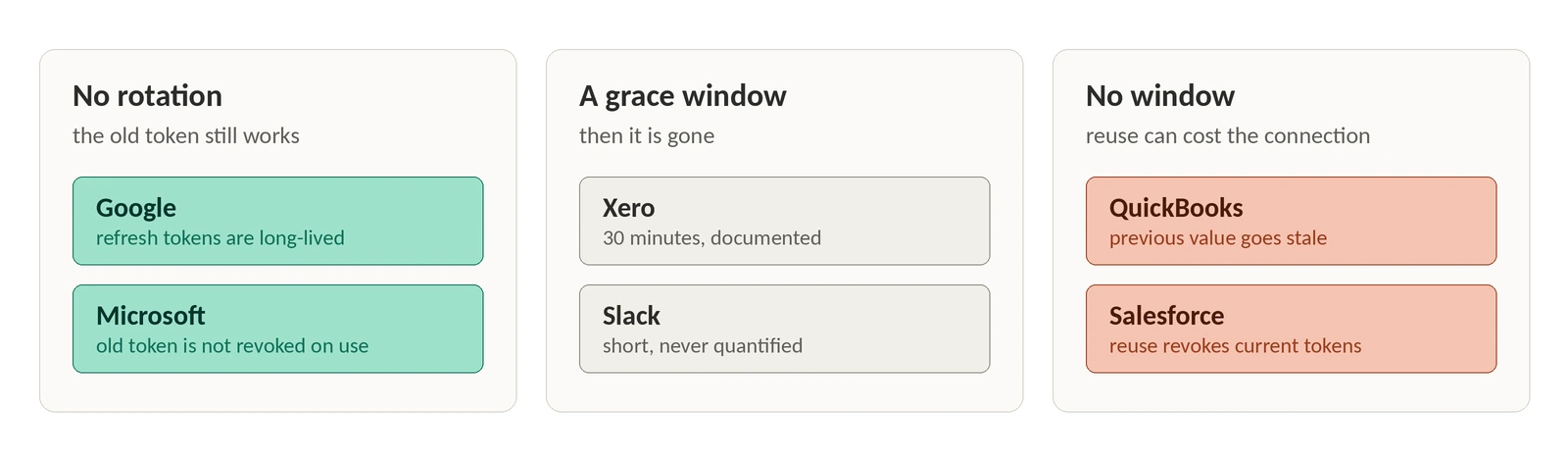
Xero: authorization codes may only be exchanged once and expire 5 minutes after issuance; the id_token lasts 5 minutes, the access token 30 minutes, the refresh token 60 days. Every refresh returns a new access token and a new refresh token, and you must save both to maintain API access. If your app doesn't receive the response, or fails to save the new token, you can retry using the existing refresh token for a grace period of 30 minutes. After that the previous refresh token expires and the user has to re-authorize.
QuickBooks: the access token is good for 3,600 seconds and the refresh token for 100 rolling days, extended each time it's used, with a hard cap of five years. But the refresh token's value changes roughly every 24 hours, and when a new one comes back the previous value goes stale. Use a stale refresh token and you get invalid_grant.
Intuit also documents a concurrency hazard sharper than Salesforce's. Exchange tokens one at a time: if two attempts are made in parallel, the first succeeds and the second returns invalid_grant, and Intuit's servers "may see this as a possible security issue and revoke your refresh tokens for the first successful call." The parallel request does not merely fail, it can take the successful one down with it.
Then there is the trap in the status codes. A 400 from the QuickBooks token endpoint at oauth.platform.intuit.com/oauth2/v1/tokens/bearer should carry invalid_grant, while 5xx means outage and should be retried. But Intuit separately documents that service outages "may return an invalid_grant error," so a 400 is not reliable evidence that the grant is dead. A simultaneous spike of invalid_grant across every QuickBooks tenant is a status page check, not a mass reconnect campaign.
On the code-exchange side, Intuit attributes invalid_grant to redirect URI mismatches, redirect URIs carrying query parameters, and mixing development keys with production environments. Those never resolve by retrying.
Grace windows vary more than you'd expect. Slack's rotating access tokens always expire in 43,200 seconds, and the refresh token you just used is revoked after a short grace period that Slack deliberately never quantifies. Refresh repeatedly before expiry and a burst guard applies: call oauth.v2.access multiple times for the same token within a 12-hour period and Slack enforces a limit of 2 active tokens, revoking the oldest additional one.
Triage by asking which grant you sent
Before reading the description, answer one question: which grant type produced this error? It halves the search space.
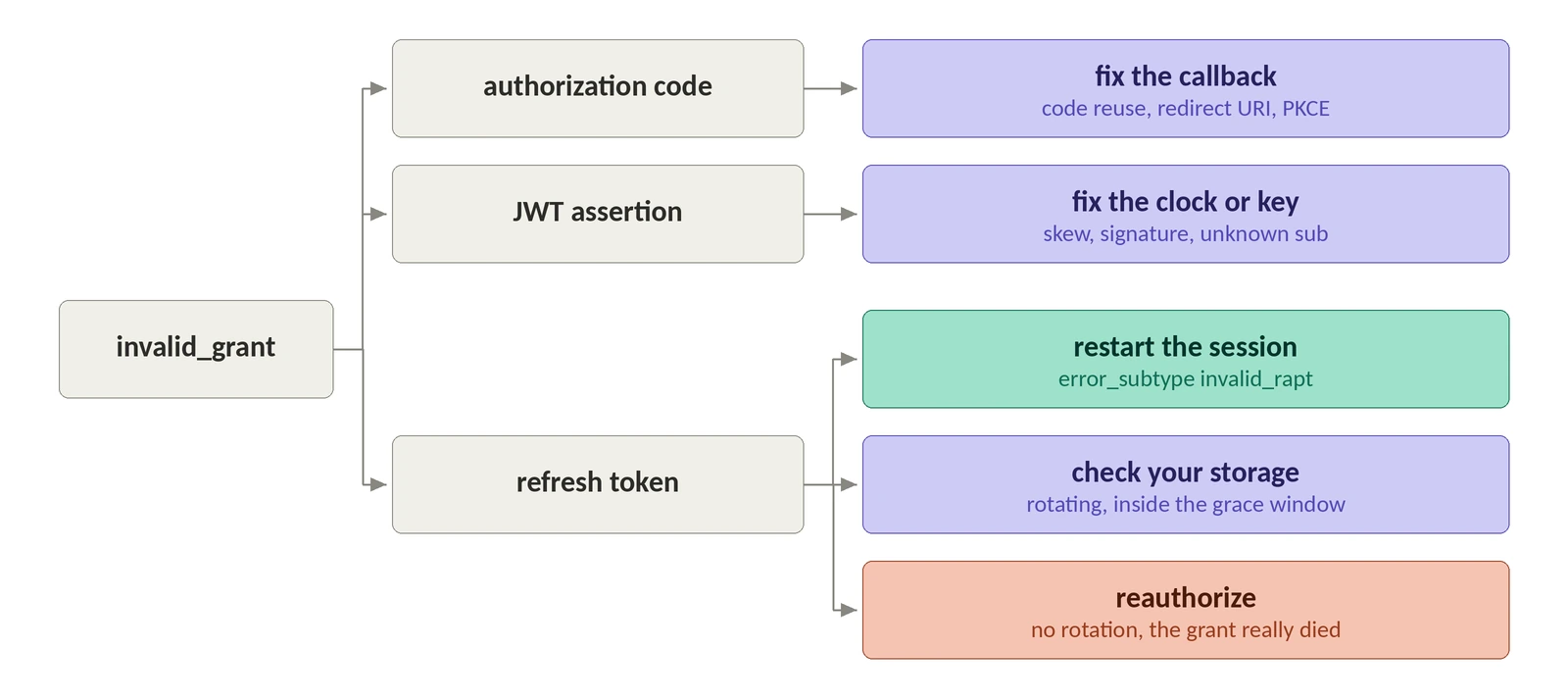
If you sent an authorization code, the token is not the problem. Codes are single-use, with a recommended maximum lifetime of 10 minutes, and on reuse the authorization server must deny the request and should revoke all tokens previously issued based on that code. Double-submitted callbacks, a retried POST, a user refreshing the redirect page, a redirect URI that doesn't match byte-for-byte: those are code-exchange bugs. Microsoft names it outright with AADSTS54005.
If you sent a JWT assertion, suspect the clock and the key before the account.
If you sent a refresh token, split on whether the provider rotates. Non-rotating means the grant genuinely died: revocation, inactivity, or a policy timer. Rotating means your storage might be the culprit, and the window to recover is measured in minutes.
Two outcomes are not enough for that. Here is the shape:
The string matching is the disposable part; swap it for provider-keyed rules and the AADSTS numbers where you have them, and remember that Google signals admin scope restrictions with its own admin_policy_enforced code rather than invalid_grant. What matters is that fix_client and restart_session exist at all. A pipeline with only "retry" and "reauthorize" branches will happily email a customer to reconnect their account because your container's clock drifted outside the window Google allows between iat and exp.
Note what retry_later is not. A login-hours failure resolves when the org's business hours come around, and an IP restriction never resolves from the same egress address at all. Wire either one into a naive exponential backoff and you have built a machine for hammering a token endpoint all night.
Misclassification scales the way your refresh loop does. A rule that maps clock skew to re-authorization doesn't produce one bad email, it produces one per connection per cycle, so log the classification decision next to the raw error and watch the ratio between branches. A deploy that quietly moves 40% of failures into the reauthorize bucket is visible in that ratio hours before it shows up in your reconnect rate.
Log the fields that make the next one a five-minute problem
Every invalid_grant you can't diagnose after the fact is a logging gap. Record the grant type you sent, the provider, the verbatim error_description, and, for Microsoft, the error_codes array plus trace_id and correlation_id, which is the minimum needed to trace a failure without reproducing it. Store the issue time of the refresh token you used: AADSTS50173 hands you the grant's issue time and the user's TokensValidFrom date, and comparing them tells you immediately whether a password reset killed it. Log which worker performed the refresh, so Failed: Token request is already being processed resolves to a concurrency bug instead of a mystery.
Log rotation writes as their own event, too. When a provider expires the old refresh token the moment it issues a new one, the interesting failure is the write you didn't persist, and that happened before the error you're looking at.
invalid_grant is a routing decision with four destinations: retry later, fix your client, restart the session, or send the user back through consent. Go back to that Token has been expired or revoked line at the top of this post. With the grant type, the provider, and the raw description stored beside it, you can tell in one lookup whether you're looking at a clock, a queue, or a genuine revocation. Decide what your code does with the clock case first, because that's where re-authorization is both the most tempting response and completely wrong.