Building a mental model of identity providers from scratch
I tried to reverse-engineer how SSO works from three angles: as the employee logging in, the IT admin managing access, and the developer who needs to support it. Here is what I learned.

I've used Okta at previous jobs, but I never sat down to build a mental model of how an identity provider actually works under the hood. Joining WorkOS, that's my first order of business. The model doesn't have to be perfect, only plausible, and I'll update it as I learn more.
I'm going to think out loud from three perspectives: an employee using SSO to access their tools, an IT admin at the same company, and a developer building an application that needs to offer SSO as an authentication method.
The employee
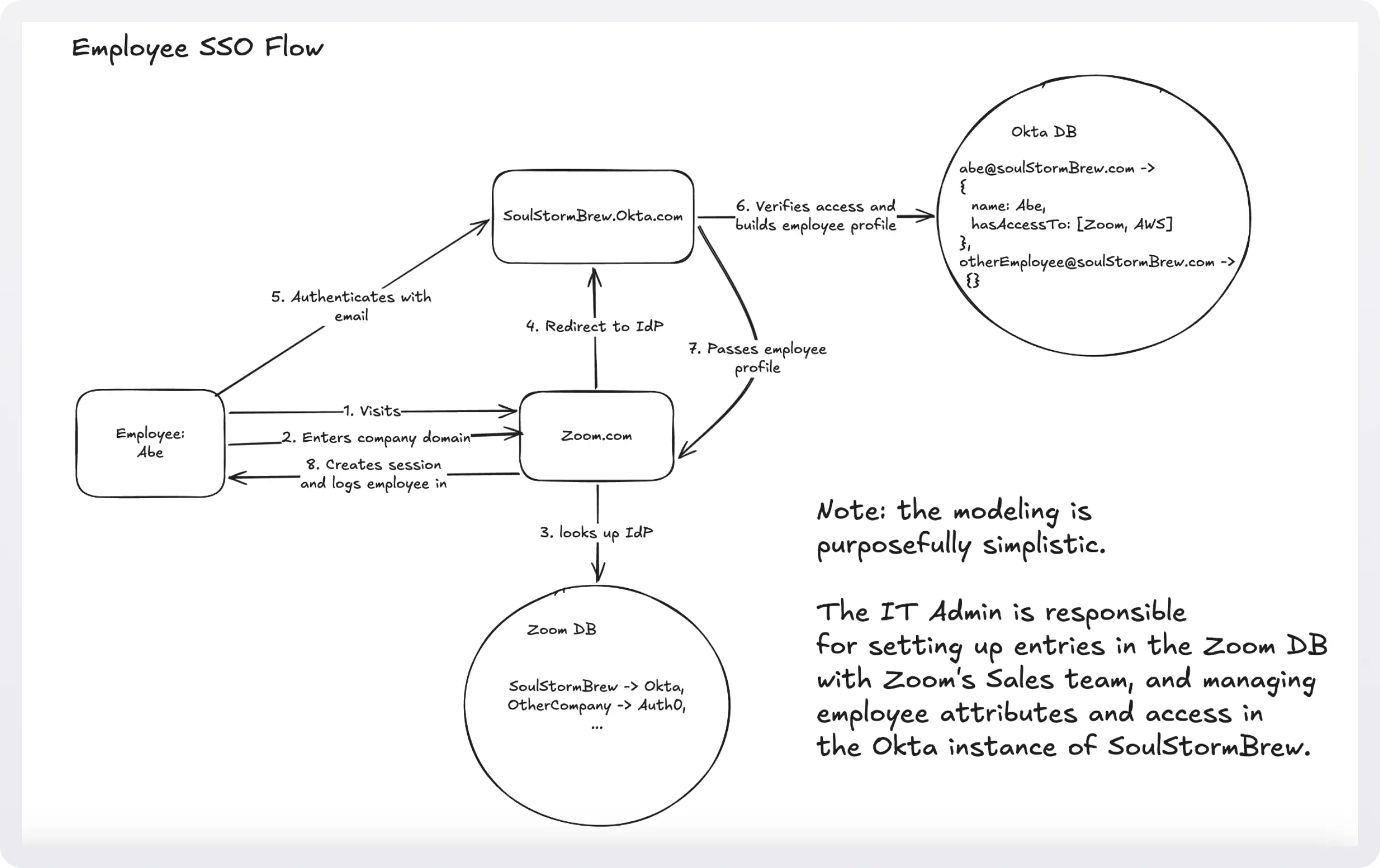
Say I'm an employee at SoulStormBrew and I want to log into Zoom. I click the SSO link and Zoom asks me for my company domain. I enter it, and I'm redirected to soulstormbrew.okta.com.
First learning: Zoom already knows that SoulStormBrew uses Okta. That connection had to be set up beforehand. My best guess is that an IT admin at SoulStormBrew registered Zoom inside Okta and pointed Zoom at the company's Okta subdomain.
On the Okta page, I verify my identity. There are a few ways this can happen: email and password, an authenticator app code, the Okta Verify app. Once that completes, I'm dropped into Zoom, and my first and last name are already filled in on my profile.
That's the second interesting thing. I never typed my name during the login flow. It can't be coming from Zoom. So it must have come from Okta, which means someone (the IT admin again) entered my name and role into Okta at some point, and Okta handed that profile information to Zoom as part of the login.
The IT admin
Now flip perspectives. I'm the IT admin, and my job is to set up applications for the rest of the org.
SSO makes obvious sense here. Without it, I'd have to manage access to every application for every employee individually. Granting or revoking access would mean logging into each app, finding each user, and updating their settings by hand. With SSO, I can grant access to a whole set of apps for a new hire (or cut off a departing one) from one place.
Step one is picking an identity provider. Something like Okta. I should pick exactly one, because the whole point is that a single sign-in gets me into many apps. Then I'd shop for applications and wire each one up to Okta.
When procurement signs the Zoom contract, what does Zoom actually need from me to make this work? At a minimum, Zoom needs to know the name of my identity provider and my company's domain, so that when an employee starts a login it can redirect them to the right Okta subdomain.
What happens on Okta's side? Okta receives an authentication request from Zoom for some employee at my company. It needs to figure out which employee, so it prompts for an email and asks them to authenticate (password, passkey, authenticator codes, whatever combination is configured). Then it checks whether that employee is actually allowed into Zoom, and if so, it prepares a profile to send back. That profile carries things like name, email, access level, and any other attributes the app cares about.
That tells me what the day-to-day as an IT admin actually looks like. For each employee, I fill in their information once (name, email, role) and then assign them access to each app and configure what profile payload gets sent to each one. Some apps only want an email. Some want a name. Some want a role. Hopefully there are sane defaults for the popular apps so I'm not hand-mapping fields from scratch every time, and I can probably group apps into bundles like "Engineering Apps" and grant the whole bundle in one click.
On the way out: deprovisioning should be one switch that severs every app at once.
The application developer
Last perspective. I'm a developer. My app is doing well, but customers only authenticate with email and password. Enterprise buyers want to come on board, and they're not going to manage their employees inside my bespoke admin panel. I need SSO.
Which identity provider do I integrate with? Okta? Auth0? Microsoft Entra? The honest answer is: as many as I can, because every enterprise prospect has already picked one, and if I don't support theirs, I don't win the deal.
The protocols themselves (SAML and OIDC, which is built on OAuth 2.0) are open standards. But I can already anticipate that it will not be simple: every identity provider has its own idiosyncrasies on top of those standards, and I'd be the one absorbing the differences. This is where WorkOS comes in. Its pitch is to tuck that accidental complexity away behind a single API so I can spend my time on product instead of wrangling each provider's quirks.
Whichever route I take, I have some work left to do. I need to decide which user profile fields my app actually depends on (name, email, maybe city, maybe a role that determines whether they're an admin) and register those requirements with each identity provider I support. Or just once, if I'm going through WorkOS.
I also need to tell the identity provider which page users should land on after a successful login. And logout is more involved than it sounds: it isn't just clearing a local session. It may also need to call the identity provider to terminate the session on its side via a single logout flow, so that signing out of my app actually signs the user out everywhere.
Where this leaves me
I'm sure I'm missing nuance. Real protocol details, edge cases around JIT provisioning, directory sync, group mappings, signed assertions, certificate rotation: none of that is in this model yet. But the three-perspective sketch gives me a frame to hang the rest of it on, and that's enough to start asking sharper questions.
I'll come back and revise this as the picture fills in.