Migrating auth at scale: What changes above 200K users
Auth migrations at scale break in different ways than small ones. This guide walks through the CLI-first import workflow, the transparent proxy approach for large SSO fleets, webhook sequencing, and feature-flag-based rollout — using the updated WorkOS migration docs as the backbone.
A practical guide to migrating auth at scale — the CLI workflow, transparent proxy approach for 15+ SSO connections, and webhook sequencing above 200K users.


Auth migrations break in different ways depending on scale. At 5,000 users with three SSO connections, you can hand-roll a cutover in a weekend. At 200,000+ users with dozens of enterprise SSO connections, every shortcut you took in the small-migration playbook turns into an outage. We just shipped a comprehensive refresh of the WorkOS migration guides aimed squarely at that second group: teams who have outgrown their current auth provider and are nervous about the blast radius of moving.
This post walks through what actually changes above the 200K user/org threshold: the CLI-first import workflow, the transparent proxy approach for large SSO fleets, webhook disable sequencing, and feature-flag-based rollout.
Why 200K is the inflection point
Below a few tens of thousands of users, you can get away with a stop-the-world migration: freeze writes, export users, import them, cut over DNS, accept some downtime, move on. The math stops working somewhere north of 200K users and orgs. The general migration guide now explicitly covers the 200K+ user/org support threshold, because the failure modes shift:
- Single-shot imports take long enough that the source-of-truth diverges before the cutover completes.
- Webhook fan-out from your old provider becomes a thundering herd against your backend the moment you re-enable it.
- Enterprise SSO connection counts cross the threshold where individual reconfiguration with IT admins stops being viable.
- The risk of a partial failure rolling back hours of progress becomes unacceptable.
The migration docs refresh is structured around these specific failure modes.
The CLI is now the primary import workflow
npx workos migrations is now the primary import workflow across every provider guide we publish — Auth0, Clerk, Firebase, Stytch, Descope, Cognito, Supabase, and Better Auth. The full set of guides lives at workos.com/docs/migrate.
We standardized on a CLI rather than a one-click importer because imports at scale need to be resumable, batched, and observable. A 200K-user import is not a single API call. It's a stream of batches that you want to:
- Run in chunks small enough that any single failure is recoverable.
- Pause and resume against the same source export without re-importing duplicates.
- Diff against the source to confirm completeness before flipping traffic.
A CLI gives you a stable, scriptable surface for that. You can run it from CI, wrap it in your own orchestration, and reason about its behavior in code review. It's the same shape across every source provider, so the playbook your platform team learns for one migration carries over to the next.
What the CLI actually does to your users
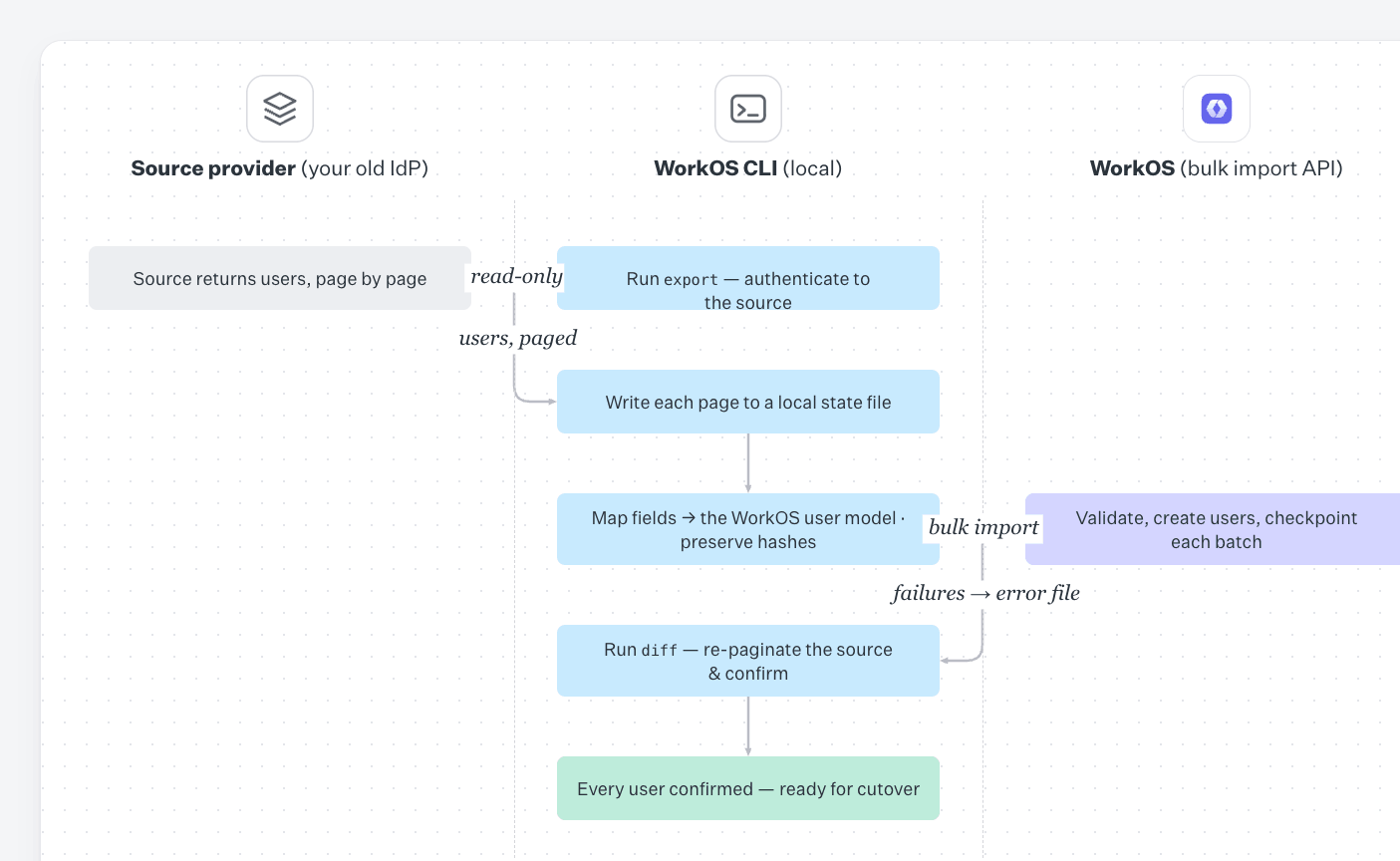
The shape of npx workos migrations is intentionally the same regardless of where your users are coming from. Under the hood it does three things: it authenticates against your source provider, pulls users in pages, and writes them into WorkOS via the bulk import endpoints — with progress state persisted locally so you can stop and restart without re-importing anyone.
The high-level flow on the user side looks like this:
- Authenticate against the source. You point the CLI at your source provider with credentials scoped to read users. For Auth0, that's a Management API token. For Firebase, it's a service account JSON. For Cognito, AWS credentials with read access to the user pool. For Clerk, Stytch, Descope, Supabase, and Better Auth, it's the provider's standard API key. The CLI never asks for production write credentials on the source side — it only reads.
- Page through users in batches. The CLI requests users from the source in fixed-size pages and writes each page to a local state file before sending anything to WorkOS. This is what makes the import resumable: if the process dies on page 1,847 of 4,000, you re-run the same command and it picks up at 1,848. No duplicates, no gaps.
- Map source fields to the WorkOS user model. Every source provider stores users a little differently — Auth0 has
user_idprefixed by the connection (auth0|...,google-oauth2|...), Firebase has its ownuidplus aproviderDataarray, Cognito splits things between attributes and thesub. The CLI normalizes those into the WorkOS user shape (email,email_verified,first_name,last_name, external identifiers, and metadata) so the import payload is consistent regardless of source. - Preserve password hashes where possible. This is the part most teams care about most. If your source provider exports password hashes in a format WorkOS supports (bcrypt, scrypt, PBKDF2, Firebase's
scryptvariant, and others depending on provider), the CLI passes the hash and its parameters through unchanged. Users keep their existing passwords and never see a forced reset. For providers that don't export hashes — or for individual users whose hashes can't be exported — the CLI flags them so you can decide between a silent reset-on-next-login flow or a proactive password reset email. - Import via the bulk endpoint. Pages go to WorkOS in batches with retry and backoff on transient failures. Each successful batch is checkpointed locally. Failed records are written to an error file with the source payload and the WorkOS API response so you can inspect and re-run just the failures.
- Diff before cutover. Once the import completes, the CLI can run a diff pass — re-paginating the source and confirming each source user has a corresponding WorkOS user. This is the step that catches drift if your source provider was still accepting writes during the import.
A typical run for a large tenant looks roughly like:
The export/import split matters at scale. You can run the export against your source provider during business hours without touching WorkOS, review the resulting state file, and only kick off the import once you're confident in the data. If something looks wrong mid-import, you stop the process, fix the issue, and resume — the local checkpoint means you don't pay for the work already done.
The same CLI also handles MFA factors, organization/tenant membership, and (as we'll get to) SSO connections, so the user import isn't a one-off script you throw away. It's the same tool you'll use for the rest of the migration.
Two SSO migration strategies, chosen by connection count
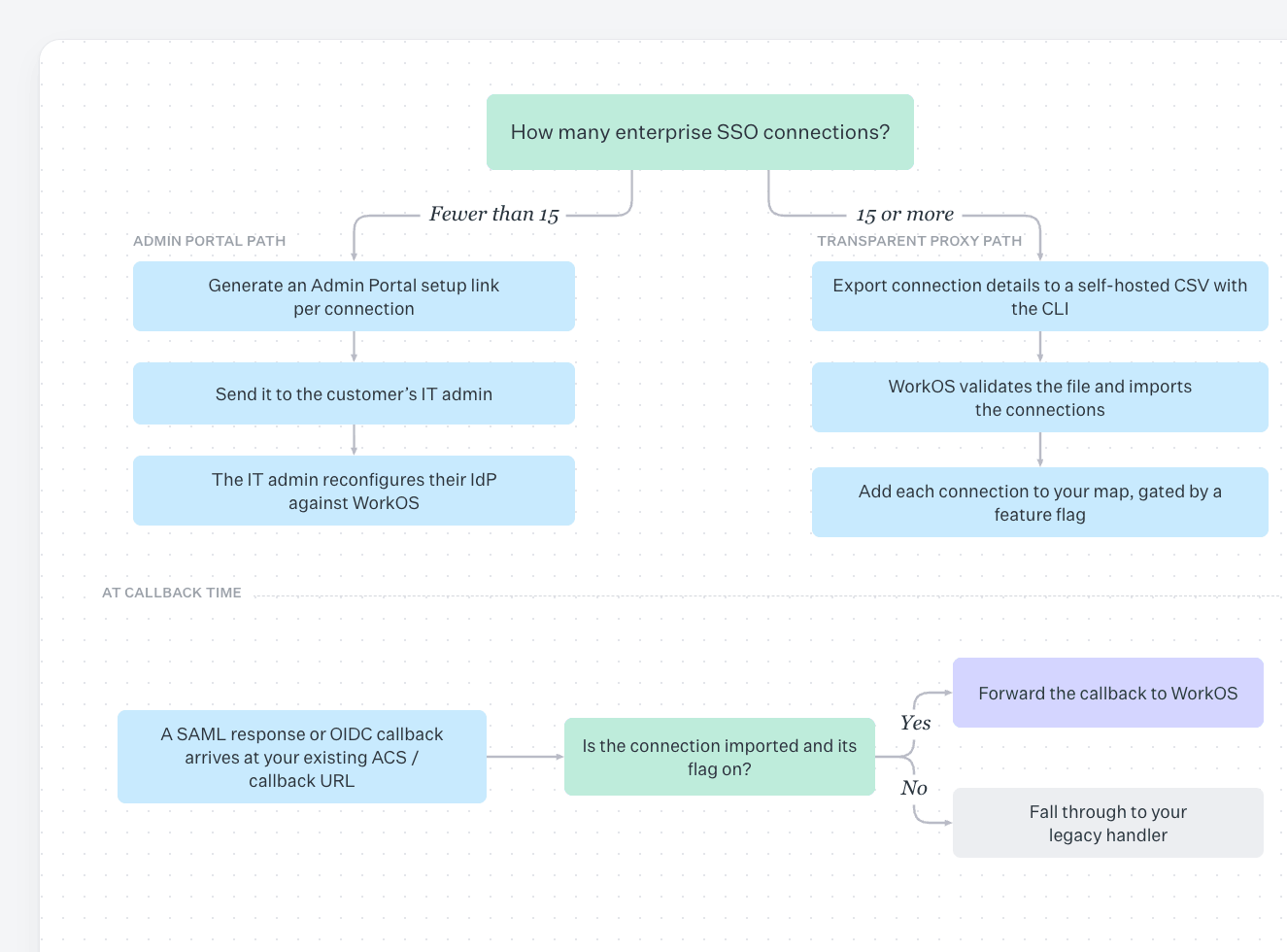
The Auth0 guide got the biggest expansion in this refresh, and it's the template for how we think about Enterprise SSO migrations at scale. It documents two distinct strategies, and the right one depends almost entirely on how many SSO connections you're moving:
- Fewer than 15 connections: use the WorkOS Admin Portal. Generate a setup link per connection, send it to the customer's IT admin, and let them reconfigure their IdP against WorkOS.
- 15 or more connections: use the transparent proxy approach. Your existing callback URL stays in place and acts as a proxy that routes SAML responses and OIDC callbacks to WorkOS. Customers do not need to change anything in their IdP.
The 15-connection line isn't arbitrary. It's the point at which the customer-communication overhead of coordinating individual IdP reconfigurations dominates the actual technical work. Above it, the proxy approach avoids per-customer IT coordination, at the cost of more engineering work on your side.
The Auth0 guide expansion includes a flow diagram of the proxy architecture and a worked example of Feature Flags-based gradual rollout.
How the transparent proxy actually works
The proxy approach is the load-bearing piece of any large SSO migration. The mechanics:
- You hand WorkOS a CSV describing your existing connections, using the self-hosted connections CSV template. For SAML connections, that includes your internal organization or tenant identifier, the IdP Entity ID, IdP SSO URL, IdP X.509 signing certificate, NameID format, and ACS URL. For OIDC connections, you include the Client ID, Client Secret, and discovery document URL. Generating this CSV by hand across dozens of connections is tedious and error-prone, so
npx workos migrationscan also automate it — pulling the connection details directly from your source provider and emitting a ready-to-validate CSV. This is currently supported for Cognito, with Auth0 and other providers coming very soon. - The WorkOS team validates the file and imports the connections, flagging any that can't be migrated transparently.
- Your existing ACS URL or OAuth callback stops being a terminal endpoint and starts being a proxy. When a SAML response or OIDC callback arrives, you check whether the connection has been imported. If yes, forward to WorkOS. If no, fall through to your legacy handler.
- You opt connections in one at a time by adding them to a connection map, gated behind a feature flag.
Some connections can't be migrated transparently and will need IdP-side reconfiguration via the Admin Portal. The common cases:
- SAML request signing with non-transferable private keys.
- SAML response encryption with non-transferable key pairs.
- Non-standard NameID formats that can't be expressed in the imported configuration.
These get triaged out during the CSV validation step so they don't surprise you mid-cutover.
Webhook disable sequencing, or: how to avoid a thundering herd
The general migration guide now explicitly covers webhook disable sequencing. This is one of the most under-discussed failure modes in auth migrations, and it bites hard at scale.
The scenario: while you're migrating, you typically pause webhooks from your old provider so your downstream systems don't get conflicting events from two sources. When the migration completes and you re-enable webhooks (or switch to WorkOS-sourced events), the old provider replays the queued events in a burst. Your event consumer, which has been quiet for hours, suddenly takes a backlog's worth of events in a short window. Downstream services fall over. Pages fire.
The sequencing the guide now recommends:
- Disable webhooks on the old provider before starting the bulk import, not during it.
- Run the import via
npx workos migrationsagainst a known-quiet source. - Cut traffic over to WorkOS, gated behind a feature flag, and verify event flow on the WorkOS Events API.
- Drain or discard the old provider's queued webhook backlog deliberately rather than letting it flood you on re-enable.
Once you're on WorkOS, you have a clean event stream to work with. The Events API surfaces authentication.sso_succeeded, authentication.sso_failed, and connections.activated, among others. If you use Datadog, you can stream those events directly into your existing observability stack via the WorkOS Datadog integration.
Feature flags for gradual rollout
The Auth0 guide includes a worked Feature Flags-based gradual rollout example. The pattern is straightforward: maintain a map from your internal connection IDs to WorkOS connection IDs, and only route a connection to WorkOS once it's in the map and enabled by your flag system.
That gives you a per-connection kill switch.
- Start with one low-risk customer.
- Verify the session lands as successful in the WorkOS dashboard.
- Verify the
authentication.sso_succeededevent fires. - Expand to 5%, then 25%, then 100% of connections.
- If anything regresses, flip the flag and traffic returns to the previous path on the next request — no DNS changes, no redeploy.
This is the difference between a migration that ships on a Tuesday afternoon and one that requires a maintenance window.
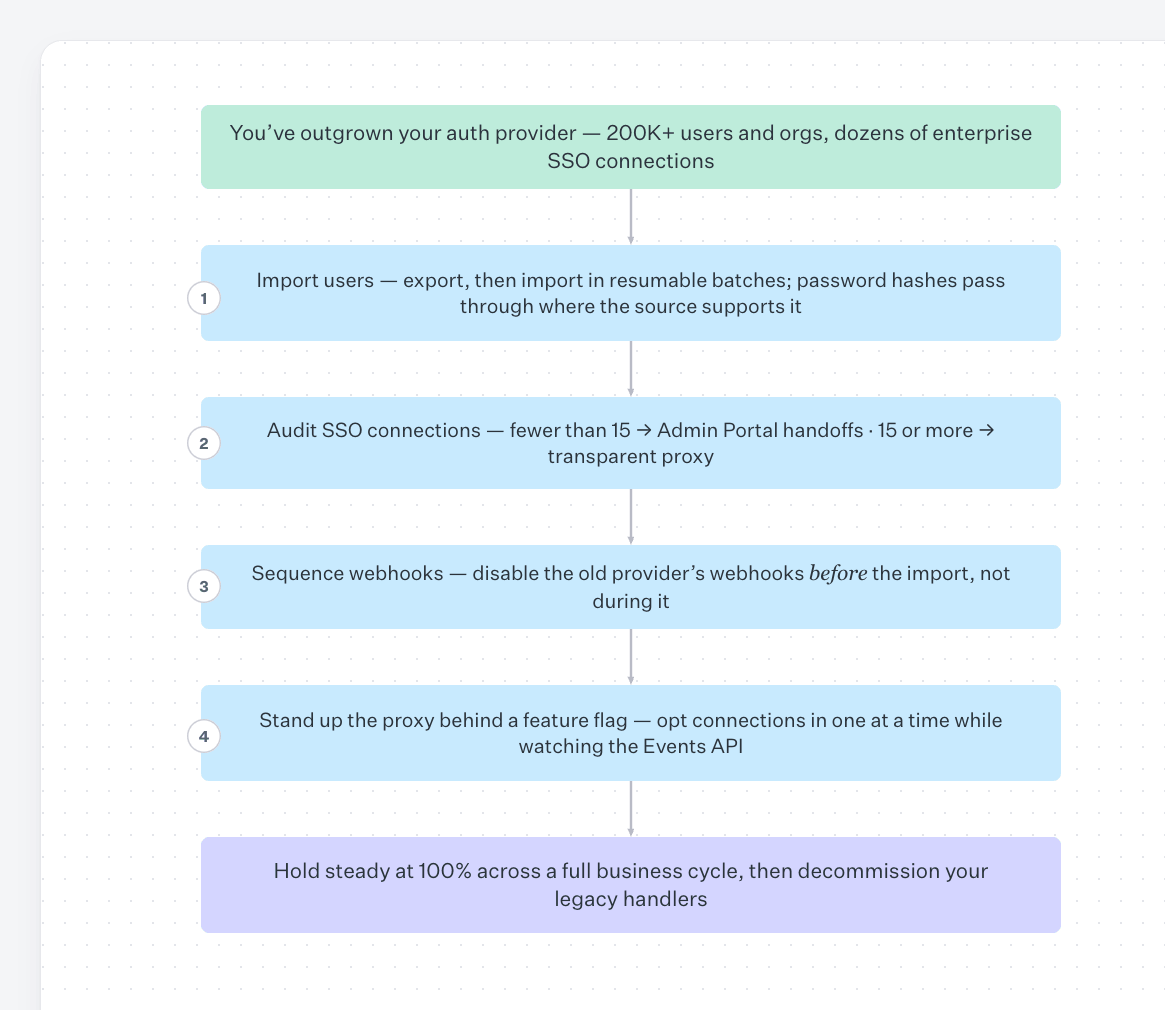
The shape of a 200K-user migration today
If you're sitting on a few hundred thousand users and a couple dozen enterprise SSO connections on an auth provider you've outgrown, the playbook is now:
- Run
npx workos migrations users exportfollowed byusers importagainst your source provider to fully export and import users in resumable batches — the CLI handles the user side end-to-end, including password hash passthrough where the source supports it. - Audit your SSO connections. If you have fewer than 15, plan Admin Portal handoffs to each IT admin. If you have 15 or more, use
npx workos migrationsto export your connections and prepare them in the self-hosted connections CSV format, ready to hand off to a WorkOS SE for validation and import. The same CLI that imports your users also produces the connection file in the exact shape WorkOS needs — no hand-assembled spreadsheets. - Sequence your webhook disable before the import, not during it.
- Stand up the proxy, gated behind a feature flag, and opt in connections one at a time while watching the Events API.
- Once you've held steady at 100% across a full business cycle without regressions, decommission your legacy handlers.
No single step here is novel. What's new is that the entire path — users and connections — is documented end-to-end at the scale where it actually gets hard, with a single CLI handling the export and prep work on both sides. Start at workos.com/docs/migrate.