AuthKit adds support for multiple roles
AuthKit now supports assigning multiple roles per organization membership, giving users the union of permissions across roles. This feature eliminates role explosion and makes access control more flexible and intuitive.




We’re excited to announce a major enhancement to AuthKit’s Role-Based Access Control (RBAC) system: support for multiple roles per organization membership. This feature gives teams the flexibility they need to model access in a way that reflects how organizations really operate.
Why multiple roles?
Until now, AuthKit enforced a single role per user per organization. While this reduced accidental over-provisioning, it often conflicted with how teams structure access. In real-world scenarios, users frequently span departments or projects and need a union of permissions. Think of a designer who also contributes to engineering, or an analyst who also requires limited admin privileges.
Without multi-role support, teams were forced into awkward workarounds, such as creating "combined roles" (e.g. design-engineering), leading to unnecessary role explosion and complexity.
With multiple roles, access models become easier to design, scale, and maintain. Instead of creating dozens of rigid, one-off roles to cover every possible combination of responsibilities, teams can assign a clean set of atomic roles that reflect their organization’s structure (e.g. Designer, Engineer, Analyst). Users who span responsibilities simply get assigned more than one role, and AuthKit automatically calculates the union of their permissions.
This approach brings several key benefits:
- Clarity in role design: Admins can focus on defining simple, well-bounded roles instead of anticipating every cross-functional need.
- Reduced role sprawl: No more “role explosion” from hybrid roles like design-engineering or analyst-admin.
- Predictable, transparent access: Roles stack additively, so it’s always clear which permissions come from where. For example, instead of inventing a custom marketing-ops role, a user can simply hold Marketing and Ops roles, and the union of their permissions applies.
- Scalability as orgs grow: As organizations add departments or projects, roles can be layered without having to rebuild complex permission structures from scratch.
- Lower maintenance overhead: Fewer roles to manage means less administrative burden and fewer mistakes when provisioning or adjusting access.
In practice, this means RBAC setups are not only easier to get right from the start, but also remain flexible and manageable as your organization evolves.
Use cases
Here’s how teams can use multi-role support:
- Cross-department collaboration: Designers who need engineering permissions, or engineers contributing to product operations.
- Disjoint access needs: Users requiring independent sets of permissions that must be additive.
- Simpler modeling and maintenance: Eliminates the need for hybrid “mega roles” and makes RBAC easier to manage over time, even as organizations grow more complex.
How it works
When enabled, organization memberships can have N roles, with permissions calculated as the union of all assigned roles.
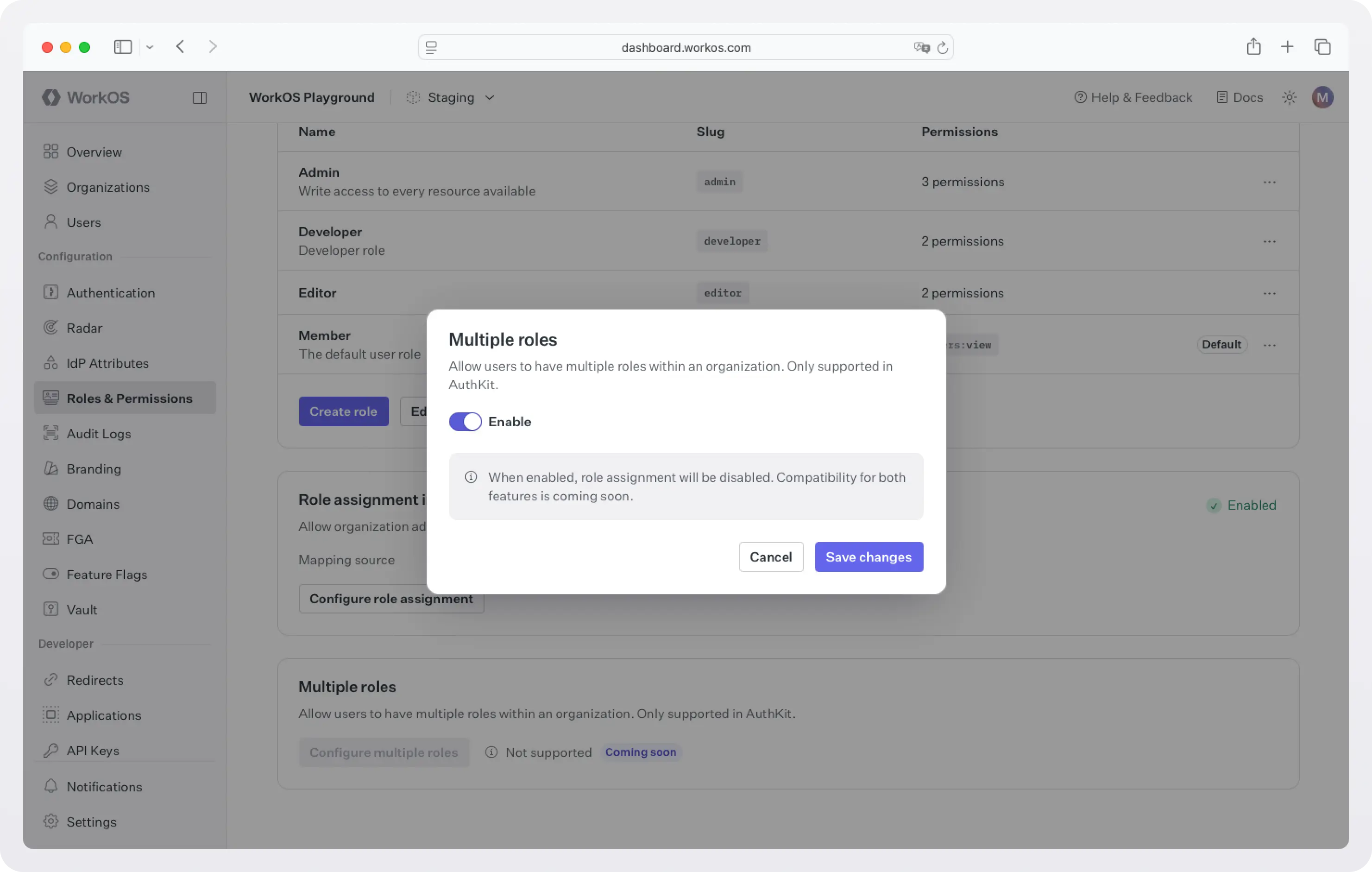
To enable the feature, go to WorkOS dashboard > Roles & Permissions, scroll down to the Multiple roles section, and enable the feature.
Multiple roles works alongside automated, identity-provider-driven role assignment. You can map SSO groups or SCIM/directory groups to roles, or assign a role directly to a native WorkOS Group, and AuthKit will assign every matching role to the organization membership, giving users the union of permissions across all of them. See Role assignment sources, below, for details on how manual, SSO, and directory assignments interact when more than one applies.
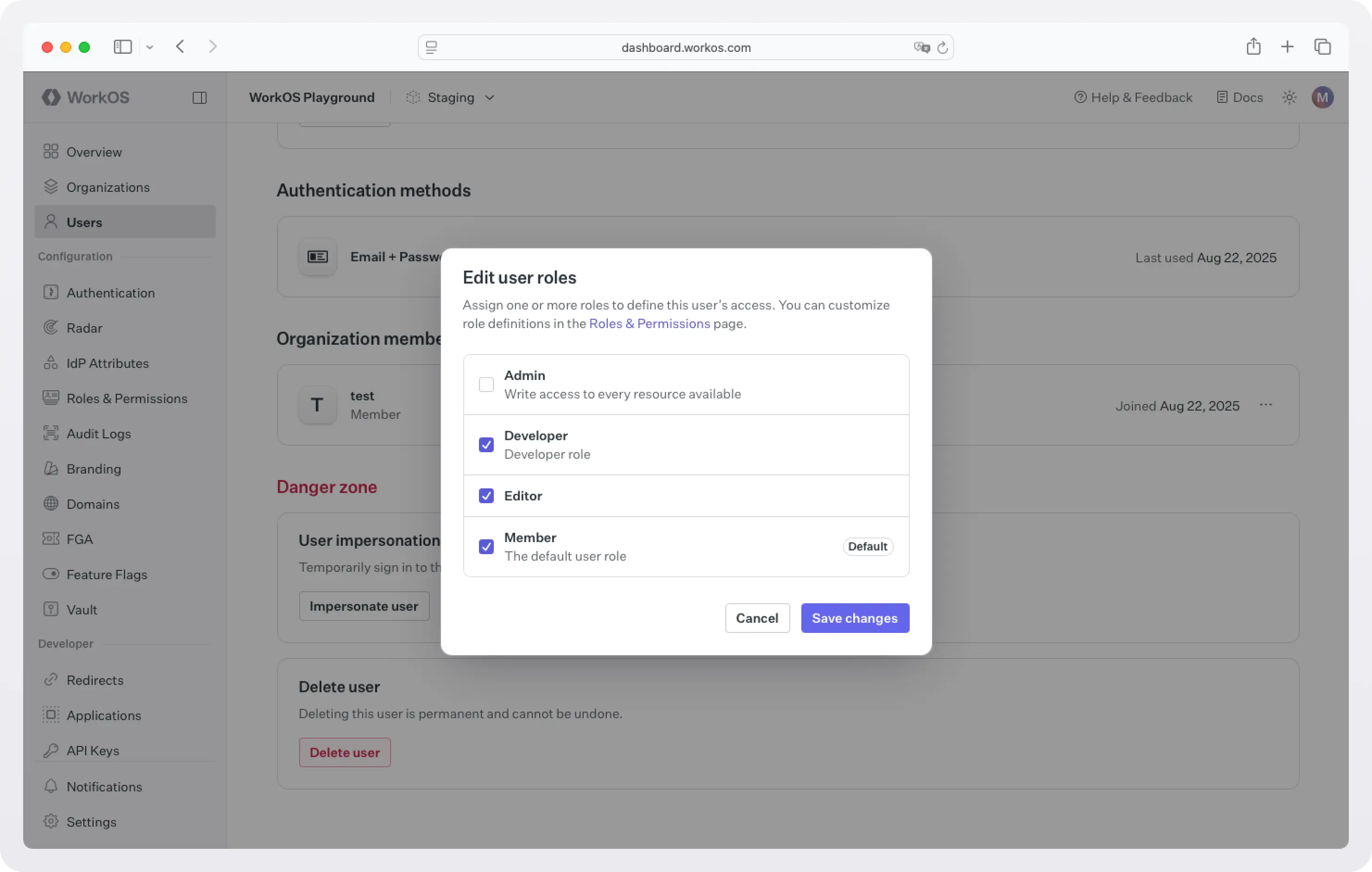
To edit the roles assigned to a user, head to the WorkOS dashboard > Users, select a user, scroll down to the Organization memberships section, and click Edit roles. Assign the user all the necessary roles.
When a user logs in, the JWT will return a roles array alongside the existing role field.
JWT for single-role (default/off):
JWT for multiple roles (enabled):
API responses will include both fields (role and roles) for backward compatibility and to make migration easier. If multiple roles are disabled, the priority order still applies, ensuring no disruption for existing deployments. Eventually, the role field will be deprecated.
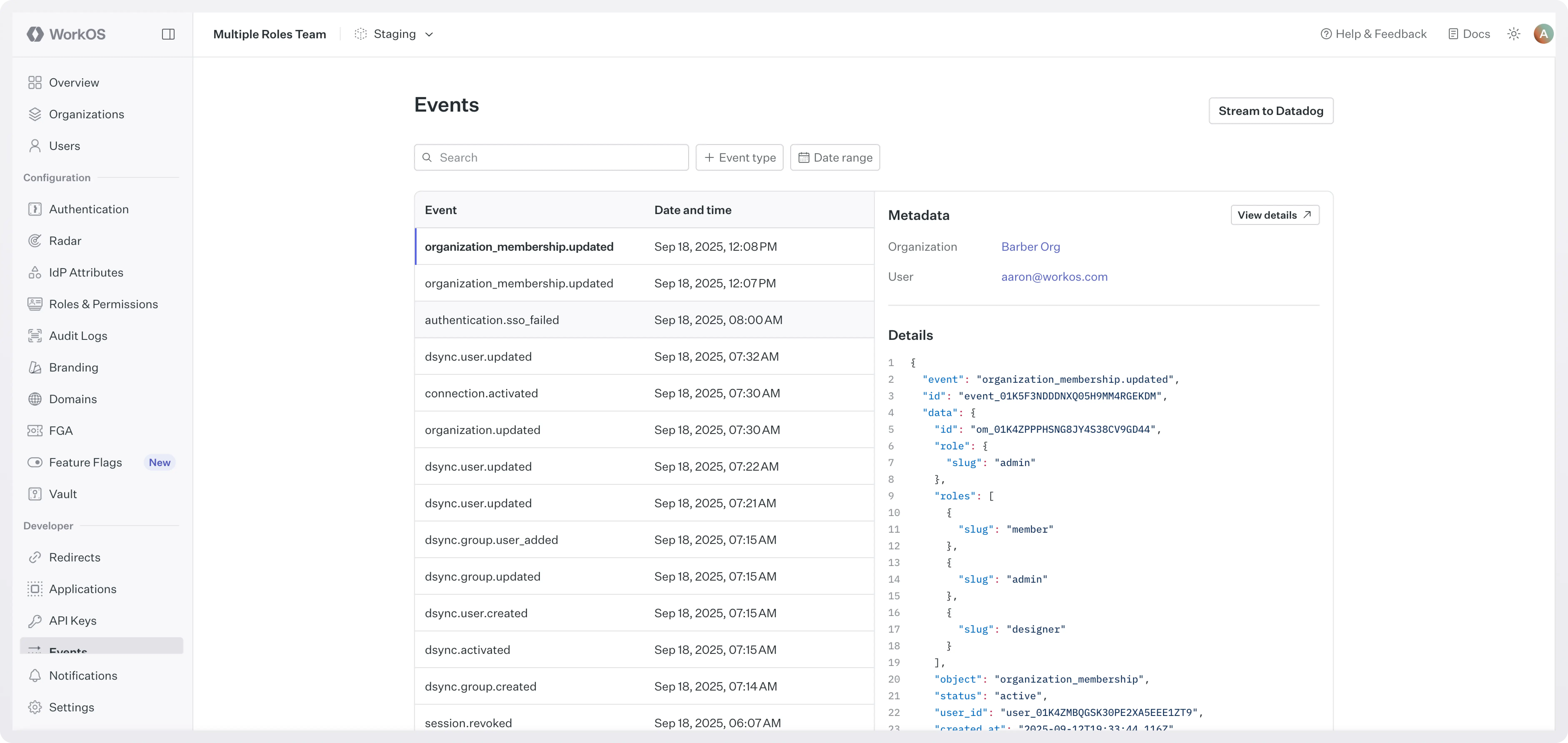
Role changes are tracked and logged via the organization_membership.updated event. To see these changes, go to WorkOS dashboard > Events and filter by organization_membership.updated.
Role assignment sources
AuthKit supports three ways to assign roles automatically based on group membership, in addition to manual assignment, and all of them are compatible with multiple roles:
- SCIM (Directory Sync): map directory groups to roles. Admins configure this mapping in the Admin Portal during SCIM or Google Workspace directory setup, and it's applied to organization memberships via directory provisioning.
- SSO: map groups returned in a user's SSO profile to roles in the WorkOS Dashboard. This requires SSO JIT provisioning to be enabled for the organization.
- Groups: assign a role to a native WorkOS Group; every current and future member of that group inherits the role automatically, without needing an identity provider at all.
Because more than one of these sources can technically be active on the same organization, AuthKit enforces a strict priority order:
- An explicit directory (SCIM) group role assignment overrides both manual assignments and SSO group assignments, and can't be overridden by SSO.
- An explicit SSO group role assignment overrides manual assignments, but not directory assignments.
- Manual overrides made via the dashboard or API are temporary; the IdP-sourced role is reapplied the next time directory sync runs or the user authenticates via SSO.
We recommend using only one role assignment source per organization to keep behavior predictable; if you're moving an organization from SSO-based to directory-based role assignment, see the docs for the recommended migration paths.
Settings & controls
- Multi-role is off by default and must be explicitly enabled.
- It is configured at the Environment level (not per-organization).
- Role assignment through Identity Providers (via SSO groups or SCIM/Directory Sync groups) is supported and compatible with multiple roles, as is assigning roles to native WorkOS Groups.
- Whether SSO or directory group role assignment is enabled is configurable per organization, so you can mix approaches across your customer base depending on how each organization is set up.
Looking ahead
This release was a foundational step for AuthKit's RBAC roadmap. Since then, we've shipped automated role assignment through SSO groups, SCIM/Directory Sync groups, and native Groups, so teams no longer have to choose between multi-role flexibility and IdP-driven provisioning.
Multiple roles in AuthKit are available today. To start configuring roles, head to the Roles & Permissions page on the dashboard. For more information, check out our docs.