SlugFest: The npm Trusted Publishing flaw that trusted names, not IDs
npm keyed publishing trust on a renameable owner/repo name instead of GitHub's immutable repository ID, exposing 1,500+ packages. The bug, the fix, and the same mistake in your own authorization code.

SlugFest is a flaw in npm Trusted Publishing, disclosed by Bloom Security on October 13, 2026: npm bound a package's publishing trust to a GitHub repository's owner/repo name instead of its immutable numeric ID, so anyone who claimed an abandoned repository name could publish new versions of the package. Bloom found more than 1,500 exposed packages with over 10 million total downloads.
Trusted Publishing did the hard part correctly. Maintainers stopped pasting long-lived npm automation tokens into CI, and a GitHub Actions workflow started exchanging a short-lived OIDC token for a publish credential that expires in minutes. npm made the feature generally available in July 2025, and it implements the OpenSSF trusted publishers standard.
The lookup key was wrong. Bloom found that npm's trust configuration recorded the GitHub repository's owner/repo name, not its immutable repository ID. A repository name is a lease. Whoever holds it today gets the keys the previous tenant was issued.
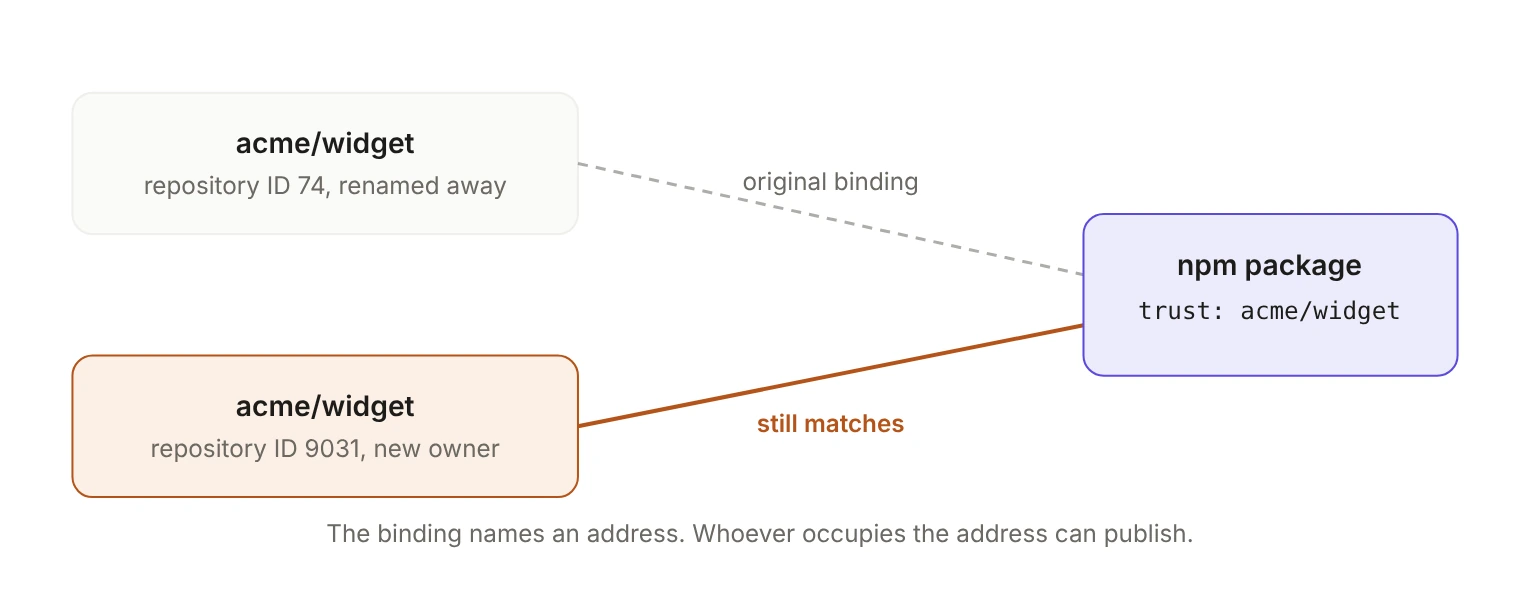
What did npm store, and what did it ignore?
When a maintainer created a GitHub Actions trusted publisher, the CLI sent the registry three fields: the owner/repo string, the workflow YAML filename, and an optional environment name. The npm web form asks for the same things: organization or user, repository, workflow filename including its .yml or .yaml extension, and an optional environment. That was the entire binding.
Every GitHub Actions OIDC token carries more than that. Alongside the human-readable names it includes repository_id and repository_owner_id, numbers that survive renames and transfers. According to Bloom, the CLI never sent them, and the registry only stored them after the first successful publish from that repository.
Here is the relevant part of a token (illustrative values; the claim names are GitHub's):
Until a configuration had published once, the exchange succeeded if the token's repository claim matched the stored slug and the workflow filename matched the stored one. Both are typed by a human and can be claimed by anyone once they're free. The two fields GitHub assigns and never reissues weren't part of the comparison.
How did the attack work?
The precondition is a trust configuration pointing at a slug an attacker can claim, on a configuration that has never been used to publish. The slug becomes free through ordinary maintenance: renaming, transferring or deleting the bound repository, or renaming or deleting the owner account.
After that, the attack takes four steps and no stolen credentials:
- Create a repository at the freed slug.
- Add a workflow file whose name matches the bound filename.
- Request an OIDC token with the standard
id-token: writepermission and trigger the workflow. - Submit the token to npm's exchange endpoint, which issues a publish credential.
Neither the maintainer's npm account nor their GitHub account is touched. Bloom ran this end to end against an npm scope it owns, publishing to the package from a second GitHub repository belonging to a different organization.
The resulting release is signed. Bloom notes that the attacker's publish is signed by Sigstore against the attacker's repository, so tooling that only checks whether a package has provenance will report it as valid. Provenance answers "was this built somewhere real." The question that matters is "was this built where I expected."
Bloom's registry-wide scan found more than 1,500 vulnerable packages with over 10 million total downloads and more than a million a month; CSO Online reports that one of them alone gets over 200,000 downloads a month. The denominator matters: that's out of packages with trusted publishing configured, a much smaller population than npm as a whole. Bloom isn't releasing the affected names, because the issue is still prevalent. GitHub's long-standing policy of retiring the namespace of any open source project with more than 100 clones in the week before its owner's account is renamed or deleted narrows the exposed set somewhat. Whether anyone exploited this in the wild is unknown.
Bloom's framing of why it matters now: the average AI agent installs about 70 packages a month, and some developer endpoints reach 350. As Bloom's Golan Myers told CSO Online: "A hijacked package doesn't need to find a developer anymore."
Did the standard already warn about this?
Yes. SlugFest isn't a new class of bug, and the OpenSSF specification npm implements has a section called "Resurrection and Rename Attacks":
The same section prescribes the remedy: when configuring a trusted publisher, call the third-party service to "resolve" IDs from the configured names, then persist those IDs as part of the policy. Bloom says PyPI's Warehouse already implements exactly this pattern. Its recommended fix for npm has the same shape: resolve owner/repo through GET /repos/{owner}/{repo} at configuration time, store the IDs alongside the slug, and require exact equality on the token's repository_id claim at exchange.
The spec is honest about the limits. Not every resource has an ID (GitHub's workflow filename doesn't), so the goal is to shrink the mutable surface, not eliminate it.
What does GitHub's 48-hour fix close?
GitHub's October 2, 2026 changelog entry is narrow, and says so:
A configuration becomes validated and exempt from expiry after its first successful publish, and npm's documentation says that first publish "validates the configuration and binds it to the repository's immutable identity." Changing the repository or project identity requires a new trust relationship with a fresh 48-hour window. npm also now rejects trusted publishing tokens from GitHub Actions issue_comment events, on top of the existing pull_request_target restriction.
That shrinks the window rather than changing the key at configuration time. A configuration is still created from a name, and for up to 48 hours it trusts whoever holds that name. The changelog doesn't say what happened to configurations that were already unvalidated on October 2, and Bloom reports the same weakness in npm's GitLab trusted publishing integration. Both are reasons to audit your bindings this week instead of assuming.
The disclosure timeline is its own warning. Bloom reported through GitHub's HackerOne program on June 6, 2026, and the report was triaged and validated on June 9. The last response came on July 8; six follow-ups and a mediation request to HackerOne went unanswered. Bloom counts over 120 days from disclosure to fix, for a bug whose remediation is one API call at configuration time and one equality check at exchange.
Where else does a renameable name carry authorization?
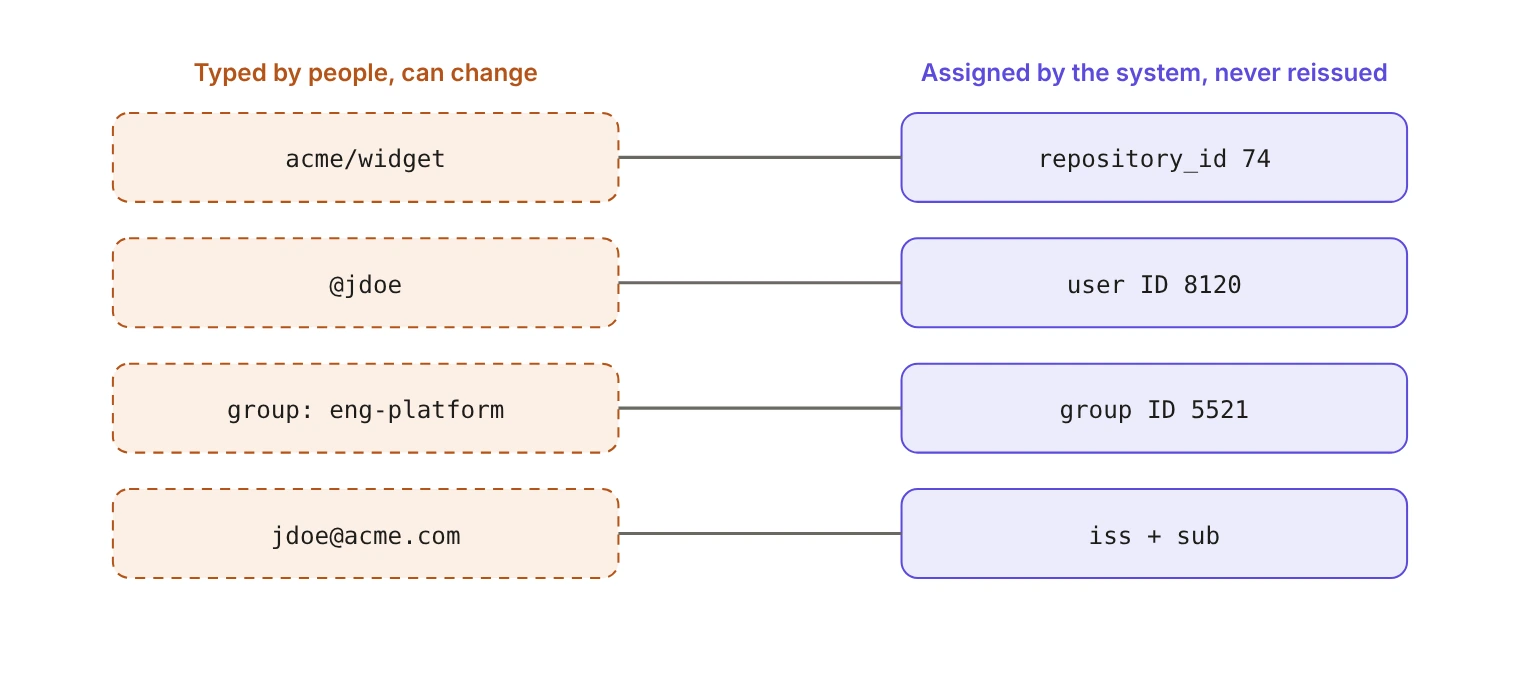
Read the Bloom finding with "npm" removed and it describes a lot of production authorization code. Somewhere in your system, a permission is probably keyed on a string a person can edit:
- Organization and workspace slugs. A tenant renames itself, the old slug frees up, and a webhook route or trust policy still points at it.
- Usernames and handles. Platforms recycle handles, so the name in an allowlist may now belong to someone else.
- Group and role names. A directory group renamed during a reorg either silently loses its grants or silently picks up someone else's.
- Verified domains. Domains change hands, and "anyone with an address at this domain" is a rule with an expiry date you don't control.
- Email addresses. The classic case, covered in Stop using email as a primary key.
The test takes a minute. For every identifier your authorization logic compares, ask who can change it and what happens to the old value. If the answers are "a customer, from a settings page" and "someone else can claim it," you have a slug-reclaim bug waiting for a rename.
GitHub has made the same concession at the protocol level. Since July 15, 2026, newly created repositories, and repositories renamed or transferred after that date, get an immutable subject format that embeds IDs, like repo:octo-org@123456/octo-repo@456789:ref:refs/heads/main. Older repositories keep the old format unless they opt in, and GitHub Enterprise Server doesn't get it at all. Any trust policy you wrote by hand has to match the format its repository actually emits; Your most privileged identity has no login covers that in detail.
How do you validate a GitHub Actions OIDC token?
If you accept these tokens, whether in a registry, artifact store, deploy service or internal exchange endpoint, these are the claims worth enforcing. The OpenSSF spec is explicit that implementations "must not rely exclusively on a generic set of claims (i.e. only sub + iss + aud)."
One caveat on environment: naming an environment only protects you if that environment has protection rules restricting which branches and tags can deploy to it.
The slug stays in the record because people need to read it. It's never what the comparison runs on.
Two more notes from the same sources. GitHub's documentation says you "must define at least one condition, so that untrusted repositories can't request access tokens" for your resources; a wildcard subject satisfies the letter of that and none of its intent. And npm says it "does not verify your trusted publisher configuration when you save it," so mistakes only surface at publish time. A form that accepts anything will eventually hold a typo pointing at a slug someone else owns.
What should you do if you publish to npm?
- Run
npm trust listfor each package and confirm every listed repository still exists under an owner you control. - Revoke and re-create any binding that points at a renamed or transferred repository, and remove the binding before you delete a repository, not after.
- After creating a binding, publish a version through it right away, so it validates and binds to the repository's immutable identity instead of sitting in the 48-hour window.
- On the consuming side, check that a package's provenance names the repository the project is supposed to come from, not just that provenance exists.
Bloom's own summary is the part worth keeping: "A name is not an identity. npm's trusted publishing treats the two as the same thing."
The same rule applies to the users and organizations in your own product. In WorkOS, users and organizations are identified by IDs that never change, while emails, names and domains are attributes that can. Key your authorization on the IDs, keep the names for display, and a rename stays a rename instead of a takeover. For the token side, How to verify WorkOS access tokens in your own API walks through the claims to check.