Your most privileged identity has no login
Service principals and CI/CD federation skip the access reviews that catch humans. The OIDC trust policy string is what actually decides who reaches production.

The shortest path into a production cloud account often starts at a build server, not an inbox. The chain is familiar from cloud red team work: a compromised CI runner, a workload token, ownership of an app or a privileged API permission, a new credential or federated subject, durable access, and finally a privileged cloud resource. Every hop there is a supported feature working exactly as designed.
The reason that path survives is boring. Workload identities (service principals, managed identities, CI/CD federation) usually sit outside the access reviews that catch a departing employee's leftover admin role. No review cycle ever asks whether the deploy role still needs its permissions.
Why the review misses them
Microsoft's own documentation is direct about what makes these identities awkward. They can't perform multifactor authentication, they often have no formal lifecycle process, and they need to store their credentials or secrets somewhere. Access review tooling assumes a manager can look at a name and decide whether that person still needs the role. There is no manager for github-actions-deploy. There's a module somewhere, and nobody currently on the team wrote it.
So the controls that do exist get applied to the wrong object. Teams rotate the service principal's secret and call the identity governed, while the two permissions that decide the blast radius go unexamined: who can add a credential to it, and who can change what it trusts.
The trust policy is the real permission boundary
Federated CI removed the long-lived secret, which was the right move. GitHub's OIDC provider mints a token for every job, and the cloud provider exchanges it for an access token valid only for that single job, which then expires automatically. The issuer is https://token.actions.githubusercontent.com, and with the official AWS action the audience is sts.amazonaws.com. The job opts in with id-token: write in its permissions block.
What replaced the secret is a string comparison. The sub claim concatenates workflow metadata (organization, repository, branch, or job environment), and your cloud provider's trust policy decides which values it accepts. GitHub is explicit that you must define at least one condition, so untrusted repositories can't request access tokens for your resources.
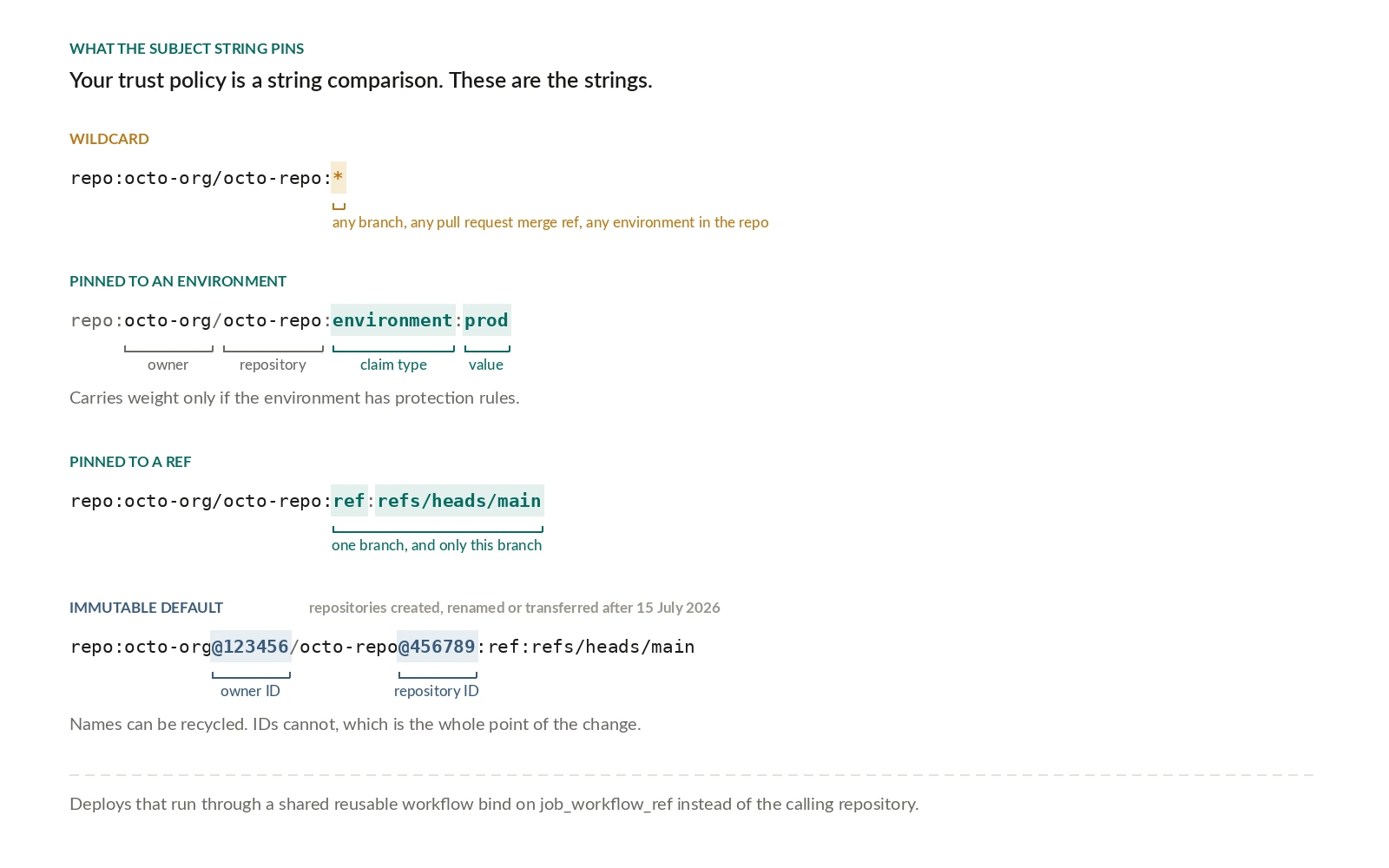
The condition many teams ship is the one from GitHub's own docs, because it works on the first try:
That wildcard allows any branch, pull request merge branch, or environment in the repository to assume the role. The role's effective access control list becomes "anyone who can get a branch into this repo." Pin it to the deployment path instead:
The environment form of the subject is repo:ORG-NAME/REPO-NAME:environment:ENVIRONMENT-NAME, and it carries weight only if the environment itself has protection rules. GitHub recommends deployment rules that restrict which branches and tags can deploy to an environment or read its secrets. Without those, you've named a string, not a gate.
If your deploys run through a shared reusable workflow, bind the condition to job_workflow_ref, the ref path of the workflow file itself, rather than to the calling repository.
On GitHub's side of the trust, organization and enterprise admins can push repository custom properties into the token as repo_property_* claims, which is what makes attribute-based policies possible without a hand-maintained allowlist of repositories.
AWS needs a different approach here, because it matches on only a small set of claims and won't see repo_property_* as separate claims at all. The workaround is to pull the properties you care about into the subject itself using include_claim_keys, then match sub as usual. It's the same policy outcome reached through one field instead of several.
There's also a subject-format change already in effect. Repositories created after July 15, 2026 use an immutable default sub that embeds owner and repository IDs, like repo:octo-org@123456/octo-repo@456789:ref:refs/heads/main, because the old name-only format meant a recycled namespace could be used to reproduce someone else's subject value. Renames and transfers after that date adopt the new format too. Older repositories keep the previous format unless you opt in at the organization or repository level, and immutable claims aren't available on GitHub Enterprise Server. Every hand-written trust policy now needs to match the format its repository actually uses.
Ownership is a permission, and it's the one you didn't inventory
The federation half of the problem is symmetrical: whoever can change what an identity trusts can grant themselves that identity. In Microsoft Entra, a federated identity credential can be added to a user-assigned managed identity or an app registration through the Entra admin center, Azure CLI, Azure PowerShell, the Azure SDK, ARM templates, or Microsoft Graph. The credential is an issuer, subject, and audience triple that must case-sensitively match the incoming token.
Adding a subject to an existing privileged app is a backdoor that files itself as a config change.
The directory roles that permit this are labeled privileged for a reason. Application Administrator can create and manage all aspects of app registrations and enterprise apps; Cloud Application Administrator has the same scope minus App Proxy. Application Developer can create application registrations regardless of the tenant's "Users can register applications" setting. None of those read as "can reach production," and each can be a step toward it.
Which is why the useful inventory starts with ownership rather than names. For every workload identity, map who can add a credential, who can change federation, which roles and API permissions it holds, what resources trust it, and where its tokens can be requested.
Detection sees the sign-in, not the grant
The obvious objection: this is already covered, because there's a detection stack and a service principal behaving strangely will light it up. Partly true. Here's where the coverage stops.
Microsoft Entra ID Protection ships workload identity detections including Leaked Credentials, Suspicious Sign-ins, Anomalous service principal activity, Suspicious API Traffic, Malicious application, and Suspicious application. Suspicious Sign-ins learns a baseline over 2 to 60 days and fires on unfamiliar properties: IP address or ASN, target resource, user agent, hosting versus non-hosting IP change, IP country, or credential type. Leaked Credentials fires when valid credentials turn up in a public code artifact on GitHub or in a data breach.
That's real coverage of the token-use step. It is thinner on the grant step, which is where the attack path turns durable. Microsoft's own investigation prompts point straight at it: were there unauthorized changes to the credentials, suspicious configuration changes, did the account acquire unauthorized application roles. The security operations guide for applications covers the audit events behind those questions, and they are the ones worth alerting on: credentials added to an application or service principal, federated identity credentials changed, new consent or app-role grants, and a role assignment followed immediately by resource access.
Two scope gaps matter when you plan around this. ID Protection doesn't currently cover managed identities, and Conditional Access for workload identities applies only to single-tenant service principals registered in your tenant; non-Microsoft SaaS, multi-tenant apps, and managed identities are out of scope.
Continuous Access Evaluation is the part that closes the revocation window rather than widening it. CAE gives instant enforcement of Conditional Access policies and detected risk signals, and CAE-enabled non-Microsoft workload identities reaching CAE-capable first-party resources hold 24-hour long-lived tokens that stay subject to continuous security checks. The catch is scope, not latency: outside that path you're back to waiting for a token to expire.
What it costs to get wrong
An attacker who adds a federated subject to a privileged app no longer needs the CI runner. They hold an identity that authenticates on its own, carries standing permissions, and appears in no joiner-mover-leaver process. Cleanup is correspondingly ugly. Microsoft's remediation sequence is to inventory every credential on both the service principal and application objects, add a new one (x509 certificates recommended), remove the compromised credentials, then rotate every Azure Key Vault secret the service principal could reach. That's two systems and an open-ended secret inventory.
The hardening that prevents it is unglamorous and mostly already in your backlog: replace static secrets with short-lived federation, restrict OIDC claims to repository plus branch plus environment, separate build and deployment identities, remove standing directory roles, and require approval for production environments. One operational footnote if you run your own issuer: the Microsoft identity platform stores only the first 100 signing keys downloaded from an external IdP's OIDC endpoint, and an IdP exposing more than 100 will produce federation errors.
Model the graph, then keep modeling it
The artifact worth building is a single attack-path model: principals, ownership, permissions, trust relationships, and reachable assets, in one graph. A list of service principals sorted by name will never show you that a build identity can grant itself a deployment identity's credential. A graph will.
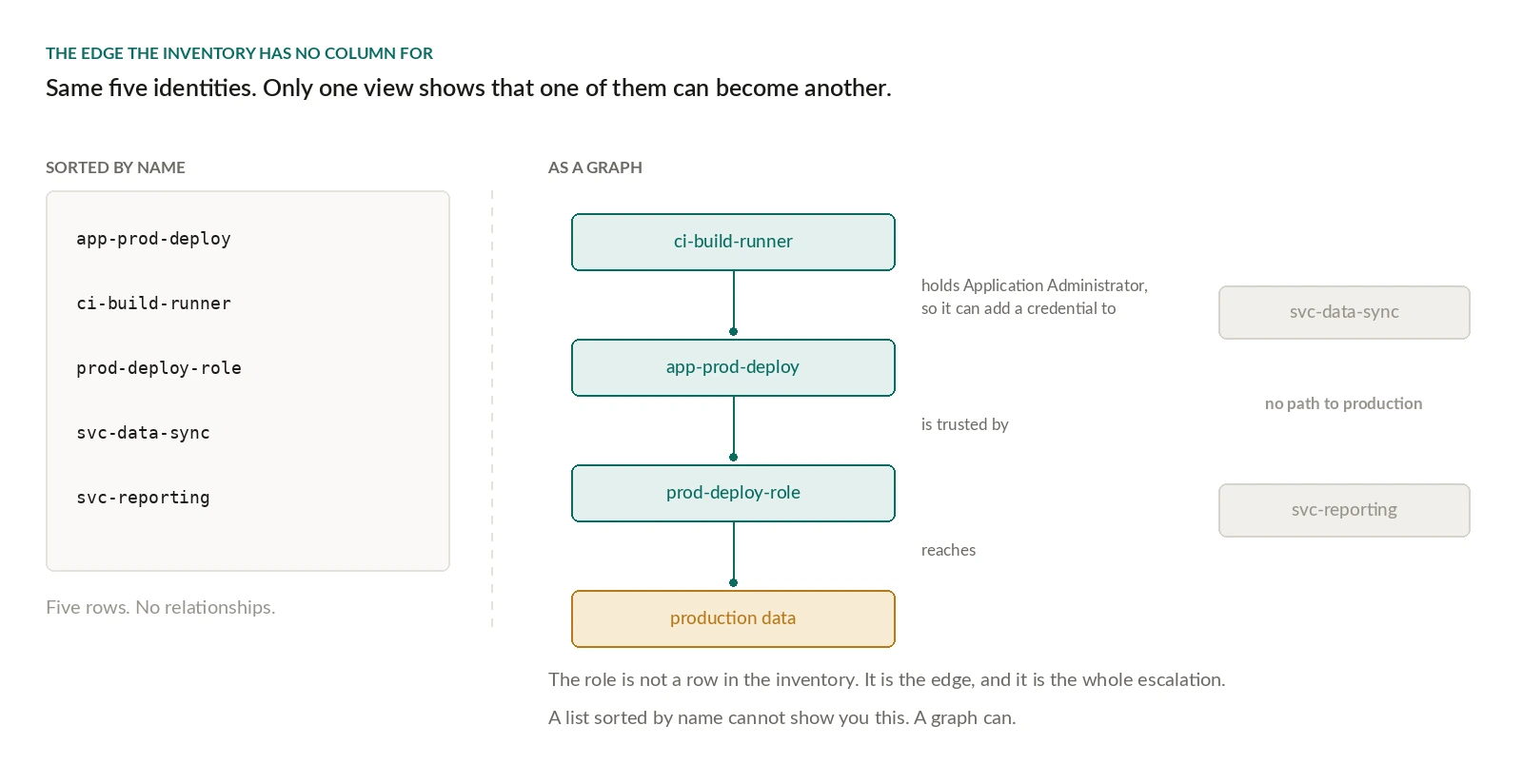
Start with one identity today, and ask the question the review never asks: who can add a credential to it. If you can't answer that from a dashboard in under a minute, that's the identity to review first.
Read more
The same ownership question arrives again, faster, with every agent you deploy, and the answers don't transfer cleanly: why IAM controls built for service accounts don't fit agents and which credential to issue for a given agent scenario.