What shipping an OAuth app on Slack, Microsoft, and Atlassian actually takes
Five installs before Slack reads your submission, a partner account before Microsoft trusts your consent screen, and identity verification before Atlassian lists you. None of it is code.

The OAuth handshake is the easy part. What Slack, Microsoft, and Atlassian actually require before your integration can go live is the part nobody schedules.
Integration plans budget for the OAuth handshake and forget the queue behind it. The handshake is code you can finish. Production access is a decision made on someone else's calendar, and it belongs on the roadmap next to the code.
Slack, Microsoft, and Atlassian each gate production access differently, and each documents that gate in a different corner of a different developer site. Here is what the three actually require, in the order they will block you.
The part of the timeline nobody schedules
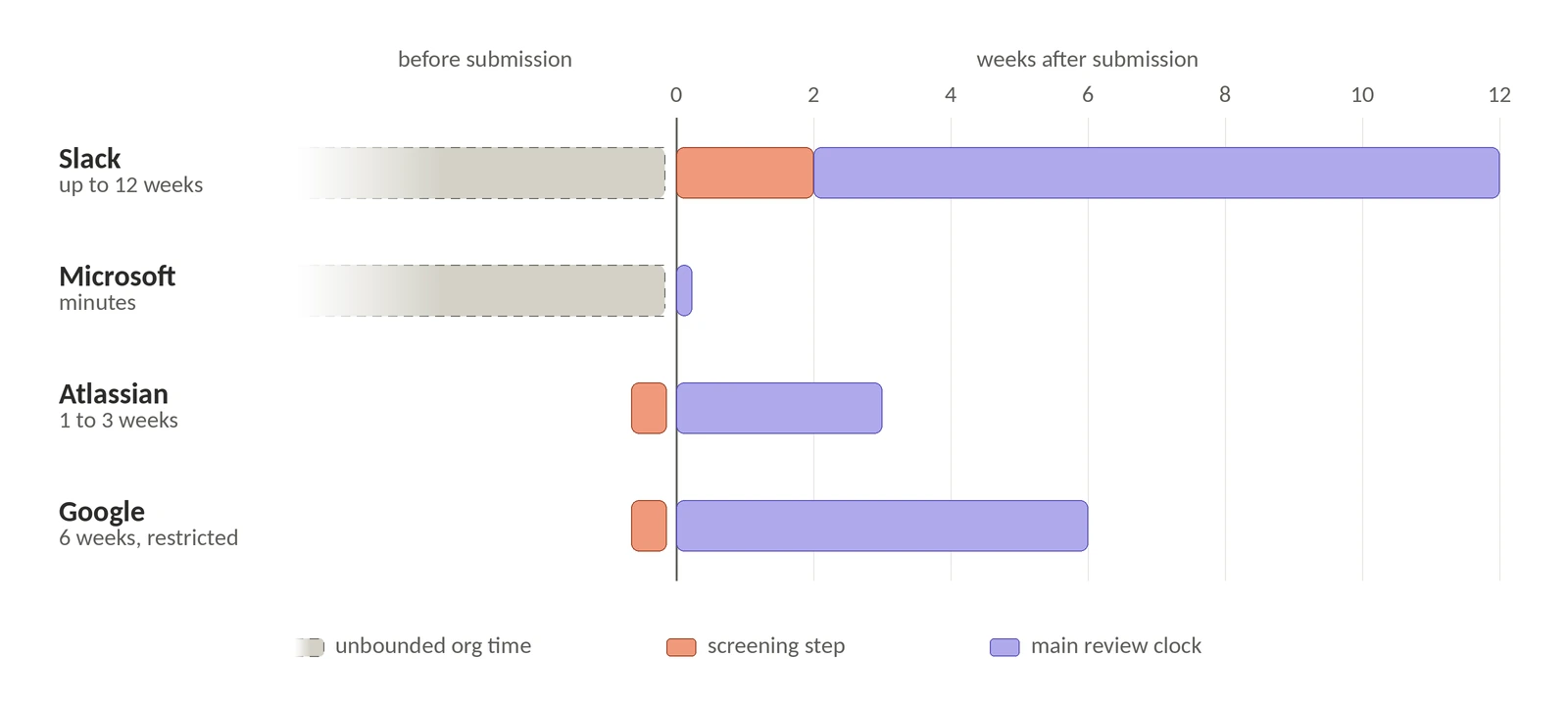
Token plumbing is deterministic. You can estimate it and finish it. Review queues are not. They move at the provider's pace, they reset when you get something wrong, and the thing under review is usually not your code. It is your install count, your corporate paperwork, and your legal entity.
Slack's own FAQ on the review process is explicit that it performs "a moment-in-time review" and does not conduct a code review. Nobody is checking your refresh logic. They are checking the listing, the consent screen, and whether the company behind it is real, which is the work engineers leave until last.
Slack wants five installs before it will read your submission
The Slack Marketplace has a prerequisite that reorders your whole launch plan:
"Your app has been installed on 5 or more active workspaces and the service has been tested on those workspaces in accordance with the above bullet. An active workspace is a workspace that has been used in the past 28 days. Please note: apps that do not meet this requirement will be blocked from submitting to the Marketplace (this does not apply to security & compliance partners working with our Discovery API)"
Five active workspaces, where active means used in the past 28 days, and submissions below the bar are blocked outright. A second, higher bar sits alongside it: Slack lists apps that are installed on fewer than 10 active workspaces and have fewer than 10 weekly active users as unsuitable for the Marketplace. Clearing the submission gate is not the same as clearing the suitability bar.
Listing follows distribution. It does not create it. You have to ship the integration to real customers before you are allowed to ask for the listing.
Then the clock starts. The preliminary review takes up to 10 business days to return feedback, and the functional review takes up to 10 weeks for new submissions and 6 weeks for published apps resubmitting changes. Here is the asymmetry that costs teams months: during the preliminary review, every resubmission resets your place in the queue, while in the functional review your place is held once a reviewer has been assigned and you have received your first set of feedback. Sloppy listing copy is therefore more expensive than a functional bug.
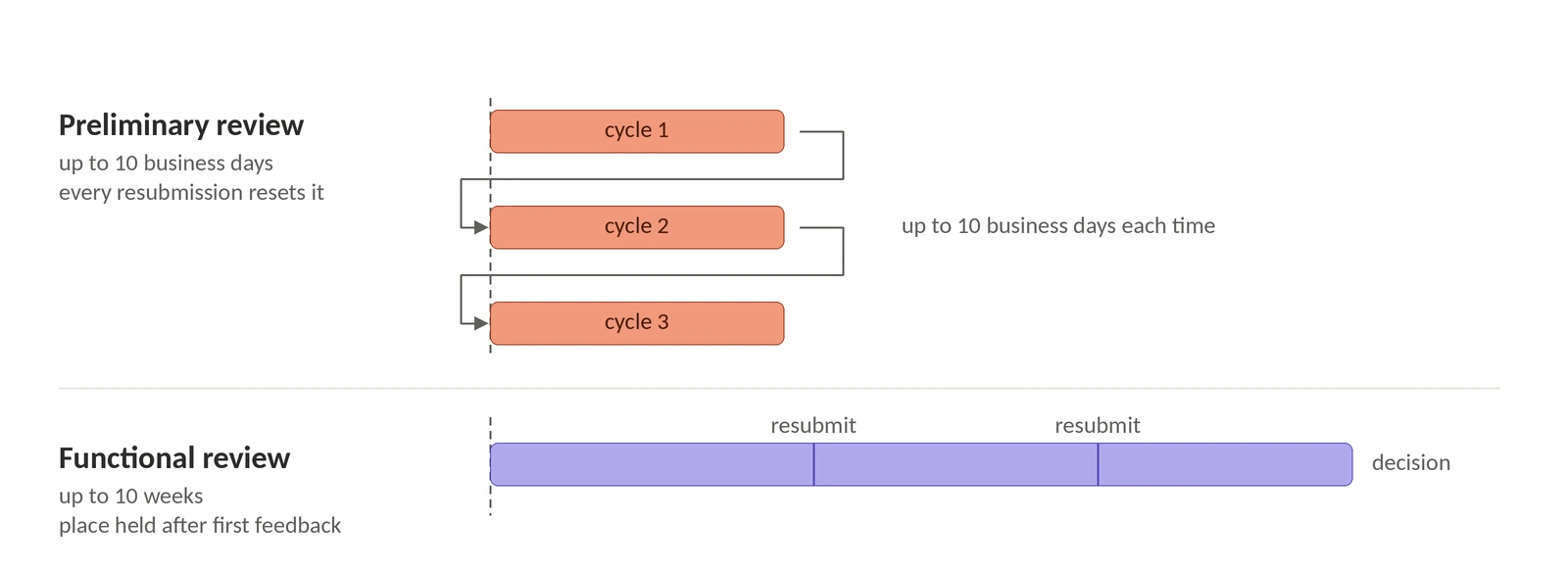
Two more requirements catch people mid-review. The first is scopes. Slack will not list apps using legacy or restricted scopes and methods, or scopes that provide extensive access to workspace data without a clear use case that requires them. The named examples are admin.*, identity.*, search:read, workflow.steps:execute, triggers:*, and the legacy read, post, and client scopes. Read the qualifier carefully, because it is doing real work: this is a strong presumption, not a flat ban. Slack says broad *:history access is unlikely to be approved without a clear use case, and names real-time search and MCP server functionality as use cases that qualify. A set of higher-risk scopes, including *:history, files:read, canvases:read, and admin.*, now triggers an enhanced review. The practical read: a broad scope with a documented reason is a conversation, and a broad scope without one is a rejection.
The second is test access. You must supply working credentials for your own service and for any third-party service your app connects to, because reviewers cannot use your Slack workspace to test. If your service requires a paid plan, the test account needs to be on it. Support requests are expected to get a response within 2 business days.
The constraint that outlives the launch is the lock. Once your app is published, the live version is locked: you cannot make changes to your app's configuration, features, or scopes without resubmitting for review. You can still save changes in the dashboard, they simply do not take effect until a re-review succeeds, which is a subtler trap than an outright block. Adding a scope later also means manually updating your OAuth URLs, and shipping an install link with scopes that were never reviewed shows your customers an error instead of a consent screen. Substantial changes require a staging app identical to the published one so reviewers can test it.
So decide your full scope set before you submit. Every scope added afterward buys another functional review of up to 6 weeks.
Microsoft's gate is paperwork, not code
Publisher verification reads like a branding nicety, a blue badge on the consent screen, until you read what happens without it. Beginning November 2020, with risk-based step-up consent enabled, users cannot consent to most newly registered multitenant apps that are not publisher verified: apps registered after November 8, 2020, that request permissions beyond basic sign-in and read user profile, from users in tenants other than the one where the app is registered. For a multitenant OAuth app, unverified means your enterprise users hit a warning and a dead end at the moment of consent.
The requirements are organizational. You need a Partner One ID for a verified Microsoft AI Cloud Partner Program account, and it has to be your organization's partner global account, not a partner location ID. The app must be registered with a Microsoft Entra work or school account; apps registered with a personal Microsoft account cannot be verified at all. The app needs a publisher domain, and it cannot be *.onmicrosoft.com. Azure AD B2C tenants are not supported. The email domain used during partner account verification has to match that publisher domain or be a DNS-verified custom domain on the tenant. And whoever clicks the button needs an eligible Entra role, with Application Administrator and Cloud Application Administrator the two Microsoft names in the overview, plus CPP Partner Admin or Account Admin in Partner Center, signing in with multifactor authentication performed in that same session.
Every item on that list lives with finance, legal, or IT, which is why it slips past engineering-owned timelines. The tail is short, though: Microsoft charges nothing for publisher verification, requires no license, and says developers who have already met these requirements can be verified in minutes. Start the partner account months early and the verification itself is an afternoon. One hard limit to check before you promise anything to a government customer: publisher verification is not supported in national clouds, and apps registered in national cloud tenants cannot be verified.
Atlassian verifies the business, then the app
Every new publicly listed Marketplace app needs Atlassian's approval. After that, routine cloud version updates do not, with exceptions that are broader than most teams expect: a change to your payment model, or a new app type such as an app edition, an Atlassian Government Cloud variant, Isolated Cloud, or Multi App Compatibility. Major version updates also go back through manual review, so "approved once" only covers minor releases.
Budget the wait from the right page, because Atlassian publishes two numbers. The app approval guidelines say approvals take 10 to 15 business days, worked in chronological order and varying with the team's volume, and that Platinum, Gold, and Silver partners receive expedited SLAs. The newer security workflow page says 5 to 10 business days for new app submissions and major version updates, and 2 to 3 business days for partner verification. Plan against the longer figure.
The gate that surprises first-time partners is identity. Atlassian runs Know Your Customer and Know Your Business verification when you onboard a new app, with individual identity confirmed through Stripe Identity and business identity verified by Atlassian from the information you submit. It happens once, it carries across later submissions, and it is a hard dependency: partners who fail it cannot upload apps at all. Alongside it, three prerequisites will stall a review if they are outstanding: privacy and security tab and ticket approval, the partner verification ticket, and any pending security vulnerability ticket.
Two rules fail submissions late in the process. The first is authentication hygiene, stated plainly in the approval guidelines:
"Whilst your app may make use of Basic authentication with Atlassian's product REST APIs for ease of development/speed during development, this shall not be the case for any public, approved app."
That sentence understates the current position. Basic auth with passwords was deprecated and disabled years ago, and Atlassian now says outright that apps which collect API tokens or instruct customers to create individual 3LO apps do not comply with its security requirements for cloud apps or its acceptable use policy. Shared secrets from customer-installed apps also have to be stored securely.
The second is naming. Atlassian treats trademark infringement as an automatic rejection, and the difference is word order: "Jira App X" is rejected, "App X for Jira" is approved. Renaming a product after the marketing site is live is not a five-minute fix.
Google is the reason you start this early
Google is the outlier that makes the case for treating approval as a schedule item. Any app requesting restricted scopes that has the ability to access that data from or through a third-party server has to pass a security assessment by Google-empanelled security assessors. The assessment is standardized on the App Defense Alliance's CASA framework, and passing earns a Letter of Validation, which Google's developer docs also call a Letter of Assessment.
Two properties make it a planning problem rather than a task. It is slow: brand verification typically takes 2 to 3 business days when branding has changed, and restricted-scope verification runs to roughly six weeks. And it does not end. Apps must be reverified and reassessed at least every 12 months from the assessor's approval date, the reassessment is a comprehensive test of the app regardless of whether anything changed, and once an app has been validated at the highest assurance level it keeps being assessed at that level in later years. Restricted scopes are a permanent line item, not a launch cost.
The price is harder to pin down than it used to be, and the number most teams have heard is stale. Google's 2018 announcement of the policy estimated an assessment fee of "$15,000 to $75,000 (or more) depending on the size and complexity of the application." That post now carries a note superseding itself, and Google's current FAQ takes the opposite position: "Google does not charge the developer any fees for security assessment," with cost agreed directly between the developer and an authorized assessor, and a free tier 2 assessment available for apps in scope. Real quotes today are usually far below the old range.
The number to remember is not the fee. It is the six weeks, plus twelve months, plus every renewal after that, the next time someone proposes adding Gmail read access two weeks before launch.
A timeline you can put in a plan
What to build while the queue moves
None of this is skippable, and no vendor can shorten Slack's functional review. What you control is how much of your own code sits idle waiting on it.
That is the split we designed Pipes around. Pipes handles secure token storage, token refresh, the OAuth flow itself, and provider-specific configuration, so a single API call returns a fresh access token, or a structured error telling you the user needs to reconnect or reauthorize a missing scope. Your users get an embeddable widget that lists the available integrations and walks them through connecting each one, and a second admin widget lets org admins enable providers and supply their own credentials and scopes. Coverage started with GitHub, Google, Slack, and Salesforce and now runs to more than 300 providers, including Microsoft 365, Atlassian, Notion, and Linear, alongside API key providers, client credentials, and custom providers you define yourself.
Shared credentials are the part that maps onto the approval problem: you can build against WorkOS-provided OAuth applications per provider without creating a Google Cloud project or registering a GitHub app. With one deliberate limit:
"Shared credentials are available for development and testing only—for production, you'll configure your own OAuth applications with each provider."
In practice that means sandbox environments. So Pipes does not get you out of Slack's queue or Google's assessment. Shared credentials are a development shortcut, not a production bypass. What they buy you is the ability to build and pilot before you own an approved production app, which is the ordering Slack forces on you anyway, since five active workspace installs come before submission.
There is a second thing worth knowing if the code calling those provider APIs is an agent. Relay, currently in early access, is a forward proxy: instead of handing your application the user's access token, WorkOS attaches the credential to the outbound request and returns the provider's response, so the provider credential never enters your runtime. It is built for agent sandboxes, ephemeral compute, and customer-controlled environments, the places a live OAuth token should not sit. It covers a subset of the full Pipes catalog, and your WorkOS API key still authenticates every call, so that key needs the same care you were going to give the tokens.
Put the review windows in the sprint plan, not the launch retro. Lock the scope set before you submit, and start the corporate paperwork before the code is done. The approval date is the launch date, and the OAuth code is the only part of it you control.