Three OAuth account takeovers, one bug: Auto-linking by email
Pingvin Share X, Better Auth and AshAuthentication each attached a stranger's OAuth sign-in to someone else's account. Here's how each check failed and what a safe linking decision looks like.

On October 9, 2026, CVE-2026-108157 was published for Pingvin Share X, a self-hosted file sharing app. The bug lets an unauthenticated attacker sign in as any user, administrators included, and skip their TOTP second factor along the way. The cause sits in one line of decision logic: when an OAuth sign-in arrived with an email that matched an existing account, the app linked the two.
It is the third account takeover with the same shape in four months. Better Auth shipped a fix for CVE-2026-53516 in July. AshAuthentication fixed CVE-2026-88952 in September. Each library got a different part of the check wrong, which makes them a useful set to study together.
Why apps auto-link at all
The feature exists for a good reason. A user signs up with a password, forgets about it, and months later clicks "Continue with Google." If the app creates a second account, the user lands in an empty workspace and files a support ticket. So the app sees the same email address, decides it is the same person, and attaches the Google identity to the existing account.
The problem is the word "decides." An email address in an OAuth or OIDC response is a claim made by whoever runs the identity provider, about an address the app has never checked itself. The OpenID Connect spec is direct about this in section 5.7:
The only stable identifier the spec guarantees is the pair of iss (issuer) and sub (subject). Auto-linking by email means using a non-unique, provider-asserted value to decide who owns an account. That can be done safely, but only if several separate conditions all hold. Each of these CVEs dropped a different one.
The three failures
1. Pingvin Share X: trusting an email nobody verified
According to the VulnCheck advisory, OAuthService.signUp() linked incoming OAuth identities to existing accounts by email, and the generic OIDC provider never checked the email_verified claim. An attacker who could create an account at any enabled OIDC provider with the victim's address, unverified, could sign in to Pingvin as the victim.
OIDC defines email_verified as "True if the End-User's e-mail address has been verified; otherwise false." Ignoring it treats every address a provider passes along as proven. Affected versions run from 0.19.0 up to, but not including, 1.22.0.
The TOTP bypass deserves its own note. The OAuth path created a fully authenticated session without asking for the second factor the victim had set up. Linking a new identity is a change to how an account can be accessed, so it should never be easier than signing in with the account's existing factors.
2. Better Auth: checking one side of the link
Better Auth did check email_verified. The advisory explains that the auto-link gate in handleOAuthUserInfo allowed a link whenever the provider asserted email_verified: true, without also requiring the local user row's emailVerified to be true.
That leaves room for a pre-hijack:
- The attacker signs up with the victim's email and a password the attacker chooses. The local row is created with
emailVerified: false. - Later, the victim signs in with a real, verified OAuth account at that address.
- The provider says the email is verified, so the victim's OAuth identity is linked to the attacker's row.
- The attacker now holds a working password login to an account the victim believes is theirs.
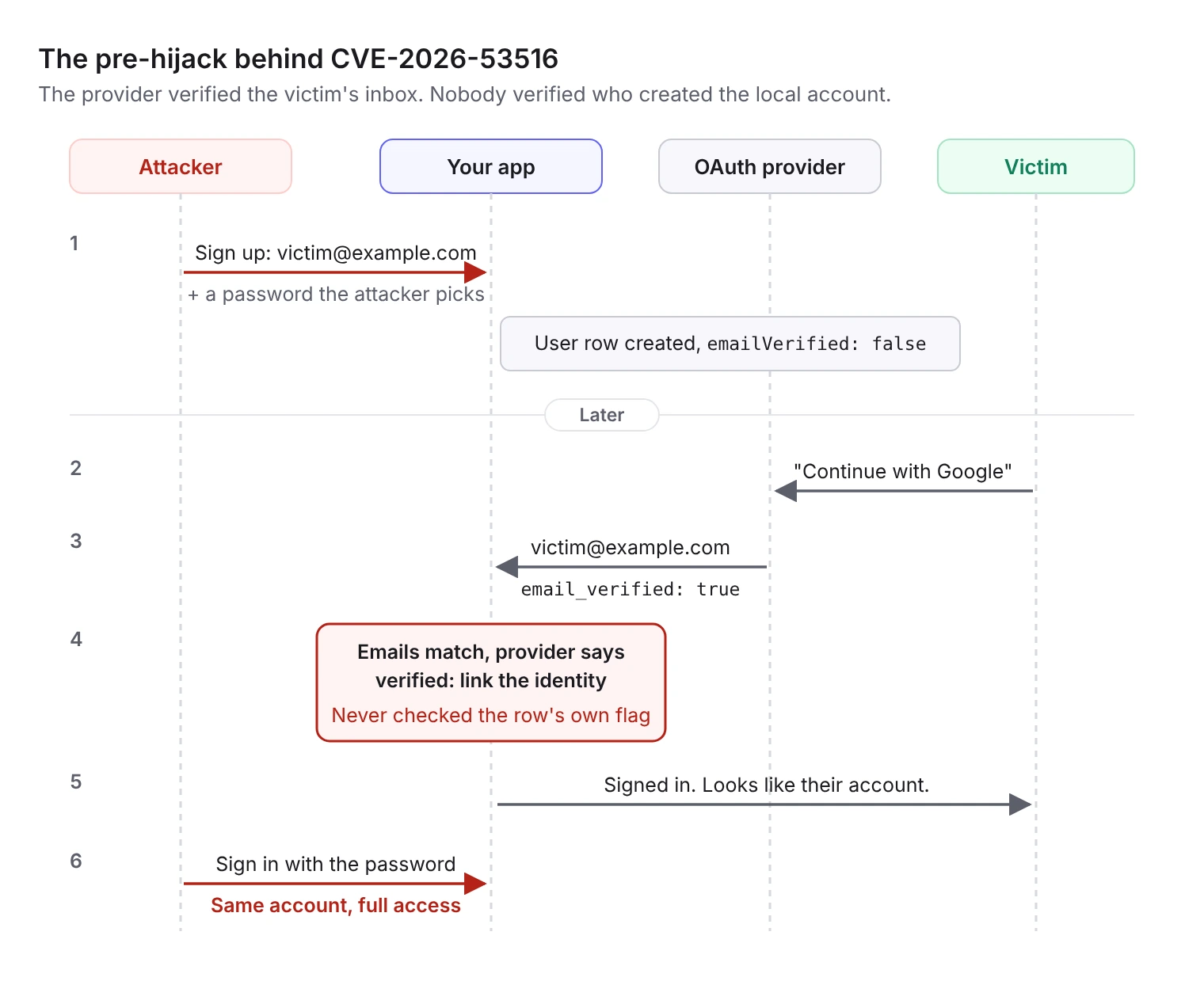
The provider's verification only proves the person signing in controls the inbox. It says nothing about who created the local account. Better Auth fixed this in 1.6.11. The advisory compares it to Microsoft's 2023 nOAuth issue, where apps trusted a mutable, unverified email claim from Entra ID.
3. AshAuthentication: matching on the wrong thing
AshAuthentication's bug comes from the opposite direction. Per the advisory, the OAuth2 sign-in path matched an existing account through its identity upsert keys, and the only gate was the provider's email_verified flag. It never compared the provider's email with the email on the account it had matched. The same gap existed in the sign-in path when registration was disabled.
The upsert then overwrote the victim's email with the attacker's. That turns a one-time sign-in into persistent control, because password reset and other recovery flows now go to the attacker's inbox. Fixed versions are 4.15.0 and 5.0.0-rc.14.
Same week, different step of the callback
Two WordPress plugins had CVEs published on October 10 that are not linking bugs, but they fail in the same place: the code that runs when an identity provider sends the user back.
- WPCOM Member (CVE-2026-104803, CVSS 3.1: 9.8, versions up to 1.7.27): the social login callback lacked nonce validation, OAuth
stateverification and per-visitor session isolation. An attacker who knows or can discover a user's social provider ID can plant a forged session entry and sign in as that user. - WPO365 (CVE-2026-104759, CVSS 3.1: 8.1, versions up to 44.1, fixed in 45.0): a deprecated ID token path verified the OIDC nonce with a function that could never accept the nonce format the plugin generated. The check failed, and authentication continued anyway, so a previously issued ID token could be replayed. It is exploitable only when the
use_id_token_parser_v2option is on.
The WPO365 bug is a good reminder that a verification step which cannot pass is worse than none, if its failure does not stop the flow. Every check in a sign-in callback has to fail closed.
What a safe linking decision looks like
Taken together, the three linking CVEs map out the conditions that have to hold before an incoming identity can join an existing account. In order:
- Look up by
issandsubfirst. If this exact identity is already linked, sign the user in. Email plays no part. - Treat an email match as a hint, not a decision. A matching email only means the two accounts might belong to the same person.
- Require proof on both sides. The provider must assert a verified email, and you should only trust that assertion from issuers that are authoritative for the address. The local account's email must also be verified by you. (Better Auth missed the second half.)
- Compare the emails you are actually linking. The address in the provider response must match the address on the account you found, after normalization. (AshAuthentication missed this.)
- When in doubt, make the user prove they own the existing account. Ask them to sign in with their existing method, including MFA, or enter a one-time code sent to the account's inbox, before you attach the new identity.
- Never let linking change account data. Don't overwrite the stored email, roles or recovery settings from provider claims during a link.
- Tell the user. Send a notification to the account's existing email whenever a new sign-in method is added.
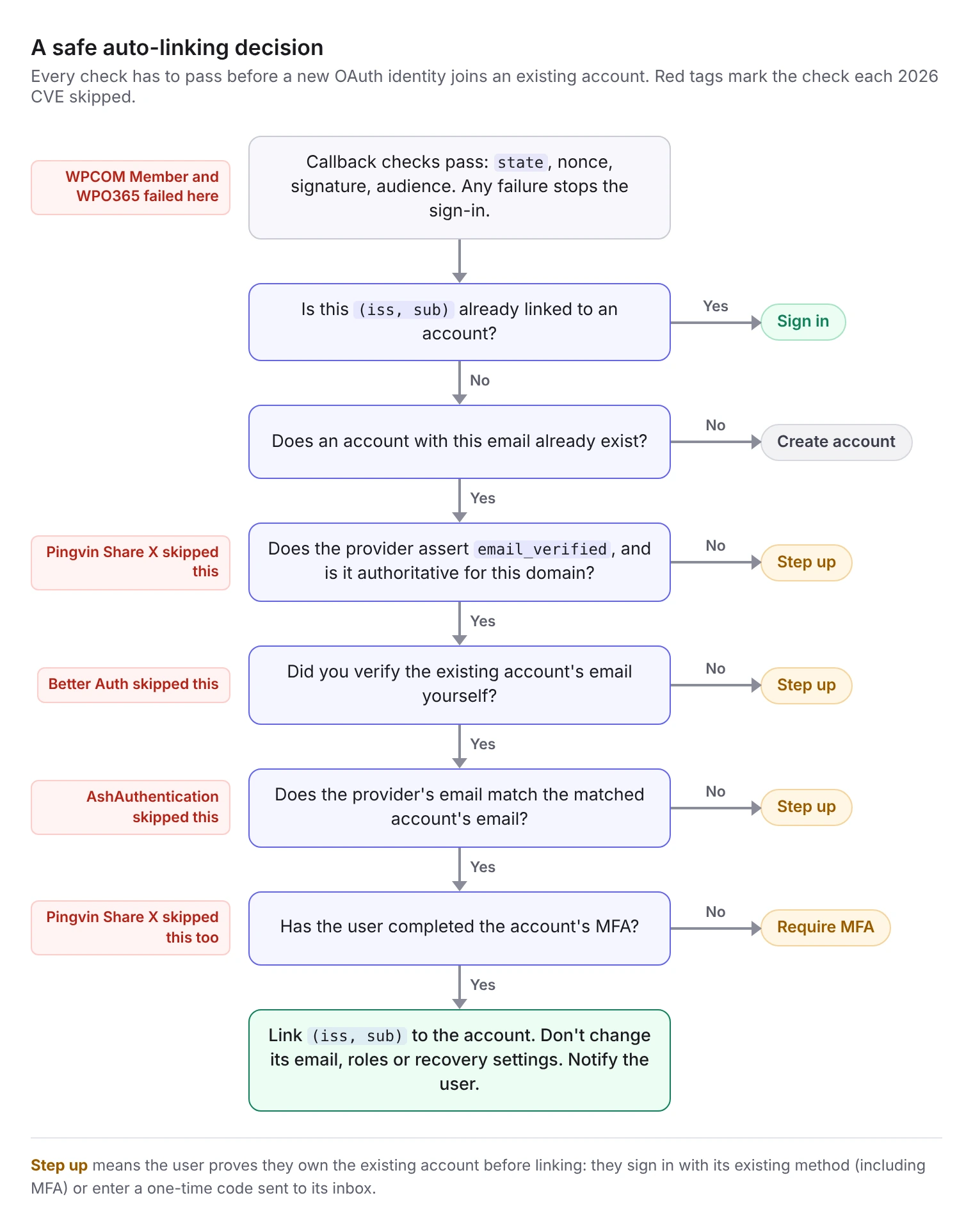
Here is the same logic as pseudocode:
The isAuthoritativeFor check matters most for generic OIDC. Google asserting a verified @gmail.com address is meaningful. A self-hosted or arbitrary OIDC provider asserting it about any domain is not, because whoever runs that provider decides what it says.
Checklist
- Identities are stored and looked up by
(iss, sub), never by email alone. - Auto-linking requires a verified email from the provider and a verified email on the local account.
- The provider's email is compared with the matched account's email before linking.
- You only trust
email_verifiedfrom issuers that are authoritative for the domain. - Linking can't skip the account's existing MFA.
- Linking never overwrites the stored email or recovery settings.
- Users are notified when a new sign-in method is added.
- Every callback check (
state, nonce, signature, audience) fails closed. - If you run Pingvin Share X, Better Auth, AshAuthentication or WPO365, you're on a fixed version (see the table above).
How AuthKit handles linking
AuthKit also uses the email address to link credentials, so it has to answer the same questions. Per the identity linking docs, a new credential is attached to an existing user only when WorkOS can verify the user has access to that email inbox. If an identity can't be linked safely, the sign-in doesn't complete.
For enterprise SSO, verified domains change the picture: when an organization has verified its domain, SSO users on that domain are treated as verified. SSO users on unverified domains go through email verification before their SSO credential is linked. When Directory Sync and SSO describe the same person, WorkOS matches on the identity provider's user ID before falling back to verified email, so an email change on one side doesn't create a duplicate user.
For the background on why identity linking is risky in the first place, see Lessons in safe identity linking and Stop using email as a primary key.
The takeaway
Auto-linking by email is a convenience feature that makes an ownership decision. Each of these libraries checked something, and each attacker went through the condition that wasn't checked. If your app links accounts automatically, read the code that makes that decision against the checklist above. It is usually short, and that is exactly why it's easy to get wrong.