Designing the connect flow your users actually see
What the consent screen shows, why partial grants are normal, and how to model connection health.

Your user never sees the token. They see a button, a screen you don't control, a list of connections in your settings, and the Tuesday it quietly stops working.
Most writing about third-party integrations begins after the token exists: how to store it, refresh it, scope it, keep it out of an agent's memory. Your user sees none of that. They see a button, a provider screen you don't control, a list of connections in your settings page, and a Tuesday when the sync quietly stops.
That sequence is a product surface, and it breaks in ways your token-handling code never sees. Here's what to design for.
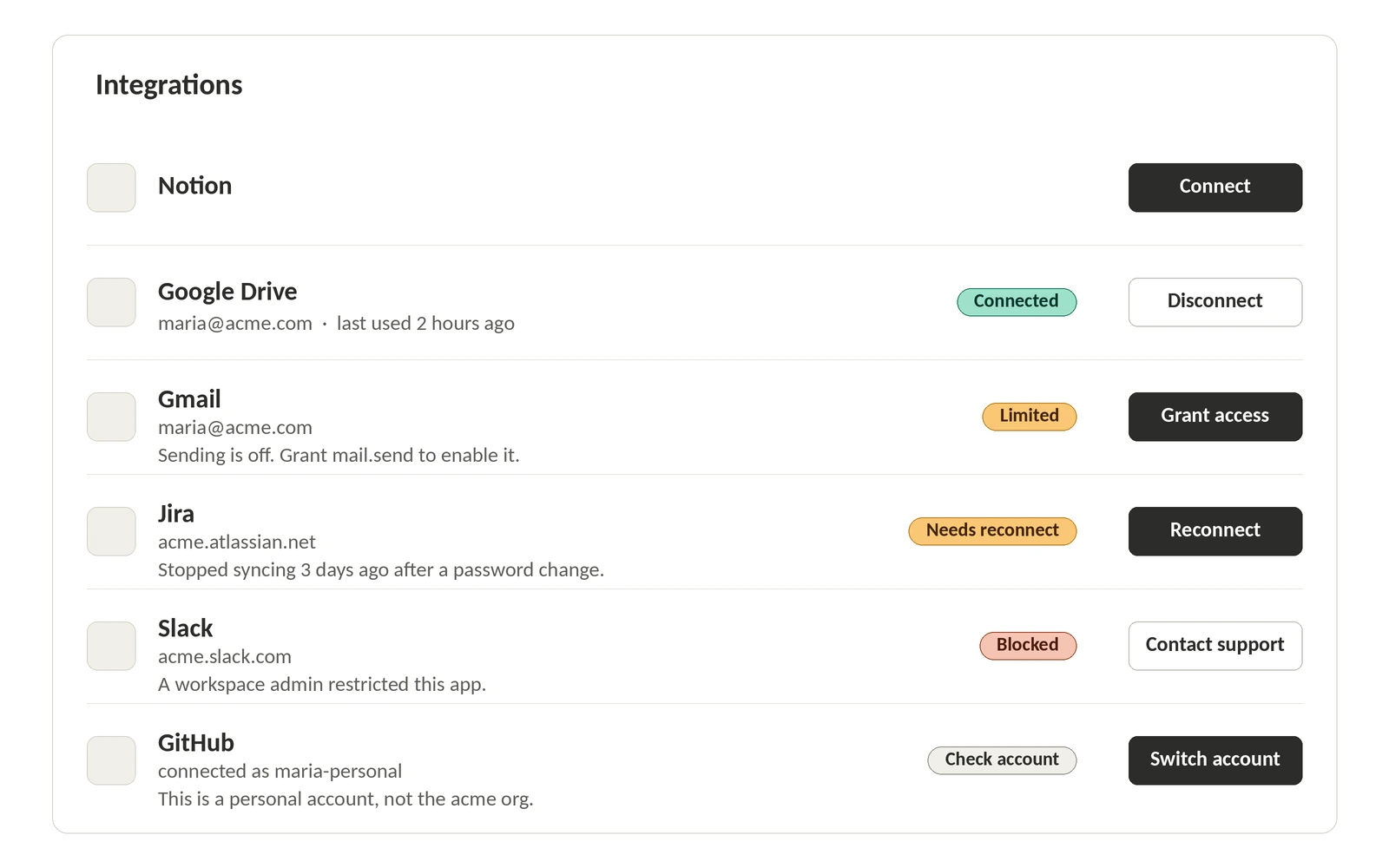
The screen you don't own
The moment a user clicks connect, they leave your app for a page written by someone else. Google's consent screen tells users who is requesting access and what kind of data the app wants, drawing its app name, logo, support email, privacy policy, and terms links from what you configured in the Cloud Console. Microsoft says the key details of a consent prompt are the permission list and the publisher information.
Before you design around that screen, check whether your branding will appear on it at all. Google is explicit: your brand must be verified for your application logo and name to be visible, and without verification, only your application domain shows. An unverified app isn't merely trusted less, it is anonymous at the moment the user decides.
What that page asks is not always all-or-nothing. Google shows a granular consent screen with per-permission checkboxes once you request more than one non-sign-in scope, or a mix of sign-in and non-sign-in scopes, and publishes the matrix:
Google's own example: ask for email and calendar scopes together and a user can grant Calendar but not Gmail.
Two other things can appear on that page and neither is your UI. If your branding is unverified, Google says users may trust the request less, which leads to fewer authorizations and more revocations later. The automated brand check usually finishes in minutes, though a manual review takes 2 to 3 business days when it can't be decided automatically. If an admin has to approve, the user hits a wall instead of a grant. Microsoft prompts for admin consent when a high-privilege permission was requested and consent wasn't already granted, and separately when the tenant's own consent policy restricts what users may approve, which can mean the user is never prompted at all. GitHub renders the final button of a third-party install as Install, Install and request, or Request depending on how much of the access an organization owner must sign off.
Since you can't edit that page, edit the one before it. Item three of Google's granular-permissions best practices is the whole design brief:
"3. Provide justification to users before asking the authorization request. Clearly explain why your application needs the requested permission, what you'll do with the user's data, and how the user will benefit from approving the request. Our research indicates that these explanations increase user trust and engagement."
One screen, in your voice, listing the scopes in plain language and what each one powers, is the cheapest conversion work in the whole flow.
Ask at the moment of use
Google calls it a best practice to request scopes incrementally, at the time access is required rather than up front, and gives the obvious example: an app that saves events shouldn't request Calendar access until the user presses "Add to Calendar." The reason is behavioral. Bundling several scopes at sign-in, especially for first-time users who don't know your features yet, makes the request hard to comprehend, raises alarms, and deters people from going further.
Slack builds the same idea into its app configuration. Optional scopes let you mark permissions as optional so users choose which ones to grant at install time, which Slack frames as giving users control while reducing installation abandonment. Note the order of operations: users pick from the optional scopes the admin has pre-approved, so the workspace admin still bounds the menu.
And after a denial, don't re-ask on a loop. Google's policy on multiple scopes says to prompt again only once the user has clearly indicated intent to use the specific feature that needs the scope.
Partial grants are the normal case
If your code assumes the grant it got is the grant it asked for, it's already wrong. Google tells developers to compare the scopes in the token response against the scopes their features need and disable any feature that can't function. Google also warns that the returned scope may not match the requested scope even when the user approved everything, because an API can map several scope strings to a single scope of access and return one string for all of them. Slack's advice is identical in shape: handle missing_scope errors, store the granted scopes from the oauth.v2.access response, and check them before showing functionality that needs an optional permission.
So the connection row in your UI has more than two states. It has a state per capability. A Google connection that can read Drive but not send mail should render as connected with one feature greyed out and a one-line explanation, plus a way to grant the missing piece when the user reaches for it.
WorkOS Pipes exposes this as data. The credentials response carries a missing_scopes array (missingScopes in the Node SDK) on the success path, which makes it a planning signal rather than an error. If your provider configuration gained a scope the user hasn't granted, that's a reconnect prompt for their next visit, not a failed request.
One asymmetry to know before you promise users fine-grained control: on Slack, scopes are additive across installs, you cannot downgrade an access token's scopes, and there is no way to remove a scope from an existing token without revoking it entirely. A "reduce this app's access" button, on that provider, means disconnect and reconnect.
Connection health is a state machine
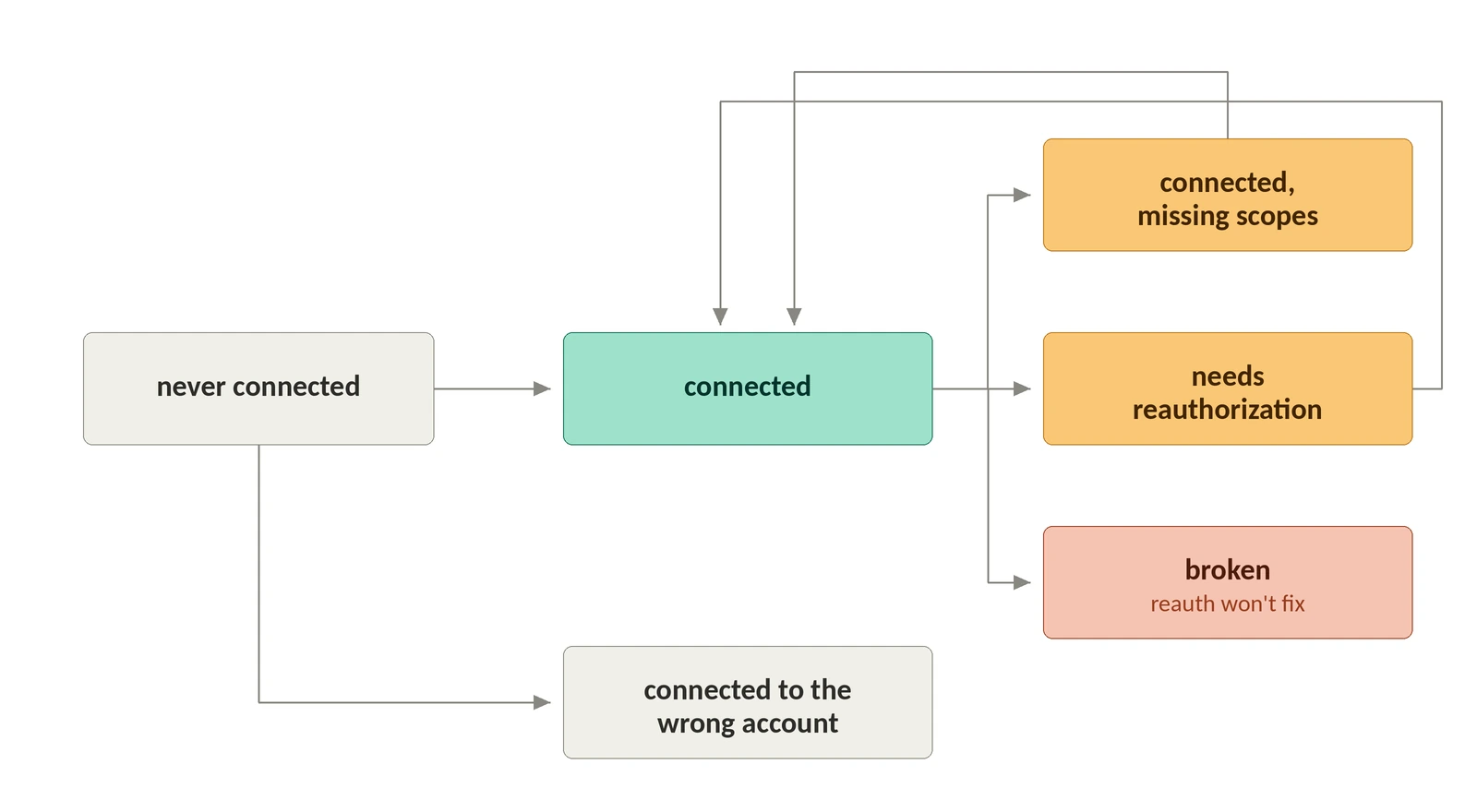
A boolean connected flag can't express what happens to a grant over time. The states worth modeling separately:
Pipes stores the user's authorization as a connected account whose state is either connected or needs_reauthorization, and you read it directly:
WorkOS notes that more states may be added, so handle an unrecognized value as "needs a human," not as connected.
That fourth row is the one that fills up, because most grants die for reasons the user never chose. Google lists them: the user revoked access, the refresh token went unused for six months, they changed their password while the token held Gmail scopes, the account exceeded its maximum live refresh tokens, time-based access expired, an admin set a requested service to Restricted, or, for Google Cloud Platform APIs, an admin-set session length was exceeded. The Restricted case is the one that belongs in the fifth row rather than the fourth, since it surfaces as admin_policy_enforced and no amount of reconnecting will clear it.
There is a limit of 100 refresh tokens per Google Account per OAuth client ID, and crossing it invalidates the oldest token without warning, though service accounts are exempt. A project whose consent screen is configured for an external user type and is still in Testing status gets refresh tokens that expire in 7 days, unless the only scopes requested are a subset of name, email address, and user profile. That one will look exactly like a dev-environment-only bug if nobody thinks to check publishing status.
Google Cloud session control policies add a case that looks exactly like revocation and isn't: the call fails with invalid_grant, and only error_subtype (for example invalid_rapt) tells you it was a session policy, with session durations as short as an hour. This one is scoped to apps that require the Cloud Platform scope, so it won't explain a broken Gmail integration, but telling a user to reconnect when their admin set a one-hour session is a support ticket you wrote yourself.
Which account, which workspace, which repositories
Users have more than one of everything, and the flow rarely asks clearly. GitHub splits the decision in two: installing an app grants access to organization and repository resources and picks which repositories are in scope, while authorizing it grants access to your account and permission to act on your behalf, and you can do either without the other. During a third-party install the user chooses All repositories or Only select repositories, while the app always keeps at least read-only access to every public repository on GitHub. The same app can be installed on a personal account and several organizations at once, so "connected to GitHub" is not a statement about anything in particular.
Slack has the same ambiguity in workspace form. Omit the team parameter and the user picks the workspace themselves; if they weren't signed in, the workspace they choose at sign-in wins regardless of what you passed. Slack's own recommendation is to call team.info and users.info after the code exchange and compare the domain against the one you expect, because otherwise an employee can authenticate with a personal account and inadvertently link corporate Slack data to an unmanaged instance outside their organization's control.
Get the scoping wrong and the failure is invisible. Pipes connections are either organization-scoped or user-only, lookups require an exact match, and a mismatch in either direction is indistinguishable from a user who never connected. Render the account, workspace, or organization a connection belongs to in the UI, always. It's the only way a user can tell "not connected" from "connected as someone else."
Errors the user can act on
Slack's docs make the point better than most design guidelines:
"One more suggestion: show the user a nice message once they are redirected and you successfully gain an access token — or, if there's been an error, report that error to the user. The reason the user is redirected back to your app at the end of OAuth is for transparency purposes: the user deserves to know the end of the story, whether your app was installed successfully or not."
Sort failures by who can fix them. A temporary authorization code that expired (Slack's lasts ten minutes) is a "try again" with a button. Errors like unapproved_scope, invalid_scope, bad_redirect_uri, invalid_team_for_non_distributed_app, and scope_not_allowed_on_enterprise are your configuration problems; showing a provider error code to a user who can't act on it moves your bug into their inbox.
When a background job finds the failure instead of a click, the same split applies. A Pipes relay call for a user who never connected, whose grant was revoked, or whose token can no longer refresh returns 402 with a reconnect URL:
Treat authorization_url as optional. It is null for API key and client credentials connections, which have no OAuth screen to send anyone to, and it can also be null when a provider's OAuth configuration is incomplete. Fall back to the widget rather than assuming the field is present.Make the disconnect button honest
Deleting a Pipes connected account disconnects it, removes the stored access and refresh tokens, and returns 204 No Content, but it does not revoke access on the provider side, and the user may still need to disconnect your app in the provider's own settings. If your UI says access was removed while the grant is still listed in the user's Google account permissions, you've told them something false about their own security posture. Say what you revoked, and link them to the provider's settings for the rest.
Revocation also flows the other way. Absent token rotation, Slack tokens don't expire, and they die when a workspace owner fully uninstalls the app, a user removes their own configurations, or the account of the person who originally authenticated the app is deactivated. Google notes that users and Workspace admins periodically review the third-party apps with access to their account. None of those events start in your product. Your connection list has to be able to find out that it lost access.
What you can hand off, and what stays yours
Build all of this per provider and you maintain six states of UI logic, one reconnect path per provider, and a refresh loop, forever. The Pipes widget is the pre-built version: it lists available providers, lets users connect and manage them, and tells the user when reauthorization is needed. Behind it, tokens are refreshed on both the credential and relay paths so callers always get a valid credential, the refresh token stays in Pipes rather than in your database, PKCE is on by default, and there are 300+ providers to enable.
It also decouples connecting from signing in: users can authenticate however they want, including SSO through Okta, and separately authorize the specific services your app needs, with integrations presented as capabilities rather than login methods. That separation is what lets you ask for Calendar access at the moment someone schedules something instead of at the door.
What stays yours is the judgment. The pre-redirect explanation screen is yours to write. Which scopes each provider integration requests is yours to choose, and shared WorkOS-managed credentials are for development and testing only, so production runs on your own OAuth app, which is also what puts your name, logo, and privacy policy on the consent screen the user reads before deciding. Provider-side access after a disconnect stays the user's to remove.
If you want a place to start, take your current integrations settings page and try to render all six states from the table above. Most implementations can only draw two. Start with needs_reauthorization: it's the state users hit most often, it breaks their workflow silently, and it's the one your support queue is already paying for.
For the server side of this, pulling per-connection credentials with nobody signed in, plus rotation, revocation, and audit logging, see the Pipes background-worker tutorial, or start with the Pipes docs.