Passkeys stop phishing. Your MFA fallbacks undo it.
How FIDO2 and passkeys use cryptographic domain binding to stop phishing attacks, why SMS and push notification fallbacks destroy your security posture, and what to do about it.

AI-powered phishing has made most multi-factor authentication obsolete. Adversary-in-the-middle (AiTM) phishing kits now steal authenticated sessions in real time, deepfake voice calls walk employees through fake login flows, and AI-generated lures have pushed click-through rates to 54%, compared to 12% for traditional phishing. The tools to run these attacks cost as little as $200 on Telegram and require no technical skill.
In 2026, the question is no longer whether MFA can be bypassed. It is being bypassed daily, at scale, as a commercial service. By mid-2025, a single phishing-as-a-service platform, Tycoon 2FA, accounted for 62% of the phishing volume Microsoft blocked. SMS codes, authenticator apps, and push notifications offer no defense against these attacks, because they all depend on a human relaying a value that an attacker's proxy can intercept.
But there is a class of authentication that these attacks cannot touch.
In 2018, Google deployed FIDO security keys to all 85,000+ employees and has reported zero successful phishing attacks since. In 2022, Cloudflare survived the same sophisticated phishing campaign that compromised Twilio, because it required FIDO2 hardware keys and had disabled every other MFA method. Snap reported zero account takeovers for more than two years after adopting the same approach.
The technology works. The problem is that most organizations either have not deployed it or have deployed it alongside weaker methods that attackers simply walk around.
How traditional MFA fails
To understand why passkeys and FIDO2 security keys are different, it helps to understand what they are different from.
Traditional MFA methods (SMS codes, authenticator app TOTPs, and push notifications) all share a common architecture: they produce a value that a human transmits from one device to another. You receive a six-digit code on your phone and type it into a browser. You tap "approve" on a push notification. In every case, the security of the system depends on the human sending that value to the legitimate service and not to an attacker.
This is the exact assumption that adversary-in-the-middle (AiTM) attacks exploit. The attacker places a reverse proxy between the user and the real login page. The user sees the real site, enters the real password, completes the real MFA challenge. The proxy captures the session cookie that the legitimate service issues after successful authentication. The attacker now has an authenticated session, and MFA did nothing to prevent it.
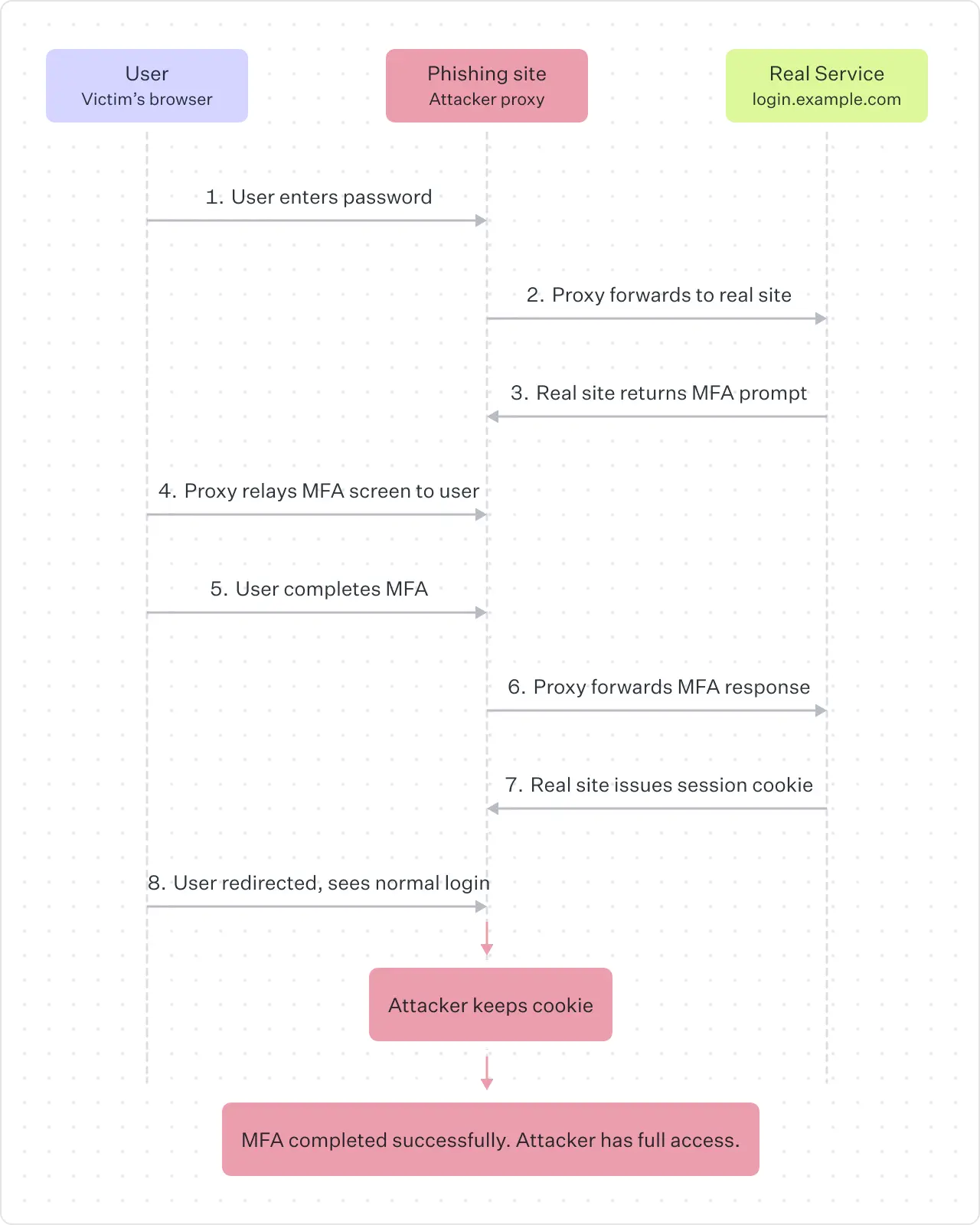
The problem is structural. Any MFA method that relies on a human relaying a value to a website is phishable, because there is no mechanism preventing that value from being relayed through an attacker's proxy. The code does not know which site it is being entered on. The push notification does not know whether the login request was initiated by the user or by an attacker using stolen credentials.
How FIDO2 and passkeys actually work
FIDO2 authentication (the standard behind both hardware security keys and passkeys) eliminates this vulnerability through a mechanism called cryptographic origin binding. Here is how the protocol works at a technical level:
- Registration. When you create a passkey for a website, your device generates a unique public-private key pair. The private key is stored in secure hardware on your device (a Trusted Platform Module, Secure Enclave, or hardware security key) and never leaves it. The public key is sent to the server and associated with your account. There is no shared secret. The server never holds anything that can be used to impersonate you.
- Authentication. When you attempt to sign in, the server sends a random challenge (a nonce) along with the Relying Party ID, which is the domain of the service. Your device checks whether the domain in the browser matches the Relying Party ID that the passkey was registered with. If it matches, the device signs the challenge with the private key and returns the signature. The server verifies the signature using the stored public key. If it matches, you are in.
Phishing fails because if an attacker creates a phishing site at fake-login.example.com and proxies the real login page, the browser will see that the domain is fake-login.example.com, not accounts.google.com. The passkey registered for accounts.google.com will not be presented. The device will not sign the challenge. There is nothing for the proxy to capture. The attack is stopped by the protocol, not by the user's judgment.
This is the critical difference. Traditional MFA puts the burden on the human to detect the phishing site. FIDO2 puts the burden on the cryptographic protocol, which is immune to social engineering.
The fallback problem
If FIDO2 is this effective, why are organizations still getting phished? In most cases, the answer is fallbacks.
The majority of organizations that deploy passkeys or security keys do not remove their existing authentication methods. They add phishing-resistant MFA as an option alongside SMS codes, authenticator apps, email-based one-time codes, and password reset flows. This creates what security researchers call an MFA downgrade attack surface.
The attack works like this: an attacker targets a user who has a passkey enrolled. Instead of trying to phish the passkey (which is cryptographically impossible), the attacker manipulates the login flow to trigger a fallback method. Some platforms allow users to click "try another way" and fall back to SMS or email codes. Others allow password reset flows that bypass MFA entirely. The attacker does not need to defeat the strongest method. They only need to find the weakest one that is still active.
This is not theoretical. Tycoon 2FA, the phishing-as-a-service platform that Microsoft attributed 62% of its blocked phishing volume to in mid-2025, included JavaScript specifically designed to detect passkey prompts and redirect users to weaker authentication flows. Researchers from Push Security have documented similar functionality in other criminal phishing platforms targeting Google accounts.
Apple stated at the 2025 FIDO Authenticate conference that adding passkeys as an option does not make a system phishing-resistant if SMS recovery or password reset flows still exist. This is the point that many implementations get wrong: phishing resistance is a property of the entire authentication chain, not a property of the strongest method in the chain.
The QR code fallback vulnerability
Even FIDO2 itself has a fallback that attackers have learned to exploit: the cross-device authentication flow.
Modern passkey implementations support a QR code mechanism for signing in on a device that does not have the passkey stored locally. You scan a QR code on the screen with your phone, approve the authentication on your phone, and the login completes on the other device. This is a legitimate and useful feature for shared workstations and new devices.
In mid-2025, a campaign called PoisonSeed demonstrated how to exploit this. Attackers presented a spoofed QR code on a phishing site. Victims scanned it with their phones, saw a legitimate-looking approval prompt, and approved it. By approving the QR-based authentication, they were unknowingly providing a valid FIDO assertion to the attacker. The attack worked at scale, prompting both Microsoft and Okta to issue emergency guidance recommending that organizations disable the QR code cross-device fallback feature where possible.
The lesson is consistent: any mechanism that introduces a gap between the cryptographic domain check and the user's approval is a potential attack vector.
Passkeys protect only the authentication layer
It is important to be clear about the boundaries of what phishing-resistant MFA addresses. Passkeys and FIDO2 security keys protect the authentication layer. They prevent attackers from stealing your credentials or your session during login. They do not protect the authorization layer.
Consent phishing (also called OAuth phishing) bypasses authentication entirely. The attacker tricks the user into granting OAuth permissions to a malicious application through a legitimate consent screen. Once the user clicks "allow," the attacker receives access tokens that work independently of any authentication method. Passkeys do not help here because the user is not being phished for credentials. They are being manipulated into granting access through a legitimate mechanism.
Similarly, if an attacker compromises the endpoint itself (through malware, for example), they can hijack sessions after authentication completes. FIDO2 protects the authentication ceremony, but endpoint security, session management, and authorization controls are separate layers that require their own defenses.
What developers should do
If you are building applications that authenticate users, here is how to implement phishing-resistant authentication correctly:
- Support WebAuthn as a first-class authentication method. Integrate the Web Authentication API (WebAuthn) into your login flow. The API is supported by all major browsers and operating systems. Use the
navigator.credentials.create()andnavigator.credentials.get()APIs, and set the Relying Party ID to your exact domain. - Require phishing-resistant methods for sensitive accounts. For admin accounts, accounts with access to financial data, and any account with elevated privileges, make FIDO2 the required method, not an optional one.
- Eliminate phishable fallbacks. This is the hardest step and the most important one. Once users have enrolled a passkey, disable SMS, TOTP, email codes, and push notification methods for that account. If your platform offers a "try another way" option during login, ensure it does not route to a phishable method. If your password reset flow can bypass MFA, redesign it.
- Design recovery carefully. Account recovery is the most commonly exploited gap in passkey deployments. Require users to register multiple passkeys (for example, one on their phone and one on a hardware security key). If you must support a recovery flow without a passkey, require in-person identity verification or a recovery code generated at enrollment time. Do not fall back to email or SMS for recovery.
- Disable the QR code cross-device flow if your threat model requires it. For high-security environments, disable the Bluetooth-based cross-device authentication (caBLE/hybrid) flow. If you need cross-device authentication, require users to register passkeys on each device individually.
- Enforce attestation for high-assurance environments. FIDO2 supports attestation, which lets your server verify the make and model of the authenticator being used. For environments that require NIST AAL3 compliance, enforce attestation and only allow device-bound authenticators.
What security teams should do
If you are responsible for securing an organization's identity infrastructure:
- Audit your current MFA fallback surface. Inventory every authentication method that is active across your identity providers and applications. Document every path a user (or attacker) could take to authenticate without a phishing-resistant method. This includes password reset flows, backup code mechanisms, and "try another way" options.
- Deploy hardware security keys to privileged users first. Start with IT admins, domain administrators, finance, and anyone with access to production systems. Hardware security keys (YubiKey, Google Titan) cost $25 to $75 each. A single breach costs millions.
- Roll out synced passkeys to the broader workforce. For non-privileged users, synced passkeys (stored in iCloud Keychain, Google Password Manager, or Windows Hello) provide phishing resistance with minimal friction. Users do not need to carry a separate device.
- Block legacy authentication protocols. Disable POP, IMAP with basic authentication, and any protocol that does not support modern MFA. These are common bypass vectors.
- Implement conditional access policies. Use your identity provider's conditional access or risk-based policies to enforce phishing-resistant MFA for high-risk sign-ins, sensitive applications, and administrative actions.
- Monitor for MFA downgrade attempts. Configure alerting for authentication events where a user who has a passkey enrolled authenticates using a weaker method. This is a strong signal of either misconfiguration or active attack.
- Complement authentication with session-layer controls. Bind sessions to devices. Set short token lifetimes. Implement continuous access evaluation that re-checks risk signals throughout the session, not just at login.
The math is simple
Google deployed security keys and had zero successful phishing attacks across 85,000 employees. Cloudflare deployed security keys, disabled all other MFA methods, and survived a sophisticated phishing campaign that compromised other companies. Snap adopted FIDO2 security keys and reported zero account takeovers for more than two years.
In every case, the pattern is the same: deploy phishing-resistant authentication and remove the fallbacks. The technology works. It has worked for years. The organizations that get breached through phishing in 2026 will overwhelmingly be the ones that either did not deploy it or deployed it alongside weaker methods that attackers simply walked around.
The AI-powered phishing tools do not care how long your password is. They do not care how fast you can type a six-digit code. They care whether there is a cryptographic domain binding between your device and the legitimate service that prevents them from proxying the authentication. Passkeys and FIDO2 security keys provide that binding. SMS, TOTP, and push notifications do not.
Remove the fallbacks. That is the entire strategy.
Stay safe with WorkOS
WorkOS AuthKit supports passkey authentication built on the WebAuthn standard, with progressive enrollment that prompts existing password users to create a passkey on their next sign-in. AuthKit treats passkeys as both a first and second factor, requiring user verification (biometric or PIN) for every passkey login.
By design, WorkOS does not offer SMS-based MFA, because it is a phishable method that weakens your authentication chain.
If you are building a B2B application and want phishing-resistant authentication without the fallbacks this article warns against, start here.