PKCE vs Device Flow: Which OAuth flow is best for CLI auth?
A practical, security-first comparison of the two browser-delegated OAuth flows that CLIs use, with recommendations for laptops, headless servers, containers, and CI runners.

You're shipping a CLI and the question of how to handle authentication has come up. Or you're reviewing someone else's CLI and they've picked one of these two flows, and you want to know if it was the right call. Either way, the choice between Authorization Code with PKCE and the OAuth 2.0 Device Authorization Grant comes up early in CLI design and tends to stick.
The two look similar at first glance. Both delegate authentication to a browser. Both end with the CLI holding an OAuth access token and a refresh token. Both work with SSO, MFA, and any IdP that speaks OAuth or OIDC. But underneath, they make very different assumptions about the environment, and they produce very different security properties. Different enough that AWS switched defaults in CLI v2.22, Microsoft has started blocking one of them in some enterprise tenants, and Google never offered both.
This piece walks through how each flow actually works, where they diverge on security, what major CLIs ship today, and which one you should default to. The short answer is in the next section; the rest is the why.
TL;DR
For interactive CLIs running on a user's own machine, default to PKCE. Reserve the Device Code flow for headless environments where no local browser is available: SSH sessions, containers, cloud IDEs, dev VMs.
If your CLI ships into enterprise environments, the right answer is almost always to ship both, default to PKCE, and put device code behind an explicit --device flag.
Why CLIs need a browser at all
A CLI shouldn't ask the user for a password directly anymore.
The reason is SSO. Once an enterprise customer's identity provider (Okta, Microsoft Entra ID, Google Workspace) is in the loop, "authentication" stops being username and password. It's a SAML or OIDC handshake, often gated by MFA, sometimes gated by conditional access policies that check device posture, location, and time of day. None of that fits in a terminal prompt.
The standard answer is to delegate authentication to a browser, where the IdP can run whatever flow it wants, and have the CLI receive a token at the end. PKCE and Device Code are the two patterns OAuth 2.0 settled on for doing exactly that. They solve the same problem, make different assumptions about the environment, and produce meaningfully different security properties as a result.
How each flow works
Authorization Code with PKCE
PKCE (Proof Key for Code Exchange, RFC 7636) is the modern standard for native apps and CLIs. The flow:
- The CLI generates a random
code_verifier(a 43- to 128-character random string) and computes its SHA-256 hash, called thecode_challenge. - The CLI starts an HTTP server on a loopback address (
http://127.0.0.1:<random_port>/callback) and opens the user's browser to the IdP's/authorizeendpoint, passing the challenge and the loopback URL asredirect_uri. - The user signs in. SSO routing happens here if their organization has it configured: enter
alice@acme.com, get redirected to Okta, complete MFA, come back. The IdP then redirects the browser tohttp://127.0.0.1:<port>/callback?code=.... - The CLI captures the code from the loopback request and exchanges it for tokens by posting back to the IdP with the original
code_verifier. The IdP hashes the verifier, compares it to the stored challenge, and issues tokens if they match.

The key security property is the loopback redirect. The authorization code is delivered over a connection that only a process running on the same machine can receive, and it's cryptographically tied to a code_verifier that the CLI generated and never sent over the wire.
OAuth 2.0 Device Authorization Grant
The Device Flow (RFC 8628) was originally designed for input-constrained devices like smart TVs and game consoles, where typing a password with a remote control is impractical. It works just as well for CLIs in environments where opening a local browser isn't possible. The flow:
- The CLI posts to the IdP's device authorization endpoint and gets back two codes: a
device_code(kept secret on the CLI side) and a short, human-readableuser_code(e.g.BDWP-HQPK). The response also includes averification_uri(e.g.https://login.example.com/device) and a polling interval. - The CLI displays the user code and the URL. The user opens the URL on any device with a browser, signs in, and enters the code (or confirms it if the URL was pre-filled with
?user_code=...). - The CLI polls the IdP's token endpoint with the
device_codeuntil either the user approves and tokens are returned, or an error likeexpired_tokenarrives.
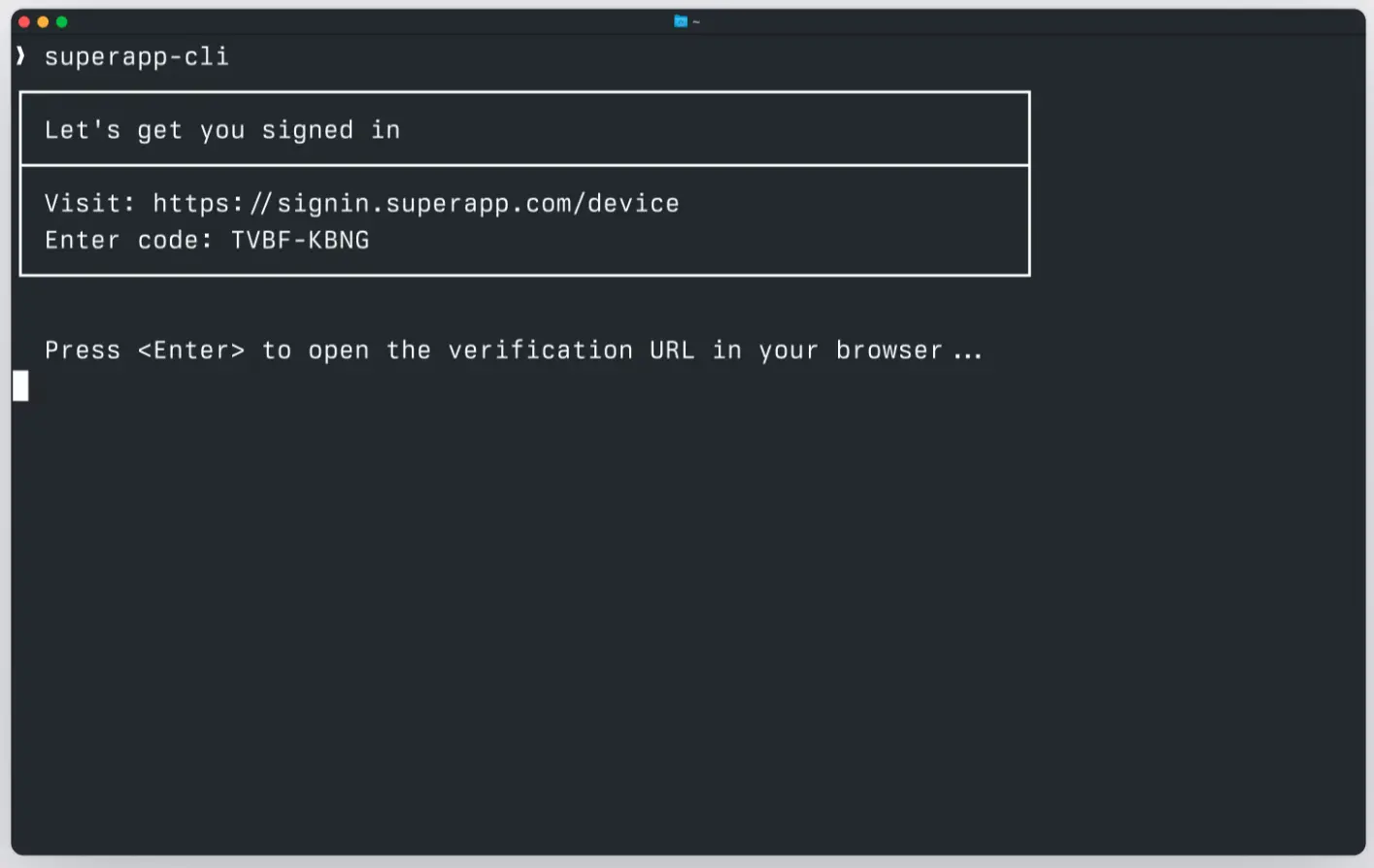
The user can complete this flow on a totally different device from where the CLI is running. They can type the code into their phone, their laptop, anywhere. That's the design intent: the device with the CLI doesn't need to participate in the browser session at all.
Two answers to the same problem
Both flows produce the same end state: an OAuth access token and a refresh token, with authentication delegated to a browser. The differences come from what each one assumes about the environment.
PKCE assumes the user is sitting at the same machine the CLI runs on, and that the CLI can bind a local TCP port to receive the redirect. When those assumptions hold, PKCE is faster, has no polling, and is more phishing-resistant. When they don't hold, PKCE has nowhere to redirect to.
Device code assumes nothing about the CLI's environment beyond an outbound HTTPS connection. The user's browser session and the CLI's polling loop are completely decoupled, which is exactly what you want for SSH, containers, and embedded devices, but is also exactly what creates the phishing window discussed below.
Security: The part that matters most
This is where the two flows really diverge.
The Device Code phishing attack
The Device Flow has a specific attack pattern that's been documented against AWS, Microsoft, and other providers. The mechanics:
- The attacker runs the legitimate CLI (or hits the IdP's public device endpoint directly) and gets a real
device_codeanduser_codefrom the legitimate IdP. - The attacker sends the
user_codeandverification_urito a victim, framed as a routine authentication request. The classic pretext is something like, "IT needs you to re-verify your account; please go to login.example.com/device and enter code BDWP-HQPK." - The victim opens the URL, signs in legitimately to the real IdP. Everything looks correct, because everything is correct: it's the real domain, the real branding, the real SSO flow, the real MFA prompt. The victim enters the code.
- The IdP issues real tokens against the device code. The attacker, who has been polling all along, receives them.
This works because the user code is a bearer credential with respect to the polling session. There's no binding between the device that initiated the flow and the device that completes it. That's the whole point of Device Flow as a feature, but it's also exactly what makes the attack possible.
The attack is dangerous because every defensive signal points the right way:
- The IdP's screens are real. Standard phishing detection (URL inspection, certificate checks) doesn't help.
- The MFA prompt is real and the user passes it correctly.
- Conditional access checks pass because the user really is on a trusted device on a trusted network.
- The audit log on the IdP shows a successful authentication with no anomalies. From the IdP's perspective, nothing went wrong.
Why PKCE closes this gap
PKCE has no equivalent attack because the authorization code is never something the user types or transcribes. It's delivered directly from the browser to a server bound to 127.0.0.1 on the same machine. An attacker on a different machine has no way to receive that redirect, and the code_verifier needed to redeem the code never leaves the original CLI process.
You could try to phish a PKCE flow by getting a victim to run a malicious CLI that opens a browser and somehow forwards the code to the attacker's machine. But at that point the attacker needs to have already gotten the victim to run arbitrary code on their machine, which is a much higher bar than "click a link and type a six-character code."
Why Microsoft started blocking Device Code
Microsoft Entra ID added a conditional access option to block the device code flow entirely for selected users or applications. This is the strongest enterprise response so far: rather than try to detect phishing in real time, simply don't allow the flow at all for high-value tenants.
If you're building a CLI that targets large enterprise customers, you should expect that some percentage of them have already turned device code off at the tenant level. That's another reason to default to PKCE: it keeps working in tenants that have blocked device code, while a device-code-only CLI is dead on arrival in those environments.
This isn't theoretical. AWS made the same call: in CLI v2.22, AWS switched the default for aws sso login from device code to PKCE, and put device code behind a --use-device-code flag.
Mitigations if you must use Device Code
If your CLI's deployment context forces you to use device code (or you're shipping it as a fallback), the mitigations that actually matter:
- Short user-code lifetimes. A 10-minute window is the spec recommendation. Shorter is better.
- Display the application name and (when known) the organization on the confirmation screen. A user who sees "Confirming sign-in for Acme CLI" is more likely to question a request that didn't come from a CLI they started themselves.
- Require explicit confirmation, not just code entry. The user should have to click a button labeled with what they're authorizing.
- Log and alert on device-flow grants server-side. Anomaly detection on volume, geography, or time-of-day catches scaled phishing campaigns even when individual phish go through.
- User education. "Only enter codes that came from a CLI you started yourself" is a simple rule, and it helps.
These reduce risk; they don't eliminate it. PKCE eliminates this specific risk by design.
When to use which
For a CLI sold into enterprise environments, the answer is almost always "ship both." Default to PKCE and put device code behind an explicit flag.
What major CLIs actually do
A quick survey of where well-known CLIs landed:
- AWS CLI v2.22+: PKCE default,
--use-device-codeflag for the older behavior. The switch was a direct response to documented phishing risk in the Device Flow. - gcloud: PKCE only. Has always used a loopback redirect; never offered Device Flow.
- GitHub CLI (
gh): Hybrid. The web flow opens a browser and shows a code that's pre-filled in the browser, combining elements of both patterns. - Vercel CLI: Adopted device code as the default in September 2025.
- Confluent CLI: Device Flow with OIDC.
- Microsoft Entra ID: Conditional access policies can disable Device Flow per-tenant, full stop.
The pattern most mature CLIs converge on is PKCE-first with device code as a fallback. The exceptions tend to be products where the typical user genuinely runs commands inside containers, on remote boxes, or in environments where binding a loopback port is unreliable.
Implementation complexity
A common assumption is that PKCE is significantly more code than Device Flow. In practice they're close enough that complexity shouldn't drive the decision.
PKCE needs: a random code_verifier, a SHA-256 hash for the code_challenge, a loopback HTTP server bound to 127.0.0.1 on a dynamic port, and a token exchange POST. The trickiest part is reliably picking a free port and handling the case where the browser doesn't redirect (the user closed the tab, the OS resolved localhost to IPv6, the loopback was blocked by a firewall).
Device code needs: a POST to request the codes, a polling loop with exponential backoff on slow_down, and timeout handling for expired_token. The trickiest part is the polling state machine, especially handling all the documented error responses correctly.
Roughly equivalent, in lines of TypeScript. Where complexity differs significantly is in error UX: PKCE's failure modes tend to be obvious (browser didn't open, port already in use), while device code's failure modes are mostly silent until polling times out.
Frequently asked questions
Can I use Device Flow on a laptop?
Technically yes, and it works fine. But you're choosing the less secure flow when the more secure one is available, which is hard to justify when both are roughly the same amount of code to ship.
Does PKCE work without a browser?
No. PKCE requires the user to complete an interactive browser flow on the same machine the CLI runs on. If you don't have a browser locally, you need Device Flow (or a non-interactive option like client credentials).
Is plain authorization code (without PKCE) acceptable for a CLI?
No. Without PKCE, an authorization code can be intercepted by another local process and exchanged for tokens. PKCE was created specifically to close this gap for native apps and is now considered mandatory for any client that can't keep a client secret.
Can Device Flow work with SAML?
Not directly. Device Flow is OAuth 2.0; SAML is a separate protocol. But identity providers that bridge SAML to OIDC (like WorkOS AuthKit) let you use device flow on top of any SAML connection without writing SAML code yourself.
What about the implicit flow?
Don't use it. The implicit flow is deprecated for new applications by OAuth 2.0 BCP and was never appropriate for CLIs.
Does PKCE protect me if my user's browser is compromised?
No. If the browser itself is compromised, the attacker can do anything the user can do, including completing OAuth flows. PKCE protects against a different threat: code interception by other local processes, and the device-code style of phishing.
How long do refresh tokens last?
Depends entirely on the IdP's configuration. Common defaults range from a few hours to several weeks. Some providers use sliding windows (refresh extends the lifetime), others use absolute expiry.
Recommendation: Ship both
The right architecture for a CLI that needs to work across enterprise environments is to implement both flows, default to PKCE, and expose device code behind an explicit flag like --device. This gives you:
- Best-in-class security on the common case (developer on a laptop)
- A working fallback for SSH, containers, and cloud IDEs
- Compatibility with tenants that have disabled Device Flow at the conditional access layer
- A surface area small enough that you're not maintaining two separate code paths
The IdP-side complexity (SAML or OIDC handshakes, MFA, conditional access, deprovisioning) doesn't need to live in your CLI. Both flows, by design, hand all of that off to a browser and an identity layer.
If you want to see what shipping both looks like in TypeScript, with WorkOS handling the IdP side, see our tutorial on adding enterprise SSO to your CLI with WorkOS.