How to preserve your AI context across devices, outages, and model providers
Lost all your AI session data switching computers? Here's how to externalize your context into Obsidian, Linear, and git so any agent can pick it up.

A colleague of mine got a new computer last week. She powered it on, installed Claude, opened it up, and found... nothing. Months of Claude Cowork sessions, conversation history, workflow context, project knowledge — all gone. There is no account-level sync. No export. No way to transfer sessions from one machine to another. A fresh start, whether she wanted one or not.

If you have been using AI tools seriously for any amount of time, you have probably felt a version of this. Maybe it was a new computer. Maybe it was an outage that wiped your session state.
Maybe you just wanted to try a different tool and realized everything you had built up with your current one was locked inside it. The feeling is the same: you are starting over, and you should not have to be.
The fragility of local session state
Most AI tools today store your context locally. Your conversation history, your project knowledge, your workflow state — it all lives in the tool's own storage on your machine. This creates a few problems that get worse the more you rely on these tools.
It is not portable. Your context is trapped inside one application on one device. Switch tools, switch machines, or hit an outage, and that context evaporates.
It is not composable. You cannot run two different agents against the same body of knowledge. Your Claude context and your Cursor context are siloed from each other, even when they are about the same projects.
It is not durable. Local state is ephemeral by nature. It survives until it does not — a reinstall, a migration, a corrupt database, a provider decision to change their storage format.
Even rapidly improving built-in memory systems for these tools do not address the core issue. The core issue is that your context is owned by the tool instead of owned by you.
Externalize everything
The fix is a pattern I have been refining for a while now: externalize your context into durable, agent-agnostic systems that you control and that any tool can connect to.
Here is what my setup looks like — and how to build yours depending on where you are starting from.

The stack
Obsidian as your knowledge graph
Obsidian is a markdown-based note-taking app that stores everything in a local vault of plain text files. I use it for longform thinking, project notes, daily TODOs, research threads, and anything I want to persist and cross-reference over time.
The key feature is bidirectional linking. Every note can link to any other note, and over time this builds a genuine knowledge graph — a Zettelkasten that grows more useful as you add to it.
But the reason it matters here is that your vault is just a folder of markdown files. Any agent can connect to it through MCP servers that expose file system access. Your accumulated knowledge is not locked in any tool. It is sitting in plain text on your file system, version-controllable, searchable, and readable by anything.
Setup:
- Download Obsidian (free for personal use)
- Create a vault in a synced location (iCloud, Dropbox, or a git repo)
- Start with three folders:
projects/,daily/,references/ - Install the Obsidian MCP server so your agents can read and write to your vault
Linear as your task and project state
I keep all my task and project state in Linear, including on a personal account. Every ticket, every project, every status update lives there.
Any agent with the Linear MCP integration can read and write to it. If I switch from Claude Code to another tool tomorrow, my project context does not move — because it was never inside the AI tool to begin with.
Setup:
- Create a Linear account (free tier works)
- Create a personal workspace with a team for each area of your life (e.g., "Content", "Side Projects", "Home")
- Connect the Linear MCP:
claude mcp add --transport http linear https://mcp.linear.app/mcp - Run
/mcpin Claude Code to authenticate via OAuth
Now any agent can pull your tickets, update statuses, add comments, and file new issues. Your project state is always current and always accessible.
Markdown files in git repos
This is the simplest and maybe most powerful piece. CLAUDE.md files, project specs, architectural notes, decision records — all of it lives in version-controlled markdown inside the repos they relate to.
They are portable by definition. They are readable by any agent that has file system access. And they carry their own history through git.
Setup: You are probably already doing this. The key shift is being intentional about it:
- Every project repo gets a
CLAUDE.md(or equivalent) with project context, conventions, and decisions - Specs and architectural decisions go in
docs/rather than in Notion or Google Docs - Use
AGENTS.mdfor cross-tool agent instructions that are not specific to Claude
A private repo for your bespoke tools and skills
This is the piece most people miss, and it is the highest-leverage move you can make.
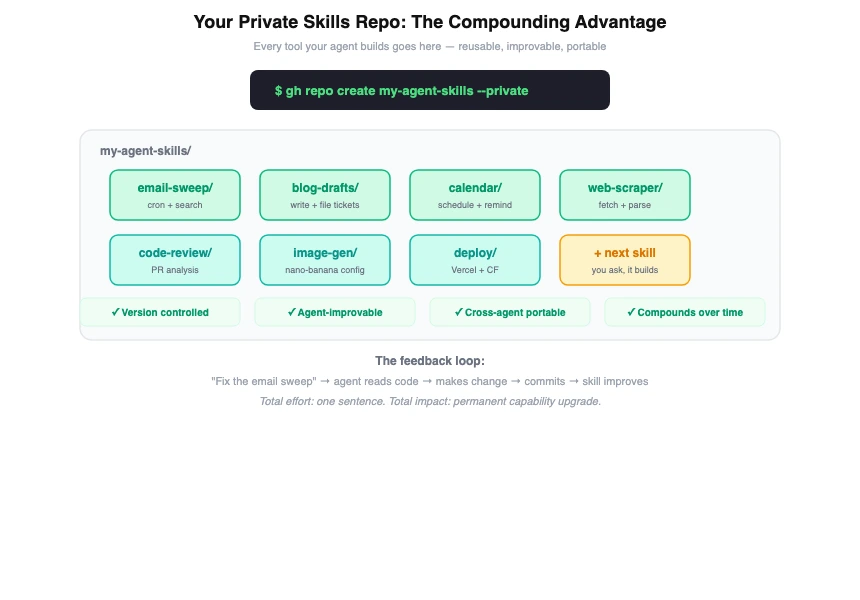
Create a private git repo — call it my-tools, agent-skills, whatever you want — and use it as the home for every custom tool, skill, script, and automation your agents build for you. When you tell your agent "build me an email search tool" or "create a skill that drafts blog posts," the output goes into this repo.
Your agents can maintain and improve them. When a skill is in a git repo your agent has access to, it can read the code, understand how it works, fix bugs, and iterate on it. Tell your agent "the email sweep skill is too verbose, fix it" and it can open the file, make the change, and commit it. The skill gets better over time through casual feedback.
You can reuse them across agents. The same skill repo can be referenced by Claude Code, OpenClaw, or whatever you use next. Skills are just code in a folder — they are not locked to any platform.
They are version-controlled. When an agent makes a change that breaks something, you can revert. When you want to understand how a skill evolved, you have the full git history.
They compound. Every skill your agent builds makes the next one easier. An agent that already has an email tool, a calendar tool, and a file management tool can combine them in ways that an agent starting from scratch cannot.
Setup:
- Create a private repo:
gh repo create my-agent-skills --private - Structure it with a folder per skill:
email-sweep/,blog-drafts/,calendar/, etc. - Point your agent at it: add the path to your
CLAUDE.mdor include it as a workspace - When your agent builds something new, tell it to put it in this repo
- Review and commit the changes yourself — you maintain control, the agent does the work
Over time this repo becomes the most valuable piece of your setup. It is a growing library of capabilities that any agent can use, that gets better every time you give feedback, and that follows you regardless of which AI tool you are using.
MCP as the glue
Model Context Protocol is what ties all of this together. Linear MCP, file system MCP, Notion MCP if that is your preference — these integrations let any MCP-compatible agent connect to your externalized context.
The protocol does not care which model is behind the agent. It does not care which client you are running. It just connects tools to your data.
How this works in practice
I run OpenClaw on a System76 Meerkat that stays on my desk, connected via Discord. I run Claude Code on my laptop. Both connect to the same Linear workspace. Both can read and write to the same git repos. Both have access to my skills repo. Both can access the same project context.
Switching between them is seamless, not because the tools talk to each other, but because neither of them owns the context. They are both clients connecting to the same external systems.
If Claude goes down for an hour, I open a different agent and keep working. If I get a new laptop, I clone my repos, point at my Linear workspace, open my Obsidian vault, and I am back to full context in minutes rather than starting from zero.
This is also what makes it possible to run multiple agents simultaneously against the same body of work. One can be researching while another is implementing, and they are both reading from and writing to the same source of truth.
Where to start based on your comfort level
If you are just getting started with AI tools:
Start with Obsidian and a single CLAUDE.md in your main project repo. Get in the habit of writing your project context in markdown files rather than relying on conversation history. This alone will save you when you inevitably switch tools or machines.
If you are using AI tools daily:
Add Linear for task management and connect the MCP. Create your private skills repo and start having your agent build tools into it. Set up your CLAUDE.md files in every active project. This is the setup that makes you resilient to outages and tool changes.
If you are running autonomous agents:
Go all the way. Obsidian vault with MCP access, Linear for all project state, private skills repo that your agents actively maintain and improve, and MCP connections for every external system you use. This is the setup that lets you run multiple agents against the same context and switch between them without friction.
The portability payoff
Anthropic had outages this week. OpenAI has had them too. If your entire workflow is locked into one provider and they go down, you are dead in the water. But if your context lives in Linear, Obsidian, and git repos — and you are connecting to models through a routing layer — you just switch providers and keep working.
Services like OpenRouter make this concrete. OpenRouter gives you a single API endpoint that routes to hundreds of models across dozens of providers. You pay them for API credits and they handle the routing. If Anthropic is down, your requests automatically fail over to another provider. If you want to save money, you can route basic chat and RAG queries to cheaper models like MiniMax M2.5 (which costs 20x less than Claude Opus) while keeping the expensive frontier models for reasoning tasks that justify their price.
You can even use Claude Code itself through OpenRouter — two environment variables and you are running:
export ANTHROPIC_BASE_URL="https://openrouter.ai/api/v1"
export ANTHROPIC_API_KEY="sk-or-your-openrouter-key"
Now Claude Code works through OpenRouter with automatic failover, and you can switch models on the fly with claude --model deepseek/deepseek-chat-v3 or claude --model google/gemini-2.5-pro.
The broader point is this: there is an explosion of services right now — OpenRouter, Replicate, Together, Fireworks — that make insanely capable and specialized models available via API call. Image generation, video generation, voice synthesis, code generation, embedding models — whatever you need, someone has made it available as a simple API. When your context is externalized and agent-friendly, you can plug any of these in. You are not waiting for one provider to ship every feature. You are composing the best available tools from across the entire ecosystem.
The AI tooling landscape is moving fast. The specific tools we use today will not be the tools we use in two years. But if your knowledge, your project state, your skills, and your workflow context live in systems you own, that churn becomes a feature instead of a threat. You can always adopt the best available tool because you are never locked in.
My colleague lost months of context because it was stored in a place they did not control. That does not have to be your story.
Externalize your context, build your skills in repos you own, and let the tools compete for the privilege of connecting to your systems — rather than the other way around.