Protecting against Login CSRF attacks: How WorkOS keeps your users secure
A deep dive into Login CSRF risks and the layered security controls WorkOS uses to protect authentication flows.

Every cyber attack starts and ends with a human being.
Behind every exploit, phishing link, or compromised session, there’s always someone being deceived, and someone designing the deception. Among the subtler threats in this space is the Login Cross-Site Request Forgery (Login CSRF) attack, commonly pronounced “Login see-surf.”
Login CSRF can lead to stolen credentials, session hijacking, or account manipulation by taking control of a user’s authentication flow.
At WorkOS, we’ve built comprehensive safeguards to protect against this, including our sign-in consent page, which provides an additional layer of assurance during login.
What is a Login CSRF attack?
A Login CSRF (Cross-Site Request Forgery) attack occurs when an attacker tricks a victim into logging into a web application with the attacker’s credentials without the victim’s consent or awareness.
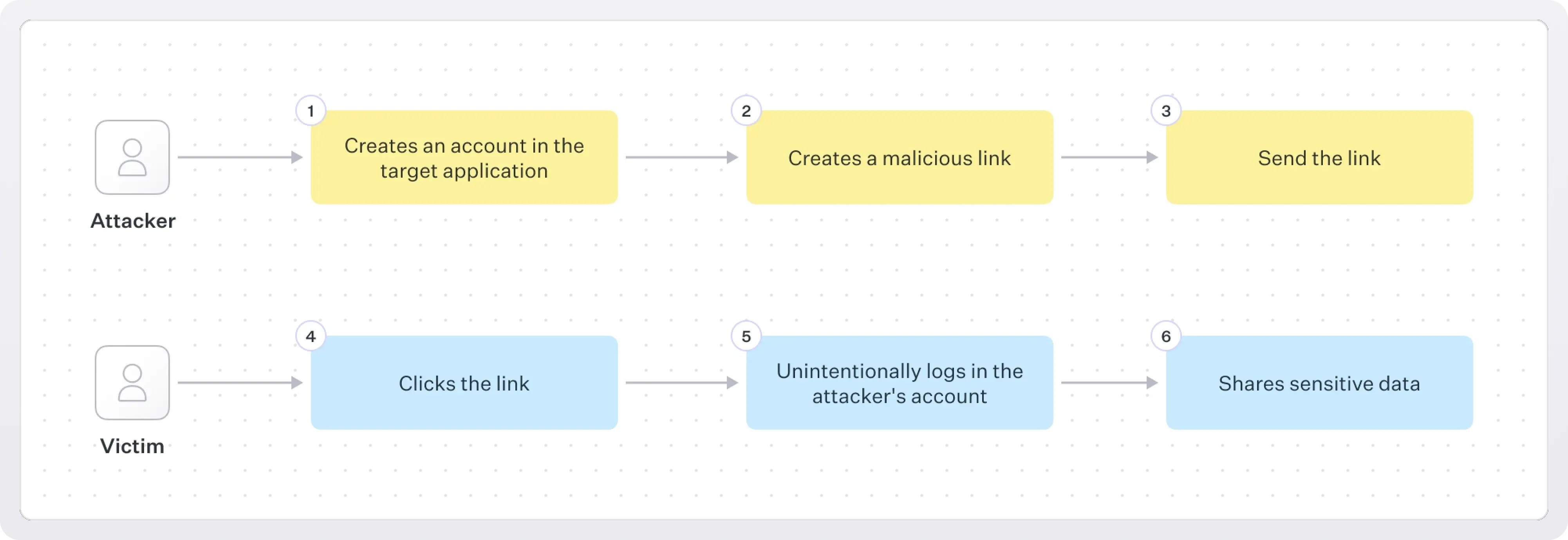
Here are the details as to how this exploit works step-by-step::
- Attacker registers an account on the target application.
- Attacker constructs a malicious URL that, when visited, issues a login request using the attacker’s credentials.
- Attacker delivers the URL to the victim (e.g., in an email, chat message, or on a webpage).
- The victim clicks the link and unknowingly starts the authentication process into the attacker's account.
- The victim is now unknowingly authenticated to an attacker-controlled account.
- The victim performs actions or shares data while logged into the attacker’s account; the attacker can subsequently access or exfiltrate that data.
This can be exploited in subtle ways. Attackers may gather behavioral data, manipulate stored preferences, or even trick users into performing actions that compromise their own data later. While it doesn’t immediately expose sensitive information, it erodes trust and can be a stepping stone to more serious attacks.
Why traditional CSRF defenses don’t always help
Login CSRF is a subset of general CSRF attacks, but the defenses that typically block standard CSRF (like synchronizer tokens or same-site cookies) don’t fully protect the authentication process itself.
Since login CSRF attacks naturally occur before a session has been established, these attacks can bypass typical CSRF defenses which are tied to an authenticated user's session.
How WorkOS prevents Login CSRF
At WorkOS, we take a layered approach to mitigating this risk. Our authentication infrastructure includes several built-in protections designed to prevent Login CSRF:
1. Strict redirect validation
WorkOS enforces strict validation for redirect URLs during OAuth and SSO flows. This ensures that users are always returned to pre-configured endpoints and cannot be redirected to attacker-controlled domains.
2. Session binding
Our sessions are cryptographically bound to specific clients and requests, making it impossible to reuse authentication results across origins or browser contexts.
3. Sign-in consent page
When a login attempt appears suspicious, originates from a third-party site, on-premises provider, or follows an unexpected redirect, WorkOS displays a sign-in consent page. This page asks users to explicitly confirm that they intended to log in to the requesting application, breaking the automatic login chain that makes Login CSRF possible.
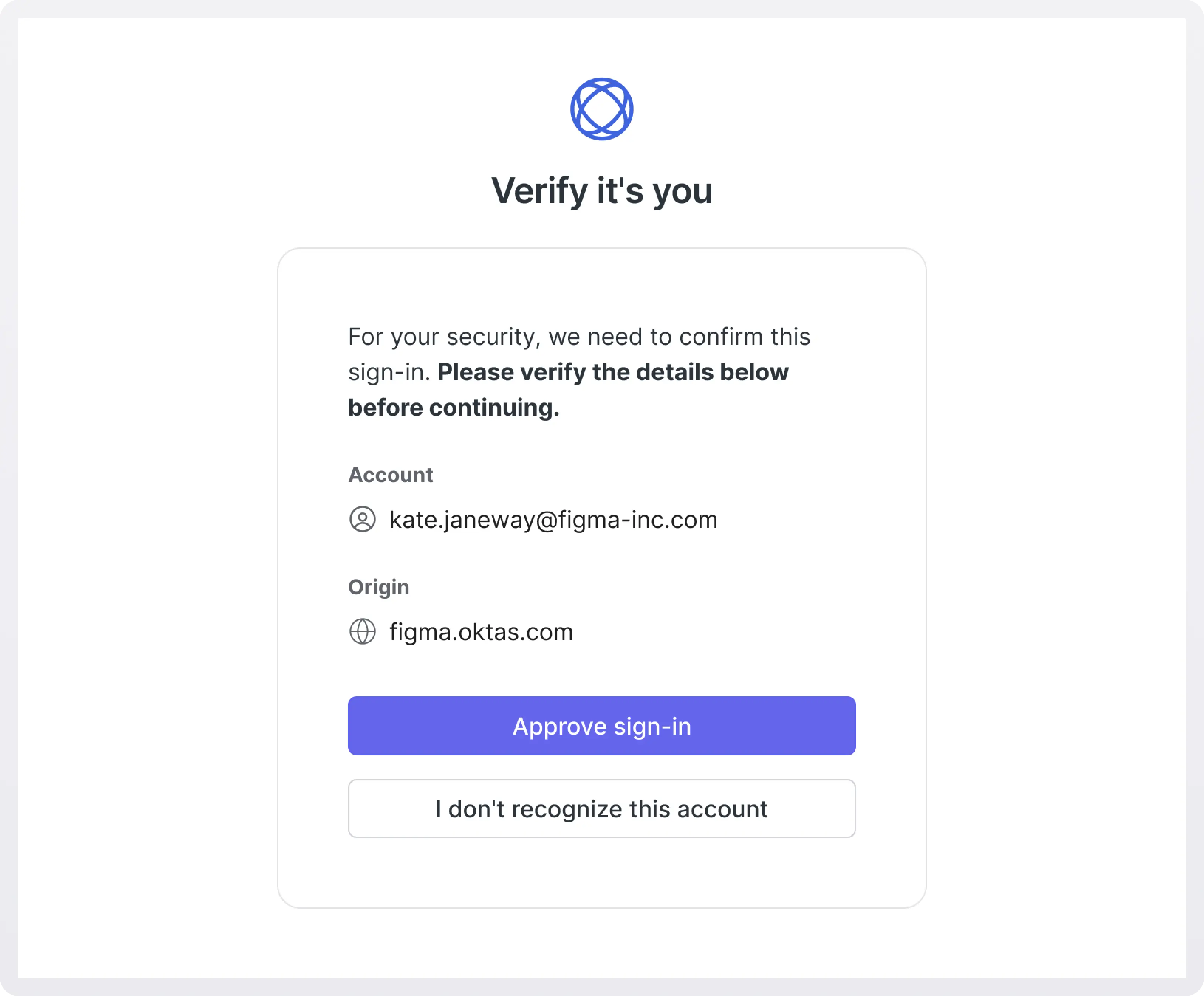
By requiring deliberate user interaction, the sign-in consent page ensures that:
- Authentication only proceeds when the user genuinely initiates it.
- Attackers cannot silently sign in users into unintended accounts.
- Users maintain awareness and control of where they’re signing in and with what email address.
4. Cookie isolation policies
WorkOS applies secure cookie configurations to prevent browsers from sending authentication cookies in cross-origin requests — another key protection against CSRF-style exploits.
5. Content Security Policy (CSP) header
WorkOS enforces a strict Content Security Policy (CSP) on its authentication endpoints.
CSP restricts where scripts, iframes, and resources can be loaded from. This blocks malicious injection or framing that could be used to automate login requests or embed login forms in attacker-controlled pages.
For example, our CSP headers prevent:
- Loading WorkOS login pages in untrusted iframes (frame-ancestors 'none').
- Injecting external scripts into WorkOS pages.
- Exfiltrating data to untrusted origins.
This ensures that WorkOS authentication pages run only trusted code from trusted sources.
Secure by design
The WorkOS authentication platform is designed around security-first principles. Every layer of our system, from OAuth to session management, is built to eliminate implicit trust between domains, browsers, and login flows.
Our goal is to make enterprise-grade security accessible to every app, without requiring teams to reinvent complex identity safeguards.
Conclusion
Login CSRF may not be as widely known as a traditional CSRF attack, but it represents a serious, and often-overlooked threat to user safety. With WorkOS, developers can integrate authentication with confidence, knowing that protections like the sign-in consent page and rigorous session validation stand guard behind every login attempt.
If you’d like to learn more about securing authentication with WorkOS, visit our Authentication documentation or contact our team.