How to build flexible authorization for multi-tenant B2B SaaS
Build an authorization model your B2B app won't outgrow: how to go from flat roles to fine-grained, resource-scoped access control without a rewrite.

Most B2B SaaS products start with two roles: admin and member. For a while, that's fine. Then a customer asks for project-level access, another needs to sync roles from Okta, a third wants workspace admins who can't touch billing, and suddenly the authorization layer becomes the hardest part of the codebase to change.
This guide walks through how to build an authorization model that starts simple and scales without a rewrite, using WorkOS RBAC for organization-level access and WorkOS FGA for resource-scoped fine-grained control.
How authorization complexity compounds
Almost every B2B product goes through the same stages:
- Flat roles: admin and member, enforced with a simple
if user.role === 'admin'check. - Permission flags: a growing list of boolean columns on the user table (
can_edit,can_invite, etc.). - Role explosion: a new role for every combination of access that customers request (
billing-admin,read-only-engineer,workspace-viewer). - Patched RBAC: a mix of tenant-wide roles and ad-hoc per-resource checks scattered through the codebase.
By stage 4, changing access logic means hunting down checks in dozens of places. Onboarding an enterprise customer who wants their Okta groups mapped to your roles becomes a custom project. Adding a new resource type (a workspace, a pipeline, a dataset) means deciding how it fits into a model that was never designed for it.
AI agents accelerate this problem. As more B2B products embed agents that act on behalf of users, flat RBAC creates a specific new failure mode: an agent that inherits a user's full access token can access far more than it needs for any given task. You need a way to scope what the agent can do to the specific resources it is operating on, not the full breadth of what the user can access. With flat roles, the only options are to give the agent broad access or to create a combinatorial set of agent-specific roles, one for every possible resource combination.
The fix is not to abandon RBAC; it is to build it right from the start and extend it with resource hierarchy when you need it. That hierarchy is what lets you say "this agent has editor access to this project and nothing else," without creating a custom role for every permutation.
Start with org-level RBAC
Before reaching for resource-scoped access control, it is worth getting the foundation right. WorkOS RBAC integrates directly with AuthKit and user management, so roles and permissions are embedded in session JWTs and available wherever you need them without extra API calls. For most of your authorization decisions, that is all you need.
Roles and permissions
The model has two components:
- Roles are logical groupings of permissions. They are identified by immutable slugs (e.g.,
admin,editor,viewer) and assigned to users via organization memberships. Every environment ships with a defaultmemberrole, which is automatically assigned when a user joins an organization. - Permissions are individual access grants referenced in your code (e.g.,
reports:view,users:invite,billing:manage). A permission can belong to any number of roles. Using permissions as your enforcement primitive means you can restructure roles without touching application code: if you splitadminintobilling-adminandops-admin, you just reassign permissions in the dashboard and the checks continue to work.
A common naming convention for permissions uses a resource:action pattern with delimiters like :, ., or _. Keep them concise because permission slugs end up in session JWTs, which have a size limit of around 4 KB in most browsers.
Organization-level roles
In multi-tenant apps, a user's role is scoped to the organization they belong to. The same user can be an admin in one organization and a member in another. WorkOS models this through organization memberships: each membership carries the role(s) for that organization, and the session JWT reflects the active organization context.
If you need organizations to define their own custom roles (for example, letting a customer create a security-reviewer role with a specific subset of permissions), WorkOS supports organization-level roles alongside environment-level ones.
Multiple roles
By default, each user has one role per organization. If your use case requires users to span functions (e.g., someone who is both an editor and a billing manager), you can enable multiple roles. This avoids creating a combinatorial set of editor-billing-admin roles and instead lets you compose access additively.
Multiple roles is an environment-level setting, so it applies to all organizations. The practical rule of thumb: start with single-role for simplicity, switch to multiple roles when you find yourself creating roles that are just intersections of two others.
IdP role assignment
For enterprise customers, provisioning roles manually is a non-starter. Their IT team manages access in Okta, Azure AD, or another identity provider, and they expect your application to reflect it automatically.
WorkOS supports IdP role assignment via both SSO and Directory Sync:
- SSO group role assignment: roles are updated each time the user authenticates. The IdP group maps to a WorkOS role, and the session JWT reflects it immediately.
- Directory Sync group role assignment: roles update in real time as WorkOS receives directory events (user added to group, group membership changed, user deprovisioned).
IdP role assignment always takes precedence over roles set manually via the API or dashboard. This is intentional: the source of truth is the identity provider, and your app stays in sync automatically.
Reading roles and permissions in your app
Once RBAC is configured, enforcement is straightforward. After a user authenticates via AuthKit, their session access token contains their role(s) and permissions for the active organization. A typical check looks like this:
Because permissions are embedded in the JWT, checks like this require no network calls. For organization membership details, you can also read them from the WorkOS API.
Recognize when flat RBAC breaks
RBAC works well when access control maps cleanly to job function. An admin can do everything, a viewer can read, an editor can write. The model breaks down when you need to answer questions like:
- "Can this user edit this specific project, even though they are a viewer at the org level?"
- "Should a workspace admin have access to all projects in their workspace, but not projects in other workspaces?"
- "Can I grant a customer's power user admin rights on one workspace without making them an org-level admin?"
Flat RBAC cannot express these patterns without creating a new role for every combination of resource and permission. In a product with many organizations, workspaces, and projects, that leads to a combinatorial explosion of roles that becomes unmanageable.
The same failure mode applies to agents. You do not want an agent to be an "editor of repositories" globally. You want to express: "this agent can edit code in this specific branch, in this specific repository, and nothing else." Flat RBAC requires a unique role for every permutation of resource and permission, which quickly becomes impossible to manage at scale.
The solution in both cases is to add hierarchy: assign roles not at the root of the tenant, but at specific nodes in a resource tree.
Add resource hierarchy with FGA
WorkOS FGA keeps the same mental model as RBAC (roles, permissions, assignments) but attaches them to specific nodes in a resource hierarchy rather than to the tenant root. It is designed as the next step after RBAC, not a replacement: existing organization-level roles continue working exactly as before, and you adopt FGA incrementally for the parts of your application that need resource-level control.
FGA introduces three building blocks:
- Resource types define the schema of your authorization model. They describe the categories of entities in your product (workspaces, projects, apps, repositories) and how they relate to each other. You configure resource types in the WorkOS Dashboard; they are the blueprint for your hierarchy.
- Resources are instances of resource types created at runtime. When a user creates a workspace in your app, you register a corresponding resource in WorkOS with a type, an ID, and a parent. This keeps the authorization graph in sync with your application state.
- Assignments bind an organization membership to a role on a specific resource. When a user is assigned
editoronworkspace:acme-platform, they get editor access to that workspace and all resources beneath it in the hierarchy.
Designing your resource hierarchy
Start by mapping the entities in your product that need independent access control. The key question is: can a user have different access levels to different instances of this entity? If yes, it is a good candidate for a resource type.
For a typical multi-tenant SaaS platform, the hierarchy might look like:
For a developer platform:
For an analytics product:
Keep hierarchies shallow (2-4 levels). Deep hierarchies are harder to reason about and harder to explain to customers when they configure access for their team.
A few constraints to keep in mind: each resource instance has exactly one parent (no multi-parent scenarios), and resource type slugs are immutable after creation, so choose them to match your product's terminology.
Hierarchical permission inheritance
The defining feature of FGA is that permissions flow down the hierarchy automatically. A workspace admin can access all projects and apps within that workspace without needing separate assignments at each level. You assign a role once, and access propagates to all children.
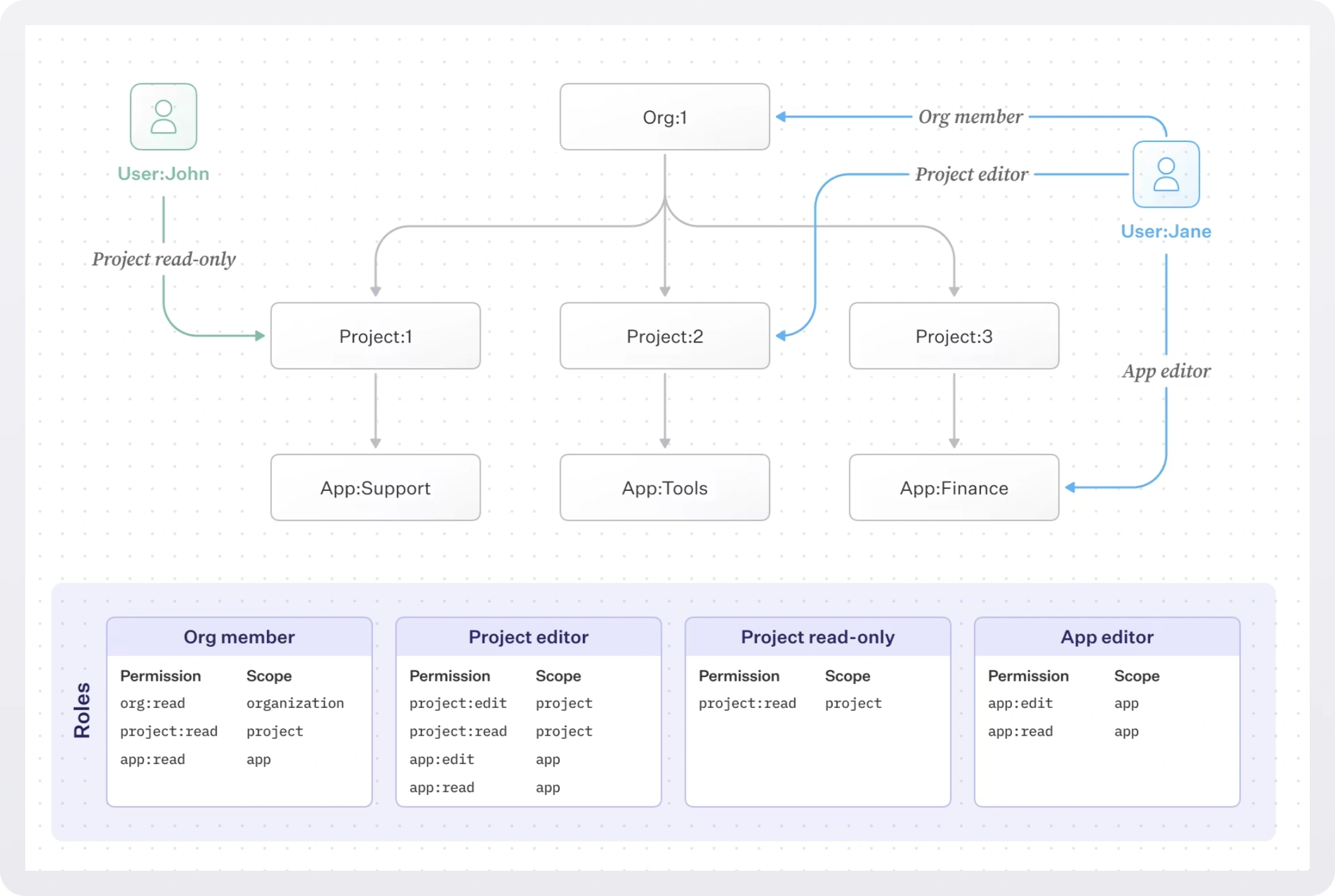
This also means you can grant precise access at a lower level. A user can be a viewer at the organization level and an editor on a specific project, with the more specific assignment taking effect for that project.
The hierarchy also provides lateral isolation. Assigning editor on workspace:frontend does not grant any access to workspace:backend. Permissions do not bleed sideways, only downward. This is the property that makes agent scoping tractable: an agent assigned to a specific project subtree has full power within it and zero access everywhere else, without any custom role required.
Roles and permissions in FGA
Roles in FGA are scoped to specific resource types. You might define:
workspace-admin: full control over a workspace and everything in itproject-editor: can edit projects and their child resourcesapp-viewer: read-only access to a specific app
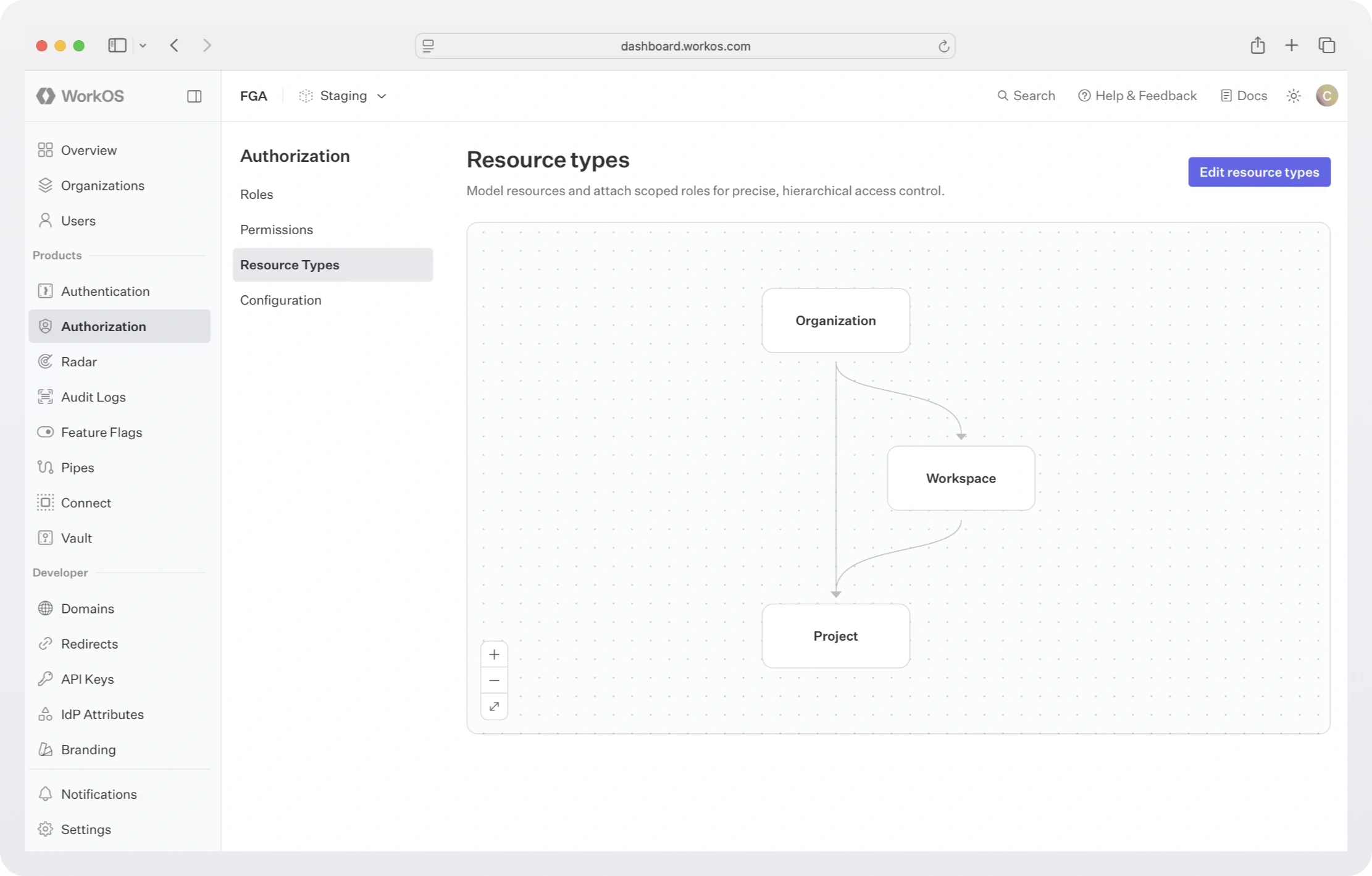
Permissions within those roles can apply to the same resource type or to child types. A workspace-admin role might include permissions that apply to the workspace itself (workspace:delete, workspace:manage-members) as well as permissions that apply to projects beneath it (project:create, project:edit).
When a workspace admin is assigned to workspace:acme-platform, they automatically inherit the project-level permissions for all projects under that workspace without needing separate project-level assignments.
Making access checks
Once the hierarchy is set up, access checks are a single API call:
FGA provides sub-50ms p95 response times and strong consistency, meaning role changes take effect immediately.
You can also query in the other direction:
- "Which projects can this user access?" (resource discovery)
- "Who has access to this project?" (for showing access lists in your UI)
Structural resources vs. asset data
A common concern when adopting FGA is whether you need to register every object in your application. The answer is no. Register the structural resources that define your access boundaries (organizations, workspaces, projects) and leave high-volume asset data (individual files, rows, images) in your primary database.
When a user tries to access a specific file, identify which project it belongs to and check access against that project:
This keeps the authorization graph lean, avoids double-write consistency issues, and maintains the performance characteristics FGA is designed for.
The two-layer approach: JWT for org-wide, API for resources
FGA integrates with AuthKit to give you a practical enforcement strategy:
- Organization-level permissions are embedded in the session JWT and can be checked without any network call. Use this for coarse-grained feature access (can the user see the billing page? can they invite members?).
- Resource-level permissions are checked via the FGA API when you need to know whether a specific user can act on a specific resource.
This two-layer model is efficient: fast JWT checks cover the majority of access decisions, and the API is only called when resource context is needed.
Roll it out incrementally
You do not need to migrate everything at once. A typical rollout looks like this:
- Start with RBAC. Configure roles and permissions in the WorkOS Dashboard. Assign roles to organization memberships. Enforce permissions from the JWT in your application. Set up IdP role assignment for enterprise customers.
- Identify where RBAC breaks down. Look for places where you are creating many similar roles to represent different resource access patterns, or where access logic requires knowing which specific resource a user is acting on.
- Define resource types. Start with the top level of your hierarchy (workspaces or projects, typically). Add types for child resources as needed.
- Register resources at runtime. When a user creates a workspace, call the FGA API to register it as a resource. Include the parent (the organization) to establish the hierarchy.
- Introduce resource-scoped assignments. Start assigning users to roles at the resource level where you need that granularity. Existing org-level roles continue working for everything else.
- Replace patched checks with FGA checks. Gradually move per-resource access logic to FGA API calls, removing ad-hoc checks from the codebase.
- Add new resource types as you ship features. When you add a new entity type that needs its own access control, add it to the hierarchy without touching existing role assignments.
Handle enterprise requirements
Automatic role provisioning via SSO
When an enterprise customer authenticates via SSO, WorkOS can automatically assign roles based on their IdP group memberships. This means that when a user joins the "Engineering" group in Okta, they get the engineer role in your application without any manual intervention.
Configuration happens in the WorkOS Dashboard: you map an IdP group to a WorkOS role, and WorkOS handles the sync whenever the user authenticates or their directory entry updates.
Organization-level custom roles
Some customers want to define their own roles with custom permission sets, rather than accepting the roles you have defined at the environment level. WorkOS supports organization-level roles for exactly this pattern.
This is useful when large enterprise customers have internal compliance requirements around named roles, or when different tenants genuinely need different permission structures. Keep in mind that organization-level roles are separate from environment-level roles and are managed independently.
Delegated role management
If you expose a role management UI to your customers (letting their admins assign roles to team members), you can use the WorkOS User Management Widget, which includes role management out of the box. Alternatively, you can build your own UI on top of the organization memberships API.
Summary
The combination of WorkOS RBAC and FGA gives you a single authorization foundation that can grow with your product:
- RBAC handles organization-level access, IdP integration, and JWT-based enforcement for the majority of authorization decisions.
- FGA handles resource-scoped access where users need different permissions on different instances, without requiring a new role per combination.
- Incremental adoption means you start with RBAC and add FGA where you need it, with no migration or conceptual rewrite.
- The two-layer enforcement model (JWT for org-wide, API for resources) gives you fast checks where possible and precise control where needed.
For most teams, the right time to introduce FGA is when you find yourself creating multiple roles to represent variations of the same access level on different resources, or when a customer asks for a permission model that flat RBAC simply cannot express without creating dozens of new roles.