Refresh token behavior across fourteen providers
Which providers rotate refresh tokens, which return expires_in, which give you a grace period, and which revoke on reuse. One row per provider, verified against provider documentation in August 2026.

A customer's Slack sync stops at 2am and every request comes back invalid_grant. You have a dozen providers wired into your app, and the reason that token died is different for every one of them. Google's refresh token quietly stops working after six months of disuse. A Box refresh token is good for exactly one use. Atlassian has a reuse window you cannot see from the error payload.
Prose about OAuth refresh does not help at 2am. A table does. What follows is the documented refresh behavior for fourteen providers, in fifteen rows, because GitHub's two app types behave nothing alike. Every claim links to the provider's own documentation, and where a widely believed behavior is not actually documented, the row says so rather than repeating it.
Grid of provider cards holding bars of different lengths, one card highlighted, standing in for per-provider token lifetimes.
The four questions you are actually asking
Every refresh-loop bug reduces to one of these:
- How long is the access token good for, and does the provider tell you?
- Does the refresh call hand back a new refresh token, invalidating the old one?
- If your write-back fails after a successful refresh, is there a grace period?
- What kills a refresh token when nobody touched anything?
The columns below map to those questions in that order.
The table
Rotation is the column that breaks your database
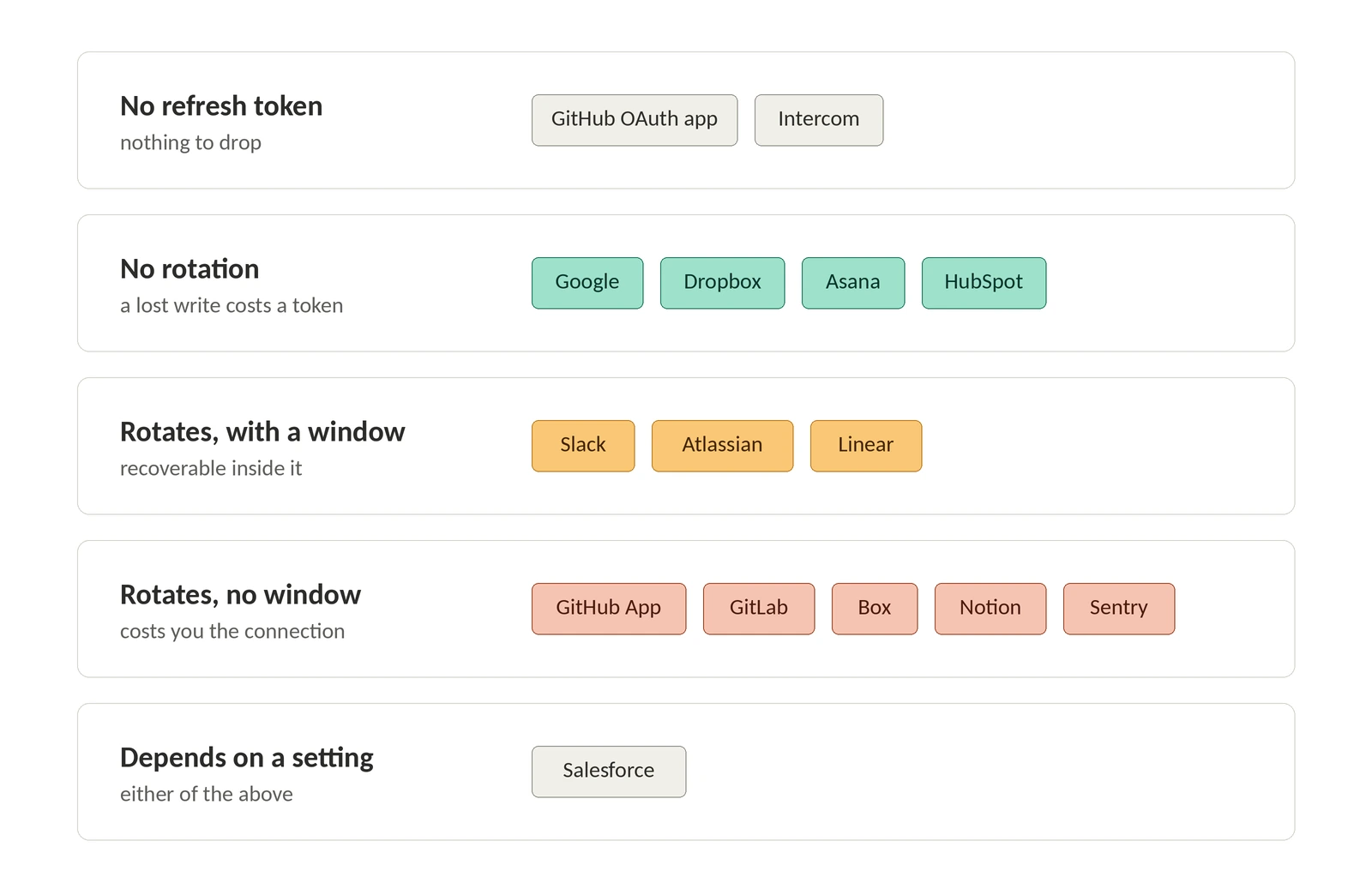
Eight of these fifteen rows rotate on every refresh. Four do not, two have no refresh token at all, and Salesforce makes rotation a setting. That one property decides how you write the refresh path.
When the provider does not rotate, as with Google, Dropbox, and Asana, a failed write after a successful refresh costs you an access token. Retry and move on. Google's docs say plainly to keep the stored refresh token in long-term storage and use it as long as it works.
When the provider does rotate, a failed write costs you the connection. Box states it exactly: 60 days, one use, and a new refresh token comes back with every access token. Atlassian says the same and names the failure. If your app is not replacing the previous refresh token with the new one, you get invalid_grant and the user reauthorizes from scratch.
So the token write and the API call cannot share an optimistic block. The ordering that survives a crash is persist, commit, then call:
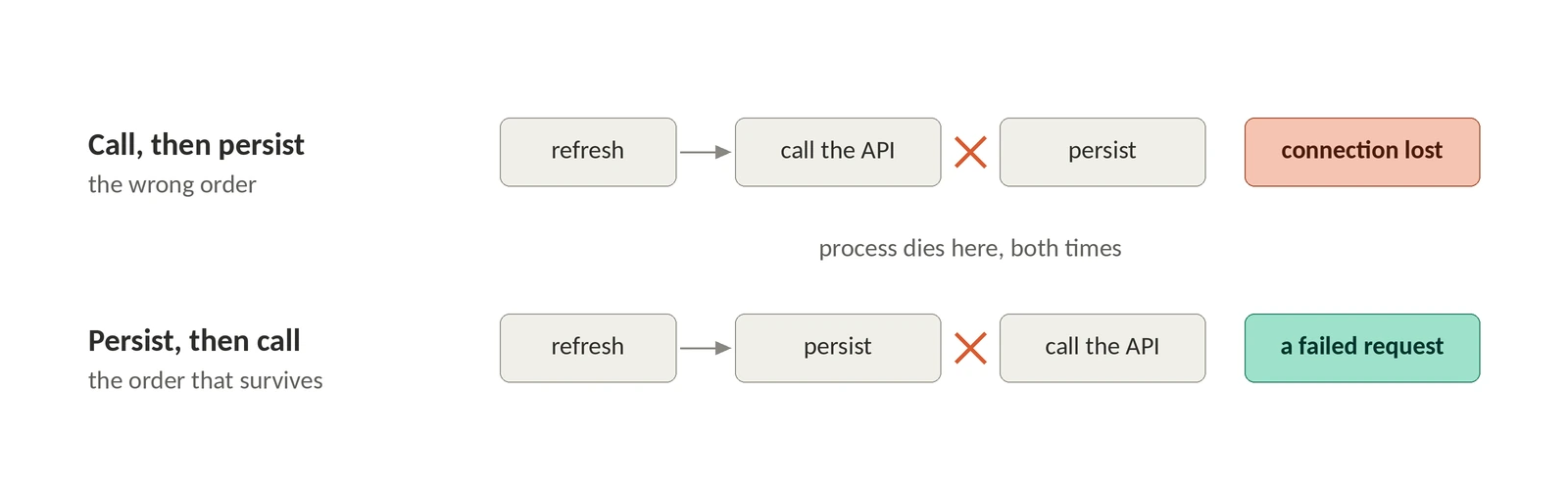
If the commit throws, the connection is already holding a refresh token the provider has retired, and the only safe move is the provider's grace window or a fresh consent flow. The ?? connection.refreshToken fallback is there for the non-rotating rows, where the response has no refresh_token to store.
The nastiest rows are the configurable ones. Salesforce rotation is a checkbox on the connected app, and Slack rotation is a switch you cannot flip back once it is on. Same provider, same code path, two different failure models depending on a setting made in someone else's admin console.
Grace periods are the only reason your retries work
Rotation tells you what a crash costs. The grace window tells you whether you can get it back, and only three providers publish one.
Linear allows a 30-minute replay: make a refresh request with a valid refresh token, lose the response, and you can replay the original request for up to 30 minutes to retrieve the new refresh token. Atlassian's default reuse interval is 10 minutes, during which breach detection does not fire when the same refresh token is exchanged more than once, and the docs say the interval exists to avoid network concurrency issues. Slack revokes the used refresh token after a short grace period without naming a duration, and caps you at 2 active tokens.
Box is the other corner: one use, no window at all. A crash between Box's response and your commit is a lost connection, full stop.
Salesforce goes further and tells you not to send concurrent refreshes: identical simultaneous requests fail intermittently, and Login History records "Failed: Token request is already being processed". If you run more than one worker per connection, that error is your own concurrency, not a Salesforce outage.
So the pair of columns is what matters. Rotation plus no grace window, which is Box, GitHub App, and GitLab, means a crash between refresh and commit costs you a customer rather than a request.
expires_in is not a promise
Four different shapes show up in that one field. GitHub returns a constant, always 28800 for the access token and always 15897600 for the refresh token. Slack does the same with 43200. Dropbox returns the real expiry each time and deliberately never publishes a number. Sentry skips expires_in entirely and returns an expiresAt ISO 8601 string alongside token and refreshToken, which is also a reminder that its response is camelCase while its request body is snake_case.
Salesforce is the outlier worth a code comment. The documented response parameters for the refresh token flow are access_token, refresh_token when rotation is on, token_type, token_format, instance_url, id, issued_at, signature, and the Experience Cloud site fields. No expires_in. The expiry lives in the connected app's session timeout setting, which your code cannot read. Refresh-if-expired logic keyed on expires_in will treat a Salesforce token as immortal and find out otherwise when a call fails.
The idle killers
Tokens die when nobody is looking, and the reasons are specific enough to earn a runbook line each.
Google offers four separate ways to lose a refresh token without doing anything wrong: six months of disuse, a password change when the token carries Gmail scopes, the 100-token-per-account-per-client cap where a new token silently invalidates the oldest, and Cloud session control policies that produce invalid_grant with an error_subtype such as invalid_rapt on sessions as short as an hour. Atlassian expires a rotating refresh token after 90 days of inactivity, resetting the clock on each use, and lists an account password change as a cause. Box's 60 days is the shortest idle window in the table. GitHub's OAuth app tokens are revoked after a year of non-use.
All of these arrive as the same invalid_grant that woke you up. Terminal and transient look identical on the wire, which is why the runbook has to be per-provider.
What this costs when you get it wrong
Your customer finds out before your monitoring does. Every dropped rotation ends in a reauthorization prompt, and then a ticket that opens with "your integration keeps disconnecting."
The silent variants are worse. GitHub tokens issued while expiry was disabled never expire, even after you re-enable it, so a migration can leave you holding long-lived credentials you believe are short-lived. GitHub documents the cleanup for that case, DELETE /applications/CLIENT_ID/token, and it is worth running rather than assuming.
The fair objection to a table like this is that it is a snapshot, and snapshots rot. Linear migrated every OAuth application to a new refresh token system on 1 April 2026. HubSpot is retiring four v1 OAuth endpoints on 16 February 2027, specifically POST /v1/token, GET /v1/access-tokens/{token}, GET /v1/refresh-tokens/{token}, and DELETE /v1/refresh-tokens/{token}, because they carry secrets in paths and query strings; the replacements are the date-versioned /oauth/2026-03/token family. Everything above was verified against provider documentation in August 2026, and every row links to its source so you can check a claim rather than trust it.
Where Pipes fits
This matrix is what WorkOS Pipes exists to absorb. Pipes launched with GitHub, Google, Slack, and Salesforce and now lists more than 300 providers, including every one in the table above. The refresh token stays in Pipes rather than in your database, held in Vault and encrypted at rest with AES-256, and your code makes one call:
One call returns a valid token, and Pipes handles expiry, refresh, and concurrency behind it. The shape is the same for every provider above.
The trade is real and worth naming: you no longer hold the refresh token, and a token fetch becomes a call to us instead of a lookup in your own database. If you are single-provider and your app needs the raw credential, keep your own loop and treat the table above as your runbook. Past two or three providers, the rotation bugs compound faster than you can special-case them.
Either way, take one thing from the table: find your providers in the rotation column, then check whether they publish a grace window. That pair decides whether a crash between refresh and commit costs you a request or a customer. The rest of this is runbook detail. That one is a data-loss bug.