How to revoke an AI agent's access: Ending agent sessions in an organization
Agent sessions in WorkOS Agent Auth can be listed and revoked. Here is the removal routine, what a revoke stops, and how fast it takes effect in your API.

An agent instance session is the revocable state behind an AI agent's tokens. Each mint creates or chains a session, and that session bounds the tokens issued under it: the single-use refresh token and the access tokens minted with it. Revoking the session is how you take an agent's access away.
Picture the end of a customer contract. The SSO connection gets disabled, the shared API key is rotated, and an autonomous agent instance in that organization keeps rotating its refresh token on schedule, because nothing in that checklist touched its session. Agents need their own line in the offboarding routine.
Agent Auth is in early access and has to be enabled for your environment, so if the endpoints below return nothing useful, that's the first thing to check. Contact your WorkOS account team if it isn't available yet.
What is an agent instance session?
Agent Auth is built from four pieces: a blueprint, an instance, a session, and the session tokens. The blueprint is the reusable definition of what an agent may do. An instance is that blueprint running in a specific organization, created the first time a session is minted there, and for delegated agents it's tied to a specific user. The session is the part you can revoke.
Sessions are created when tokens are minted. A session record is small and tells you what you need for a removal decision:
revoked_at is null until the moment you revoke, and once a session is revoked it stays revoked.
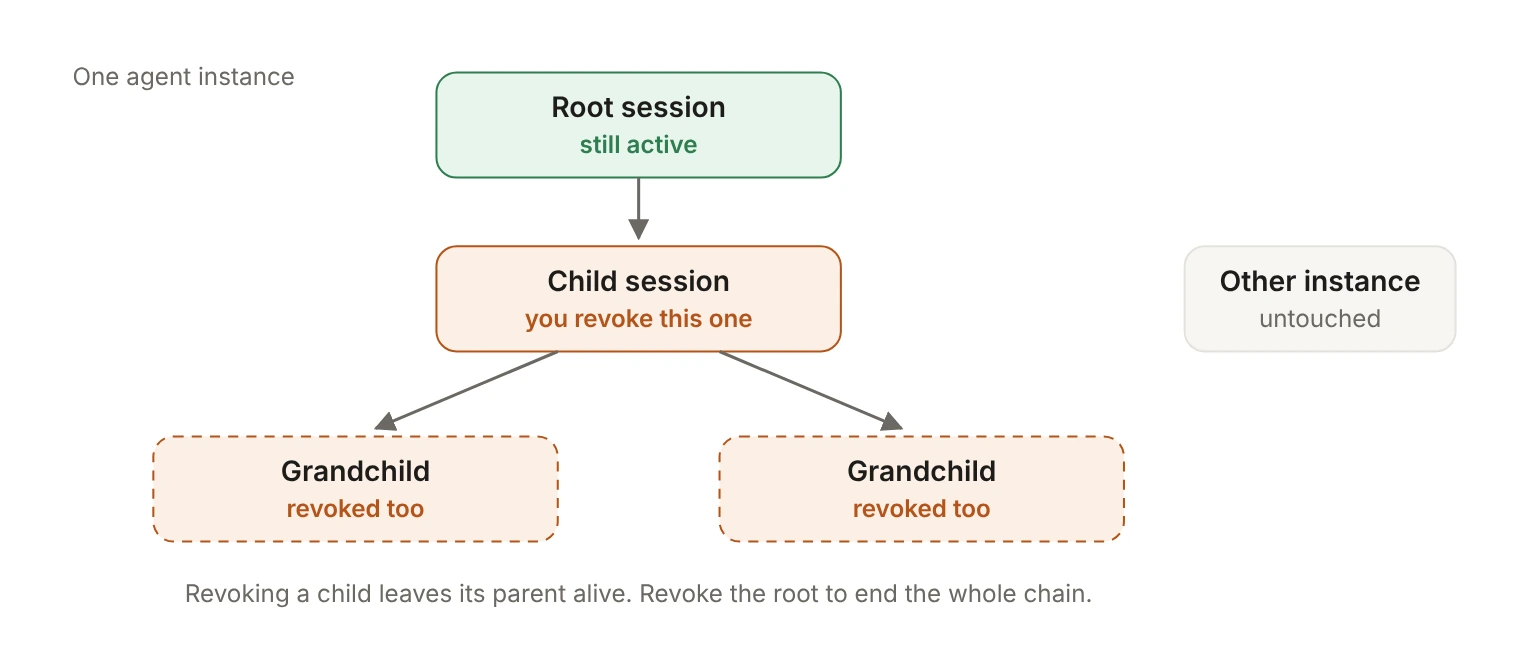
An agent can also present its own access token to mint a child session on the same instance. Each child records its parent, which forms a chain back to the root session. That chain matters when you revoke, so it's worth knowing which of your agents chain at all.
Which sessions are running in this organization?
Start by listing. GET /agents/sessions returns the agent instance sessions in the current environment and takes organization_id, agent_blueprint_id and agent_instance_id as filters, alongside the usual before, after, limit and order pagination parameters.
limit accepts 1 to 100 and defaults to 10, so set it explicitly and page through the results rather than assuming the first response is the whole picture.
The filter you pick depends on what triggered the removal:
- A customer relationship ends: filter by
organization_idand revoke everything you find. - One agent definition is being retired across every customer: filter by
agent_blueprint_id. - A single agent is misbehaving: filter by
agent_instance_id. You can find instances the same way, sinceGET /agents/instancestakesorganization_idandagent_blueprint_idfilters and reports whether each instance isdelegatedorautonomous.
Every one of these calls is a server-side call authenticated with your WorkOS API key.
How do you revoke a session?
One POST, with the session ID in the path:
Or with the Python SDK:
Two things happen. The session's refresh token is invalidated, so the agent can't rotate itself into a fresh access token. And the revocation cascades: every session chained under the one you revoked is revoked too. You don't have to walk the tree yourself, but you do need to revoke the right node, because revoking a child leaves its parent alive.
If you want the instance gone rather than one session, DELETE /agents/instances/{agent_instance_id} deletes the instance along with its sessions, so refreshes fail afterwards. Deleting a blueprint goes further and removes its configuration, instances and sessions. Both are heavier than a revoke and neither is reversible, so reach for them when the agent itself is being retired, not when you're cutting off a single run. In every case, access tokens already issued follow the timing in the next section.
How fast does access actually end?
The answer depends on how your own services check tokens.
Agent access tokens are JWTs signed with your environment's keys, with an iss that matches the issuer advertised by your AuthKit domain's OpenID configuration. A service that verifies a token locally against the JWKS is checking a signature and an expiry. It isn't asking WorkOS anything, so it keeps accepting an already-issued token until that token expires.
How long that is comes from the blueprint's session_settings. access_token_ttl_seconds defaults to 300 (five minutes) when a blueprint is created without session settings, and its maximum is 3,600 seconds (one hour). Access token lifetimes are also clamped to the session's expiry, so a token never advertises validity past its backing session.
So with default settings, local verification gives you a worst case of five minutes of continued acceptance after the revoke, and the refresh that would have extended the agent's reach never succeeds.
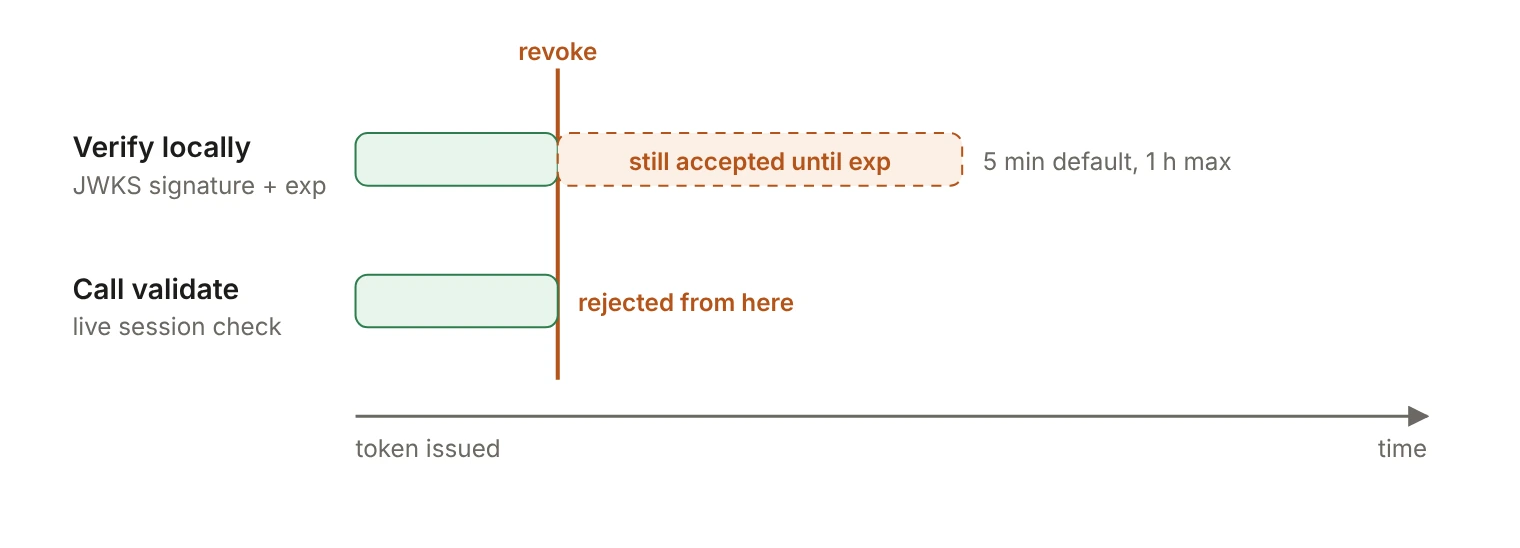
If you need the cutoff to be immediate, call the validate endpoint instead of only checking the signature. POST /agents/blueprints/{agent_blueprint_id}/tokens/validate verifies the signature, verifies the token was minted under that blueprint, and verifies the backing session is live: not revoked and not expired.
A valid token comes back with the context you'd otherwise parse out of the JWT: instance, session, organization, permissions, intent, the acting user for delegated sessions, and when the backing session expires.
valid is always true in a successful response. An invalid token comes back as an error with a stable code, never as a 200 with valid: false, so write your handler around the error codes.
The tradeoff is a network call on every request against a revocation that takes effect the instant you make it. A reasonable middle ground: verify locally on read paths, keep access_token_ttl_seconds short so the local tail stays small, and validate on operations where even a five-minute tail is unacceptable, such as payments, data export, or anything that writes into a customer system. If you cache a successful validation, cache it for less than the token's remaining lifetime, or you've rebuilt the problem you were trying to solve.
What happens when you revoke twice or pass a bad ID?
Revocation is idempotent. Revoking a session that's already revoked keeps the original revoked_at rather than moving the timestamp forward. A cleanup job can re-run over the same list without rewriting the moment access ended, which is the timestamp your incident review will care about.
An ID that doesn't exist is a plain 404, the standard WorkOS response for a resource that wasn't found, and an invalid API key is a 401. Treat a 404 during a bulk revoke as a data problem in your list, not as a failed revoke to retry.
What does the runbook look like?
Step 5 is cheap and easy to skip. Agent Auth emits agent.instance.session.created and agent.instance.session.revoked, among other lifecycle events, through webhooks and the Events API. Subscribing gives you the removal record without building your own log of who revoked what.
What does revocation not cover?
A revoke is an explicit step, and it stays explicit. Put it in the runbook next to the rest of the offboarding work rather than assuming another removal reaches the agent.
A few user-side changes do reach agent sessions, and it helps to know which. Each refresh recomputes the agent's roles and permissions from the current organization membership, so a role change reaches the agent at its next refresh. For delegated agents, deactivating the user's membership revokes their agent sessions, and deleting the membership deletes their instances. For delegated sessions, when the user signs out or their session is revoked, further mints and refreshes are refused. In every one of these cases, access tokens already issued still follow the timing above.
The last gap is the one revocation can't close at all. Stopping an agent's access doesn't unwind what it already read or wrote, which is the subject of AI agent deprovisioning: Revoking access doesn't erase what it read. Revoke first, then look at what the agent touched.