How to add authentication to a Rust axum app with WorkOS AuthKit
Use the WorkOS Rust SDK to sign users in with AuthKit, verify their session on every request, and check webhook signatures in an axum service.

Sending a user to AuthKit and back is the easy half of authentication in a Rust backend. The half your service owns is deciding, on every request, whether the cookie in front of you still belongs to a live session, and on every webhook, whether the JSON really came from WorkOS. The WorkOS Rust SDK covers both: a sealed session cookie verified locally against your environment's signing keys, and a webhook verifier that checks the signature before you touch the payload.
The examples use axum, but nothing depends on it. Anything that hands you a query string, a cookie and the raw request body will do.
How do you set up the client?
The crate needs Rust 1.88 or newer on the 2024 edition. Its default features pull in a reqwest transport with rustls; enable native-tls instead if you want the platform TLS stack.
cargo add workos picks up the latest release, which is what you want: the SDK ships fixes regularly, so let Cargo track minor versions.
Build one Client at startup and share it. It's cheap to clone and designed to be passed across handlers and tasks:
build() panics if the API key contains bytes that aren't valid in an HTTP header; try_build() returns Err(workos::Error::Builder(_)) instead, so a stray newline in a secrets file becomes a startup error you can log. The builder also takes .base_url(), .timeout() (30 seconds by default) and .max_retries() (3 by default).
The cookie password has a strict format: a 64-character hex string, which the SDK turns into a 32-byte AES-256-GCM key. Anything else is rejected. Generate one with openssl rand -hex 32 and store it next to the API key. Sealed cookies use a format specific to the Rust SDK, so a cookie sealed here can't be read by a service using another WorkOS SDK, and the other way around.
How do you send the user to AuthKit?
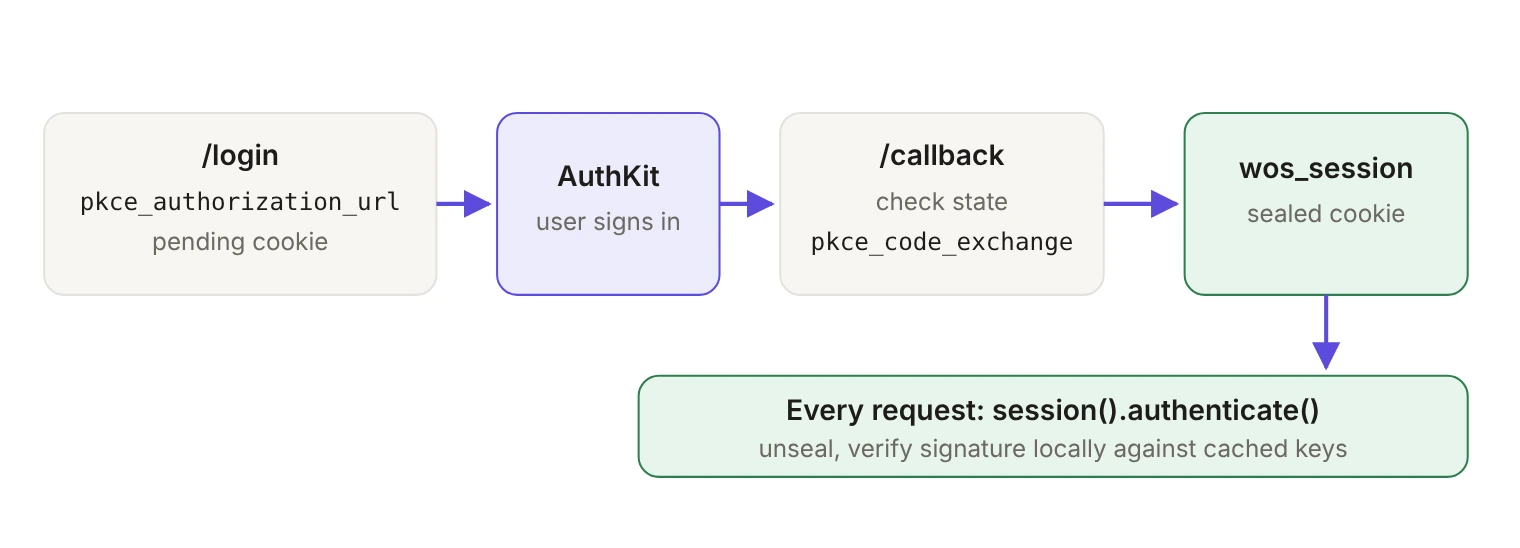
client.authkit().pkce_authorization_url(...) builds the AuthKit URL without making an HTTP call. It generates a PKCE code verifier and challenge plus a random state value, and hands back all three. Keep the verifier and state in a short-lived cookie, sealed with the same password, so the callback can check them:
(AppError here and below is a thin IntoResponse wrapper around workos::Error, with a BadRequest variant for bad input.) The other fields on AuthKitAuthorizationUrlParams cover organization_id, connection_id, login_hint, domain_hint and screen_hint. Leave client_id empty and the client's configured one is used. The redirect_uri has to be registered first, on the Redirects page of the WorkOS dashboard.
How does the callback create a session?
The callback checks the state, then exchanges the code with pkce_code_exchange. On a server client, that call sends your API key as the client secret along with the code verifier. The response carries the user and both tokens, which go straight into a sealed session cookie:
Both tokens arrive as workos::SecretString. Its Debug output is SecretString("<redacted>"), so a tracing line that dumps the whole response doesn't put a bearer token in your logs; call .expose() when you need the raw string. That protection covers values the SDK hands back to you. If you write a custom transport, don't log outgoing requests, because they carry your API key in the Authorization header.
How do you verify the session on every request?
The sealed cookie is opaque to the browser, but it can still be tampered with, replayed, or presented after the session behind it has ended. client.session(sealed, password).authenticate() unseals it and verifies the access token's signature against your environment's signing keys. The check itself runs locally; only the key set crosses the network, and the SDK caches it for 10 minutes, shares one in-flight fetch between concurrent callers, and keeps the last good key set if a refresh fails.
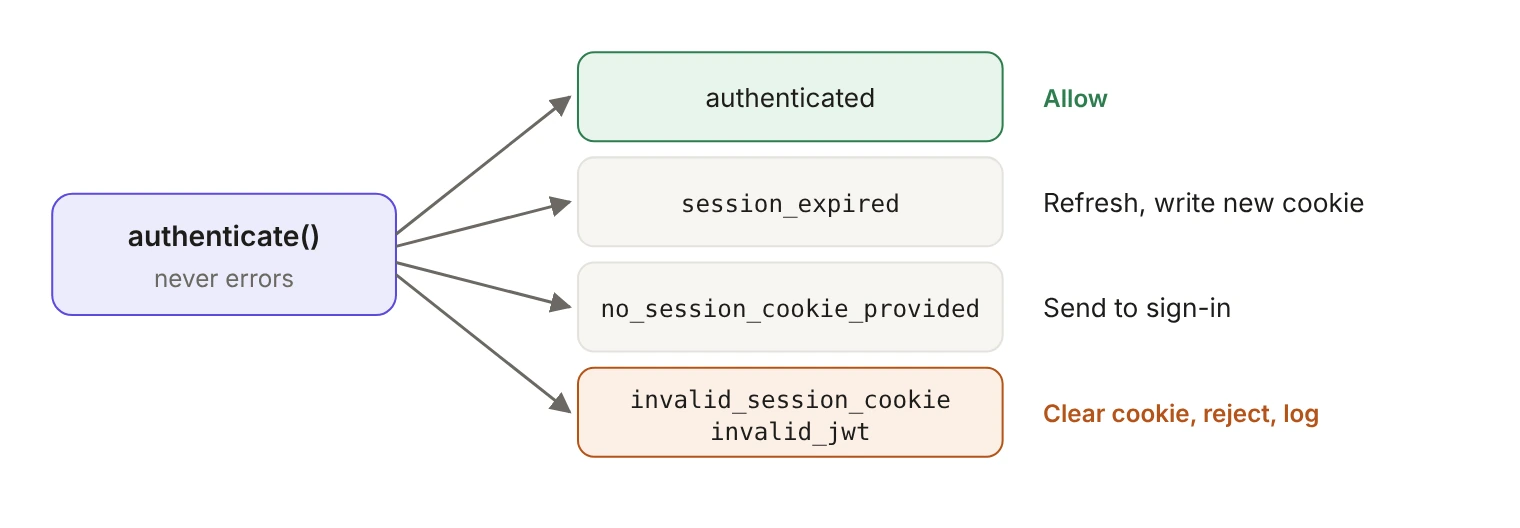
authenticate() never returns an error. Every outcome comes back as a SessionState, with authenticated, needs_refresh and a reason, plus the session's session_id, organization_id, role, permissions, entitlements and user. That shape lets a handler answer the question it actually has, which is what to do with this caller:
session_expired is the one that sets needs_refresh. invalid_session_cookie and invalid_jwt both mean a credential failed verification, which is worth a log line; a missing cookie is just someone who hasn't signed in. An API route maps SignIn and Reject to a 401, and a browser route redirects to /login.
One rule for building authorization on top: verification binds the session to the signed token's subject, the user ID. Treat the rest of the cookie's profile data, email included, as display data. If you check an admin allowlist or an email domain, look the user up by the verified ID in the WorkOS API or your own database.
How do refresh and sign-out work?
refresh() trades the refresh token at WorkOS and re-seals the result, so your job is to write the new cookie:
For sign-out, logout_url(Some("https://app.example.com")).await builds the WorkOS logout URL for the session's ID. It needs a valid session to do that and returns an error if the session isn't authenticated or has no session ID. Build the URL first, then send the redirect to it in a response that also clears your wos_session cookie, so the user is signed out of your app even if they close the tab mid-redirect.
How do you verify webhook signatures?
An unverified webhook endpoint is a public, unauthenticated write endpoint. WorkOS signs each delivery with a WorkOS-Signature header carrying a timestamp (t=) and an HMAC SHA256 signature (v1=) of the timestamp, a period and the raw body, keyed with your endpoint's secret. WebhookVerifier checks both and only then deserializes the event:
Take the body as a String, not a deserialized struct: the signature covers the exact bytes WorkOS sent, and parsing first breaks the check. The comparison is constant-time, the default timestamp tolerance is 180 seconds (.with_tolerance() changes it), and an unknown component in the header is rejected rather than ignored. Failures come back as Error::Webhook with messages such as webhook not signed, timestamp outside tolerance and no valid signature found. In tests, .with_clock() pins the clock to a fixture's timestamp, so a replay test needs no sleep.
The rest follows the WorkOS webhooks guide. Return 200 quickly: a non-2xx counts as a failed delivery and is retried up to 6 times with exponential backoff over up to 3 days in production. The same event can arrive more than once and out of order, so the worker should record each event.id it has processed (an INSERT … ON CONFLICT DO NOTHING against a table of IDs is enough) and skip repeats.
What should you know about errors and retries?
Every API call returns Result<_, workos::Error>, and errors carry structured metadata: status(), code(), request_id() and helpers such as is_rate_limited(). Log request_id() on anything you might ask WorkOS support about.
Retries are on by default for 429s, 5xx responses and retryable transport errors, up to max_retries, with backoff that honors Retry-After. The client only retries requests it considers safe to repeat: GET, HEAD and OPTIONS, plus requests that carry an Idempotency-Key. A POST, PUT, PATCH or DELETE without a key is sent once. The SDK never adds that header on its own; you set it per call through RequestOptions. Before you do, check that the endpoint deduplicates: WorkOS documents deduplication for POST /audit_logs/events. A key on an endpoint that doesn't honor it makes the request retry-eligible in the client without making it safe to repeat on the server.
What doesn't local verification cover?
Revocation. Because the session check is local, it can't see that a session was ended at WorkOS until the access token expires. A session revoked in the dashboard keeps passing authenticate() for the rest of the token's lifetime, which is set by your environment's access token duration.
If that window matters, close it where it counts rather than on every request: subscribe to session and user events on the webhook endpoint you just built, and re-check with WorkOS before genuinely destructive operations. Verifying cheaply on every request and checking revocation on a few is a better trade than a round trip to WorkOS on every page load.
The crate is MIT licensed and on GitHub, with the generated API surface documented on docs.rs. For a command-line app instead of a web service, see How to add auth to your Rust CLI using WorkOS.