How to handle SAML certificate expiration with WorkOS webhooks
WorkOS sends an event before a SAML certificate expires. Turn it into one open reminder per certificate, routed to the person who can actually renew it.

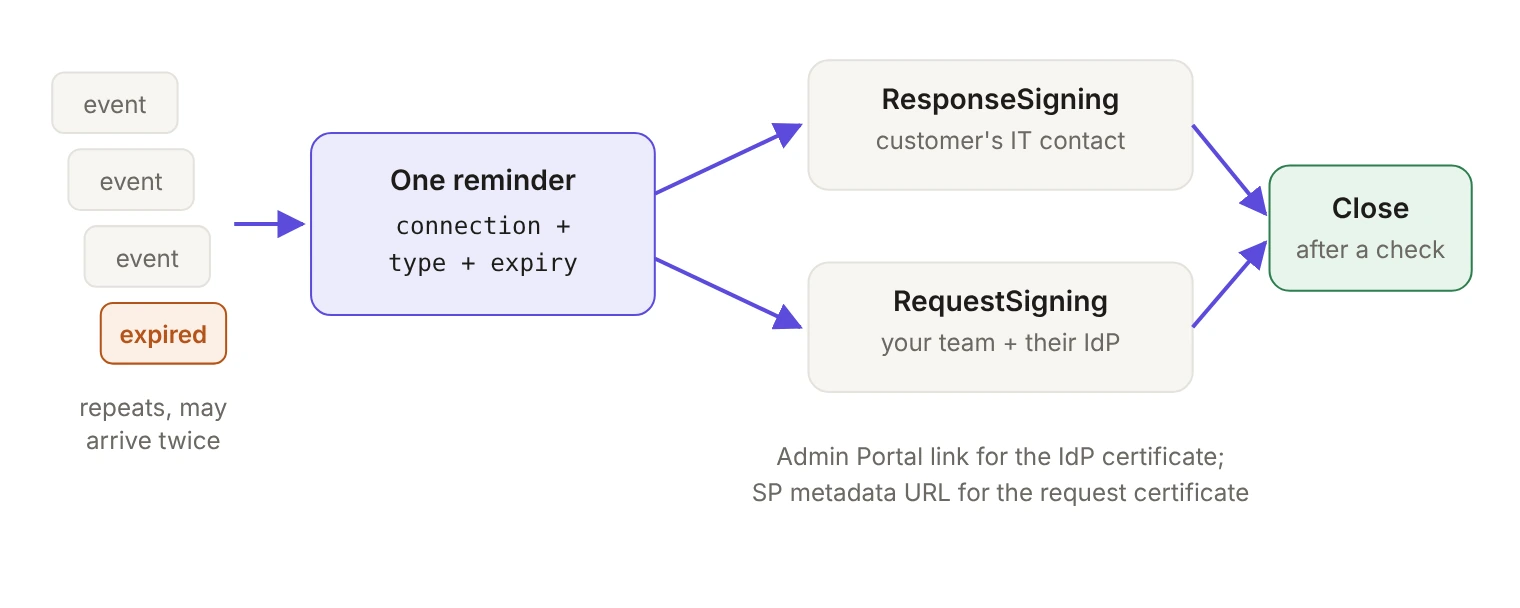
A SAML certificate expiry is an outage with the date already printed on it. WorkOS sends connection.saml_certificate_renewal_required while the certificate is still valid and keeps sending it after it expires, and sends connection.saml_certificate_renewed when a certificate is renewed in the WorkOS dashboard or the Admin Portal. Your handler's job is to collapse that stream into one open reminder per certificate and put it in front of the person who can replace it.
Why does the same certificate problem come back every year?
Response signing certificates are typically valid for one to five years. That's long enough that nobody builds a process around them. The engineer who set up the connection has moved teams, the customer's IT admin who generated the certificate has left, and the renewal shows up as a failed sign-in.
WorkOS already flags this in the WorkOS dashboard: a notification appears on the Overview page when a certificate is within 90 days of expiry or has expired, and the Organizations page can filter for connections with expiring or expired certificates. That works if someone opens the dashboard. Events work whether anyone opens anything, which is why the renewal workflow belongs in your handler and your ticketing system.
Which certificate is whose problem?
The certificate_type field is the routing decision, because the two types you'll see land on different desks.
ResponseSigning is the identity provider's certificate. It's generated by your customer's IdP and reaches WorkOS either by upload or through a monitored metadata URL. Nobody on your team can renew it. The action is to get the customer's IT contact a way to do it themselves.
RequestSigning is the certificate on your side of the connection. WorkOS updates it on the SP metadata URL automatically before it expires, and it's up to the customer's IdP to either monitor that URL or have the new certificate added by hand. The alert can arrive before WorkOS has rotated anything, so the action isn't "renew"; it's making sure the customer's IdP will pick up the new certificate when it appears.
The type also lists ResponseEncryption. Don't build an automated path around it: route any type your handler doesn't explicitly handle to a person on your team instead of guessing at an owner.
What do the two events contain?
Every WorkOS event has the same envelope: event, id, data, created_at and an optional context. The interesting part is data. These are the payload types as the WorkOS Node SDK declares them:
The renewal event tells you which connection and organization, which certificate, when it expires, whether that has already happened and how many days are left. The renewed event tells you the connection, the certificate type, the new expiry date and when the renewal happened. That's everything a reminder needs.
How do you keep repeated events from spamming the owner?
The renewal event isn't a one-time notice. It's sent several times as expiry approaches, and once every 7 days after the certificate has expired, so design for a long series of deliveries. On top of that, WorkOS can deliver the same event more than once and doesn't guarantee order, so the handler has to be idempotent.
Key the reminder on the connection ID, the certificate type and the expiry date. Every later delivery is an update to that one record:
A connection can have more than one certificate in play, so the certificate type belongs in the key. So does the expiry date: once a certificate is replaced, the next cycle opens a new reminder instead of reviving the old one.
When does a reminder get to close?
Start from connection.saml_certificate_renewed, matching on the connection ID. Don't match on the expiry date: the renewed event carries the new certificate's expiry_date, not the one you opened the reminder with.
Then treat the event as a prompt to check, not as proof. Two things make that necessary:
- Request signing rotations are silent. When WorkOS rotates the certificate on the SP metadata URL, there's no
renewedevent for it. ARequestSigningreminder closes when the customer confirms their IdP has the new certificate, or monitors the SP metadata URL so it always will. - Match on the connection, then look. When a
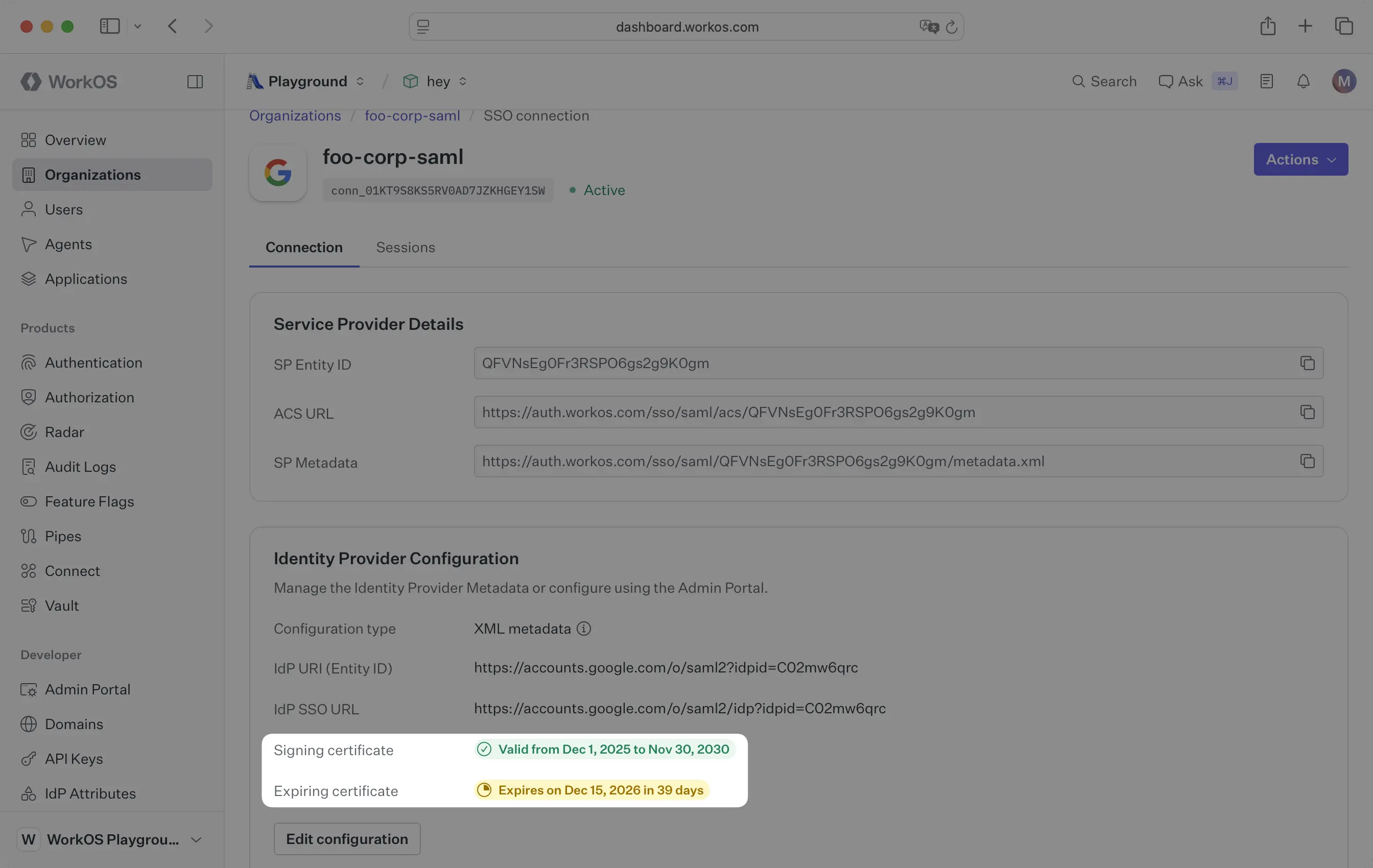
renewedevent arrives, find every open reminder for that connection and check the connection's certificates before closing any of them. In the WorkOS dashboard, open Organizations, select the organization, and open the SSO connection: the identity provider’s certificates are listed in the Identity Provider Configuration card, each with its validity dates, and your side’s request signing certificates, when the connection has them, are in the Service Provider Details card.
Here’s what that looks like on a connection where the customer has already uploaded a new certificate but the old one hasn’t expired yet. For where expiry notices and filters live in the dashboard, see the SAML signing certificates guide.
A reminder that only ever closes on an event will eventually sit open under a certificate that was already replaced, and the support conversation turns into an argument with a customer who did the work.
What happens if the certificate expires anyway?
Escalate on is_expired rather than sending the same reminder louder. The field is in the payload for exactly this, and the event keeps arriving every 7 days after expiry.
Don't design around a grace period. Whether an expired certificate breaks sign-in right away depends on the identity provider, so treat the expiry date as a hard deadline and plan the renewal to land before it.
How do you get the reminder to the person who can act?
An IT contact is a member of the customer's IT team responsible for configuring SSO or Directory Sync, and IT contacts receive critical alerts and error notifications directly from WorkOS, including a notice when one of the organization's connection certificates is nearing expiry. You can add one with POST /organizations/{organization_id}/it_contacts, which doesn't send an Admin Portal invitation by itself. Collect that email address during onboarding. It costs one form field.
For the renewal itself, give the contact an Admin Portal link scoped to the task: the portal link endpoint accepts the certificate_renewal intent and an optional it_contact_emails list. From the dashboard's Connection page you can also enter the IT contact's email, and WorkOS emails them a certificate renewal link and notifies them about future expiring certificates. The portal then walks them through the steps for their identity provider.
One constraint to build around: a portal link expires five minutes after it's issued. Don't generate one inside your webhook handler and drop it into an email someone reads the next morning. Either let WorkOS email the contact, or generate the link when your user clicks through to renew.
What does webhook hygiene look like for this handler?
None of this is specific to certificates, but skip it and one expiry turns into duplicate tickets and reminders nobody trusts.
Verify the signature before you trust the payload. The WorkOS-Signature header carries a timestamp (t=) and an HMAC SHA256 signature (v1=). The SDKs check both for you, including a tolerance on the timestamp to stop replays.
Acknowledge fast and process later. WorkOS recommends putting the payload on a queue, returning 200 and letting a background worker do the work. If your endpoint doesn't return a 2xx, WorkOS retries up to 6 times with exponential backoff over up to 3 days in production, so a slow handler turns one delivery into several.
Subscribe only to what you need. WorkOS discourages receiving every event type, and a certificate reminder worker has no reason to parse Directory Sync traffic.
Which event, which owner, which action?
The whole workflow comes down to one idempotent key, one routing field and one closing check. Build it once, and the next expiry becomes a reminder your support team closes in a week instead of a login outage your customer finds first. SAML isn't going anywhere, as we argued in You still have to support SAML, so neither are its certificates. The renewal is the part you can automate.