How to build approval workflows from the SCIM manager attribute
Directory Sync maps manager_id, manager_name and manager_email from the IdP. Where they land, how to key approval chains on them, and the no-manager fallback.

Directory Sync manager attributes are predefined attributes that carry each user's manager from the customer's identity provider or HR system into your app: manager_id, manager_name and manager_email. Once you enable them, they appear in the Directory User's custom_attributes, and your approval logic can read who signs off on a request from the directory instead of from a table your app maintains.
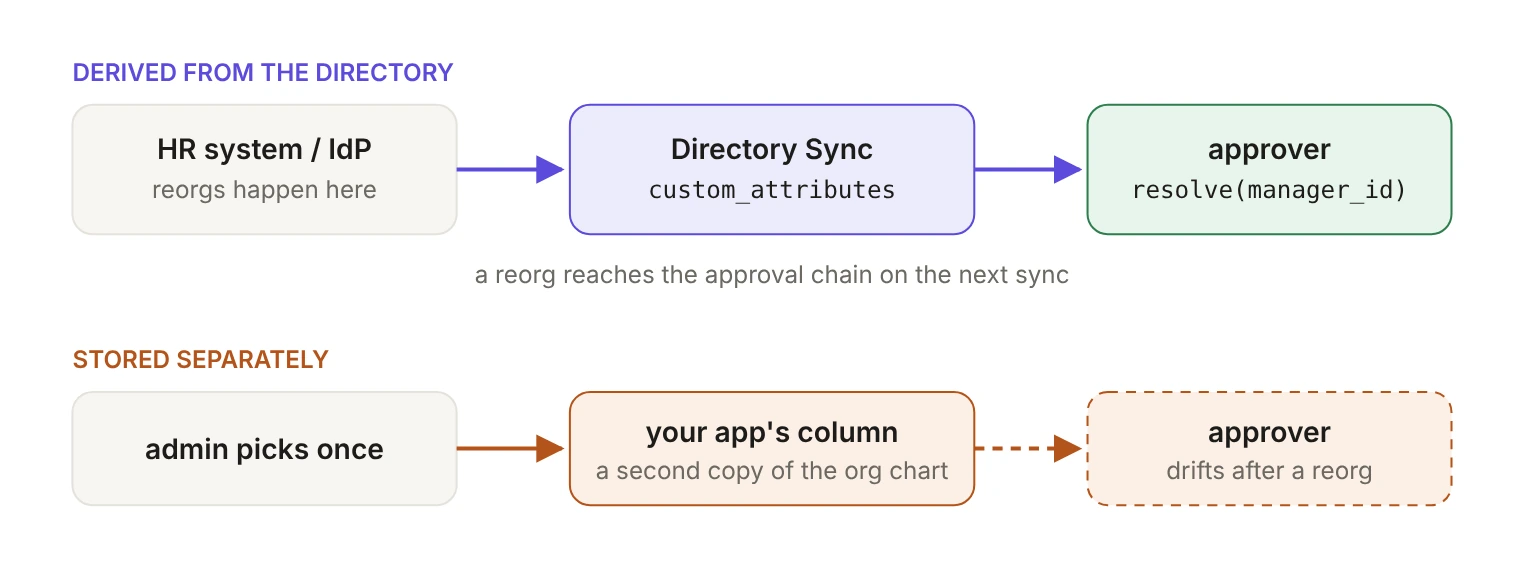
Every approval workflow has to answer one question: who signs off on this? Most apps answer it with a dropdown. An admin picks a manager for each user during onboarding, the choice lands in a column your app owns, and nobody opens that screen again. Reorgs happen in the HR system, so a quarter later the expense approvals are routing to someone who changed teams in February.
The directory already has the answer, and since March 30, 2026 WorkOS maps more of it for you. manager_name and manager_id are available as predefined Directory Sync attributes, alongside display_name, employee_number, organization and phone_numbers, and they join manager_email, which was already there. They're mapped automatically from directory providers once you enable them, so the org chart your approval logic depends on is maintained by the people whose job that already is.
Where do the manager fields land in the Directory User?
Not at the top level. Predefined attributes appear in the custom_attributes object, the same place as attributes you map yourself. The top-level standard attributes stay small and guaranteed: idp_id, first_name, last_name, email and state.
Here's the shape, trimmed to the parts that matter for approvals. The full object is in the Directory User API reference.
That placement is deliberate. WorkOS describes predefined attributes as "detailed user attributes for specific use cases, normalized across providers," and you opt into them one at a time. Their names are fixed, since WorkOS names and schematizes them, and every one is optional even when enabled, because not every provider has data for every field.
The fields you may already read are moving the same way. emails, job_title and username used to be standard top-level attributes and are now deprecated in favor of equivalent auto-mapped custom attributes, and raw_attributes is deprecated. Write your manager-handling code against custom_attributes and you're already on the right side of that change.
Which manager field should your approval chain key on?
manager_id. Three manager fields come across: manager_id is the identifier of the user's manager from the directory provider, manager_name is the manager's name, and manager_email is their email address. Only one of those is meant to be a key.
SCIM's enterprise user extension in RFC 7643 makes the hierarchy explicit. manager is a complex type that "optionally allows service providers to represent organizational hierarchy by referencing the 'id' attribute of another User," and manager.value is "the 'id' of the SCIM resource representing the user's manager." The displayName next to it is optional and read-only: a label, not a pointer.
Names and email addresses change. Provider-assigned identifiers are designed not to: WorkOS tells IT admins that the external ID stays the same when a person's name, username or email changes, and Directory Sync requires it to be unique within a directory, declining any update that would collide. So store the identifier, and treat manager_name as something you display.
What manager_id holds depends on the directory, so your join has to accept two shapes. Confirm In SCIM directories, WorkOS resolves the manager reference the identity provider sends: when the manager is already in the directory, manager_id is the manager's Directory User id, the one that starts with directory_user_. In HR integrations such as HiBob and BambooHR, it's the provider's own employee identifier, which is the same value as the manager's idp_id. If a SCIM manager can't be matched when the user is synced, for example because the manager hasn't been provisioned yet, you also get the provider's raw value.
So match on the Directory User id when the value has the directory_user_ prefix, and on idp_id otherwise. Before you route anything through it, check that the join holds for each customer's directory: pull a page of users from the directory_users endpoint and count how many manager_id values find a match. Until the unmatched set is explained, send those requests down the fallback path.
How do you turn the attributes on without faking a reorg?
Predefined attributes are enabled in the WorkOS Dashboard on the Identity Provider Attributes page. Three consequences matter for a running app.
First, updates may take up to an hour to reach your Directory User API responses, and a dsync.user.updated event is emitted for every Directory User changed by the toggle. Enabling manager_id across a large environment fires a burst of update events that looks exactly like a company-wide reorg. The payload gives you the tell: previous_attributes carries shallow differences for root properties and custom_attributes, and an attribute that had no previous value shows as null. Check whether the previous value was null before you send anyone a "your approver changed" notification. That's a backfill, not a promotion. The reverse also holds: users who still have no manager after the toggle get no event at all, because nothing changed for them, so run a full pull from the API once the backfill settles instead of waiting for events to tell you who's missing.
Second, custom attribute configuration is environment-level and applies to every organization in that environment, so there's no rollout customer by customer. Deploy code that reads the attribute and tolerates its absence, then flip the toggle. It's the same order WorkOS recommends for the raw_attributes migration: ship the reader with a fallback first, then enable the attribute, so nothing is lost in between.
Third, look at what's already on the Identity Provider Attributes page. Teams that needed manager data before March often mapped it by hand as a custom attribute. Predefined names are reserved, so you can't create a custom attribute called manager_id; a hand-made mapping lives under its own name, such as supervisor_id. Point your code at the predefined attribute, confirm the values match, and only then retire the old mapping.
What happens when a user has no manager?
An attribute that can't be mapped for a particular user comes through as null, and provider coverage for the manager fields is uneven. manager_id and manager_name come from SCIM, Workday, HiBob, People HR and BambooHR directories, and not from Google Workspace, Breathe HR, Cezanne HR or Fourth. manager_email covers every provider except Fourth, including Google Workspace.
Source: the predefined attributes coverage table. Even where a provider supports a field, it's empty for any user whose record doesn't have it filled in.
A fallback ladder that covers the real cases:
manager_idresolves to an active user. Route to them.- No
manager_id, butmanager_emailis present. Look the manager up by email. Thedirectory_usersendpoint takes anemailfilter on primary email (with thedirectoryparameter), and email addresses are unique within a directory. This is the path for Google Workspace directories. If the manager's address is an alias rather than their primary email, the lookup misses and you fall to step three. - Neither resolves. Route to an approver configured at the organization level. Never auto-approve, and never drop the request.
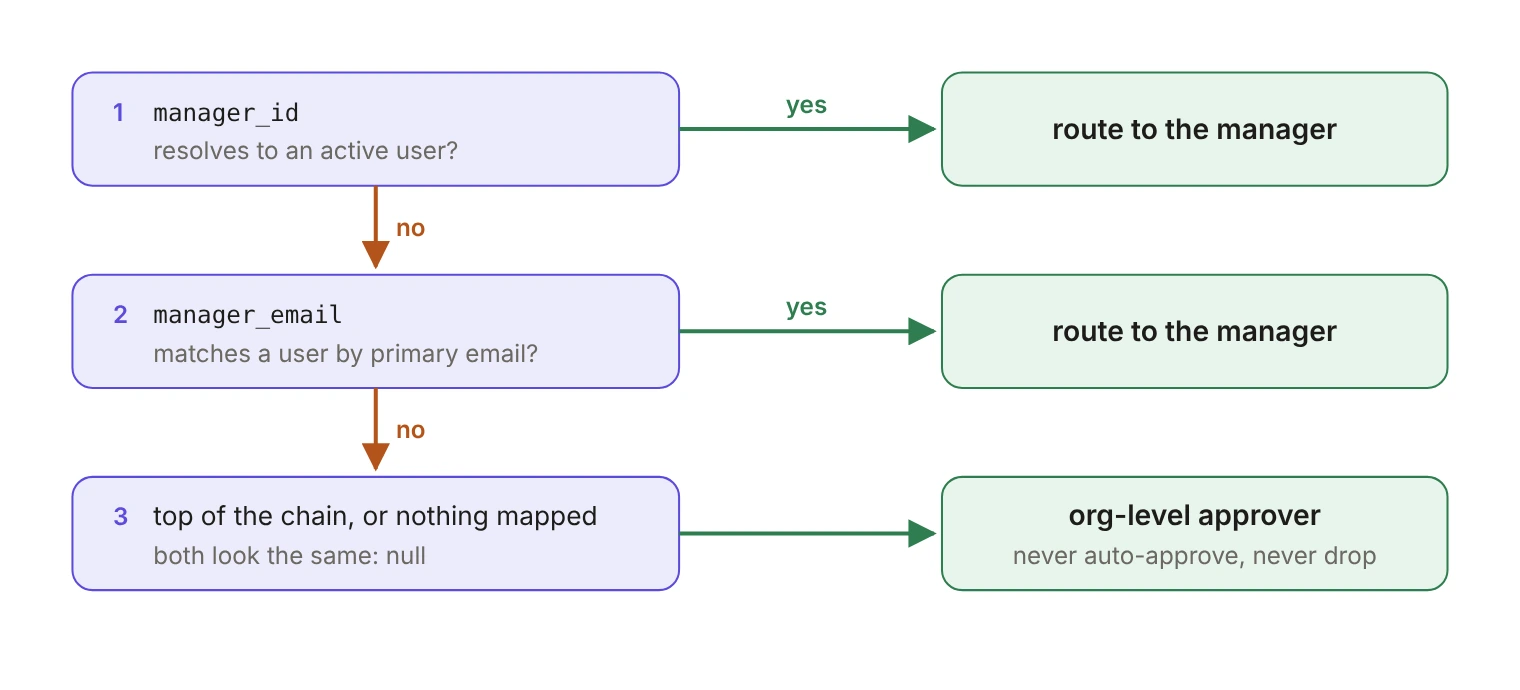
Step three isn't an edge case you can defer. The person at the top of the chain has no manager, and their record looks identical to a user whose attribute failed to map: both are null. "No manager" has to be a routable state in your model, not an error branch.
Two more failure modes are worth handling while you're there. When a manager leaves, what you receive depends on the environment. Most providers soft-delete users, but in environments created after October 19, 2023, Directory Sync deletes users who move to the inactive state, so you get dsync.user.deleted; older environments, or ones where support has turned on retention, get dsync.user.updated with state set to inactive instead (events lifecycle). Either way, the reports' manager_id keeps pointing at the departed manager until the provider updates their records, which is why the code above falls through when no active user matches.
And when an attribute changes from null to undefined or back, no dsync.user.updated event is emitted at all, so events alone won't always tell you a manager field disappeared. A reconciliation job closes that gap. WorkOS suggests a cron job that pulls from the API every one to six hours, depending on your provisioning volume.
When you walk the chain upward for multi-level approvals, keep a visited set and a depth cap. Directory data is entered by people, and a loop where two users list each other as manager will otherwise produce an approval chain that never ends.
Can you put the manager in your access tokens?
Yes, one hop of it. If you use AuthKit with directory provisioning, Directory User custom attributes are also exposed on the organization membership's custom_attributes field, and JWT templates can render them into access tokens from the organization_membership.custom_attributes context.
The || operator supplies the fallback when a value is null or undefined. Without one, a top-level key whose expression evaluates to null is removed from the token, so in this template the employee_number claim simply vanishes for users whose directory doesn't send it. Templates must render to 3072 bytes or less because of browser cookie size limits, which rules out putting a full chain in the token. When a membership is linked to both a Directory User and an SSO Profile, the Directory User's custom attributes take precedence.
What else comes with the predefined attributes?
display_name is the one most apps want on day one: the name the directory shows, instead of the first-plus-last concatenation your UI builds now. Every listed provider sends it.
employee_number is a string. RFC 7643 calls it "a string identifier, typically numeric or alphanumeric," typically based on order of hire. Don't cast it to an integer, and don't assume uniqueness it was never promised. It's useful in an approval audit trail, where you want the identifier HR uses rather than the one your database generated. Coverage matches the manager fields.
organization names an organization in the HR sense, often a legal entity, not your tenant, and only SCIM and Workday directories send it. Keep scoping on your WorkOS organization ID. phone_numbers and addresses are lists of structured objects, with sub-fields like value, type and primary on the first and locality, region and postal_code on the second. Flattening either into a single string throws away what the provider sent.
Where should you start?
A dropdown for "who is this person's manager" is a second copy of the org chart that nobody owns. It's accurate the day it's filled in and decays quietly from then on, and the failure stays invisible: approvals keep succeeding, just to the wrong person.
Ship the fallback ladder and the reconciliation job first, then flip the toggle in the dashboard. The JWT claim and the display name are cosmetic until a request with no manager has somewhere to go. The Directory Sync attributes docs list every predefined attribute and the providers that send it.