Your AI agent shouldn't inherit your admin's permissions
Delegated agent sessions are now capped by the user and the agent definition at once, which closes a gap we couldn't close a few months ago.

Four months ago we wrote a guide on which credential to issue an agent and when. For a personal agent, the one acting on behalf of a specific human, the recommendation was a user-scoped API key. Attribution is built in, revocation is clean, and the agent can't reach past what the person can reach.
Then came the caveat:
"The tradeoff is that you cannot restrict the agent below the user's permission level: if the user can issue refunds, so can the agent."
That was true at the time. It isn't the answer anymore. Agent Auth, now in early access, lets you set a ceiling on an agent independently of the person who started it, and a delegated agent gets the intersection of the two.
You could have the scope or the attribution, not both
The three credential shapes most teams reach for each fail in a different place.
A user-scoped key gives you a person to point at in the audit log and a hard floor you can't get under. An org-scoped key gives you a tight scope and no idea who kicked the agent off. M2M is the right answer for a backend service and the wrong answer for anything a human triggered.
The thing you actually want for a delegated agent is both bounds applied at once: this agent can do at most these five things, and only ever on behalf of a person who can already do them.
A ceiling and a floor
Agent Auth introduces a blueprint: a reusable agent definition holding a permission ceiling, a list of who may invoke it, and session lifetimes.
The blueprint is instantiated per organization, and per user when the agent runs on someone's behalf. Instances come in two kinds, and they resolve permissions differently:
- Delegated. The agent acts for a specific signed-in user. Effective permissions are the intersection of that user's permissions and the blueprint's ceiling.
- Autonomous. The agent acts as itself inside an organization, with no user principal. Effective permissions are the ceiling.
Run the sales example through it. Your VP of Sales holds crm:read, crm:write, email:send, and billing:write. The prospecting agent's ceiling is crm:read and email:send. A delegated session started by the VP carries exactly crm:read and email:send. The agent can read the CRM and send email, and it cannot write to the CRM or touch billing, because those aren't on the ceiling. A support rep who only holds crm:read starts the same agent and gets a session with crm:read alone, because the intersection cuts the other way too.
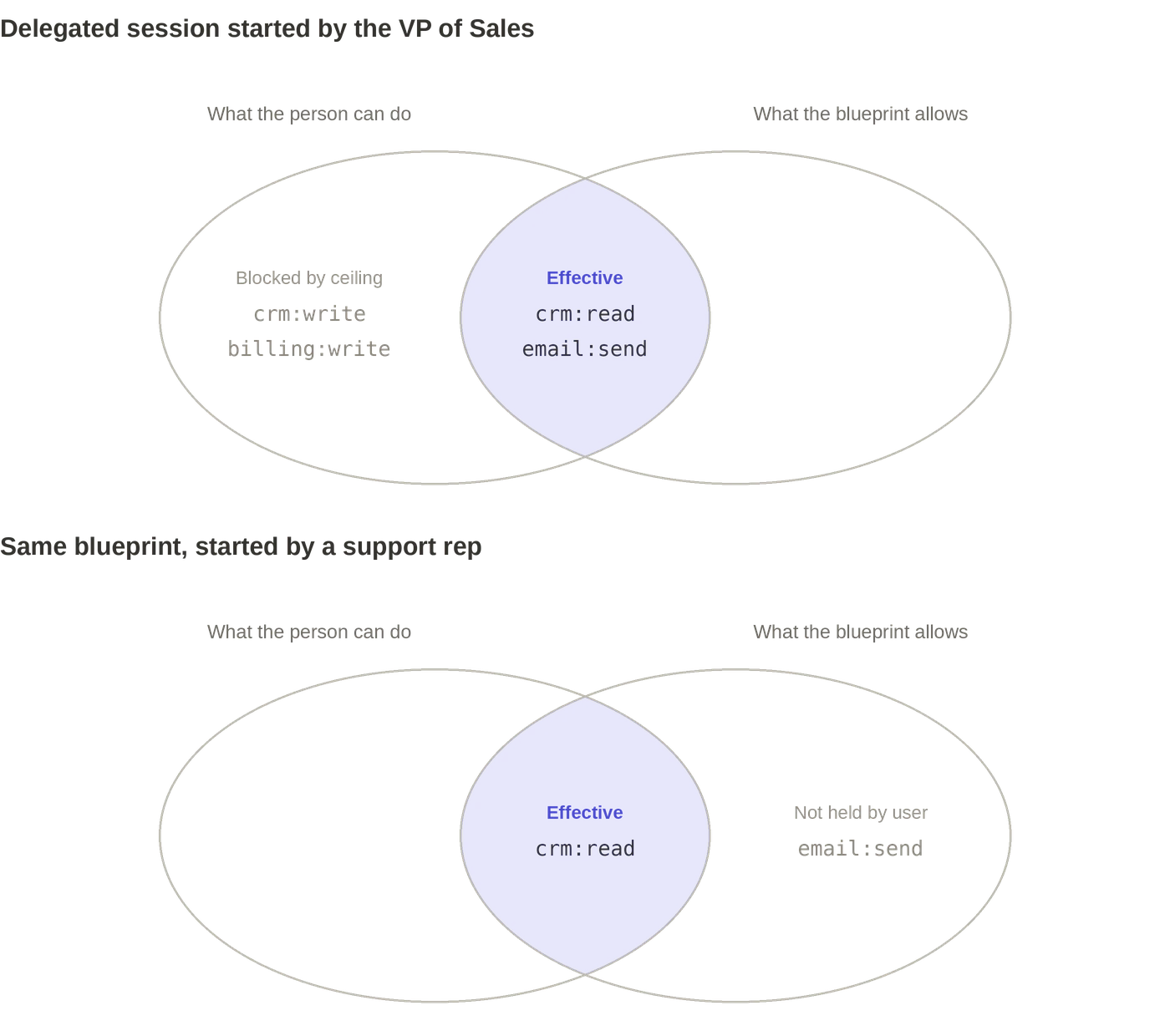
Neither principal can raise the other. That's the property the old primitives couldn't express.
What the agent actually carries
Minting is a server-side call authenticated with your WorkOS API key. Your backend presents the user's access token and hands the result to the agent, so the agent never holds your API key, only the short-lived token issued for it.
The access token is a JWT signed with the same keys as your environment's user access tokens, so your existing verification path already works. Four claims are worth knowing about:
That last one is the small quality-of-life detail. Check sub_profile and you know whether a request came from an agent without parsing ID formats or maintaining a list of agent identifiers. User access tokens omit the claim.
You get one honest answer to "who did this" that doesn't collapse the agent into the person. The agent is the actor. The person is the authority the actor borrowed. Both survive into your audit log.
The intersection is re-derived, not frozen
The part that matters operationally: authority is recalculated at every refresh, not captured once when the session starts.
Refresh tokens are single-use, and each rotation re-derives permissions from current state. Demote the VP of Sales, remove them from the organization, or strip a role, and the agent's next refresh reflects it. With access_token_ttl_seconds set to 300, as in the blueprint above, the window between a permission change and the agent losing that permission is five minutes. It is not the remaining life of a long-lived key.
Three other lifetime controls are worth setting deliberately:
access_token_ttl_secondscaps at one hour. Set it in minutes. There's no upside to a long-lived agent access token when refresh is cheap and re-derives authority.max_age_secondsis the hard ceiling on the whole session chain and can't be extended by refreshing. Set it to the realistic horizon of the task, not the horizon of the product.- Revocation cascades. Revoking a session invalidates its refresh token, every access token issued under it, and every session chained beneath it.
For delegated sessions there's a fourth property you get without configuring anything: authority flows from the user's own session. When that session ends, refreshes are refused. The agent stops when the person signs out.
Picking a ceiling
A few things I'd keep in mind writing your first blueprint.
- Model the task, not the job title. The temptation is to mirror your existing role catalog and create a blueprint per role. Roles are broad because humans are general-purpose. An agent is doing one job. The ceiling should read like the tool list for that job, not like a persona.
- Start from the tools the agent can call. Enumerate them, map each to the permission it requires, and make the union of those permissions your ceiling. If a permission on the ceiling doesn't correspond to a tool the agent has, take it off.
- Use
invocable_byas a second gate. Restrictingrole_slugsto["manager"]means only managers can start delegated sessions from that blueprint, regardless of whether a given user happens to hold the permissions on the ceiling. Leaving the lists empty allows any member and any organization, which is a reasonable default in development and rarely the right one in production. - Watch the events. Agent Auth emits
agent.blueprint.created,agent.instance.created,agent.instance.session.created,agent.instance.session.revoked, and others through webhooks and the Events API. Sessions being created from a blueprint nobody remembers approving is exactly the signal you want early.
What this doesn't solve
Agent Auth is built for first-party agents, the ones you build and operate inside your own application. Every blueprint and token call is authenticated with your API key, so your backend stays in control of which agents run. Third-party agents connecting to your app from outside are a different problem with a different answer.
It also scopes permissions, not resources. The ceiling is a set of permission slugs. It doesn't express "this workspace only." If your agent needs to be bounded to a specific tenant, project, or record, pair the blueprint with fine-grained authorization and keep checking resource access at the tool boundary. The intersection tells you the agent may read the CRM. It doesn't tell you which accounts.
And the intent string, which every mint variant accepts and which is echoed into the token as { "text": "..." }, is caller-supplied context. It travels with the token through your logs and downstream services and your API can read it when authorizing. It is not verified and it is not a control. Treat it as an input to a decision, not the decision.
Try it
Agent Auth is in early access. If you're running agents in production on borrowed sessions or a shared service account and you want a real ceiling under them, get in touch and we'll turn it on for your environment. The docs cover blueprints, instances, session chaining, and revocation in full.