Session length vs. access token duration vs. inactivity timeout
Maximum session length, access token duration, and inactivity timeout each run a different clock in AuthKit. What each one controls, and how to choose it.

AuthKit has three session settings:
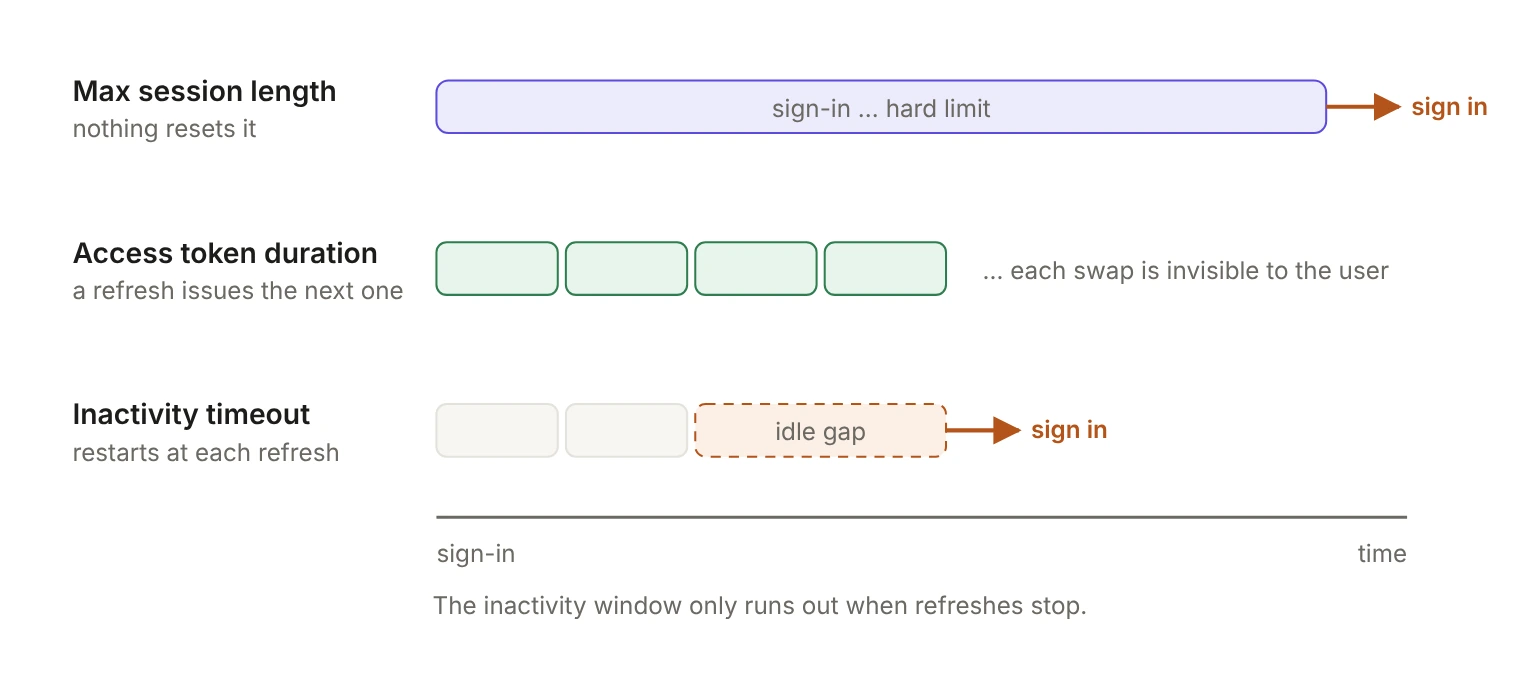
- Maximum session length is the hard limit on how long a session can live.
- Access token duration is how long each short-lived token your backend verifies stays valid before it's refreshed.
- Inactivity timeout ends a session that hasn't been refreshed for a set time.
The first and third sign the user out; the second should never be visible to them.
A user gets bounced to the sign-in screen mid-task and nobody can say which setting did it. All three live in the Sessions tab of an application, reached from the Applications page of the WorkOS Dashboard. Each starts at a different moment and trips on a different condition.
What do the docs say each setting does?
The docs define them in three lines:
- Maximum session length: The session will expire after this length of time. Once expired the user will need to sign in again.
- Access token duration: Your backend can verify the access token on each request. It's recommended to keep the access token duration short so that changes in the session are quickly reflected in your app.
- Inactivity timeout: The session ends if a refresh has not occurred in this length of time. The user will need to sign in again.
Two of the three end the same way: the user signs in again. The difference is what starts each clock and what, if anything, resets it. The docs don't publish default values, so check what your application is actually set to before you change anything, especially in an environment someone configured a year ago.
What does maximum session length control?
It's the hard limit. The clock starts at sign-in and nothing resets it, so a user who has been active all day still gets the sign-in screen when the limit lands, mid-task.
Two questions decide the number:
- What are you trying to limit? If it's "how long an unattended laptop stays useful," the inactivity timeout is the tighter tool. If it's "how long any session may live before the person signs in again," this is the right setting.
- Are you using it to remove access? Don't. Waiting for a session to hit its limit is the slowest way to cut someone off. To end a session before its limit, revoke it with
POST /user_management/sessions/revoke. You can list a user's live sessions withGET /user_management/users/:id/sessions, and WorkOS emits asession.revokedevent you can use to keep your own records in step.
What does access token duration control?
One thing: how long each access token, the JWT your backend verifies on each request, stays valid. When it expires, the refresh token gets a new one, and refreshes succeed as long as the session is still active. A signed-in user should never see this boundary. It's the only one of the three that doesn't end in a sign-out.
What the number buys you is freshness. The user's role and permissions travel in the token as claims, so the duration is how long a role you just removed can still work. It's also how long an access token stays usable after you revoke its session: revoking stops the session from being refreshed, but tokens already issued remain valid until they expire. Both are why the docs recommend keeping it short.
The cost is refresh traffic, and the concurrency that comes with it. Refresh tokens can be rotated after use, so two requests that notice an expired token at the same moment could race each other. The session resilience docs describe a 30-second grace period: replaying a just-exchanged refresh token inside that window returns the same rotated tokens instead of an error. After the window, the old token comes back as invalid_grant.
The SDKs also refresh before expiry rather than at it. From the authkit-nextjs README, the proxy refreshes the session when the access token is within a buffer of its expiry: 60 seconds, or 30 seconds for tokens with a total lifetime of 5 minutes or less. You can tune it with refreshBufferSeconds, and 0 turns proactive refresh off. If a proactive refresh fails, the request is served with the current access token, and the session is never destroyed while that token is still valid.
What does inactivity timeout control?
Read the definition closely: the session ends if a refresh hasn't happened in this length of time. The clock measures refreshes (and new sign-ins), not people.
Two consequences follow:
- Anything that refreshes counts as activity. A background tab, a polling dashboard or a mobile client waking on a timer keeps the session alive with nobody at the keyboard. If the requirement is "the person walked away," you need your own last-activity signal. authkit-nextjs exposes
onSessionRefreshSuccessandonSessionRefreshErrorcallbacks, and updating a last-activity timestamp is one of their documented uses. Record it on a real user request, not on every refresh. - It has to be longer than the access token duration. Refreshes happen around token expiry, so an inactivity window shorter than the token's lifetime would end sessions before the first refresh could arrive. The Dashboard won't let you save that: the inactivity timeout must be longer than the access token duration, and both must be shorter than the maximum session length. Leave room beyond the minimum for the refresh buffer and a retry or two.
Where you keep the refresh token shapes this too. The docs suggest persisting it on the backend, in a database, a cache or a secure http-only cookie. A shared server-side record refreshes on behalf of every tab at once, while a per-browser cookie only advances the clock in browsers that are actually open.
One more trap: your app's cookie lifetime is a separate clock. In authkit-nextjs, WORKOS_COOKIE_MAX_AGE defaults to 34,560,000 seconds, or 400 days. The authoritative state is the WorkOS session object, which has status, expires_at and ended_at, and you can inspect a user's sessions from the Users page in the Dashboard.
Which clock trips first?
The shortest clock that applies is the one your users experience, and it's usually not the one you tuned most carefully.
What don't these settings do?
- They don't invalidate an access token that's already been issued. The token is a signed JWT your backend verifies, valid until its
exp, which is the real argument for a short duration. - They don't end a session early. Revocation does that, by stopping further refreshes.
- They don't tell an expiry apart from a network hiccup. A terminal failure is
invalid_grantat HTTP 400; timeouts,5xxand429are transient, and the right response is to retry with the same refresh token. The framework integrations handle that for you: they keep the session cookie on a transient failure and redirect to sign-in only oninvalid_grant. - They aren't per user or per organization. They're set per application, and the clocks run per session, not per person: one user can have several sessions at once, such as a phone and a laptop, which is why the list endpoint returns a collection. An enterprise customer asking for a 30-minute idle timeout is asking about the whole application.
Set the three numbers by answering three separate questions: how long may a session live at all, how stale may a permission change get, and how long should an idle session survive. Most surprise sign-outs come from a number chosen to answer one of those questions and then applied to the other two.