How to let support agents act as a user without losing the audit trail
Support agents need to see what a user sees. Here is how to run impersonation on AuthKit and Audit Logs with scoping, short sessions, clean revocation, and dual-identity records.

A customer says their invoice page renders blank. Screenshots don't reproduce it, your logs show a successful response, and the only reliable way to see what they see is to be them for a few minutes. Every B2B application hits this, and plenty of them solve it badly: a shared admin login, a "view as" toggle nobody audits, or an engineer running a hand-written query against one customer's rows in production.
The primitive that fixes it is delegation: one identity acting on behalf of another, with both identities on the record. Auth0 shipped its version of this in August. Below is how to build the same capability on AuthKit, and the four controls that decide whether it survives an enterprise security review.
What a delegated support session looks like
Auth0's August 7, 2026 changelog entry put Custom Token Exchange - Session Delegation into Open Early Access for Enterprise, B2B Professional, and B2C Professional customers. The changelog's own framing is the support case exactly:
Session Delegation builds on Custom Token Exchange's delegated authorization model to cover a common use case: letting an authorized actor, such as a support agent, establish a web session as another user, so they can navigate your application on that user's behalf rather than only calling APIs for them.
Mechanically, a Custom Token Exchange request with a special session_transfer audience returns a Session Transfer Token instead of an access token, authorized by the same Action logic that already governs delegation. The browser is redirected to the target application, which redeems the token through the standard /authorize endpoint, with no extra login step for the user being acted for. Both identities survive the trip: sub is the user the session belongs to, and the RFC 8693 act claim is whoever is actually acting. Delegated sessions are short-lived, issue no refresh tokens, skip MFA and consent prompts by design, and can be bound to the requesting IP address. Delegated logins are written as distinct tenant log events, separate from regular logins.
That list works as a specification for anyone building this, regardless of which identity provider you run on: a scoped entry point, dual identity in the token, a session that expires on its own, and a separate audit record.
The same capability with AuthKit
AuthKit calls this impersonation, and it targets the same job: administrators and support team members assume the identity of one of your users to reproduce or debug an issue the user is having. If you have already integrated AuthKit, no additional code is required to start using it.
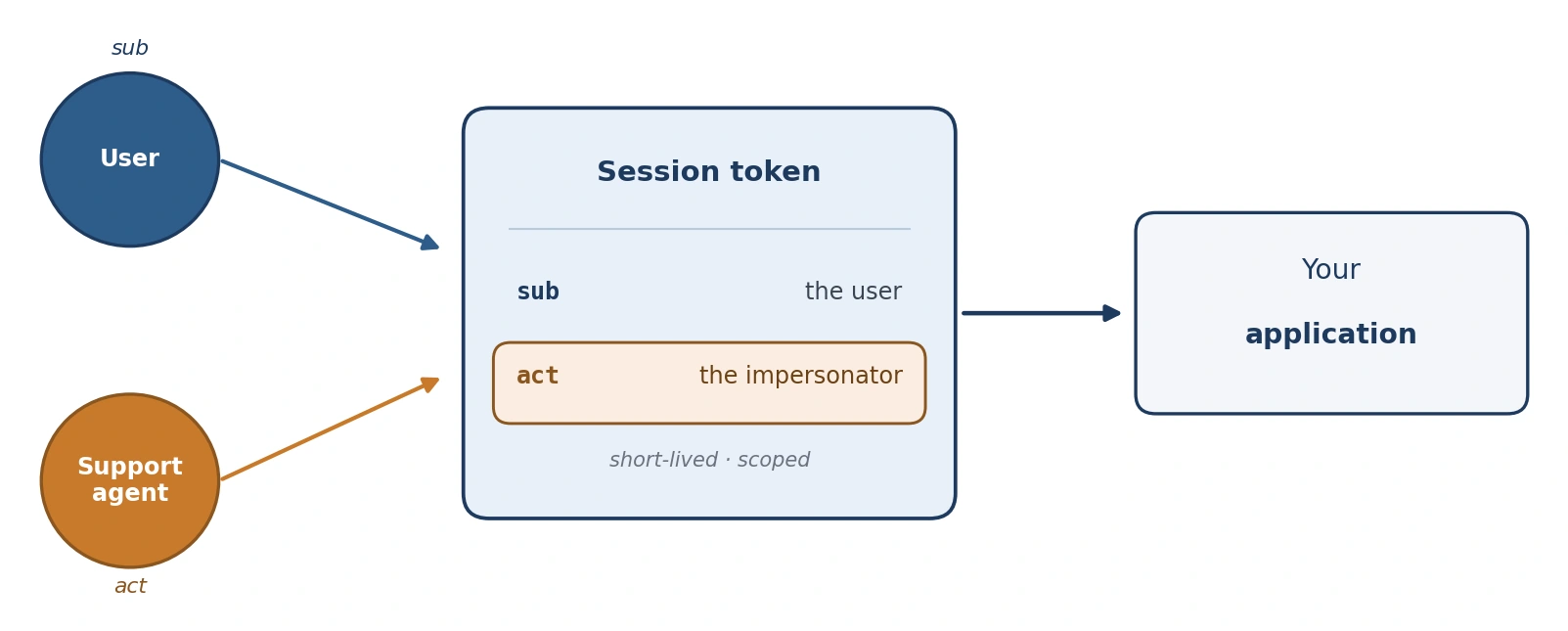
The flow starts in the WorkOS Dashboard. A team member opens the user, starts an impersonation session, and the browser is redirected to your application's callback endpoint with an authorization code for the impersonated user. You don't have to send support staff into the Dashboard to find that button. The flow is deep-linkable from your own admin tooling at https://dashboard.workos.com/<environment_id>/users/<user_id>/details?dialog=impersonate, which puts the decision of who is allowed to start one of these sessions in your admin app, where your own roles already live.
Dual identity shows up in two places your code already reads. The access token for an impersonated session carries an act claim with the impersonator's email, and the Authenticate with Code response includes an impersonator object with that email plus the reason they gave. The session record keeps it too:
That is the documented response shape from listing a user's active sessions. Support access stops being something you infer from application logs and becomes a row you can query. The reason field is not optional: it's required when starting the session and recorded on the session.created event WorkOS emits for every impersonation.
Scope the grant before you grant it
Impersonation is off by default in every WorkOS environment, and turning it on requires the Admin role. The switch lives under Authentication → Features → User Impersonation, per environment. Leave it off wherever nobody should be doing support work.
Two more scoping decisions matter. If the user belongs to more than one organization, the impersonator has to pick which organization they are signing in as the user, so an agent working one customer's ticket doesn't quietly land in a different tenant's context. And impersonating a user generally gives the same level of access as that user, which is why the docs recommend restricting sensitive views or redacting fields during an impersonated session. Skip that step and the agent debugging a blank invoice page can also read the customer's full billing history, which is exactly the access a security questionnaire will ask you about.
Make it visible while it is happening. The authkit-nextjs library ships an Impersonation component that renders a visually distinct frame with an option to hide it or end the session, cheap insurance against an agent forgetting which hat they are wearing.
Keep the session short, then end it on purpose
AuthKit impersonation sessions expire automatically after 60 minutes. That's a ceiling, not a dial. Maximum session length, access token duration, and inactivity timeout are configurable per application in the Dashboard, and the impersonation expiry isn't among those knobs in the docs, so plan on the hour being fixed.
If your bar is tighter, and for anything touching regulated data it usually is, do the ending yourself. POST /user_management/sessions/revoke with a session_id kills a session on demand, and GET /user_management/users/:id/sessions lists what is currently open. Wire the revoke call to whatever event means the agent is done (ticket closed, chat ended) and real lifetimes drop to minutes. None of those triggers are guaranteed to fire, though. A crashed tab never calls revoke, which makes the 60-minute expiry your actual backstop rather than a formality.
Revocation leaves its own trace. WorkOS emits session.revoked when an issued session is revoked for a user, so a session cut short is a record rather than a gap.
Put both identities on every event
Session events prove a support session existed. They say nothing about what the agent did inside your application, which is the question a customer's security team actually asks. That's the Audit Logs job.
Every WorkOS audit log event records what happened (action), who did it (actor), what was affected (targets), and when and where it took place. For delegated support work, keep the actor as the human doing the work and the target as the user whose data was touched, with the impersonation context in metadata. One convention that fits that schema, with action and actor names you define yourself:
Two details make this hold up over time. Actions and targets have to be configured in the Dashboard before any events can be emitted, so your support vocabulary is a deliberate list rather than whatever string a service happened to send. And metadata objects, at the root of the event and inside actor and targets, can each carry their own JSON Schema, with non-conforming events rejected outright. Require reason and session_id in the actor schema and an event that forgets who authorized the access fails at emit time instead of during an audit six months later. Budget for the limits: 50 keys per metadata object, key names up to 40 characters, values up to 500. The create-event API honors an Idempotency-Key header with keys expiring after 24 hours, so a retried emit doesn't double-count a support action.
Because events are scoped to an organization, the customer whose account was accessed can read their own trail. Log Streams push those events to Datadog, Splunk, AWS S3, Google Cloud Storage, Microsoft Sentinel, Snowflake, or a generic HTTPS endpoint, and the customer's IT contacts can configure the destination themselves through the Admin Portal. Support access landing in the customer's own SIEM is often the difference between a security questionnaire answered in one line and a three-week thread.
The human version of a problem you already have with agents
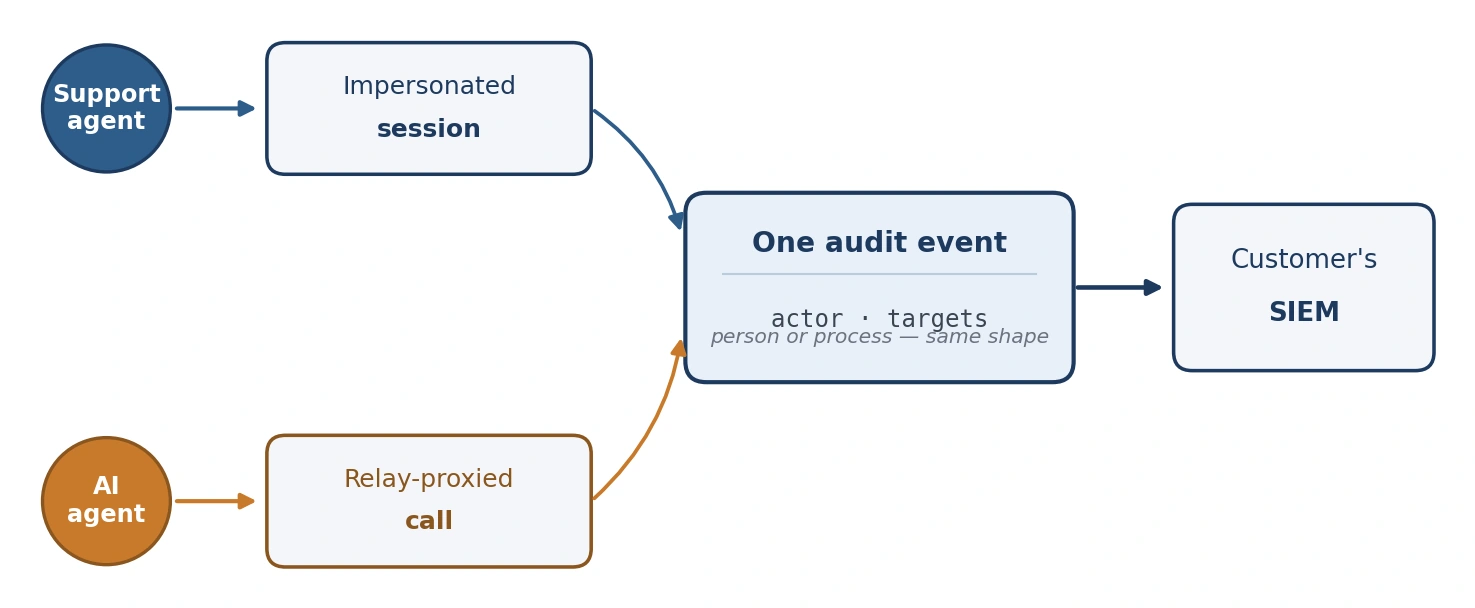
Support impersonation and AI agent delegation are the same primitive wearing different clothes. An actor acts on a user's behalf, the token has to say who the user is and who is acting, and the trail has to survive the handoff. The risk profile differs in speed more than in kind: a support agent looks at one page at a time, while a misbehaving agent process can replay the same action a few thousand times inside its window. That's why the agent case pushes the credential out of reach entirely. WorkOS Relay lets an agent name the provider and the user it's acting for without ever holding the provider token. We wrote that case up separately in delegated access for AI agents.
Keep them in one system anyway. If human support sessions and agent actions land in two ledgers with two vocabularies, an incident starts with a join you do by hand at the worst possible moment. Put both through one actor/targets shape and one stream to the customer's SIEM, and whether the actor was a person with a ticket number or a process with a task id becomes a field rather than a second system to build.
The test for all of it is a question an enterprise customer will eventually ask: who looked at my account last month, when, and why. If the answer is a query instead of a Slack thread, delegation is working.