What else happens when you impersonate a user?
The side effects nobody documents: analytics, lifecycle email, feature flags, webhooks, and the background job that runs as the wrong person an hour later.

Adding impersonation is the easy part. Most identity providers hand it to you with no code: a support engineer picks a user, your callback receives an authorization code, and the resulting session carries a marker saying who is really driving. WorkOS puts the impersonator's email in an act claim on the access token and an impersonator object on the authenticate response, with the reason they gave. You render a banner, maybe hide a few sensitive fields, and ship.
Then the side effects start, and you find them one at a time, usually because a customer tells you.
The reason this is hard is that impersonation is not a feature with a boundary. It is a session, and everything downstream of a session assumes the person holding it is the person it belongs to. Every analytics call, every lifecycle email, every counter and cache and queued job inherits an identity that is now a lie. None of that code knows about your banner.
Here is the full inventory, grouped by how far the damage travels. Not all of it will apply to you, but the list is what you want in front of you before you ship, rather than after.
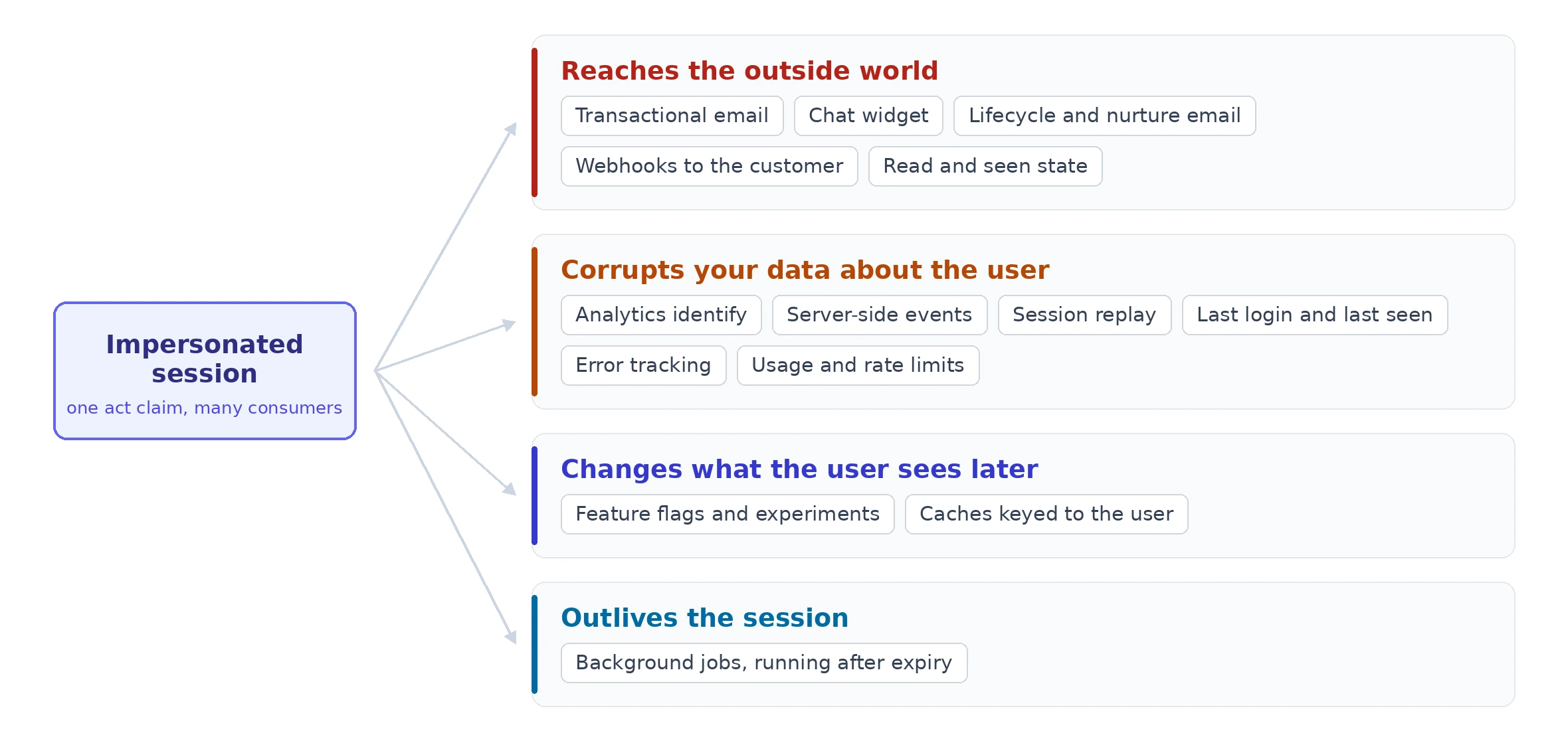
Things that reach the outside world
These are the worst, because you cannot take them back.
- Transactional email and notifications. The support engineer changes a setting to reproduce a bug and the user gets "your billing address was updated," which they did not do. At best it is confusing. At worst it looks exactly like an account takeover.
- Chat widgets. If you run Intercom, Crisp, or anything similar in-app, the support session opens a conversation as the user. Jamie Lawrence, CTO of Podia, described the outcome: you send a message and then read it yourself in the impersonated session, and the user never gets a notification. Your support tool is now talking to itself.
- Lifecycle and nurturing email. This is the one people miss, because the trigger is not an action but a state change. A support engineer visiting the dashboard can be enough to mark onboarding step three complete, which advances the user to the next drip email. When LangWatch audited their own impersonation handling, they found seven separate Customer.io hooks syncing impersonated activity into email automation.
- Webhooks. If your app emits webhooks to the customer's own systems, impersonation produces events attributed to the user, landing in their SIEM or their Zapier or their data warehouse. You have now put a false statement about their employee into their audit trail.
- Read receipts and seen state. Marking messages, tickets, or documents as read on the user's behalf destroys information they were relying on. It is a small thing that generates a very annoyed support ticket.
Things that corrupt your data about the user
- Analytics identify calls. The client-side
identify()fires with the impersonated user's ID, and every event in the session is attributed to them. Lawrence's version of the warning is the memorable one: disable analytics or you will develop a very suspicious hotspot of user activity around your support staff's location. - Server-side event tracking. Usually a separate code path from the client SDK, and usually missed on the first pass. LangWatch found five call sites of their server-side tracking helper that needed guarding, in addition to the client identify.
- Session recording and replay. Your replay tool captures the support session, which means you have recorded a support engineer browsing customer data and shipped it to a third party. Worth deciding deliberately rather than discovering.
- Last login and last seen timestamps. Impersonation updates them, which quietly corrupts the things built on top: churn analysis, inactive user cleanup, "we noticed you have not logged in" campaigns, and seat usage reporting. A customer who has not logged in for two months now looks active because you helped them.
- Error tracking. Errors the support engineer triggers get attributed to the user, so the next person debugging that account is looking at a stack trace nobody on the customer side ever saw.
- Rate limits and usage quotas. Support activity consumes the customer's allowance. If you bill on usage, you are billing them for your own support session.
Things that change what the user sees later
- Feature flags. This one has a trap worth stating precisely. If you use PostHog and suppress tracking with
opt_out, that suppressescapture()calls only. It does not disable feature flag evaluation. So flags still evaluate for the impersonated user, still get recorded as evaluated, and can still enroll them in an experiment they never visited. Verify this behavior in whichever SDK you use rather than assuming that turning off analytics turned off everything analytics-adjacent. - Caches. Anything the session warms or invalidates is keyed to the user, so a support session can leave a cache entry shaped by what the engineer did rather than what the user does. Rare, but very hard to debug when it happens.
Things that outlive the session
Background jobs. A job enqueued during impersonation runs later, as the impersonated user, with no impersonation context attached, possibly after the session has expired. WorkOS impersonation sessions expire after 60 minutes, but a job sitting in a retry backoff does not care. The actor information was on the session, and the session is gone.
This is the category with the least written about it and the longest tail. If your jobs carry an actor, put the impersonator in the payload at enqueue time, not at execution time.
One flag, set early, read everywhere
The implementation that works is boring: derive a single boolean from the session, put it somewhere every layer can reach, and have each integration consult it.
Two traps in the wiring, both of which have bitten real teams.
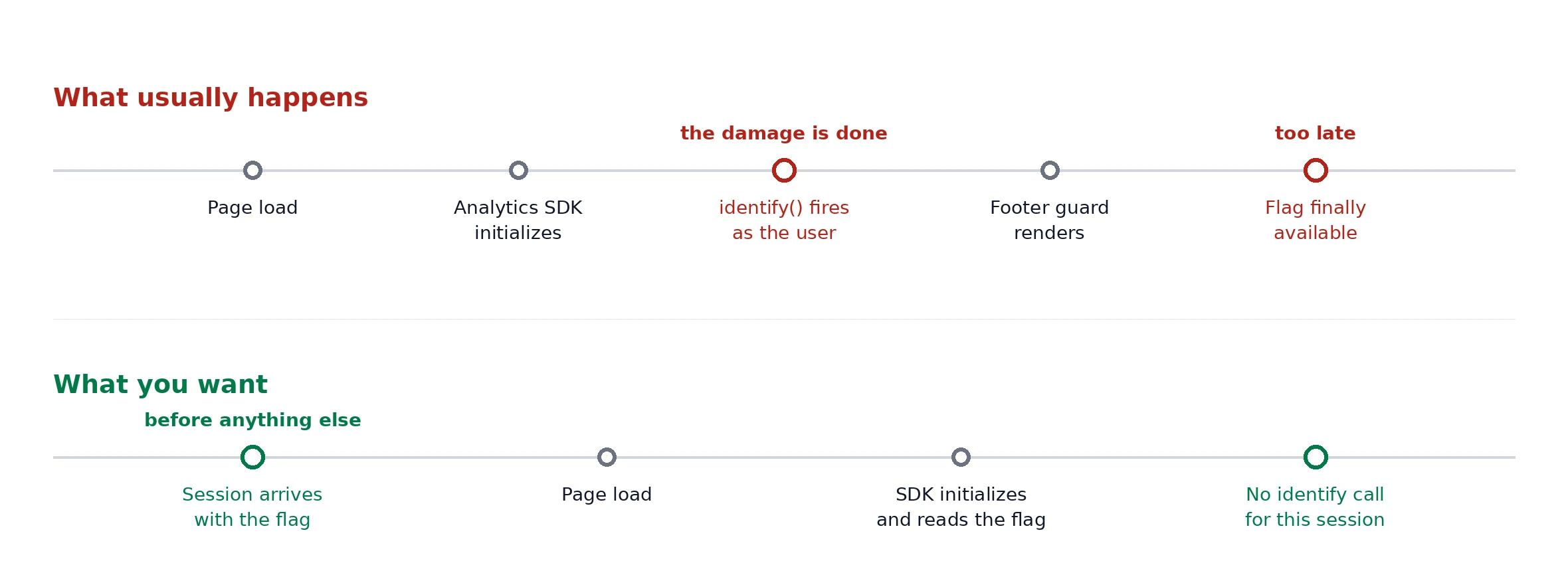
Ordering. The suppression has to happen before the thing it suppresses initializes. LangWatch's guard lived in a footer component that rendered after their identify hook had already fired, so it was correct code that ran too late. If your analytics SDK initializes on page load, your flag has to be available at page load, which usually means it comes down with the session rather than being fetched afterward.
Fail direction. Write the check so that a missing or malformed flag leaves normal behavior intact. LangWatch's first attempt at suppressing tracking during impersonation caused an outage affecting all users and was reverted about five hours later. A bug in your suppression logic should degrade to "we tracked a support session by mistake," never to "we stopped tracking anyone."
Suppressing notifications is not as obviously right as it looks
Here is the part where the simple advice goes wrong.
There is a real argument against suppression. If you silence notifications during support sessions, you remove the user's only independent check on what was done to their account. As one practitioner put it in a discussion of exactly this: notifications are the only way the user can cross-check that the agent actually did the thing they were supposed to do, and only that thing.
And the failure mode is not hypothetical. Someone who worked at a large benefits outsourcing firm described what happened when their platform had both impersonation and an agent-facing way to cancel notifications. A few agents worked out that they could change a participant's address, take a 401k loan, and cancel the notifications for both. They used the combination to steal from the people they were supposed to be helping.
Note what went wrong there. Neither feature was indefensible on its own. Impersonation is how you reproduce a bug. Cancelling a notification is how you stop a duplicate email. The theft lived in the composition, which is exactly the kind of thing that no single code review catches.
So the rule is narrower than "suppress notifications":
- Suppress based on session type, computed from the token, never as something an operator can toggle. If a human can turn off the notification, the notification is not a control.
- Suppress the ones that are noise, the ones that say "you did a thing" when the user did not.
- Send one that is signal. A single "an administrator accessed your account" message, with who and when, preserves the user's ability to notice. This is the synthesis of an argument that usually gets stuck at suppress-versus-notify, and it is what GitHub does.
- Keep the record independent of the delivery. Whether or not the user gets an email, the event should exist somewhere they can eventually see.
What to log instead
Since you are suppressing the automatic trail, replace it with a deliberate one. Three things are worth recording that most implementations skip.
- Both identities on every event. Not the impersonator instead of the user, and not the user instead of the impersonator. Attributing a record solely to the support engineer breaks the very flows you are impersonating in order to reproduce. A
createdByandcreatedOnBehalfOfsplit, the way Outlook handles send-on-behalf-of and the way git separates author from committer, keeps both facts. - Session end, not just session start. Most platforms emit an event when impersonation begins and nothing when it stops, which means you cannot answer "how long was someone in that account" without inferring it. GitLab emits separate start and stop audit events, which is the right shape.
- Something the customer can see. An internal-only record answers your questions, not theirs. Support access that is invisible to the customer is indistinguishable from an intrusion, which is the whole reason the banner exists in the first place. If you sell to enterprises, expect this to come up in a security review, and expect the answer "we log it internally" to be unsatisfying.
Where your identity provider helps, and where it stops
WorkOS impersonation gives you the two things the rest of this list hangs off. The access token carries an act claim with the impersonator's email, and the authenticate response carries an impersonator object with that email plus the reason they typed before starting, which is required rather than optional. That is the flag in the section above, available at session creation, before your analytics SDK initializes. Sessions also expire after 60 minutes on their own, which removes the most common operational failure, the engineer who impersonated someone on Friday and opened the tab again on Monday.
What no identity provider can do is know about your Customer.io hooks, your webhook fan-out, or your job queue. The actor identity is a primitive, and the twelve questions below are about what your own code does with it. That is the part that stays yours.
Before you ship
Run this list against your own stack. The answer to any of them can legitimately be "we accept this," but it should be a decision rather than a discovery.
- Does a support session send transactional email as the user?
- Does it open or reply in your in-app chat?
- Can it advance a lifecycle or onboarding sequence?
- Does it emit webhooks to the customer's systems?
- Does it mark anything as read or seen?
- Does it call
identifyin your analytics SDK, client or server? - Does it record a session replay?
- Does it update last login, last seen, or seat activity?
- Does it evaluate feature flags or enroll the user in experiments?
- Does it consume rate limits or billable usage?
- Do background jobs it enqueues carry the impersonator?
- Does anything at all record when the session ended?
The first eleven are about not lying to your own systems. The twelfth is the one your auditor asks about.