Vercel acquired Better Auth: What it means and how to migrate to WorkOS
What the deal changes for teams building on the open source library, and a step by step path for moving your users, organizations, and passwords to WorkOS.

On July 7, 2026, Vercel announced it is acquiring Better Auth, the company behind the open source TypeScript authentication library. Founder Bereket Engida and the core team are joining Vercel. At the time of the announcement the library had more than 4.7 million weekly npm downloads and over 850 contributors.
The library itself stays free and MIT licensed, keeps its name, and the team continues to lead development with the same open contribution model, community governance, and framework support. Nothing breaks today, and nobody is forced to move.
What does change is where the project's direction gets set, and what it is pointed at next. Both companies are aiming at agent identity. The Better Auth team has been building the Agent Auth Protocol so each agent carries its own scoped, revocable identity with the user as the single point of control, and that work continues at Vercel, feeding into Vercel Connect and eve.
That is a genuinely interesting problem. It is also not the enterprise checklist a B2B SaaS team is working through this quarter.
What this changes for you, and what it doesn't
If you run Better Auth in production, three things are worth naming honestly.
Governance and roadmap now sit inside a platform company. That is not automatically bad, and Vercel has a real track record of stewarding open source, but it is a different decision-making structure than an independent project.
Near-term energy is going toward agent identity and Vercel's product surface. If your next two quarters are about SAML edge cases and a security questionnaire from a customer's IT team, that is a different roadmap than yours.
And "auth you own" still means you own the operating burden. That is the point of the library and it is a real asset when you want full control. It is a cost when the thing you actually want is for identity infrastructure to be somebody else's on-call rotation.
When a framework fits, and when a platform does
Better Auth ships SSO, SAML, SCIM 2.0, organizations, RBAC, and MFA as plugins across a wide range of frameworks. It is a serious piece of engineering, and if you want auth living in your codebase, on your infrastructure, with the code in front of you, that is exactly what it is for.
The question is not which is better. It is which cost you would rather carry.
Running these features yourself means owning the long tail: identity provider quirks that only appear with one customer's Okta tenant, directory sync edge cases, audit log retention, the security review that arrives with a six-figure contract. WorkOS runs that layer as a managed platform. AuthKit handles authentication, and SSO, Directory Sync, RBAC, MFA, Audit Logs, and Feature Flags run alongside it. You wire it in once, and the edge cases are already handled because someone else hit them first. OpenAI, Cursor, Perplexity, Webflow, PlanetScale, and Indeed made that call.
If you are moving upmarket, closing enterprise deals, and would rather spend engineering time on your product than on identity plumbing, that is the trade a managed platform makes. For the full breakdown, see the complete guide to user management for B2B SaaS.
The rest of this post is the migration itself.
Before you start: What moves cleanly and what doesn't
Read this part first, because two items on it need a plan rather than a script.
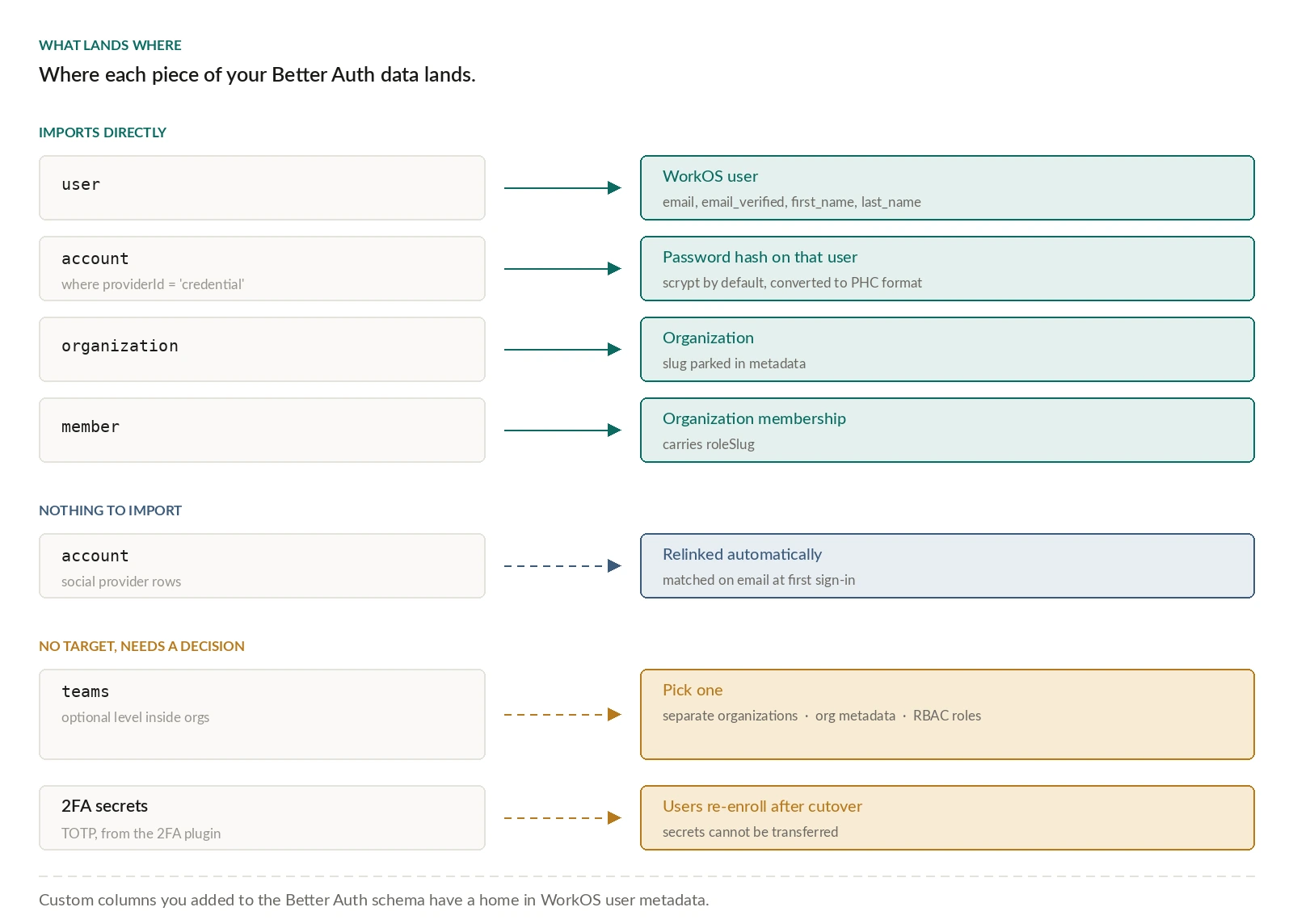
- Moves cleanly. Users, email verification status, organizations, organization memberships, and roles. Password hashes move too: Better Auth uses scrypt by default, which WorkOS supports, along with bcrypt, argon2, and pbkdf2 if you configured something else.
- Needs a decision. Better Auth stores a single
namefield, while WorkOS has separatefirst_nameandlast_name. You either parse it or put the whole value infirst_name. Better Auth'simagefield has no direct equivalent. - Does not move. MFA secrets. If your users enrolled through Better Auth's two-factor plugin, they re-enroll after migrating, because TOTP secrets cannot be transferred for security reasons. Plan the comms for that before you cut over, not after. Note also that WorkOS does not support SMS factors, by choice, given the known vulnerabilities.
- Has no direct equivalent. Better Auth's teams, the optional hierarchical level inside organizations. You have three options: convert each team into its own organization, store team information in organization metadata, or represent team membership through RBAC roles. For most B2B applications, flattening teams into organizations is the cleanest path, and it has a practical upside: SSO and Directory Sync operate at the organization level, so flattening puts your enterprise features exactly where your customers expect them.
Step 1: Export from your Better Auth database
Better Auth stores user data directly in your database, so you already have full access. There is no built-in export tool and you do not need one. Four tables matter:
user: core user records (id,name,email,emailVerified,image, timestamps)account: provider-specific data, including password hashesorganization: present if you use the organization pluginmember: the mapping of users and their roles to organizations
Password hashes live in account, on rows where the provider is credential-based:
Export to CSV or JSON, whichever suits your tooling.
Step 2: Import users and passwords
The fastest path is the CLI:
If you would rather be walked through it, npx workos migrations wizard gives you a guided run.
For a scripted migration, use the Create User API. It is rate limited, so batch with delays for anything large. The field mapping is short:
For passwords, pass password_hash_type as 'scrypt' and password_hash as the value from the account table. One detail that will cost you an afternoon if you miss it: the hash has to be in PHC string format. If Better Auth is storing raw scrypt hashes, convert them first. The importing passwords guide has the PHC parameters for each algorithm.
Users who signed in through social providers keep working. Better Auth stores those in the account table under provider IDs like google, github, and microsoft. Once you configure the matching provider in WorkOS, those users sign in as before and are linked automatically by email address. Some will be asked to verify their email, depending on whether the provider is known to verify addresses; Google users on a gmail.com domain will not be.
Step 3: Organizations, memberships, and roles
Create the organizations first and keep a map of old ID to new ID, because you need it for memberships. Better Auth's slug has no direct field in WorkOS, so metadata is a good home for it:
Then walk the member table and create memberships, passing the role. Define your equivalent roles in the WorkOS Dashboard before you run this, then map Better Auth's role strings onto their slugs:
If your Better Auth setup uses complex RBAC with custom resources and actions, expect to either simplify to standard roles and permissions or keep some authorization logic in your application.
Step 4: Wire in AuthKit
With the data in place, set up AuthKit to handle sign-in, sessions, and the hosted UI. This is the part that replaces your Better Auth handlers.
You do not have to do it in one jump. Because Better Auth's tables live in your own database, you can leave them in place through a transition period and run a gradual rollout, with some users authenticating through WorkOS while the rest stay put. Custom columns you added to the Better Auth schema have a home in user metadata.
Step 5: Turn on enterprise features as customers ask
These are configuration rather than code, which is the point of moving:
- Single Sign-On for SAML and OIDC.
- Directory Sync to provision and deprovision from your customer's IdP.
- Admin Portal so your customers' IT teams configure their own SSO and directory connections without a ticket landing on you.
- Audit Logs for the security review that shows up with the enterprise contract.
Handling signups during the cutover
If people can sign up at any hour, anyone who registers after your export and before your switchover gets left behind. Two workable approaches.
- Disable signups for the window. Schedule the migration, gate signup behind a flag, re-enable when you are live on WorkOS. Simple, and fine if you can afford a short pause.
- Dual-write. For products that cannot pause, write new signups to both systems, creating the WorkOS user through the Create User API at the same time as the Better Auth record. You still run the historical migration, and you need to keep updates like email and password changes synchronized in both places until you finish. More work, no downtime.
If your stack has more than one auth system
Plenty of teams accumulate two or three. WorkOS publishes migration guides for Auth0, AWS Cognito, Clerk, Descope, Firebase, Stytch, and Supabase Auth, so consolidating several systems in one move is a normal path rather than a special project.
The bottom line
The acquisition does not force anyone off Better Auth. The library is open source, actively maintained, and now better resourced than it was.
What an acquisition is good for is prompting a deliberate decision. If you are early, or auth is something you want to own outright, a framework is a reasonable answer and always was. If you have real users, real revenue, and a pipeline full of enterprise deals that arrive with SAML requirements and security questionnaires, the question is whether identity infrastructure is where you want your engineers.
If the answer is no, the path is documented. Start with the Better Auth migration guide, or email support@workos.com and someone will help you scope it.