Evaluate feature flags locally in Node with the WorkOS runtime client
The WorkOS Node SDK ships a feature flags runtime client that keeps flag configuration in memory, so a flag check on a hot path never waits on a request.

A flag check that waits on a remote call puts a network dependency on a code path that can't afford one, and the alternative of carrying every flag in the user's access token runs into a size budget shared with your other claims. The WorkOS Node SDK's feature flags runtime client avoids both: it holds flag configuration in memory and evaluates locally, syncing with the Dashboard in the background. If your backend runs on Node, the docs point you here, especially once your flag set is large.
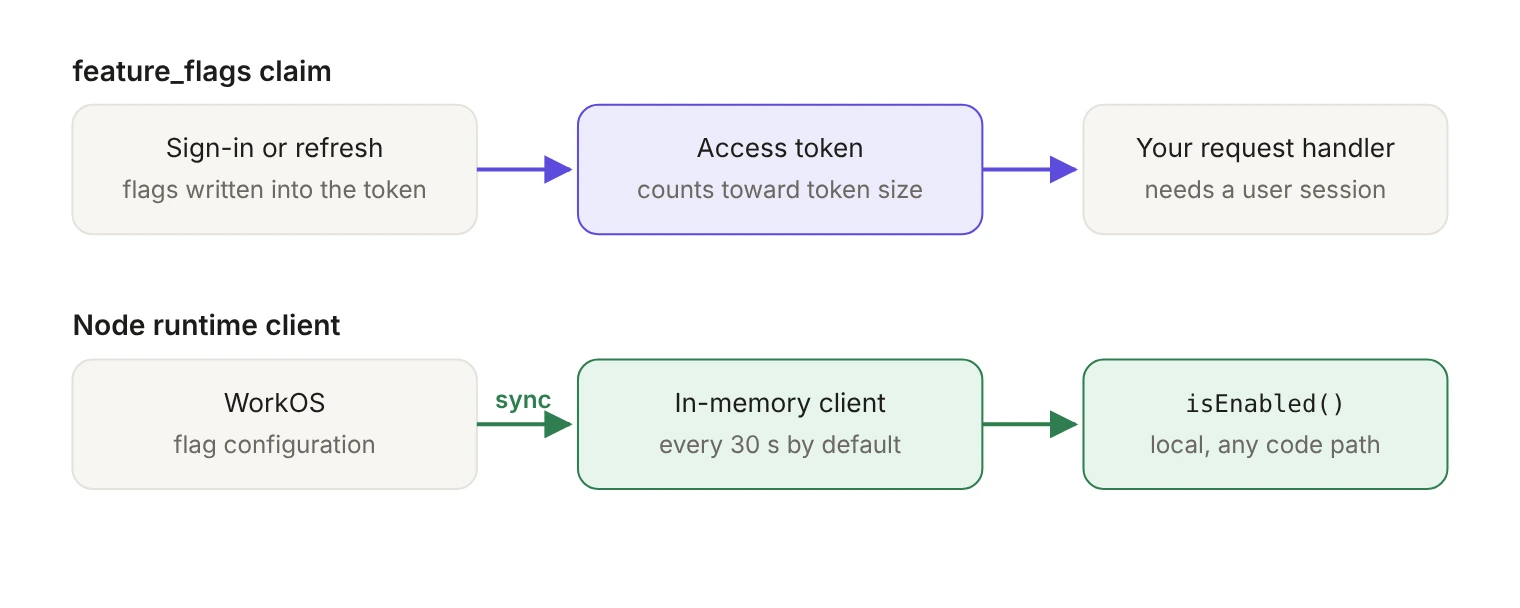
Why evaluate flags locally on Node?
There are two ways to read WorkOS feature flags in an application, and which one fits depends on your platform and on what the check is for.
The feature_flags claim in an AuthKit access token holds the slugs of the flags enabled for that user, based on your organization and user targeting. Reading it needs no extra request, because the flags arrive with the session the user already has. The claim travels inside the token, so it works on any platform whose AuthKit SDK gives you an authenticated session, and on Node it still works well for a small, stable set of flags.
Two things push you off it.
The first is freshness. A flag you change in the Dashboard reaches the user the next time they sign in or their session refreshes, rather than within a polling interval.
The second is size. Every flag in the claim takes up space in the access token, which is stored in the AuthKit session cookie, and that space is shared with your role, permission and entitlement claims under a 3,072-byte limit. A flag set that grows over the life of a product ends up competing with claims you can't drop.
Then there's the check the claim can't serve at all: a background job or a webhook handler has no session to read a claim from. The runtime client is built for that case, and it stays in sync independently of user authentication. It ships in the Node SDK only.
Which version of the Node SDK do you need?
Pin version 12 or later.
The runtime client guide covers @workos-inc/node version 12.0.0 or later. Earlier versions ignore rules that serve false, so they can return true where 12.0.0 returns false. That behavior arrived in v12.0.0, released on October 23, 2026, listed in the release notes as the breaking change "Evaluate ordered targeting rules". The SDK requires Node 22.11 or later.
If you use @workos-inc/authkit-nextjs, check which Node SDK it pulls in. Version 4.5.0 supports only @workos-inc/node 9 and 10; version 4.6.0 and later also accept 12. Upgrade the Next.js package and make sure the Node SDK it resolves to is 12 or later before you rely on the runtime client through it.
How do you create the client?
Create a single, shared runtime client when your process starts, not one per request: the client handles synchronization and evaluation for the lifetime of the process. The constructor is workos.featureFlags.createRuntimeClient(). Attach an error listener before anything else (an unhandled error event throws), then wait for the client to become ready with a timeout you choose.
waitUntilReady() resolves once bootstrap data is provided or the first sync succeeds. Before then it rejects on a 401 or once timeoutMs passes. Bounding it at startup keeps a slow or failing first sync from hanging your boot sequence instead of failing it outright.
The runtime client belongs in trusted server-side environments only. Never expose your WorkOS API key in client-side code.
How do you evaluate a flag?
isEnabled returns true or false based on the flag's configuration and the targeting that matches the context you pass. Pass an organizationId, a userId, or both:
Pass no context and an enabled flag returns its default value. If the flag doesn't exist, isEnabled returns false, and you can override that by passing a third argument as the default return value.
Targeting is set in the Dashboard, per environment, to None, Some or All for users and organizations. Flags exist across every environment in a project, so you can exercise one in a sandbox environment before turning it on in production. To target resources that belong to your own application, such as workspaces, read the custom targets guide.
What happens before the first sync completes?
Until the client has flag data, from bootstrap data or its first successful sync, isEnabled treats every flag as unknown and returns false, or the default value you pass as its third argument.
That's a decision your application has to make on purpose. A flag gating a new dashboard panel can safely read false for the short window before the first sync lands. A flag choosing between two write paths in a job runner can't.
Two ways to handle it:
- Await
waitUntilReady({ timeoutMs })during startup and don't accept traffic until it resolves. - Pass
bootstrapFlagsso evaluations work immediately from saved configuration. Live data replaces the bootstrap data after the first successful sync.
Block on readiness when a wrong answer is expensive to undo, as in a job runner picking a write path. Bootstrap data plus a deliberate default is the better trade when the check only decides what a user sees.
If every flag comes back as its default value once you're running, the usual causes are a client that isn't ready yet, a flag key that doesn't match, or an evaluation context that matches no targeting.
How fresh are the flags?
The client starts its first sync as soon as it's created, and every evaluation after that is local. Freshness is therefore a function of the polling interval rather than of your traffic, and Dashboard changes show up on the next sync.
Thirty seconds is the default and five seconds is the floor. Each sync request carries its own ten-second timeout. If you want to see flag changes land rather than infer them, listen for change, which fires when a flag's configuration changes after the first successful sync and gives you { key, previous, current }.
What should you watch for in production?
Three events carry everything you need to operate the client.
The distinction that matters operationally: error is survivable and self-healing, since the client keeps serving the last flags it received. failed isn't. Your API key is invalid or unauthorized, and synchronization stays stopped until the client is recreated with valid credentials. Page on the second, alert on a sustained run of the first.
getFlag(key) helps here too. It returns the flag's configuration entry, which is what you want behind a debug endpoint when someone asks why a customer isn't seeing a feature.
Finally, stop the background sync when the process goes away. close() stops synchronization and cleans up resources.
Claim or runtime client?
If you're setting up organization-level feature access for the first time, our walkthrough on enabling B2B SaaS features for specific customers covers creating flags and assigning them in the Dashboard.
The choice is per check, not per application. Keep the claim where a check lives inside an authenticated request and the flag set stays small and stable. Move to the runtime client the moment a check runs on a hot path, against a flag set that keeps growing, or inside a job, webhook or other long-lived process with no session to read from. On Node, that last case has only one answer.