The token that never expired: What the Zeabur breach teaches SaaS teams that store customer secrets
A cluster admin token created in 2024 and never rotated led to 3.2 million customer environment variables being read. What that means if your product stores credentials for your customers.

On October 14, 2026, an attacker signed in to Zeabur's shared Kubernetes cluster with an admin token created in January 2024. The token had never expired and had never been rotated. A day and a half later, the attacker had read 3,218,965 environment-variable records out of Zeabur's platform database: the API keys, database passwords and signing keys its customers had stored there.
On October 17, Zeabur announced it will shut down by December 31. Its preliminary incident report, published October 19, is unusually candid. It names the root cause in one sentence: "long-lived admin credentials were stored in plaintext and could be used from the public internet."
Zeabur is a developer hosting platform, but the lesson is not about hosting. Any SaaS product that holds credentials on its customers' behalf has the same shape: OAuth tokens for integrations, API keys for connected services, webhook secrets. If you run one of those products, here is what this incident shows about how a breach of your own systems turns into a breach of everyone who trusted you.
What happened
The attacker came in through two paths that met inside Zeabur's internal network. Each step used a credential that was stored in plaintext or never expired.
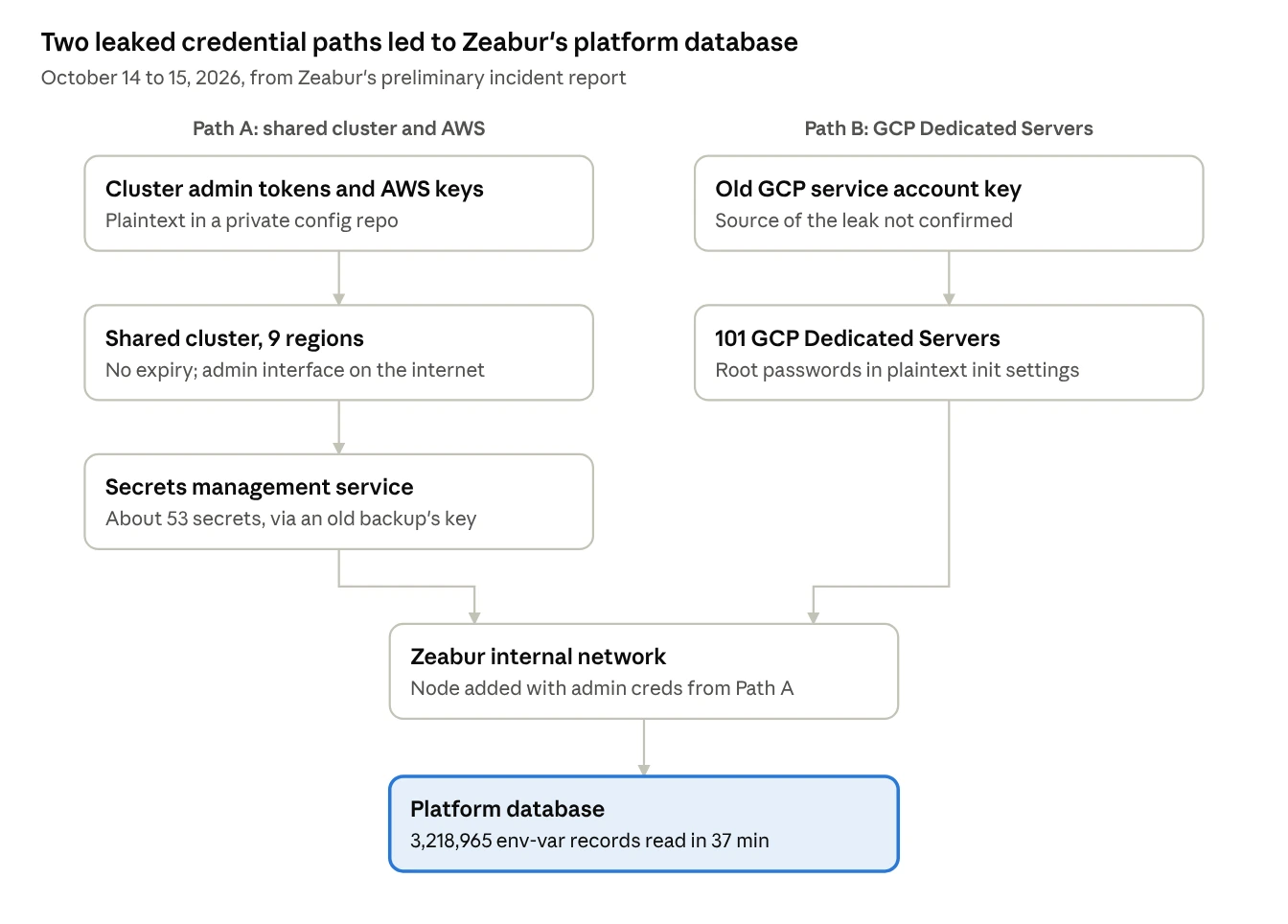
On Path A, the leaked admin tokens opened the shared cluster in 9 regions, including the settings and environment variables of every service and 865 database containers. An over-privileged key then reached an old cluster backup holding a key to Zeabur's secrets manager. On Path B, an old GCP key exposed root passwords for 101 managed servers. On October 15, the attacker used internal network admin credentials from Path A to join a node from one of those servers, then read the platform database with an internal read-only account.
Lesson 1: A credential nobody rotates becomes a permanent key
Zeabur's report lists the admin token's history: created January 10, 2024, with no expiry; written in plaintext to a private configuration repository on January 20, 2026; used by the attacker on October 14, 2026.
The painful detail is the August incident in between. After that breach, Zeabur rotated the internal keys it knew were leaked and told users that "all internal admin keys have been disabled or rotated." The October report corrects that statement: the rotation missed the cluster admin tokens and AWS keys sitting in the config repo. Those are the exact credentials used in October.
A rotation can only cover the credentials you know about. That makes the inventory the real control:
- Know every long-lived credential. List each admin token, cloud key, deploy key and signing key, with where it is stored, who owns it and what it can reach. Zeabur found a deploy key for a service that had been shut down four months earlier, still valid.
- Prefer short-lived credentials where the system allows it. A token that expires in an hour is a much smaller prize than one that never does. Where a key has to be long-lived, give it a rotation schedule and an owner.
- Rotate by inventory, not by memory. After an incident, rotate everything on the list that the attacker could have reached, not only what you can prove was taken.
- Keep secrets out of repositories, private ones included. A private repo is protected by every GitHub account and app that can read it. Zeabur hypothesizes its repo was reached through a GitHub App private key leaked in August.
Lesson 2: A database read shouldn't hand over plaintext
The platform database read took 37 minutes, from 16:10 to 16:47 UTC on October 15, using an internal read-only account. Because the environment variables were stored as readable values, those 37 minutes exposed every secret customers had kept on Zeabur.
The report also shows that encryption alone is not enough. Of the 607 n8n instances Zeabur checked, 602 kept n8n's encryption key in an environment variable. The attacker read the environment variables and the encrypted credentials together, so the encryption protected nothing. An encryption key stored next to the data it protects is just one more value to read.
The pattern that holds up has three parts:
- Envelope encryption. Each secret is encrypted with its own data key, and that data key is encrypted with a key-encrypting key that never sits in your database.
- Keys partitioned by customer. Data for different customers is wrapped by different key-encrypting keys, so one customer's key unwraps only that customer's data.
- Decryption at the point of use. Only the service that needs a plaintext secret can ask for it, at the moment it needs it, and the credential that allows that request lives somewhere else from the ciphertext and the backups.
WorkOS Vault is built on this model. Each encryption operation generates a random data-encrypting key, which is wrapped by key-encrypting keys selected by the key context you pass. The docs recommend using a long-lived boundary such as the organization ID as that context, and each unique context value maps to its own key-encrypting key (key context docs). The encrypt and decrypt calls below are in the key management API reference; the ciphertext carries its wrapped data key, so decrypt needs no context.
With this layout, someone who copies your database or a backup gets ciphertext. Without your WorkOS API key, they can't unwrap the data keys, because the key-encrypting keys stay in Vault and are never stored with your data. Customers who want their own key in the chain can use bring your own key: their key from AWS KMS, Google Cloud KMS or Azure Key Vault then wraps the data keys for operations that carry their organization ID.
This moves the problem rather than ending it. Whoever holds your WorkOS API key can still ask Vault to decrypt. That key is now the credential to protect: keep it out of repositories, out of backups and out of the services that don't need it. Lesson 1 applies to it in full.
Lesson 3: Every over-broad permission becomes a hop
A leaked credential is only as dangerous as what it can reach, and Zeabur's report reads like a list of reach nobody intended:
- The shared cluster's admin interface accepted connections from the public internet.
- A key that only needed to read one storage bucket could read every bucket in the AWS account.
- Cluster backups contained every secret, and the backup access key was stored alongside the other secrets. A key rotated mid-incident was captured by the next backup and used again.
- Internal network rules let nodes with certain tags connect to the platform database, and the internal read-only account could read all of it.
- Internal services and customer services ran on the same cluster, so reading customer settings also exposed Zeabur's own service credentials.
None of these was the root cause on its own. Together, they let one set of leaked credentials reach the secrets manager, the internal network and finally the platform database.
Detection was the last gap. The attacker used valid credentials through legitimate access paths, so about 36 hours of activity triggered no alerts. Zeabur found the incident the next day, after a user reported it. The alerts it is now adding are a good starting list: unusual use of admin access, commands run inside containers, bulk reads of secrets or databases, new nodes joining the internal network, and cloud keys used from unfamiliar sources.
A checklist for teams that store customer secrets
If your product holds credentials for your customers, check these this week:
- Every long-lived admin token, cloud key and deploy key is on a list, with an owner, its reach and a rotation date.
- No credential has gone unrotated since before your last incident or your last key-holding employee left.
- No secrets in repositories, private ones included, or in server initialization settings.
- Customer secrets are encrypted before they reach the database, with keys partitioned by customer.
- Encryption keys are never stored next to the data they protect: not in the same environment variables, database or backup.
- Backups are encrypted, and the backup access key lives outside the environment it backs up.
- Admin interfaces are not reachable from the public internet.
- Each key's permissions match what its service needs: one bucket, not the account.
- Internal services and customer workloads don't share a cluster or a network path to your core database.
- Alerts fire on bulk reads of secrets, admin access from new sources, and new nodes joining your network.
- You have a tested plan for telling customers which of their secrets to rotate, and in what order.
The takeaway
Zeabur's report notes one thing that worked. After the August incident, it gave Dedicated Server users a way to move their environment variables off the platform and onto their own servers. Projects that made the move were outside the scope of the October database read. The secrets that weren't stored centrally couldn't be read centrally.
Not every product can avoid holding customer secrets. If yours must, store them so that a stolen database is worth as little as possible, and treat the few credentials that can decrypt them as the most important keys you own.
Sources
- Zeabur October 2026 security incident (preliminary report), Zeabur, October 19, 2026
- Zeabur is shutting down: what happens next, Zeabur, October 17, 2026
- Zeabur shutting down after second security breach in two months, BleepingComputer, October 21, 2026
- WorkOS Vault, key context and bring your own key, WorkOS docs