Use FGA with your own authentication system by managing users, organizations, and memberships via API.
FGA works with any authentication system. While AuthKit provides built-in user management, you can integrate FGA standalone by managing users, organizations, and organization memberships through the API.
Use standalone integration when you have an existing authentication system, are migrating from another identity provider, or need programmatic control over user provisioning.
FGA authorization is built on three entities:
Users represent individuals in your application. Each has a unique ID, email, and profile information.
Organizations represent your customers or tenants. They serve as the root of your resource hierarchy.
Organization memberships connect users to organizations and assign an organization-level role. Every membership must have at least one role – this determines baseline permissions within the organization.
The organization membership role is always scoped to the organization itself, not to specific resources. For resource-level access control, use role assignments on individual resources.
If you want to grant access exclusively through resource-level roles, configure the default organization role to have no permissions. Users will start with no access and only gain permissions through explicit resource role assignments.
Organizations are the tenants in your application. Create one for each customer:
import { WorkOS } from '@workos-inc/node'; const workos = new WorkOS('sk_example_123456789'); const organization = await workos.organizations.createOrganization({ name: 'Acme Corp', externalId: 'acme_123', });
The external_id maps to your internal customer identifier – typically the primary key from your database.
| Parameter | Description |
|---|---|
name | Display name for the organization (required) |
external_id | Your internal identifier for this customer |
domain_data | Email domains associated with this organization |
metadata | Custom key-value pairs for your application |
Create users in WorkOS to establish their identity for authorization:
import { WorkOS } from '@workos-inc/node'; const workos = new WorkOS('sk_example_123456789'); const user = await workos.userManagement.createUser({ email: 'alice@acme.com', firstName: 'Alice', lastName: 'Smith', emailVerified: true, externalId: 'user_456', });
| Parameter | Description |
|---|---|
email | User’s email address (required) |
first_name | User’s first name |
last_name | User’s last name |
email_verified | Set to true if you’ve verified the email |
external_id | Your internal user identifier |
password | Password for email/password authentication |
password_hash | Pre-hashed password for migrations |
metadata | Custom key-value pairs |
Organization memberships connect users to organizations and assign their organization-level role:
import { WorkOS } from '@workos-inc/node'; const workos = new WorkOS('sk_example_123456789'); const membership = await workos.userManagement.createOrganizationMembership({ userId: 'user_01HXYZ', organizationId: 'org_01HXYZ', roleSlug: 'admin', });
The role_slug determines the user’s organization-level permissions. If omitted, the user receives the default role configured in your environment. This role applies to the organization as a whole – for resource-specific access, use role assignments.
If you’ve enabled multiple roles, assign several roles at once with role_slugs:
const membership = await workos.userManagement.createOrganizationMembership({ userId: 'user_01HXYZ', organizationId: 'org_01HXYZ', roleSlugs: ['admin', 'billing'], });
Once you’ve created users and memberships, FGA works as documented in other guides. The organization membership ID is the subject for all authorization operations.
Register resources as your application entities are created:
import { WorkOS } from '@workos-inc/node'; const workos = new WorkOS('sk_example_123456789'); const resource = await workos.authorization.createResource({ resourceTypeSlug: 'workspace', externalId: 'workspace_01H', organizationId: 'org_01HXYZ', name: 'Engineering', });
Grant users roles on specific resources:
import { WorkOS } from '@workos-inc/node'; const workos = new WorkOS('sk_example_123456789'); const roleAssignment = await workos.authorization.assignRole({ organizationMembershipId: 'om_01HXYZ', roleSlug: 'workspace-admin', resourceTypeSlug: 'workspace', resourceExternalId: 'workspace_01H', });
Check whether a user can perform an action on a resource:
import { WorkOS } from '@workos-inc/node'; const workos = new WorkOS('sk_example_123456789'); const { authorized } = await workos.authorization.check({ organizationMembershipId: 'om_01HXYZ', permissionSlug: 'workspace:edit', resourceTypeSlug: 'workspace', resourceExternalId: 'workspace_01H', }); console.log(authorized); // true or false
Sync WorkOS records as users move through your application’s lifecycle. Use the external_id field to map your internal IDs to WorkOS entities.
Create the WorkOS user and organization membership when a user signs up in your application:
import { WorkOS } from '@workos-inc/node'; const workos = new WorkOS(process.env.WORKOS_API_KEY); async function onUserSignup(newUser, organizationExternalId) { // Create the user in WorkOS const user = await workos.userManagement.createUser({ email: newUser.email, firstName: newUser.firstName, lastName: newUser.lastName, externalId: newUser.id, emailVerified: true, }); // Look up the organization by external ID const org = await workos.organizations.getOrganizationByExternalId({ externalId: organizationExternalId, }); // Create the organization membership const membership = await workos.userManagement.createOrganizationMembership({ userId: user.id, organizationId: org.id, roleSlug: 'member', }); // Store the membership ID for FGA operations return { userId: user.id, membershipId: membership.id }; }
Update the organization membership when a user’s role changes:
import { WorkOS } from '@workos-inc/node'; const workos = new WorkOS(process.env.WORKOS_API_KEY); async function onRoleChange(membershipId, newRoleSlug) { // Update the organization membership role const membership = await workos.userManagement.updateOrganizationMembership({ organizationMembershipId: membershipId, roleSlug: newRoleSlug, }); return membership; }
Create or remove role assignments when a user’s access to specific resources changes:
import { WorkOS } from '@workos-inc/node'; const workos = new WorkOS(process.env.WORKOS_API_KEY); // Grant access to a resource async function grantResourceAccess(membershipId, resourceExternalId, roleSlug) { const assignment = await workos.authorization.assignRole({ organizationMembershipId: membershipId, roleSlug: roleSlug, resourceTypeSlug: 'project', resourceExternalId: resourceExternalId, }); return assignment; } // Revoke access to a resource async function revokeResourceAccess(membershipId, roleAssignmentId) { await workos.authorization.removeRoleAssignment({ organizationMembershipId: membershipId, roleAssignmentId: roleAssignmentId, }); }
Delete the organization membership or user when they leave:
// Remove from one organization await workos.userManagement.deleteOrganizationMembership('om_01HXYZ'); // Or delete the user entirely (removes all memberships) await workos.userManagement.deleteUser('user_01HXYZ');
For complete API documentation on managing users, organizations, and memberships, see the API reference:
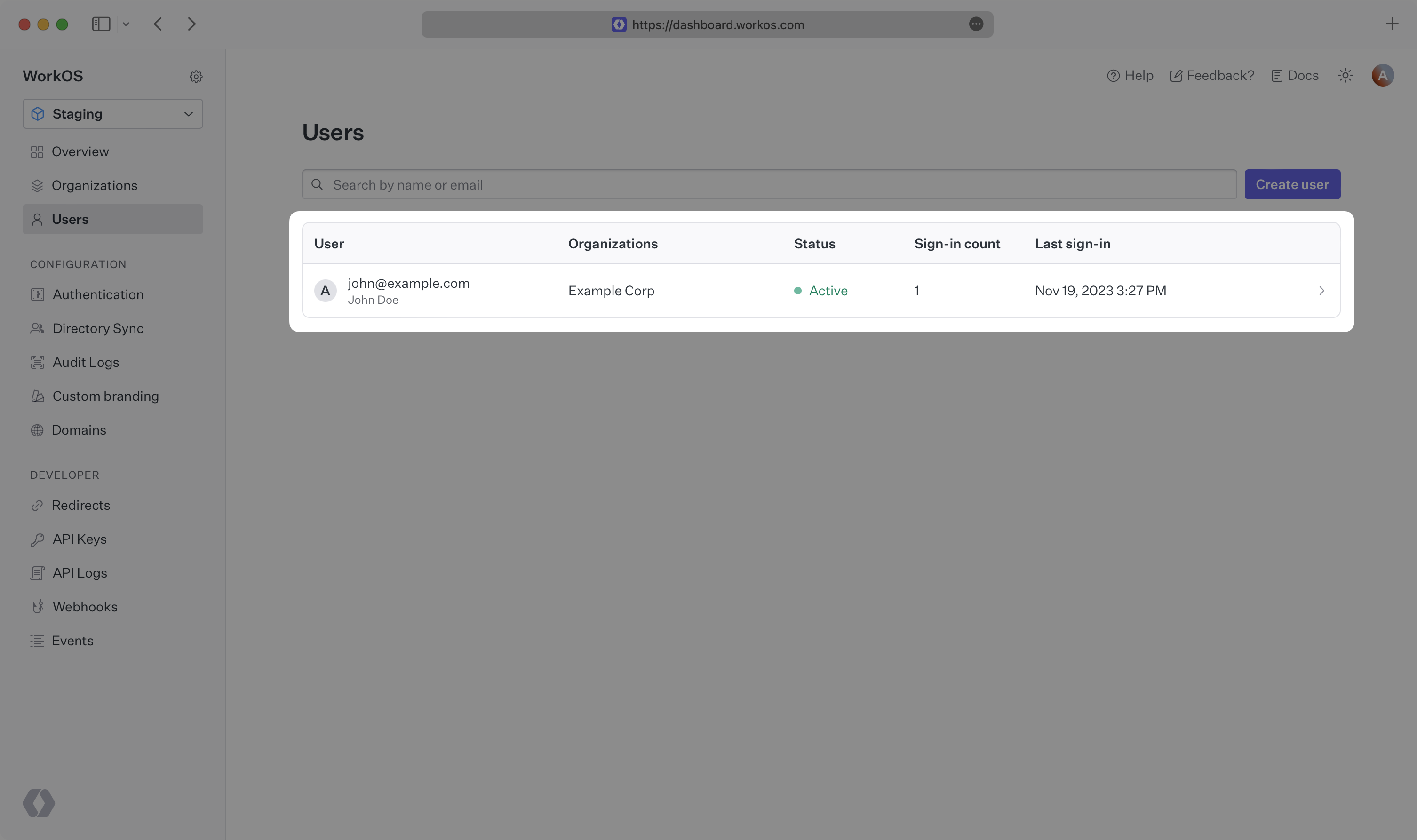
Users created via API appear in the WorkOS Dashboard. Navigate to Users to see all users in your environment, or Organizations to view members of a specific organization.
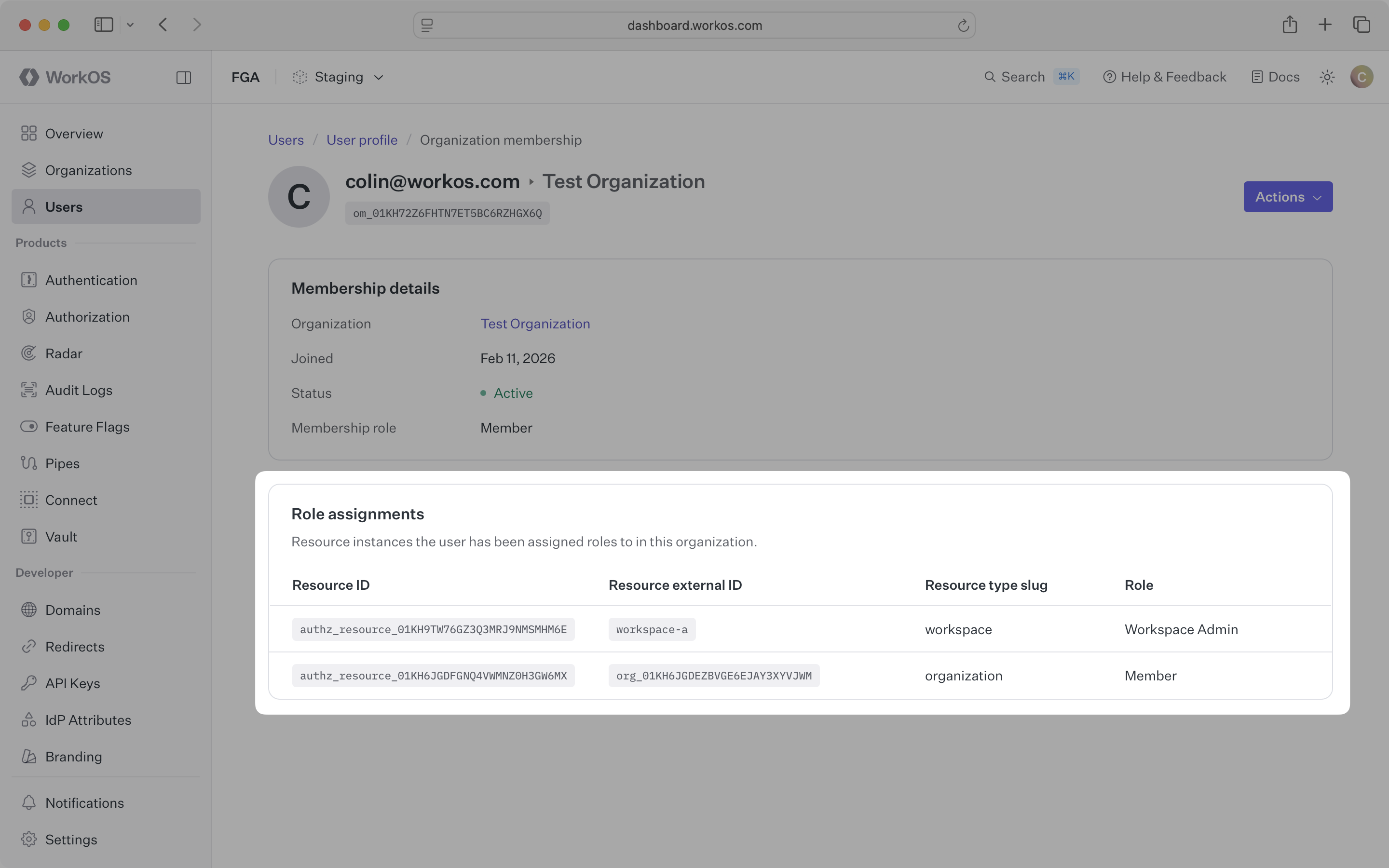
View a user’s resource-scoped role assignments by navigating to their organization membership.
To migrate from another identity provider, export your users and import them into WorkOS using the APIs described above. You can import password hashes so users keep their existing credentials, and use a dual-write strategy to handle new signups during migration.
See the migration guides for detailed steps, including provider-specific guides for Auth0, Firebase, Clerk, and others.