Connection sharing
Let an organization connect a provider once and share that connection with every active member.
By default, every Pipes connection belongs to one user: they authorize the provider, and your application acts on their behalf with their credential. Connection sharing adds a second kind of connection. An organization administrator connects the provider once, and every active member of the organization can use that connection without connecting a personal account.
Shared connections suit providers where the organization, not the individual, owns the relationship: a shared Slack workspace bot, a company-wide analytics API key, or a server-to-server client credentials grant.
A connection has exactly one owner, and the owner determines who established it and who can use it.
- User connection. Authorized and owned by one user. This is the default,
and omitting
connection_ownerfrom any API request keeps selecting it. - Organization connection, also called a shared connection. Configured
once for an organization and usable by any of its active members. The
connected account carries the
organization_idand has no user owner.
| User connection | Organization connection | |
|---|---|---|
| Owner | One user | The organization |
| Who establishes it | The user | An organization admin |
| Who can use it | That user | Every active member of the organization |
| Widget surface | Your connections in Pipes | Shared connections in Pipes and Pipes Admin |
The same provider can be offered for both user-owned and organization-owned connections in one environment. A member can then have their own connection to the provider alongside the organization’s shared one; the two are independent connected accounts. When you refer to a connection, identify it by the provider together with the connection owner, since the provider alone is ambiguous.
Sharing a connection follows the same shape as the Pipes overview, with the organization administrator taking the place of the individual user.
In the WorkOS Dashboard, open Pipes and add the provider. When organization connections are enabled for your environment, the Connection access step asks who connects: User, where each user connects their own account, or Organization, a single authorized connection shared by all the organization’s users. Choose Organization, then pick the authentication method and configure credentials the same way you would for a user provider.
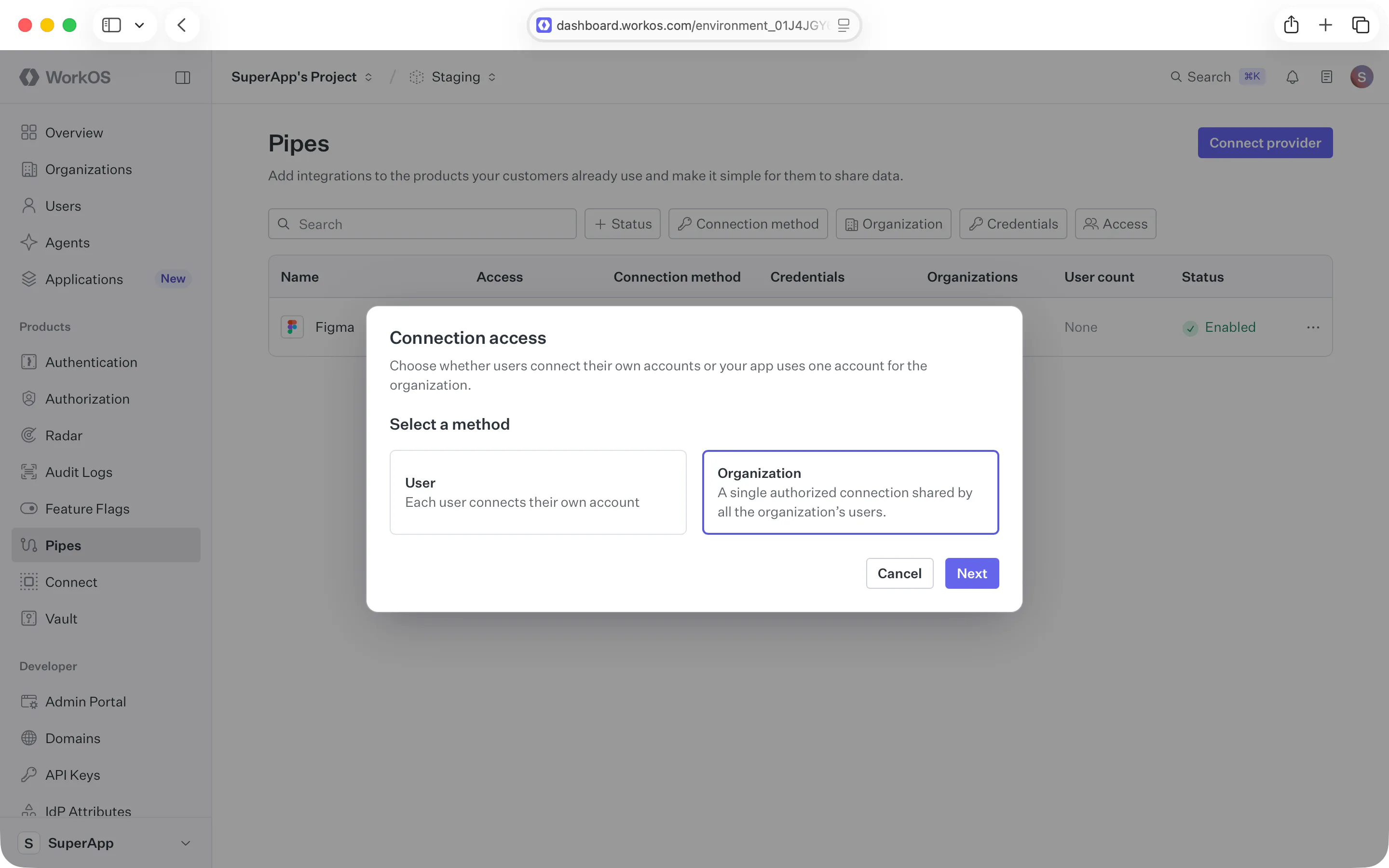
You can add the same provider once for user connections and once for organization connections. The Pipes provider list shows each with its access type.
If you manage providers programmatically, the
create data integration endpoint
accepts ownership: "organization" for the same result.
An organization administrator connects the provider from the
Pipes Admin widget, in its Shared connections
section. Admins need the widgets:pipes:manage permission. The same
authentication methods are available as for user connections: OAuth, API key,
and client credentials. For OAuth, the admin completes the provider’s
authorization flow, but the resulting connection belongs to the organization,
not to them. For API key and client credentials, the admin enters the
organization’s credential, and entering it again rotates it.
The credential is stored against the organization; it is never sent to the browser or returned to members.
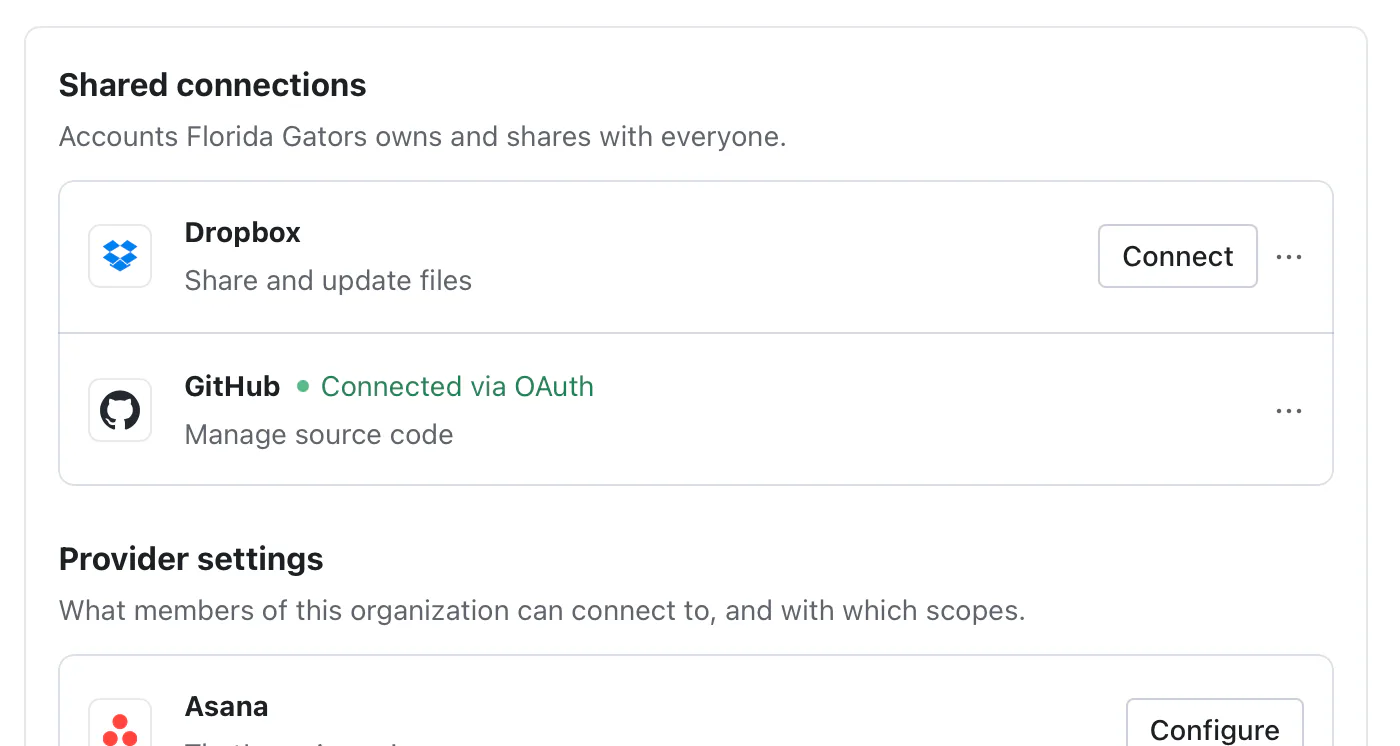
If you build your own admin UI, the
authorization URL,
API key, and
client credentials
endpoints accept connection_owner: "organization" with the acting admin’s
user_id and the organization_id. To inspect, import, or remove a shared
connection, use the organization-scoped
/organizations/{organization_id}/connected_accounts/{slug} endpoints
(get,
create,
delete);
the
/user_management/users/{user_id}/connected_accounts/{slug} endpoints only
manage that user’s own connections.
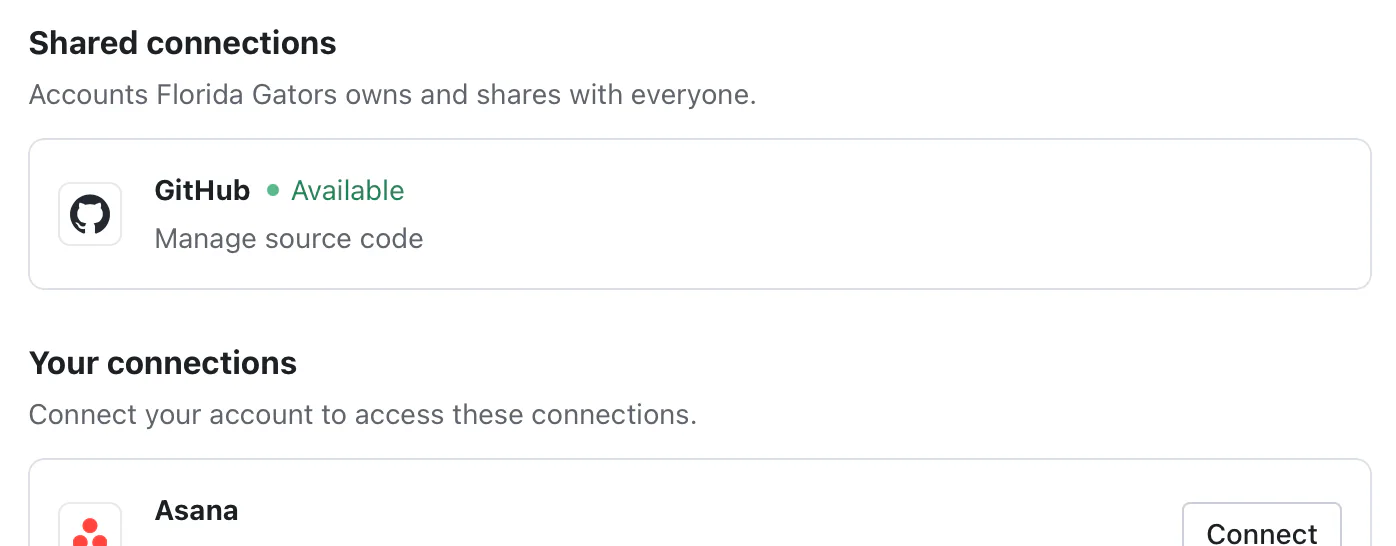
Once connected, the shared connection appears in the Shared connections
section of the Pipes widget for every active member of the
organization. That section is opt-in: render the widget with
enableSharedConnections, which defaults to false. Members can see that the provider is connected for their
organization, but they can’t reconnect, rotate, or disconnect it; those actions
belong to an administrator in Pipes Admin.
A shared credential is only as legitimate as the membership that produced it. WorkOS tracks which member established each shared connection, and when that member’s organization membership ends, the connection is invalidated at the same time.
- The material that grants access is cleared. For OAuth connections that is the access and refresh tokens; for client credentials it is the client ID and secret and any cached token; for API key connections it is the stored key.
- Credentials cannot be vended for the connection until another admin provides new credentials.
A membership ends when the user is deactivated in or removed from the organization, when Directory Sync removes them, or when the user is deleted.
Connected accounts returned to your application and to organization admins carry two fields that explain where a connection came from and why WorkOS changed its state:
established_by_user_idis the user whose authorization or credentials established the connection. It isnullfor connections your application created without a member, for connections established before WorkOS recorded provenance, and once the establishing member’s membership has ended.state_reasonexplains a WorkOS-initiated change tostate, or isnullwhen there is none. When the establishing member leaves, the connection’sstatebecomesneeds_reauthorizationandstate_reasonbecomesestablishing_member_membership_ended. The reason is kept after theestablished_by_user_idis cleared, so you can tell a departed member apart from a connection that never had one.
state remains the field to branch on. New state_reason values may be added,
so treat an unrecognized value as an unknown reason rather than an error.
Provider errors are never reported through state_reason.
The member-facing view of shared connections does not include either field, so members never learn who established a connection.
The vend credentials
endpoint selects a connection with connection_owner (connectionOwner in
the SDKs). The default, user, preserves the behavior of every existing
integration.
| Request | Selects |
|---|---|
user_id only |
The user’s own connection. |
user_id and organization_id |
The user’s own connection authorized under that organization. Still user-owned; organization_id scopes, it does not change the owner. |
connection_owner: "organization", organization_id, and user_id |
The organization’s shared connection. user_id is the acting member and must be an active member of the organization. |
The response is the same as for a user connection: an access token for OAuth
and client credentials connections, or the stored secret for API key
connections. When a shared connection isn’t established, the response is
active: false with an error describing why.
Relay selects a connection with request headers instead of a
JSON body. X-Relay-Connection-Owner chooses the owner and defaults to user.
X-Relay-Connection-Ownerselects user or organization ownership. Omit it, or senduser, for the acting user’s own connection.X-Relay-Organizationalone scopes a user-owned connection to an organization. It does not select a shared connection.- On the organization branch,
X-Relay-Usernames the acting member, not the connection owner. The member must be an active member of the organization. - Relay never falls back between owners. A request for the organization’s
connection returns
402 relay_authorization_requiredif none exists, even when the acting user has a personal connection to the same provider, and vice versa.
- For user connections, configure per-organization enabled state, scopes, and credentials with organization-scoped providers. Those overrides apply to the user-owned provider, not to shared connections.
- Embed the Pipes and Pipes Admin widgets and turn on shared connections.
- Explore the Data Integration and Connected Account API references.