How to add enterprise SSO and SCIM to a Better Auth app
Keep Better Auth for sign-in and sessions, and let WorkOS handle SAML, OIDC and directory sync for the customers who need them.

Adding enterprise SSO to a Better Auth app means letting a customer's employees sign in through their own identity provider (Okta, Microsoft Entra ID, Google Workspace and others) while your app keeps issuing its normal Better Auth session. SCIM, usually called directory sync, adds the other half: the customer's IT team creates and removes users in their directory, and your app follows along automatically.
What you'll build
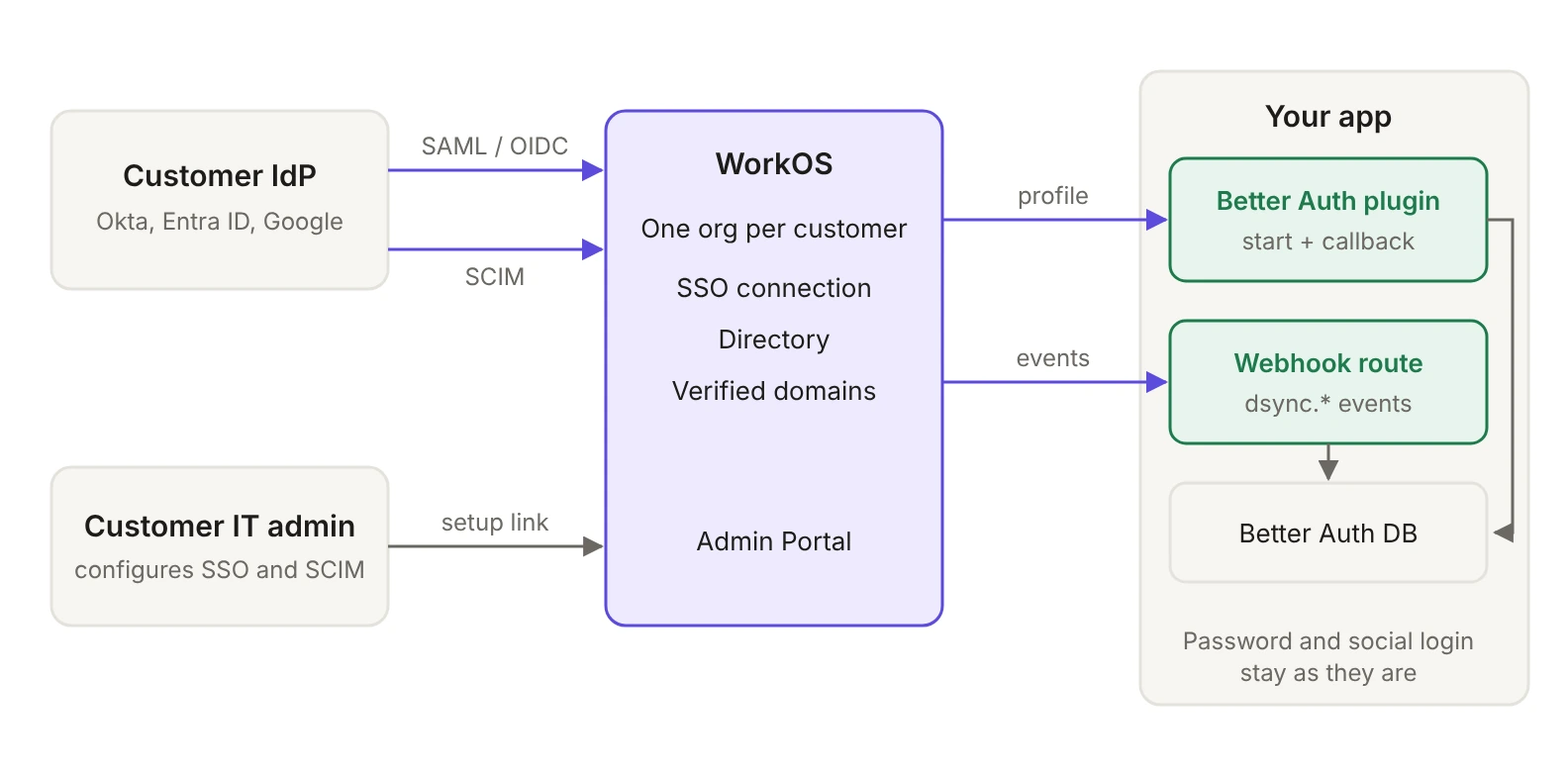
A small Better Auth plugin that sends enterprise users to WorkOS SSO and turns the returned profile into a Better Auth session, a "Connect SSO" button for users who already have an account, a webhook route that signs users out when IT deactivates them, and a settings page link that lets each customer's IT admin configure everything themselves.
Here's the path you'll follow:
- Create a WorkOS organization for each enterprise customer and keep a table of their verified domains.
- Send users with an enterprise email to SSO from your sign-in page, including users who start from their IdP's app launcher.
- Turn the SSO profile into a Better Auth session, keyed on the organization and IdP user ID.
- Let existing users connect SSO to their account, then require SSO per customer.
- Revoke sessions when the customer's IT team deactivates someone, using Directory Sync.
- Give each customer's IT admin a self-serve setup link with the Admin Portal.
- Test every path with the Test Identity Provider before a customer does.
Why add a provider instead of building SAML into your app?
Better Auth gives you email and password, social login, sessions and organizations in your own codebase, and that is often exactly right for self-serve users. The pressure changes with the first enterprise deal. The customer's security questionnaire asks for SAML SSO, their IT team asks for SCIM provisioning, and every new customer brings a different identity provider with its own metadata, certificates and attribute names.
You can build that inside your app, but then SAML response validation, certificate rotation, and each IdP's SCIM dialect become code you own and patch. The setup work also lands on your team: someone has to collect metadata URLs and certificates from each customer's IT admin and keep them current.
The approach in this guide splits the work:
- Better Auth stays in charge of users, sessions and every non-enterprise sign-in method. Nothing about your existing login changes.
- WorkOS handles the enterprise parts: the SAML or OIDC exchange with each customer's IdP (SSO), user lifecycle events from their directory (Directory Sync), and a hosted setup flow for their IT admin (Admin Portal).
If you built your own auth rather than using a library, the same pattern is covered in How to add SSO to your homegrown auth. This guide goes further: it shows how to create a real Better Auth session from the SSO profile, how to connect existing accounts safely, and how to handle deprovisioning.
How do Better Auth and WorkOS fit together?
Each enterprise customer becomes a WorkOS organization. The organization holds the customer's SSO connection, their directory, and the email domains they've verified. Your app only needs to remember one thing: which WorkOS account, identified by the organization and the user's IdP ID, belongs to which Better Auth user.
What do you need before you start?
The code in this tutorial assumes this stack. Other frameworks work the same way, since the plugin runs inside Better Auth and the webhook is a plain request handler.
- Node.js 20 or later, with TypeScript.
- Better Auth 1.7.x with a database adapter, mounted at
/api/auth. The plugin uses Better Auth's plugin API and internal adapter, so pin your version and check the release notes when you upgrade. - Next.js with the App Router for the webhook route. Any framework that gives you the raw request works.
- Packages:
npm install @workos-inc/node zod. - A WorkOS account. From the dashboard you need your API key (
WORKOS_API_KEY), your client ID (WORKOS_CLIENT_ID), and a redirect URI pointing at the callback you'll build:https://your-app.com/api/auth/workos/callback. - A webhook endpoint registered in the WorkOS dashboard at
https://your-app.com/api/webhooks/workos, and its signing secret (WORKOS_WEBHOOK_SECRET). - A database table for enterprise domains. The examples use a generic
dbclient, so swap in your ORM.
How do you model each enterprise customer?
Create one WorkOS organization per enterprise customer, and store its ID next to the customer record you already have (or on your Better Auth organization, if you use that plugin).
Then have the customer's IT admin verify their email domains through the Admin Portal (covered further down). Keep a small table in your own database that maps each verified domain to its organization, plus a per-customer flag for whether SSO is required:
You fill this table from WorkOS events: add a row on organization_domain.verified and remove it on organization_domain.deleted (the webhook route later in this guide handles both). A local table keeps the sign-in page fast, because it doesn't need an API call for every email someone types.
How do you send enterprise users to SSO at sign-in?
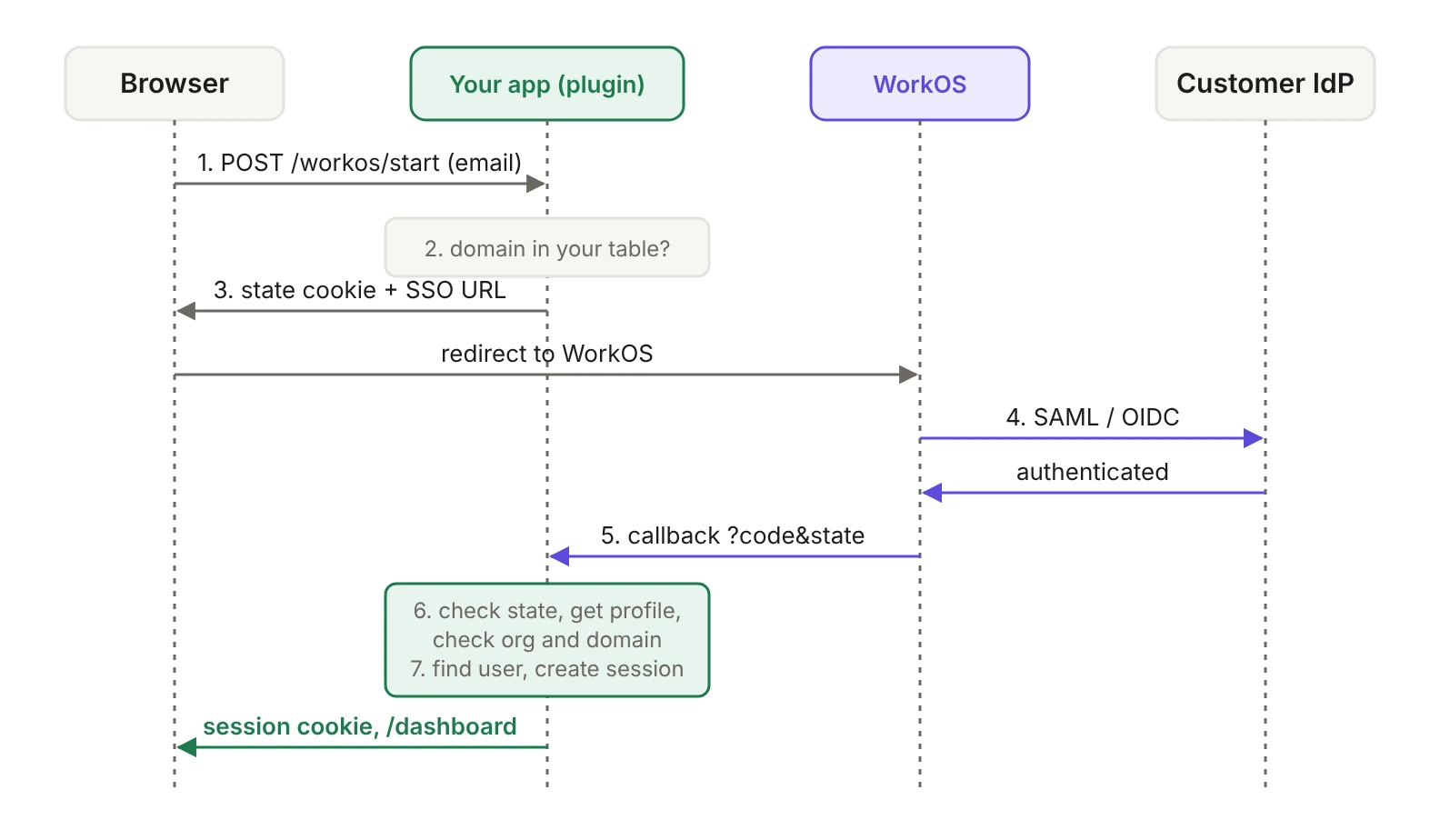
Ask for the email first. If its domain is in your enterprise domain table, start SSO for that organization. Otherwise, show your normal Better Auth form. This pattern is often called home realm discovery.
Everything lives in one Better Auth plugin, so the endpoints are mounted under your existing auth route (for example /api/auth/workos/start) and get Better Auth's request context, cookies and secret.
The state value is what ties the response back to this browser. Without it, an attacker could finish an SSO flow of their own and trick a victim's browser into landing on your callback, signing the victim into the attacker's account. The signed cookie also remembers which organization you expect, which the callback checks.
On the client, call the endpoint when the user submits their email, and either redirect to url or reveal the password field and social buttons:
What about users who start from their IdP's app launcher?
Many employees open apps from the Okta or Entra dashboard rather than your sign-in page. For these IdP-initiated sign-ins, WorkOS doesn't post an unsolicited assertion to your callback. It redirects the user to your sign-in endpoint with a connection_id query parameter, and your app starts a normal flow from there, as the IdP-initiated SSO guide describes. Set that endpoint in the WorkOS dashboard to https://your-app.com/api/auth/workos/idp-initiated.
Because the flow restarts in your app, it still gets a fresh state, and the callback checks that the profile came from the same connection.
How do you turn the SSO profile into a Better Auth session?
When the IdP is done, WorkOS redirects to your callback with a code and the state you sent. Before you trust anything in the profile, the callback checks three things:
- The
statematches the signed cookie, so the response belongs to a sign-in this browser started. profile.organizationIdis set and is the organization you expected (or the profile came from the connection you expected). The SSO guide is explicit that you should always validate the returned organization ID rather than rely on email domains.- The email's domain is one this organization has verified. If a customer needs guests from other domains to use SSO, handle that as an explicit allowlist per customer.
Then it decides which Better Auth user the sign-in belongs to. The key rule: identify SSO users by their organization and IdP user ID, never by email. The profile reference describes idp_id as the user ID assigned by the identity provider, and notes it can link the profile to Directory Sync records. Email addresses change and can be reused. The pair of organization ID and idp_id stays stable, and Directory Sync events carry the same two fields, which the deprovisioning step relies on.
handleOAuthUserInfo is the helper Better Auth's own social and SSO flows use. It looks up the linked account first, creates a new user when there's no match, and creates the session. Passing emailVerified: false and isTrustedProvider: false tells it never to attach this login to an existing user just because the email matches. Those cases go through the linking flow below instead.
Register the plugin like any other:
How do existing users connect their account to SSO?
When a customer turns on SSO, some of their employees already have accounts in your app with passwords or social login. Rather than matching them by email, let each of them connect SSO once, from a page where they're already signed in. That proves they own both the existing account and the SSO identity.
Put a "Connect SSO" button on the account settings page that calls this endpoint and redirects to url. The callback's linking branch attaches the SSO identity to the signed-in user, and refuses if that identity already belongs to someone else.
Should enterprise users still be able to use a password?
Once a customer's users have connected SSO, their IT team will expect every sign-in to go through their IdP, so their policies (MFA, device checks, offboarding) apply. Sending users to SSO from the email step covers the normal path, but the password endpoint still accepts direct requests. When the customer is ready, set ssoRequired on their domains and add a before hook to the plugin:
Apply the same check to password reset, magic link and email OTP endpoints if you use them. Turning ssoRequired on per customer, rather than for every verified domain, gives existing users time to connect SSO first, and lets you keep a password-based break-glass admin if a customer asks for one.
How do you deprovision users with Directory Sync?
SSO stops a removed employee from signing in again. It doesn't end the session they already have. Directory Sync closes that gap: when the customer's IT team deactivates someone, WorkOS sends your app an event, and your app revokes their Better Auth sessions right away.
The Directory Sync events guide describes the cases you need to handle:
Handle both deactivation events. By default, WorkOS deletes directory users that move to the inactive state, so depending on your inactive user setting you may see the update, the delete, or both. A handler that treats either one as "revoke access" works with either setting.
Because the account key you stored at sign-in is the organization ID plus idp_id, and directory users carry both fields, the webhook finds the right Better Auth user without matching on email. The same route keeps your enterprise domain table up to date:
If you keep an inactive flag on the user, also check it in the SSO callback before creating a session, so a user who's still signed in at their IdP can't come straight back.
A few things make this production-ready:
- Respond fast and process in the background. The webhooks guide recommends returning
200as quickly as possible and queuing the work. - Make handlers idempotent. Events can arrive more than once or out of order. Record processed event IDs, and compare
updated_atbefore overwriting data. - Reconcile on a schedule. Run a periodic job that lists each directory's users through the API and revokes anyone who's no longer active, so a missed webhook doesn't leave someone with access.
- Read group memberships from the API. If you map directory groups to roles, fetch the user's groups with the List Directory Groups endpoint rather than relying on the user and group objects embedded in group membership events.
- Tell Okta customers to enable deactivation. In Okta, deactivations only reach your app if the customer has turned on deactivating users in the app's provisioning settings. Add that to your setup checklist for Okta customers.
Directory Sync also lets you create users before their first sign-in and map directory groups to roles. Both build on the same account key. The Directory Sync docs cover groups and role mapping.
How do customers' IT admins set this up?
This is the part that usually eats the most time when you build SSO yourself: emails back and forth for metadata URLs, certificates and attribute mappings. With the Admin Portal, you add a button to your customer's settings page, and their IT admin follows step-by-step instructions for their specific identity provider.
Generate the link when the admin clicks, and redirect immediately. The portal link reference notes that links expire five minutes after they're issued, so don't email them or store them. Offer three buttons: verify domain (needed for routing and safe linking), configure SSO, and configure directory sync. Only show them to users who are admins of that customer in your app.
How do you test it before a customer does?
Every WorkOS staging environment includes a Test Identity Provider, so you can run the full flow without access to a real Okta or Entra tenant. Create a test organization, add a domain you control, and walk through:
- A new user signing in through SSO (just-in-time creation).
- An existing password user signing in through SSO for the first time (sent to connect SSO from settings), then connecting it while signed in.
- A profile whose email domain the organization hasn't verified (rejected).
- A callback with a missing or mismatched
state(rejected). - A password sign-in on a domain with
ssoRequiredon (blocked by the hook). - A deactivation in the directory, followed by a request with the old session cookie (signed out).
The SSO testing guide walks through the Test Identity Provider setup.
What did you build?
Your app now supports enterprise SSO and directory sync without changing how anyone else signs in:
When should you move everything to WorkOS instead?
The hybrid setup is a good fit when most of your users are self-serve and a handful of customers need enterprise features. It gets heavier as enterprise becomes a bigger share of the business: you're running two systems for sign-in, organizations and roles, and keeping them in sync is your job.
If you find yourself rebuilding organization switching, role mapping or audit logs around this plugin, it may be time to move the whole user base to AuthKit, which includes sessions, organizations, roles, SSO and directory sync in one place. The Better Auth migration guide covers importing users, password hashes, organizations and memberships, and you can do it gradually from the setup in this post.
Add enterprise SSO without replacing your auth
WorkOS gives you SSO with every major identity provider, Directory Sync, and a self-serve Admin Portal for your customers' IT teams, through one API that works next to the auth you already have. Pricing is per connection, so you pay as enterprise customers arrive. Start with the SSO docs, or see the same pattern for homegrown auth.