How to add SSO to your B2B SaaS app with WorkOS AuthKit
Enabling SSO is a dashboard toggle. The real work is the organization model, self-service configuration, and the traps that surface after your first enterprise customer.

Your first serious prospect reaches the security questionnaire and there it is: does your product support SSO. It is the first checkbox on every IT team's vendor evaluation, and answering no stalls the deal before the demo ends.
Most guides then walk you through SAML: metadata exchange, entity IDs, the assertion consumer service endpoint, certificate rotation. With WorkOS you write none of that.
WorkOS AuthKit will make the necessary API calls automatically and handle the routing of SSO users when their account is associated with an existing SSO connection.
Enabling SSO is a toggle in the dashboard under Authentication settings. You still write a normal AuthKit integration around it, and that is the next section, but none of that code is SSO-specific. There is no SAML in your application.
So this guide is not about SAML. It is about the four things that are actually yours: the organization model, who configures the connection, what happens to your existing users the moment SSO turns on, and the two test cases that fail silently.
What you actually build
The SSO integration is a standard AuthKit install. If you already have one, skip to the next section and go flip the toggle.
If you do not, the CLI installer is the fastest route. It detects your framework, installs the matching SDK, writes the callback route and the proxy, wraps your layout in the provider, sets the redirect URI in your dashboard, writes .env.local, and runs your build to confirm it compiles:
It covers fifteen frameworks, not just Next.js: React Router, TanStack Start, SvelteKit, Rails, Django, Laravel, Phoenix, Go, ASP.NET Core and others each get their own SDK and generated code. It composes with existing middleware rather than overwriting it, and it runs an agent with a restricted command set, so git diff afterwards shows you every file it touched. Node 20 or later is the only prerequisite.
Worth knowing about while you are there: workos skills install drops WorkOS knowledge into Claude Code, Codex, Cursor or Goose, so your coding agent writes correct AuthKit code without you explaining the concepts first.
The rest of this section is what the installer produces. It is worth understanding whether or not you let it do the typing.
Install the SDK. Note this is the framework package, not the general Node SDK:
In the dashboard, under your application's Redirects tab, set a redirect URI. http://localhost:3000/callback is the usual default. Wildcards are supported, but not for the default redirect URI.
Set an Initiate login URL on the same page. This one gets skipped constantly and matters more than it looks: AuthKit detects when a sign-in request did not originate at your application and sends the user here. Password reset and invitation details survive that redirect only if this URL starts an AuthKit sign-in rather than rendering your own login page.
Then four environment variables:
The NEXT_PUBLIC_ prefix is deliberate, so the value is reachable from edge functions and proxy configurations, which is what makes Vercel preview deployments work.
Wrap the app, add the proxy, add the callback. For Next.js 16 and later the file is proxy.ts; for 15 and earlier it is middleware.ts with authkitMiddleware:
Read the user with withAuth() on the server or useAuth() from @workos-inc/authkit-nextjs/components on the client, and pass ensureSignedIn: true on pages where a session is mandatory.
Now enable Single Sign-On in the dashboard. AuthKit detects when a user is signing in through an organization with a connection and routes them to the right identity provider. There are 60 or so pre-built integrations behind that, across SAML, OIDC, SCIM and HRIS, including Okta, Entra ID, Google Workspace, JumpCloud, OneLogin, PingFederate and SailPoint.
That is the part people expect to be hard.
The part that is actually yours: Organizations
An organization in WorkOS is your customer. It is the thing a connection hangs off, the thing memberships belong to, and the thing your own schema needs a foreign key to.
Create it when you onboard the customer, not when they ask for SSO:
Persist organization.id on your own account or workspace record. You need it to generate an Admin Portal link later, and you need it to answer "which customer is this user from" without guessing.
The CLI collapses that whole onboarding step into one command. workos setup-org <name> creates the organization with optional domain verification and roles, and hands back an Admin Portal link at the same time, which is convenient when you are setting up a customer by hand ahead of a pilot. There is also workos seed if you would rather define organizations, roles and permissions in a YAML file and provision them as a unit, which is the better fit for spinning up environments repeatably.
One constraint deserves more attention than it gets: organizations may only have one connection. One customer, one identity provider. That is fine for most customers and awkward for three cases you will eventually meet. A customer mid-migration between IdPs. A customer who acquired another company still on a different directory. A subsidiary with its own domain that the parent wants under one contract. In each case the answer is a second organization, which means your data model needs to tolerate one paying customer mapping to more than one WorkOS organization. Decide that now, while it costs nothing.
Domain verification is what makes routing work. Once a domain is verified for an organization, users with an email address on that domain get sent to that organization's IdP. Two rules constrain it: only one organization can claim a given domain per environment, and consumer domains like gmail.com are rejected outright.
Validate on the organization ID
Once a user is signed in, your app has to decide which customer they belong to. Use the organization ID.
It arrives in the access token as org_id, alongside sub, sid, role, permissions, exp and iat. That is the value to match against the workos_organization_id you stored on your own account record.
Be strict about this, because an email domain is not a tenant boundary:
"It is unsafe to validate using email domains as organizations might allow email addresses from outside their corporate domain (e.g. for guest users)."
A contractor with an agency.com address who has been given access to Foo Corp's workspace is an ordinary case, not an edge case. Parsing the part after the @ in your own code puts that person in the wrong tenant or in none at all.
This is a different thing from the domain matching AuthKit does at sign-in. Those domains are verified by DNS and belong to exactly one organization per environment, which is what makes them safe to route on. A raw email string carries none of those guarantees.
If you need to start a sign-in flow scoped to a specific customer rather than letting AuthKit infer it, pass organization_id when generating the authorization URL. It is the preferred parameter for both SAML and OIDC connections.
Let customers configure their own connection
This is the difference between SSO being a feature and SSO being a support queue. Without self-service, every enterprise connection becomes a two-week email thread between your engineers and someone else's IT admin, and it repeats per customer.
The Admin Portal is a white-labeled flow you send the customer's IT contact into. It uses the general Node SDK, not the AuthKit package:
Available intents are sso, dsync, audit_logs, log_streams, domain_verification and certificate_renewal, so the same mechanism covers directory sync and log streaming later.
Two operational details decide whether this works in practice.
- Links generated through the API expire in five minutes and cannot be revoked. That is a design constraint, not a footnote. It means you render a button in your settings UI that generates a link and redirects immediately. It means you never email one. If you need something a person can sit on, the dashboard-generated setup link lasts 30 days, can be revoked, and revokes itself once setup completes.
- Guard the endpoint. It hands out the ability to configure how an entire customer authenticates. It should be behind your own auth and restricted to the roles you consider IT contacts. WorkOS also supports registering up to 20
it_contact_emailsper organization, which is how those people get notified about things like expiring certificates, though note that adding an email there does not restrict who can use a link.
The trap: Turning on SSO turns everything else off
This is the single thing most likely to generate an angry message from a customer: when an SSO connection is first set up for an organization, all non-SSO authentication methods for the organization are automatically disabled.
That default is correct. An IT admin configuring SSO almost always intends it to be the only way in, and an enterprise buyer who finds an employee bypassing SSO with a personal password will log it as a security finding.
But it means that at the moment their admin finishes the Admin Portal flow, every existing user at that company who was signing in with a password stops being able to. If you have not told them that will happen, you find out from support.
Two things to build around it. Say it in your own UI, in the flow that launches the Admin Portal, before the admin starts. And know that individual methods can be re-enabled manually if a customer genuinely wants a mixed setup, so this is reversible rather than a one-way door.
Guests and contractors
Just-in-time provisioning is on by default and requires no code. When someone signs in and their email domain matches a verified domain, WorkOS creates the user and the organization membership, and existing users get added to the organization automatically. Custom attributes from the SSO profile land on the membership.
The gap is everyone whose email is not on that domain: SSO JIT provisioning is not fully supported for guests whose email domain has not been verified by the organization.
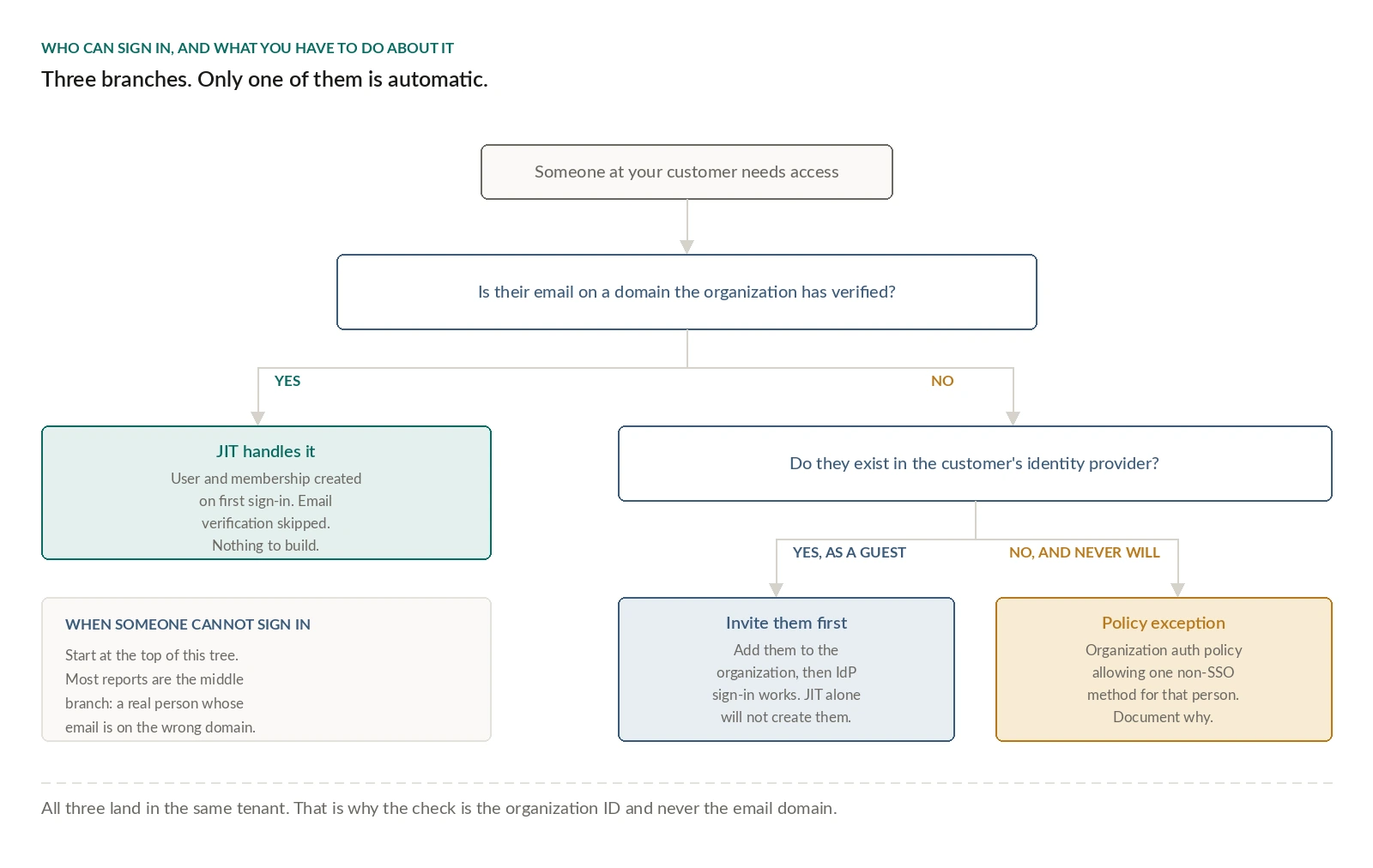
So the decision tree has three branches.
- Verified domain, and JIT handles it.
- Unverified domain, and the user has to be invited to the organization before they can sign in through the IdP.
- Contractor who will never exist in the customer's directory at all, and you are into organization authentication policies with a non-SSO method allowed for that specific case.
Worth knowing that SSO users on a verified domain skip email verification entirely, which is usually what you want and occasionally surprising.
Test the two flows that fail silently
There are four scenarios worth running against the Test IdP: service-provider-initiated sign-in, identity-provider-initiated sign-in, a guest email domain, and an error response.
Teams test the first one, because it is the flow they built. The other three are where production breaks.
IdP-initiated is the one developers forget exists. The user clicks your app's tile inside Okta rather than starting at your login page. Because your app never initiates that flow, the default redirect URI is used, and a customer can override it per-connection with a RelayState parameter on their side. If you have only ever tested by clicking your own sign-in button, you have not tested this.
The guest domain case is the one that reveals whether you took the email-domain shortcut. If you did, an outside contractor at a customer will land in the wrong tenant or none at all.
When something does fail, workos debug-sso <connectionId> prints the connection's state and its recent authentication event history, which is faster than reading the Admin Portal session list and considerably faster than asking the customer's IT admin what they saw. workos doctor checks the other half: SDK version, environment configuration, connectivity, dashboard settings and auth patterns in the current project.
Before you go to production
Staging and production are separate environments and nothing carries over. Organizations and connections have to be recreated in production, which is a sentence in the docs and a real project if you have already onboarded customers in staging.
Do all SSO testing in staging. Test SAML providers configured in production can show placeholder company names to real users, and enterprise connections in production count toward billing even when they are tests. Production redirect URIs must use HTTPS, production API keys are viewable once, and you need billing information on the account to unlock the environment even for an AuthKit-only app.
On cost: AuthKit is free up to a million monthly active users, and enterprise connections are billed per connection per month with automatic volume discounts, starting at $125 and dropping as you add more. Your spend scales with enterprise customer count rather than total users, which is the shape you want when the whole point is landing a small number of large contracts. OAuth connections in production are not charged.
SCIM is the other half, and it is the same project
SSO gets a user in. It does not remove them.
When an employee leaves your customer's company, their SSO login stops working, but whatever your app knows about them, their memberships, their assigned seats, their access to shared resources, is still exactly as it was. Directory sync is what deprovisions them, and enterprise buyers evaluate both together in the same questionnaire.
The good news is that it runs through the same machinery. Same organization, same Admin Portal, different intent: dsync instead of sso. Building the Admin Portal launch point once means adding directory sync later is a new button, not a new project.
Plan for it in the same quarter. The customer who asks for SSO is the customer who asks for SCIM about six weeks later.